
Amazon affiliate links - we earn a commission.Affiliate disclosure

Buying guide · 12 min read · Updated 2026-11-26

Best Budget Smart Thermostats (2026)

The best budget smart thermostats for 2026: Nest, ecobee, Sensi, Amazon and Aqara models compared on C-wire needs, compatibility, savings claims and setup.

Brianna Cole, Lead Product EditorBy Brianna ColeLead Product Editor6 picks comparedSpec-sheet verified
Best Budget Smart Thermostats

At a glance

Our top picks

Side by side

Spec comparison

PieceCertificationSavings claimCompatibility
Google Nest Thermostat, Energy Star, Works Without C-Wire in Most HomesBest OverallGoogle Nest Thermostat, Energy Star, Works Without C-Wire in Most HomesEnergy Starn/an/a
ecobee Smart Thermostat Essential, Color Touchscreen, 85% SystemsBest Valueecobee Smart Thermostat Essential, Color Touchscreen, 85% SystemsEnergy StarUp to 23 percent a year (vendor figure)About 85 percent of systems
Sensi Smart Thermostat ST55, Wi-Fi, Energy Star, DIYBest DIY InstallSensi Smart Thermostat ST55, Wi-Fi, Energy Star, DIYEnergy StarAbout 23 percent on HVAC energy (vendor figure)n/a
Amazon Smart Thermostat, Alexa and Ring, C-Wire RequiredCheapest PickAmazon Smart Thermostat, Alexa and Ring, C-Wire Requiredn/an/an/a
ecobee Smart Thermostat Enhanced, Occupancy Sensing, 90% SystemsBest Occupancy Sensingecobee Smart Thermostat Enhanced, Occupancy Sensing, 90% Systemsn/aUp to 26 percent a year (vendor figure)About 90 percent of systems
Aqara Smart Thermostat W200, Apple Adaptive Temperature, 4-inch ScreenBest for Apple HomesAqara Smart Thermostat W200, Apple Adaptive Temperature, 4-inch Screenn/an/aAbout 85 percent of HVAC systems

A smart thermostat swaps a dial or a basic programmable unit for a connected controller that follows a schedule, notices when nobody is home and lets you change the temperature from a phone. At a budget level the gap between models is less about gadgets and more about wiring, compatibility and how honest the savings claims are.

We compare power requirements, system compatibility, scheduling, room sensors and voice assistant support, then rank by how easily each one installs and how well it behaves in a typical house. Manufacturer savings numbers are best-case, so the real benefit comes from using a schedule you will actually keep.

Before you buy

6 Criteria to Look For Before Buying a Budget Smart Thermostat

  1. 01

    C-wire and power

    A C-wire supplies steady 24V power, and many older systems lack one. The Amazon Smart Thermostat requires it, while the Google Nest is designed to work without in most homes. Without a C-wire some models steal power, which can cause buzzing or short cycling, so use an adapter or a new cable. A quick test is to take a photo of your wires, match each letter to the new thermostat's terminals and confirm there is a C terminal before you order.

  2. 02

    HVAC compatibility

    Compatibility ranges from about 85 percent on the ecobee Essential to about 90 percent on the Enhanced. Heat pumps, multi-stage systems and line-voltage baseboard heat need extra checks. Always use the manufacturer's checker before buying. Always run the checker with your exact equipment model rather than a generic system type, since details like stage count and reversing valve type change the answer.

  3. 03

    Savings claims

    Vendors claim savings up to 23 or 26 percent a year, but independent studies suggest lower real savings. The biggest driver is a schedule that sets back the temperature when no one is home. A smart thermostat left on a flat schedule saves little. The most reliable saving habit is a lower setting while you sleep and while the house is empty, with a short recovery period before you return.

  4. 04

    Sensors and comfort

    A thermostat reads only the wall it is on. Room sensors, or the occupancy sensing on the ecobee Enhanced, address hot and cold rooms. Check whether sensors are included or sold separately. If a single room is always the problem, a sensor in that room is cheaper and more effective than a bigger thermostat.

  5. 05

    Ecosystem and voice assistants

    Alexa, Google and Apple support vary. The Amazon thermostat ties to Alexa and Ring, the Aqara to Apple Home and Matter, and the ecobee Enhanced covers Siri, Alexa and Google. Pick the one that matches your phone and speakers. Pick the assistant you already own, because a new hub or speaker adds cost and clutter for little benefit.

  6. 06

    Subscriptions and privacy

    The thermostat works without a subscription on most models, but video, security and some analytics features may cost extra. Data on your schedule and presence is sensitive, so read the privacy policy. Sensi states it does not sell personal information. A privacy policy that is easy to find and written in plain language is a good sign, while a vague policy is a reason to look elsewhere.

Detailed reviews

The 6 best budget smart thermostats, explained

01
Google Nest Thermostat, Energy Star, Works Without C-Wire in Most Homes
Energy StarWorks without C-wireAuto-awayWi-Fi
Check price on Amazon
Best for: Typical homes that want an easy install, Energy Star savings and a clean interface.

The Google Nest Thermostat is the simplest smart thermostat to live with. It is Energy Star certified, designed to work without a C-wire in most homes, and it lowers the temperature when you leave. The listing notes that some systems, including heat-only setups, still need a C-wire.

Compared with the ecobee Essential, it has a simpler interface and no touchscreen, but it also has fewer ways to go wrong during installation. Against the Amazon Smart Thermostat, it has a clearer no-C-wire design and works with Google Home and Alexa. The away detection is what drives savings for most households.

Plan on taking a photo of the existing wiring before you start, and run the manufacturer compatibility checker. Treat the first week as a learning period, then adjust the schedule. It suits renters and owners with a typical furnace and air conditioner who want an easy upgrade. A useful habit is to set a comfortable weekday schedule, a slightly cooler overnight setting and a deeper setback during work hours, then leave it alone for a month before tweaking. If you share the house with others, put the app on every phone so one person is not the only one who can adjust it, and review the energy history monthly to see whether the changes are working.

What works

  • Designed to work without a C-wire in most homes
  • Energy Star certified
  • Turns down when you leave
  • Simple setup and interface

Watch out for

  • Heat-only systems may still need a C-wire
  • No touchscreen on the unit

Specs

Certification
Energy Star
Power
Designed to work without a C-wire in most homes
Away mode
Turns itself down when you leave
Exceptions
Some systems, including heat-only, may need a C-wire
Control
App, voice and on-device
02
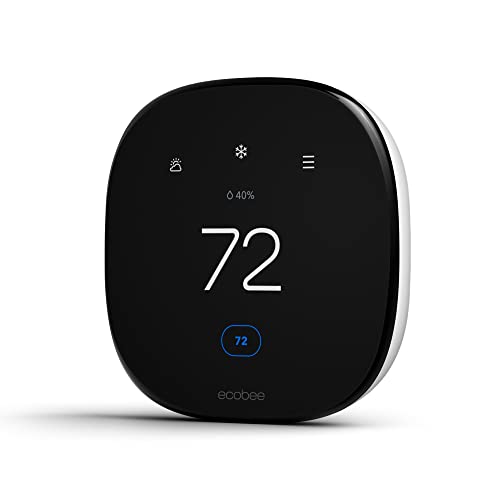
ecobee Smart Thermostat Essential, Color Touchscreen, 85% Systems
Energy StarColor touchscreen85% compatibleFree updates
Check price on Amazon
Best for: Buyers who want a color touchscreen and a mature app at a low tier.

The ecobee Essential is a Wi-Fi thermostat with a color touchscreen, Energy Star certification and an app. The company claims savings of up to 23 percent a year and compatibility with about 85 percent of HVAC systems, with an online checker to confirm yours. Free software upgrades mean the interface improves over time.

Compared with the Google Nest, it adds a touchscreen and a deeper app, but its wiring needs are a bit more demanding. Against the ecobee Enhanced, it leaves out occupancy sensing, which is why it costs less. For most households the schedule and the app are the point.

Expect to spend about half an hour on installation, longer if you add a power adapter. Use the compatibility checker first. It suits buyers who want a modern interface and a well-supported ecosystem. The app also shows runtime history, which is a handy way to spot a struggling furnace or air conditioner long before it fails in the middle of a cold snap. Many owners also appreciate that the touchscreen lets guests adjust the temperature without a phone, which avoids the usual household argument.

What works

  • Color touchscreen is easy to read
  • Compatible with about 85 percent of systems
  • Free software upgrades
  • Energy Star certified

Watch out for

  • Wiring needs can be stricter
  • No occupancy sensing in this model

Specs

Savings claim
Up to 23 percent a year (vendor figure)
Compatibility
About 85 percent of systems
Display
Color touchscreen
Updates
Free software upgrades
Certification
Energy Star
03
Sensi Smart Thermostat ST55, Wi-Fi, Energy Star, DIY
Wi-FiEnergy StarBuilt-in levelNo data selling
Check price on Amazon
Best for: First-time DIYers who want guided installation and a clear privacy stance.

The Sensi ST55 is a Wi-Fi thermostat designed for DIY installation with a built-in level and step-by-step app instructions. It is Energy Star certified and the vendor claims about 23 percent savings on HVAC energy, a figure to treat as best-case. A privacy statement says it does not sell your personal information to third parties.

Compared with the Google Nest, it is more conventional in design but more transparent about privacy. Against the Amazon Smart Thermostat, it does not require an Alexa ecosystem. The step-by-step install makes it a good first smart thermostat.

Check the wiring and compatibility before you start, and keep the old thermostat in case of surprises. It suits first-time DIYers who want a straightforward install. Because it is Energy Star certified, it may also qualify for a utility rebate in some areas, so search your provider's website before you buy and keep the receipt. The built-in level is a small detail that saves the annoyance of a crooked plate, since a crooked thermostat is visible every day for years.

What works

  • Built-in level helps mounting
  • Step-by-step app guidance
  • Privacy statement on data selling
  • Energy Star certified

Watch out for

  • Savings number is a vendor claim
  • Interface is more conventional

Specs

Install
DIY with built-in level and app steps
Savings claim
About 23 percent on HVAC energy (vendor figure)
Privacy
States it does not sell personal information
Voice
Works with Alexa
Certification
Energy Star
04
Amazon Smart Thermostat, Alexa and Ring, C-Wire Required
C-wire requiredAlexa and RingComfort zonesRebates info
Check price on Amazon
Best for: Alexa households with a C-wire already in the wall who want the lowest cost.

The Amazon Smart Thermostat is the cheapest model here and requires a C-wire, which is the main thing to check before buying. It works with Alexa and Ring, and select Echo devices or an Amazon air quality monitor can create comfort zones. Amazon also emails details about rebates that may be available from energy companies.

Compared with the Google Nest, it needs a C-wire where the Nest often does not, so it is a poor choice for older homes. Against the Sensi ST55, it is tied more tightly to Alexa. If you already have Echo devices, the integration is pleasant.

Check for a C-wire at the control board and at the thermostat before you order. It suits Alexa households with a C-wire already in the wall. If you already use Ring doorbells or Echo speakers, the comfort-zone idea is the main appeal, because the thermostat can use those devices to decide which rooms matter. The honest downside is that the benefit shrinks if you are not an Amazon household, so compare it with the Nest before you commit.

What works

  • Lowest cost in the lineup
  • Alexa and Ring integration
  • Comfort zones with Echo devices
  • Rebate information by email

Watch out for

  • C-wire is required
  • Tied to the Alexa ecosystem

Specs

Power
C-wire required
Ecosystem
Alexa and Ring
Zones
Comfort zones with select Echo devices
Rebates
Email details on possible energy rebates
Role
Entry smart upgrade
05
ecobee Smart Thermostat Enhanced, Occupancy Sensing, 90% Systems
Occupancy sensing90% compatibleSiri, Alexa, GoogleEnergy Star
Check price on Amazon
Best for: Households with changing routines that want occupancy sensing and all three major assistants.

The ecobee Enhanced adds built-in occupancy sensing to the ecobee design, with support for Siri, Alexa and Google Assistant. The vendor claims savings up to 26 percent a year and compatibility with about 90 percent of HVAC systems. The occupancy detection lets it preheat or precool when people are home.

Compared with the ecobee Essential, it adds sensing and a higher compatibility figure at a slightly higher tier. Against the Nest, it supports more assistants. The extra sensing helps in homes with irregular schedules.

Room sensors are sold separately in many ecobee bundles, so check what the listing includes. It suits households with changing routines and multiple voice assistants. This is the model for homes where the schedule is never the same two days in a row, such as shift workers or families with changing activities. Check that your plan for room sensors fits the budget, because sensors are what fix the hot bedroom upstairs, and the thermostat alone cannot.

What works

  • Built-in occupancy sensing
  • Works with Siri, Alexa and Google
  • About 90 percent system compatibility
  • Preheats and precools automatically

Watch out for

  • Savings figure is a vendor claim
  • Higher tier than the Essential

Specs

Savings claim
Up to 26 percent a year (vendor figure)
Sensing
Built-in occupancy detection
Compatibility
About 90 percent of systems
Assistants
Siri, Alexa and Google Assistant
Behavior
Preheats and precools when people are home
06
Aqara Smart Thermostat W200, Apple Adaptive Temperature, 4-inch Screen
Apple Adaptive Temp4 in touchscreenMatter controller85% systems
Check price on Amazon
Best for: iPhone households that want Apple Adaptive Temperature and a large touchscreen.

The Aqara W200 is aimed at Apple Home users, with Apple Adaptive Temperature that uses your iPhone to adjust the thermostat and Clean Energy Guidance that nudges you toward cleaner power. It has a 4 inch touchscreen, acts as a Matter controller and works with about 85 percent of HVAC systems.

Compared with the Nest, it is a better fit for HomeKit households but a less common brand. Against the ecobee Enhanced, it has a larger screen but fewer sensing features. Matter support helps with future compatibility.

Use it only if you live in the Apple ecosystem, since other benefits are limited. It suits iPhone households that want a large screen and Matter. Its Matter support means it should keep working with other smart home gear as the standard matures, which is a reasonable bet for a device you will keep for years. Expect more setup steps than a Nest, and confirm the app features you want are available in your region.

What works

  • Apple Adaptive Temperature support
  • 4 inch touchscreen is easy to read
  • Acts as a Matter controller
  • About 85 percent HVAC compatibility

Watch out for

  • Best features need an Apple home
  • Less common brand

Specs

Apple features
Adaptive Temperature and Clean Energy Guidance
Display
4 in touchscreen
Smart home
Matter controller
Compatibility
About 85 percent of HVAC systems
Install
Designed for easy installation

Spec decoder

What the listing measurements really mean

The numbers brands lead with, translated into what they tell you about fit, comfort and wear at home.

C-wire

The common wire that supplies continuous power to the thermostat. Many older homes lack it.

Watch forThe Amazon thermostat requires it while the Nest is designed to work without in most homes.

Energy Star

A certification that the thermostat meets efficiency criteria. It can unlock utility rebates.

Watch forNest, ecobee Essential and Sensi ST55 are listed as Energy Star certified.

Compatibility percentage

The share of HVAC systems the maker says the thermostat works with. It is not a guarantee for yours.

Watch forecobee Essential lists 85 percent and the Enhanced lists 90 percent.

Occupancy sensing

Detects whether people are home and adjusts the temperature. It can preheat or precool.

Watch forThe ecobee Enhanced has it built in.

Matter

A smart home standard that lets devices from different brands work together.

Watch forThe Aqara W200 acts as a Matter controller.

Methodology

How We Evaluated These Budget Smart Thermostats

Wiring requirements

We read each listing for C-wire needs and power options. We evaluated how likely each is to install cleanly in an older home. The Nest earned credit for no-C-wire design.

Compatibility

We compared the stated system compatibility and the availability of a checker. Heat pump and multi-stage notes were weighed. Higher compatibility scored better.

Features that save energy

We looked at away mode, occupancy sensing and scheduling. Features that actually reduce run time were credited over gadgets. Vendor savings numbers were treated as best-case.

Ownership patterns

Owner feedback patterns about wiring surprises, connectivity drops and app changes shaped the cons. Software support and privacy were weighed. Simpler setups scored well.

Value

Price tier ordered the lineup, and we favored the lower half. We judged what each added feature earns. Honest wiring needs scored best.

Decision guide

How to Choose the Right Budget Smart Thermostats

By Wiring

SituationPickWhy
No C-wire in the wallGoogle Nest ThermostatDesigned to work without in most homes.
C-wire presentAmazon Smart ThermostatLowest cost.
Unsure about wiringecobee EssentialCompatibility checker and 85 percent.
Complex systemsecobee EnhancedAbout 90 percent compatibility.

By Budget

SituationPickWhy
Lowest costAmazon Smart ThermostatCheapest, needs a C-wire.
Low cost easy installSensi ST55Second lowest tier.
Best use of a budgetGoogle NestEasy and efficient.
Larger budgetecobee EnhancedOccupancy sensing.

Nest vs ecobee

Nest

The Nest Thermostat is simple and designed to work without a C-wire in most homes. It suits owners who want an easy upgrade.

ecobee

The ecobee Essential and Enhanced add a touchscreen, deeper app and, on the Enhanced, occupancy sensing. They suit tinkerers.

Pick Nest for simplicity and ecobee for depth.

By Smart Home Ecosystem

SituationPickWhy
Alexa and RingAmazon Smart ThermostatNative integration.
Apple HomeAqara W200Adaptive Temperature.
Google HomeGoogle Nest ThermostatNative integration.
Mixed assistantsecobee EnhancedSiri, Alexa and Google.

For Renters Specifically

Look for

Easy DIY install, no C-wire need and the ability to reinstall the old thermostat when you move. Check your lease for wall changes.

In this comparison

The Google Nest and Sensi ST55 are the best fits.

When to Spend More

Spend more if

You have multi-stage systems, a heat pump with aux heat or large uneven homes needing room sensors. A higher-end model is worth it.

Save if

You have a simple furnace and AC and a regular schedule. A budget unit is enough.

Ownership

Maintenance schedule

The upkeep that decides whether a piece still looks good in year five.

TaskIntervalWhy it matters
Review the scheduleEach seasonSeasons change routines. An outdated schedule wastes the savings.
Update firmwareAs promptedUpdates fix bugs and security issues. Keep automatic updates on.
Check Wi-Fi signalYearlyA weak link causes missed commands. Move a router or add a node.
Replace backup batteriesAs neededSome models use batteries when power is lost. Check the screen warnings.
Clean the screen and ventsEvery 6 monthsDust can affect sensors. Wipe gently with a dry cloth.

FAQ

Frequently Asked Questions

Do I need a C-wire for a smart thermostat?

Many need one, but the Google Nest is designed to work without in most homes. Heat-only systems often need one.

Will a smart thermostat really save money?

Vendor claims run up to 23 or 26 percent, but independent studies suggest less. A sensible setback schedule is what saves.

Is a subscription required?

Not for basic control on these models. Some security and video add-ons cost extra.

Can I install it myself?

Most people can with a photo of the wiring and the compatibility checker. Heat pumps and complex systems may need a pro.

What happens if Wi-Fi goes down?

The thermostat keeps running its local schedule, though remote control stops until the link returns.

Does it work with a heat pump?

Many do, but you must check the O/B and auxiliary heat wiring. Use the maker's checker first.

Bottom line

The short version

Browse more budget smart thermostatson Amazon →
Brianna Cole, Lead Product Editor

About the author

Brianna Cole

Lead Product Editor, SenseiReview

Brianna Cole leads SenseiReview's buying guides, turning published specifications, documentation and owner feedback patterns into clear verdicts across home, tech, fitness, outdoor and DIY products.

More from Brianna →

Keep reading

Related guides