
Amazon affiliate links - we earn a commission.Affiliate disclosure

Buying guide · 13 min read · Updated 2026-11-21

Best E-Readers (2026)

Six e-readers compared on screen size, E Ink color versus black and white, front light, waterproofing, store and library support, formats and battery life.

Brianna Cole, Lead Product EditorBy Brianna ColeLead Product Editor6 picks comparedSpec-sheet verified
Best E-Readers

At a glance

Our top picks

Side by side

Spec comparison

PieceScreenStorageBest use
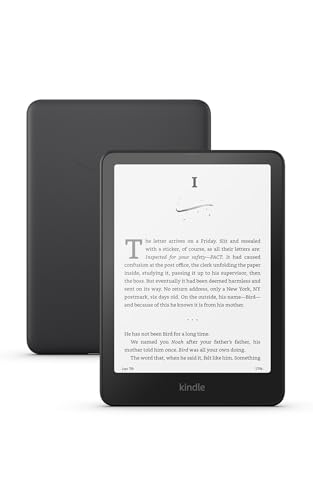
Amazon Kindle Paperwhite 16GB (2024) with 7 inch glare-free displayBest OverallAmazon Kindle Paperwhite 16GB (2024) with 7 inch glare-free display7 inch Paperwhite glare-free display16GBDaily reading for most readers
Amazon Kindle 16GB (2024) light and compact e-readerBest Value KindleAmazon Kindle 16GB (2024) light and compact e-reader6 inch high contrast display16GBCommutes and casual reading
Kobo Clara BW 6 inch glare-free e-reader with ComfortLight PROBest Open FormatKobo Clara BW 6 inch glare-free e-reader with ComfortLight PRO6 inch glare-free touchscreenn/aReaders who want EPUB and library lending
Kobo Libra Colour 7 inch color E Ink waterproof e-readerBest Color and ButtonsKobo Libra Colour 7 inch color E Ink waterproof e-reader7 inch Kaleido 3 color E Inkn/aReaders of comics, cookbooks and magazines
Amazon Kindle Colorsoft 16GB (2024) with 7 inch color displayBest Kindle ColorAmazon Kindle Colorsoft 16GB (2024) with 7 inch color display7 inch Colorsoft color display16GBKindle owners who want color
XTEINK X4 Classic 4.3 inch ultra-thin pocket e-readerBest Pocket SizeXTEINK X4 Classic 4.3 inch ultra-thin pocket e-reader4.3 inch E Ink displayn/aPocket reading and travel

An e-reader uses an E Ink screen that reflects light like paper, which is easier on the eyes in daylight and sips power, so a single charge lasts weeks. It is a dedicated reading device, built for books rather than apps, and that focus is its strength.

The real choice is the ecosystem as much as the screen. One family of readers ties you to a single store and its formats, another works more openly with standard ebook files and library lending, and small makers offer pocket devices with fewer guarantees. We evaluated six e-readers from the candidate pool using published specifications, listing details and patterns in owner feedback, then ranked them by fit for real readers rather than by screen size.

Before you buy

6 Criteria to Look For Before Buying an E-Reader

  1. 01

    Ecosystem: Kindle vs Kobo vs others

    Kindle ties you to Amazon's store, with a huge catalog and good integration. Kobo reads EPUB natively and supports library lending directly, which suits readers who borrow or buy from several stores. Small makers vary in software and support. The book you own matters more than the hardware, so pick the ecosystem first. List the three places you buy or borrow books today, then check which reader supports all three before you look at hardware.

  2. 02

    Screen size and sharpness

    A 6 inch screen is pocketable but shows fewer words per page, and 7 inches is more comfortable for long reading. Most modern readers have 300 pixels per inch for crisp black and white text. Color screens are lower resolution in color mode. Choose size based on where you read. Hold a 6 inch and a 7 inch device in a store or compare their listed dimensions, since pocketability and reading comfort pull in opposite directions.

  3. 03

    Color vs black and white E Ink

    Color E Ink adds covers, comics and highlights, but is dimmer, softer and slower than black and white. For novels, black and white is the better reading surface. Color is a bonus for cookbooks, comics and annotations. The mistake is buying color expecting tablet-like vibrancy. If you read in bed, look for a warm front light setting and a page-turn method that works with one hand.

  4. 04

    Front light and comfort

    An adjustable front light lets you read in the dark without a lamp. Warm light settings reduce eye strain at night. The Kobo Clara BW's ComfortLight PRO and the Paperwhite's adjustable light both do this. Check that the light is even across the screen. Look at the storage you need for audiobooks or comics, because those files fill 16 gigabytes faster than text books.

  5. 05

    Water resistance and build

    IPX8 water resistance protects against accidental drops in the bath or pool. Not every reader has it. Slim bodies are comfortable but can be slippery, and buttons help one-handed reading. A case adds protection. Ask whether you will read in the bath or by a pool, and weigh a waterproof rating accordingly.

  6. 06

    Battery, storage and library lending

    E Ink readers last weeks on a charge, and 16 gigabytes holds thousands of books. Audiobooks and comics need more storage. Library lending through services such as OverDrive or Libby varies by region and device. Check what works in your country. Check how your region handles library lending, because availability differs between countries and services.

Detailed reviews

The 6 best e-readers, explained

01
Amazon Kindle Paperwhite 16GB (2024) with 7 inch glare-free display
7 in displayGlare-freeWeeks of battery16GB
Check price on Amazon
Best for: Readers who want the best all-round Kindle for daily reading.

The 2024 Paperwhite has a 7 inch glare-free display, which is larger than earlier Paperwhites, with a high contrast ratio and an adjustable front light. The maker promises weeks of battery life, and the 16 gigabyte storage holds thousands of books. It is slim, light and tuned for comfortable long sessions.

The tradeoff is the Amazon ecosystem. Books are tied to Amazon's store and formats, though library lending and sideloading via Send to Kindle widen the options. Compared with the base Kindle, it has a larger screen and better build. Compared with the Kobo Libra Colour, it is cheaper and black and white, with no page-turn buttons.

Ownership is simple. Charge it every few weeks, adjust the light and sync books across devices. Owner feedback patterns on Kindles say that the screen is crisp and the ecosystem is polished, with the main caution being lock-in to Amazon's store and the ads on cheaper versions.

What works

  • 7 inch glare-free display with high contrast
  • Weeks of battery life per the maker
  • Large Kindle store and library lending
  • Slim, light body for long reading

Watch out for

  • Locked to the Kindle ecosystem
  • No physical page-turn buttons
  • Ads may appear on lower-cost versions

Specs

Screen
7 inch Paperwhite glare-free display
Battery
Weeks of battery life per the maker
Storage
16GB
Store
Kindle store and library lending support
Best use
Daily reading for most readers
02
Amazon Kindle 16GB (2024) light and compact e-reader
6 in displayAdjustable light16GBFast pages
Check price on Amazon
Best for: Casual readers and commuters who want a light, low-cost Kindle.

The base Kindle is a light, compact reader with a 6 inch high contrast screen, adjustable brightness, fast page turns and 16 gigabytes of storage. It is the cheapest way into the Kindle ecosystem and fits in a jacket pocket. The reading experience is the same E Ink clarity as the Paperwhite at a smaller size.

The tradeoff is screen size and features. A 6 inch screen shows fewer words per page, and it is not waterproof. Compared with the Paperwhite, it costs less but lacks the larger display and water resistance. Compared with the Kobo Clara BW, it has a bigger store and simpler menus but a less flexible format.

Ownership is easy. Charge it, set the light and sync your library. Owner feedback patterns on base Kindles say that they are a great value, with the main caution being no water protection and ads on the lock screen on some versions.

What works

  • Low cost entry into the Kindle ecosystem
  • Light and compact for pockets and bags
  • Adjustable front light for night reading
  • Fast page turns for a snappy feel

Watch out for

  • 6 inch screen shows fewer words per page
  • Not waterproof
  • Locked to the Kindle ecosystem

Specs

Screen
6 inch high contrast display
Light
Adjustable front light
Storage
16GB
Weight
Light and compact
Best use
Commutes and casual reading
03
Kobo Clara BW 6 inch glare-free e-reader with ComfortLight PRO
6 in displayComfortLight PRODark modeAudiobooks
Check price on Amazon
Best for: Readers who borrow from libraries and want to use EPUB files freely.

The Kobo Clara BW is a 6 inch e-reader with a glare-free touchscreen, ComfortLight PRO that adjusts the front light for comfort, a dark mode option and audiobook support. Kobo devices open EPUB files natively and include library lending, which makes them popular with readers who borrow from libraries or buy from multiple stores.

The tradeoff is the store. The Kobo store is smaller than Amazon's and its recommendations and discounts differ. Compared with the base Kindle, it is more open but has a smaller catalog. Compared with the Kobo Libra Colour, it is smaller and cheaper with a black and white screen.

Ownership is easy. Set up a Kobo account, connect to a library service and sideload EPUB files. Owner feedback patterns on Kobo say that the format flexibility and library support are major strengths, with the main caution being a smaller store.

What works

  • Native EPUB support and library lending
  • ComfortLight PRO for comfortable night reading
  • Dark mode and audiobook support
  • Open ecosystem with multiple stores

Watch out for

  • Kobo store is smaller than Amazon's
  • 6 inch screen shows fewer words per page
  • Fewer accessory options than Kindle

Specs

Screen
6 inch glare-free touchscreen
Light
ComfortLight PRO
Modes
Dark mode option
Audio
Audiobooks support
Best use
Readers who want EPUB and library lending
04
Kobo Libra Colour 7 inch color E Ink waterproof e-reader
7 in colorKaleido 3WaterproofPage-turn buttons
Check price on Amazon
Best for: Readers of comics, cookbooks and magazines who want color and page-turn buttons.

The Kobo Libra Colour has a 7 inch Kaleido 3 color E Ink screen, physical page-turn buttons and waterproof protection. Color adds book covers, highlights, comics and magazines. The ergonomic design with buttons suits one-handed reading in bed or on a train.

The tradeoff is color E Ink limits. Color screens are less sharp and a little dimmer than black and white E Ink, and colors look muted compared with a tablet. It costs more than the monochrome readers. Compared with the Kindle Colorsoft, it has buttons and open formats but a smaller store. Compared with the Paperwhite, it adds color and buttons at a higher cost.

Ownership requires reasonable expectations. Use black and white for text and color for covers and comics. Owner feedback patterns on color E Ink say that color is a pleasant addition, not a replacement for a tablet.

What works

  • 7 inch color E Ink for covers, comics and magazines
  • Physical page-turn buttons for one-handed reading
  • Waterproof body for bath and beach
  • Open EPUB and library lending ecosystem

Watch out for

  • Color E Ink is softer and dimmer than black and white
  • Costs more than monochrome readers
  • Colors are muted compared with a tablet

Specs

Screen
7 inch Kaleido 3 color E Ink
Water
Waterproof
Controls
Physical page-turn buttons
Modes
Dark mode
Best use
Readers of comics, cookbooks and magazines
05
Amazon Kindle Colorsoft 16GB (2024) with 7 inch color display
7 in color16GBKindle storeColor highlights
Check price on Amazon
Best for: Kindle readers who want color covers and highlights.

The Kindle Colorsoft is Amazon's color e-reader, with a 7 inch Colorsoft display that shows covers, comics and highlights in color. It sits in the Kindle ecosystem with the large Kindle store and library lending. It has the same slim form as the Paperwhite.

The tradeoff is the same as other color E Ink screens: lower sharpness and muted color compared with black and white or a tablet. It costs more than the Paperwhite. Compared with the Kobo Libra Colour, it has the bigger store but no buttons. Compared with the Paperwhite, it adds color at a higher cost.

Ownership is simple. Set up your account and enjoy color highlights. Owner feedback patterns on color Kindles say that the color is a nice touch for covers and annotations, but is not essential for novels.

What works

  • 7 inch color display for covers, comics and highlights
  • Large Kindle store and library lending
  • Slim, light design like the Paperwhite
  • Same polished Kindle software

Watch out for

  • Color is softer and dimmer than black and white
  • Costs more than the Paperwhite
  • Locked to the Kindle ecosystem

Specs

Screen
7 inch Colorsoft color display
Storage
16GB
Store
Kindle store and library lending support
Features
Color covers, highlights and comics
Best use
Kindle owners who want color
06
XTEINK X4 Classic 4.3 inch ultra-thin pocket e-reader
4.3 in display68g0.19 in thinPocket size
Check price on Amazon
Best for: Travelers and pocket readers who want the smallest, lightest device.

The XTEINK X4 Classic is a tiny 4.3 inch E Ink reader weighing about 68 grams and measuring 0.19 inches thick, small enough to slip into a pocket. The listing mentions dual page-turn buttons and an ultra-light design. It aims at readers who value portability over a big screen.

The tradeoff is ecosystem and support. It is a newer brand with a smaller software and store ecosystem, so check formats and update support. The 4.3 inch screen shows few words per page. Compared with the base Kindle, it is smaller and cheaper but has a thinner store. Compared with the Kobo Clara BW, it is much smaller and simpler.

Ownership requires some tinkering. Sideload EPUB files and check which formats the reader supports. Owner feedback patterns on pocket e-readers say that they are fun for travel but are best as a second device.

What works

  • Tiny and light at about 68 grams
  • Slim body slips into a pocket
  • Dual page-turn buttons
  • Low cost for an E Ink reader

Watch out for

  • 4.3 inch screen shows few words per page
  • Newer brand with a thinner ecosystem
  • Format and update support may be limited

Specs

Screen
4.3 inch E Ink display
Weight
About 68 g
Thickness
About 0.19 inch
Controls
Dual page-turn buttons
Best use
Pocket reading and travel

Spec decoder

What the listing measurements really mean

The numbers brands lead with, translated into what they tell you about fit, comfort and wear at home.

E Ink Carta and Kaleido

Carta is the black and white E Ink display used in most readers, and Kaleido adds a color filter layer. Color is less sharp. Higher ppi mostly matters for small text and fine line art.

Watch forThe Libra Colour and Kindle Colorsoft use color E Ink.

Pixels per inch (ppi)

How densely pixels are packed. Higher numbers give sharper text. Most readers list 300 ppi. Color E Ink trades sharpness for color, so most text readers prefer the black and white version.

Watch forColor modes are lower resolution than black and white.

IPX8

A water resistance rating that covers submersion for a set time. It protects against drops in water. A water rating covers accidents, and it is wise to rinse the device if it falls into salt water.

Watch forThe Libra Colour lists waterproofing, the base Kindle does not.

EPUB support

Native reading of the common open ebook format. It lets you read books from many stores and libraries. Supporting open formats means you are not tied to a single store for every book.

Watch forKobo and the XTEINK support EPUB, Kindle has its own formats plus conversion.

Front light

A built-in light that illuminates the screen without glare. Adjustable warmth reduces eye strain. A warm light setting adds amber tones to reduce blue light at night.

Watch forThe Kobo Clara BW lists ComfortLight PRO.

Methodology

How We Evaluated These E-Readers

Spec sheet and listing review

We compared screen size, display type, battery and water resistance as published by each maker. We checked that claims were stated on the same basis. For example, battery life depends on light and wireless use. We also checked how each device handles library lending and sideloaded files in practice.

Ecosystem and formats

We looked at store size, EPUB support and library lending. The ecosystem decides what you can read. This explains the Kindle and Kobo positions. We read how owners describe page-turn speed, ghosting and software updates over a year or more.

Screen and comfort

We reviewed display type, size and front light features. Color is a tradeoff. This shaped the Libra Colour and Colorsoft picks. We noted which devices include ads on the lock screen and which let you remove them.

Ownership and support

We read owner feedback patterns about software, ads and long-term support. We weighed brand maturity. This shaped the order of the lineup. We compared the weight and thickness of each device, since holding comfort matters for long reading.

Value for the reader

We compared price tier against screen, features and ecosystem for casual and heavy readers. A basic Kindle suits light reading. This shaped the budget pick. We kept the order tied to the reader's store, formats and habits.

Decision guide

How to Choose the Right E-Readers

By Reader

SituationPickWhy
Daily reader, Amazon booksKindle Paperwhite 16GBBest all-round Kindle
Library borrower, EPUB filesKobo Clara BWNative EPUB and lending
Comics and cookbooksKobo Libra Colour7 inch color with buttons
Pocket readingXTEINK X4 ClassicTiny and light

By Budget

SituationPickWhy
Lowest costXTEINK X4 ClassicLower tier pocket device
Low tier, KindleKindle 16GB (2024)Simple and light
Mid tier, openKobo Clara BWEPUB and lending
Higher spend, colorKobo Libra ColourColor and waterproof

Kindle vs Kobo

Kindle

Kindle has the largest store, great integration and the Paperwhite is polished. It is tied to Amazon's formats and store.

Kobo

Kobo reads EPUB natively and supports library lending directly. The store is smaller but the system is more open.

Choose Kindle for the biggest store, and Kobo for open formats and library lending.

By Reading Habit

SituationPickWhy
NovelsKindle Paperwhite 16GBSharp black and white text
Reading in bed one-handedKobo Libra ColourPage-turn buttons
Bath and beachKobo Libra ColourWaterproof
CommuteKindle 16GB (2024)Light and compact

For Library Borrowers Specifically

Look for

Native OverDrive or Libby support, EPUB compatibility and a way to sideload files. Check availability in your region.

In this comparison

Kobo has built-in library lending, and Kindle supports library lending in some regions.

When to Spend More

Spend more if

You read comics, cookbooks or want waterproofing and buttons. The Kobo Libra Colour is the clearest upgrade.

Save if

You read novels on a commute. The base Kindle or Kobo Clara BW covers it.

Ownership

Maintenance schedule

The upkeep that decides whether a piece still looks good in year five.

TaskIntervalWhy it matters
Update the softwareWhen promptedUpdates fix bugs and add features. Keep the device connected to apply them. Use a soft cloth, and avoid liquid cleaners on the screen.
Clean the screen with a microfiber clothMonthlyFingerprints and dust reduce clarity. Use a dry cloth. Back up annotations and highlights if you rely on them.
Back up your libraryEvery few monthsBooks bought in a store are in the cloud, but sideloaded files are not. Keep copies. Restart the device if pages ghost or the system freezes.
Charge before storingIf unused for monthsBatteries can degrade if stored empty. Keep them partly charged. Keep the device out of hot cars to protect the battery and the screen.
Check the case and coverEvery 6 monthsA good case protects the screen. Replace worn covers. Remove cases that trap heat when charging.

FAQ

Frequently Asked Questions

Is Kindle or Kobo better?

Kindle has the largest store, and Kobo is more open with EPUB and library lending. Choose based on where you get books. If you mostly buy from one store, pick the reader that integrates with it.

Is color E Ink worth it?

For comics and cookbooks, yes. For novels, black and white is sharper. If you like to borrow books, check your library's services before you choose a device.

Can I read library books on an e-reader?

Yes, through services such as OverDrive or Libby, depending on region and device. If you read in the dark, choose a reader with a good warm light.

How long does an e-reader battery last?

Weeks on a charge with light use. Audiobooks and wireless use drain it faster. If you want to keep your books if a store closes, choose a device that supports open formats.

Is a waterproof e-reader necessary?

It helps for bath and beach reading. If you read at home, it is a nice extra. If you read comics and magazines, a larger screen helps more than a color screen alone.

Can I read PDFs on an e-reader?

Yes, but small screens make PDFs hard. A larger device or a tablet is better for PDFs. If you plan to listen to audiobooks, check Bluetooth support and storage.

Bottom line

The short version

Browse more e-readerson Amazon →
Brianna Cole, Lead Product Editor

About the author

Brianna Cole

Lead Product Editor, SenseiReview

Brianna Cole leads SenseiReview's buying guides, turning published specifications, documentation and owner feedback patterns into clear verdicts across home, tech, fitness, outdoor and DIY products.

More from Brianna →

Keep reading

Related guides