

Amazon affiliate links - we earn a commission.Affiliate disclosure

Buying guide · 13 min read · Updated 2026-11-26

Best Laptop Cooling Pads (2026)

Six laptop cooling pads compared on fan type, noise, laptop size range, USB hubs and sealed turbo designs for gaming, lap use and large 17 inch laptops.

Brianna Cole, Lead Product EditorBy Brianna ColeLead Product Editor6 picks comparedSpec-sheet verified
Best Laptop Cooling Pads

At a glance

Our top picks

Side by side

Spec comparison

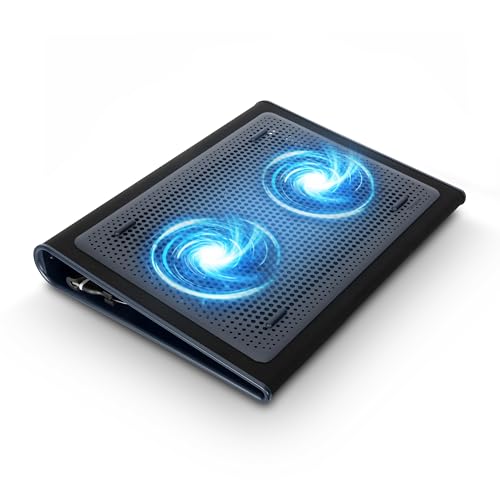
A laptop cooling pad is a stand with fans that blow cool air toward the bottom of a laptop. It helps most with thin gaming laptops whose intake vents sit underneath, where a stand that raises the machine and pushes air in can lower temperatures noticeably.

The main choice is between a wide mat of small fans and a single large turbo fan that seals against the laptop base. The six pads below cover both approaches, plus a neoprene lap mat and a budget six-fan stand, so you can match the design to your laptop's vent layout.

Before you buy

6 Criteria to Look For Before Buying a Laptop Cooling Pad

  1. 01

    Fan design: turbo versus multi-fan

    A single large turbo fan, such as the llano's 5.5 inch unit, forces air into a sealed intake and cools a targeted area. A multi-fan layout like the Kootek's five fans or the Amazon Basics six fans spreads air more evenly. Turbo suits bottom-intake gaming laptops, while multi-fan suits unknown vent layouts.

  2. 02

    Match to the laptop's intake vents

    A cooling pad only helps if the laptop draws air from the bottom. Many thin laptops intake from the base, but some draw from the sides or keyboard and gain little from a pad. Check where the vents are before buying, and center the fan under them. The raised angle itself can lower temperatures a few degrees. A quick check is to hold your hand under the laptop after twenty minutes of load: warm air blowing from a bottom grille means an intake underneath, while a hot flat base with no airflow suggests the machine breathes from the sides.

  3. 03

    Noise level

    More fans or higher speeds mean more noise. Pads like the Razer and the Amazon Basics let you slow fans for quiet work. Turbofans such as the llano can be louder at full speed. Choose a pad with speed control if you work in a quiet room. Noise also depends on the room; a fan that is inaudible over a game soundtrack becomes a steady hum in a silent library, so the ability to turn the fans down matters more than the headline decibel claim.

  4. 04

    Laptop size and weight

    Pads list a supported screen range, such as 12 to 17 inches for the Kootek and Amazon Basics or 15.6 to 17 inches for the havit. Heavy 17 inch gaming laptops need a sturdy mesh. A pad too small for the laptop leaves the intake uncovered.

  5. 05

    USB ports and power

    A pad uses a USB port for power, so a built-in hub like the Kootek's dual hub or the llano's three ports gives you ports back. Check whether power comes from USB-A or USB-C. Use a port that supplies enough current. Powered pads that draw from the laptop's own port can slightly reduce battery runtime on the go, so unplug the pad when you are working unplugged from a charger.

  6. 06

    Height adjustment and portability

    Adjustable heights tune ergonomics, with the Amazon Basics offering six and the havit two. A slim pad like the havit is easy to carry, while sealed turbo pads are bulkier. Pick what fits your desk and bag.

Detailed reviews

The 6 best laptop cooling pads, explained

01
llano V12 Gaming Laptop Cooling Pad, 5.5 in Turbofan, 3-Port USB Hub
5.5 in turbofanPressure design3 USB 2.0 portsDust filter
Check price on Amazon
Best for: Gaming laptops with bottom intake vents.

The llano V12 uses one large 5.5 inch turbo fan instead of a spread of small ones, and the listing describes an airtight pressure design that seals the airflow against the base of the laptop. The idea is that forcing air into the intake is more effective than blowing across the underside. A three-port USB 2.0 hub restores ports the pad uses, and integrated dust filtration keeps the fan clean.

Compared with the Kootek, the V12 uses one stronger fan, which concentrates cooling where a laptop's intake sits, but it only helps if your laptop has intakes under the base. Against the Razer pad it lists the same sealed concept at a lower cost and without the smart software. Turbo fans are louder than many small fans at full speed, so expect noise when the laptop is working hard.

Center the fan under the intake vents and make sure the foam seal sits flat. Clean the dust filter monthly and use a low fan setting for light work. If your laptop has bottom intake vents and you game, this is the best-performing design here.

What works

  • 5.5 inch turbofan pushes air into the intake
  • Sealed design reduces air leakage
  • Three USB 2.0 ports on the pad
  • Dust filter protects the fan

Watch out for

  • Louder at full speed than small fans
  • Only helps bottom-intake laptops
  • Needs careful alignment under the vents

Specs

Fan
5.5 in turbofan
Design
Airtight pressure seal
USB hub
Three USB 2.0 ports
Filter
Integrated dust filtration
Use
Gaming laptops with bottom intakes
02
havit HV-F2056 Laptop Cooling Pad, 3 Quiet USB Fans, 15.6 to 17 in
3 fans15.6 to 17 in2 heightsMetal mesh
Check price on Amazon
Best for: Students and office users who want a simple, low-cost stand with fans.

The havit HV-F2056 is a slim, three-fan pad for 15.6 to 17 inch laptops, with a metal mesh top and two adjustable height settings. The fans run from USB power, are described as quiet and sit under the laptop to circulate air, and the pad doubles as an ergonomic stand that raises the screen a little.

Compared with the llano, the havit is a simple blower with no pressure seal, so it lowers temperatures modestly instead of aggressively. Against the Kootek it has fewer fans and no USB hub, but it is thinner and cheaper. For office work and light gaming, the improvement in comfort and the added tilt are the main benefits.

Place the fans toward the side of the laptop where the intakes sit, and choose the higher angle for typing. Keep the mesh free of dust. For a student or office worker with a 15.6 or 17 inch laptop, it is the simplest and most affordable pad. The pad weighs little enough to slide into a backpack sleeve, which is why it suits a student who studies in several rooms.

What works

  • Three quiet USB fans
  • Fits 15.6 to 17 inch laptops
  • Two height settings for comfort
  • Slim metal mesh is easy to carry

Watch out for

  • No USB pass-through hub
  • No sealed airflow design
  • Modest cooling for hot gaming laptops

Specs

Fans
Three quiet USB fans
Laptop size
15.6 to 17 in
Heights
Two adjustable settings
Surface
Metal mesh
Tier
Low in this guide
03
Razer Laptop Cooling Pad Adaptive Smart, Airtight Pressure Chamber
Smart fan controlPressure chamberFoam sealsFits most laptops
Check price on Amazon
Best for: Gamers and creators who want a quiet-at-idle pad that ramps up under load.

The Razer pad uses an adaptive smart fan that changes speed with the laptop's load, from idle to full load, and an airtight pressure chamber with included foam seals to keep cool air from leaking. The listing says it works with most laptops, from ultrabooks to gaming machines, so it is aimed at users who want a managed solution instead of a fixed-speed fan.

Compared with the llano V12, the Razer adds intelligent fan control and a more premium build, but at a higher cost, and the sealed concept is the same. Against the havit it is a different class of product, with seals and software. The advantage is noise: a fan that slows at idle is quieter during light work.

Fit the foam seals to match your laptop's intake and check that the pad sits flat. Update any companion software and test the fan curve under load. If you want a managed, quiet-at-idle pad for a gaming or creative laptop, this is the most refined choice.

What works

  • Adaptive fan speed follows load
  • Foam-sealed pressure chamber
  • Fits many laptop types
  • Quieter at idle than fixed-speed fans

Watch out for

  • Highest cost in the guide
  • Seal fit depends on the laptop base
  • Software dependence adds complexity

Specs

Control
Adaptive smart fan control
Design
Airtight pressure chamber
Seals
Included foam seals
Fit
Most laptops, from ultrabooks to gaming
Tier
Top of this guide
04
Kootek Laptop Cooling Pad with 5 Quiet Fans, Dual USB Hub, 12 to 17 in
5 fans12 to 17 inDual USB hubQuiet design
Check price on Amazon
Best for: Users with unknown or multiple vent layouts who want a quiet multi-fan pad.

The Kootek pad spreads five quiet fans across a 12 to 17 inch laptop footprint and adds a dual USB hub, which makes up for the port the pad uses. The multiple fans give coverage across different laptop vent layouts, so it suits users who are not sure where their laptop's intakes sit.

Compared with the llano, the Kootek spreads the airflow rather than concentrating it, so it is a better fit for a laptop with multiple vents or unknown ones. Against the havit it has five fans instead of three and two USB ports, at a middle price. It is quiet at low speeds, which is its selling point for an office.

Place the pad so the fans line up with the laptop's vents, plug it into a free USB port and use the USB hub for a mouse or a drive. Clean dust from the fans occasionally. For general use across varied laptops, it is a flexible choice.

What works

  • Five fans cover many vent layouts
  • Dual USB hub restores ports
  • Fits 12 to 17 inch laptops
  • Quiet operation at low speeds

Watch out for

  • Spread airflow is less focused than a turbofan
  • Cooling gain is modest on hot laptops
  • Costs more than the 3-fan pads

Specs

Fans
Five quiet fans
Laptop size
12 to 17 in
USB
Dual USB hub
Cooling
Multi-fan airflow
Tier
Middle in this guide
05
Targus 17 in Dual Fan Lap Chill Mat, Soft Neoprene
Dual fans17 in laptopsSoft neopreneRear USB ports
Check price on Amazon
Best for: Couch and lap users who want comfort and gentle cooling.

The Targus Lap Chill Mat is built for a lap: a soft neoprene surface is comfortable on the legs, and two fans are powered by a standard USB-A connection. The mat protects your lap from heat and supports a laptop up to 17 inches, with two extra USB ports at the rear on some versions.

Compared with the Kootek and havit stands, the Targus lies flat and lacks adjustable height, so it is for lap and couch use rather than for typing posture. Against the llano it has far less cooling power, but it is much softer and lighter. Its main benefit is comfort and a barrier between a hot base and your skin.

Use it on a lap or a bed, and keep the fan area clear so it does not suck in fabric. Wipe the neoprene with a damp cloth. For people who work from a couch, it is the most comfortable option.

What works

  • Soft neoprene is comfortable on the lap
  • Dual fans powered from USB-A
  • Fits most 17 inch laptops
  • Lightweight and easy to carry

Watch out for

  • No height adjustment for typing posture
  • Weaker cooling than turbo designs
  • Fans can pick up fabric on a bed

Specs

Fans
Dual fans
Laptop size
Fits most 17 in laptops
Surface
Soft neoprene
Power
Standard USB-A
Use
Lap and desk
06
Amazon Basics Laptop Cooling Pad Stand with 6 Quiet Fans, 12 to 17 in
6 fans12 to 17 inSpeed knob6 heights
Check price on Amazon
Best for: Users who want to tune fan speed and height at a low cost.

The Amazon Basics pad packs six quiet fans, a turn knob to adjust fan speed, an LED indicator and six height settings into a stand that fits 12 to 17 inch laptops. The listing mentions both USB-A and a USB-C connection for power, which suits modern laptops with limited ports.

Compared with the Kootek, it has one more fan and a speed knob but no USB hub, and the six heights allow better ergonomic tuning. Against the havit it offers a lot more adjustability for a similar tier. For a user who wants to dial in noise versus cooling, the knob is the key feature.

Turn the knob to a low setting for light work and raise it for gaming. Pick a height that raises the screen to eye level. Clean the fans and mesh occasionally. For someone who values control and adjustability at a low cost, it is a strong pick. Because the pad uses a knob rather than software, it works the same way on any operating system, which is handy if you move between a work laptop and a personal one.

What works

  • Knob adjusts fan speed to balance noise
  • Six height settings for ergonomics
  • Six fans cover a wide area
  • USB-A and USB-C power options

Watch out for

  • No USB pass-through hub
  • Many small fans give modest cooling
  • Plain styling

Specs

Fans
Six quiet fans
Control
Adjustable fan speed knob
Heights
Six height settings
Laptop size
12 to 17 in
Ports
USB-A and USB-C input

Spec decoder

What the listing measurements really mean

The numbers brands lead with, translated into what they tell you about fit, comfort and wear at home.

Fan size and count

The number of fans and their diameter. A single 5.5 inch fan moves more air than several small ones.

Watch forThe llano lists a 5.5 inch turbofan and the Amazon Basics lists six fans.

Pressure chamber

A foam-sealed design that forces air into the intake instead of letting it escape around the base.

Watch forThe llano and Razer list sealed designs, while the others are open.

CFM and RPM

Airflow in cubic feet per minute and fan speed in revolutions per minute. Both are best case figures.

Watch forMost listings give RPM claims, which are not a measure of cooling.

Supported laptop size

The screen sizes the pad is designed to hold, usually 12 to 17 inches.

Watch forThe havit lists 15.6 to 17 inches.

USB hub

Extra USB ports on the pad that replace the one it uses.

Watch forThe Kootek lists a dual hub and the llano lists three USB 2.0 ports.

Methodology

How We Evaluated These Laptop Cooling Pads

Airflow design

We compared turbo, multi-fan and sealed designs against the way laptops draw air. The llano and Razer sealed designs lead for gaming. Spread-airflow pads were credited for flexibility.

Noise and control

We looked at fan speed control and listed noise claims. The Razer adaptive control and the Amazon Basics knob lead. Turbo fans were judged on full-speed noise.

Fit and stability

We compared supported laptop sizes and mesh strength. The Kootek and Amazon Basics 12 to 17 inch range leads. Narrow ranges lost flexibility.

Ports and ergonomics

We counted USB hub ports and height settings. The Kootek hub and the Amazon Basics six heights stood out.

Ownership and cleaning

We weighed owner feedback patterns on fan noise, dust and bearing wear. Dust filters and removable parts earned credit. Fixed-speed fans were noted for noise.

Decision guide

How to Choose the Right Laptop Cooling Pads

By Laptop Type

SituationPickWhy
Gaming laptop with bottom ventsllano V12Sealed turbofan
Premium gaming or creative laptopRazer AdaptiveAdaptive fan and seals
Unknown vent layoutKootek 5-fanMulti-fan coverage
Office laptophavit HV-F2056Slim and quiet
17 inch lap useTargus Chill MatSoft neoprene

By Budget

SituationPickWhy
Lowest tierhavit HV-F2056Cheapest here
Low tierAmazon Basics 6-fanSpeed knob and heights
Middle tierTargus or KootekLap mat or USB hub
Middle-upperllano V12Turbofan and hub
Top tierRazer AdaptiveSmart control

Turbofan vs Multi-Fan

Turbofan (llano, Razer)

Seals against the laptop and forces air into the intake. Best for bottom-intake gaming laptops, louder at full speed.

Multi-fan (Kootek, Amazon Basics, havit)

Spreads quiet airflow across the base. Good for general use, with a modest cooling gain.

Choose a turbofan if your laptop has bottom vents and runs hot; choose multi-fan for quiet general use.

By Noise Tolerance

SituationPickWhy
Quiet officeRazer AdaptiveSlows at idle
Adjustable noiseAmazon Basics knobManual speed control
Low noise multi-fanKootekQuiet fans listed
Light cooling onlyhavitThree quiet fans
Max coolingllano V12Turbofan, louder

For Gaming Laptops Specifically

Look for

A large sealed fan, a pad that centers on the intake vents and a USB hub so you do not lose ports.

In this comparison

The llano V12 for performance and the Razer for adaptive control.

When to Spend More

Spend more if

You game on a hot thin laptop and want sealed airflow, or you want adaptive fan control.

Save if

You browse or work, because the havit or the Amazon Basics already add comfort and tilt.

Ownership

Maintenance schedule

The upkeep that decides whether a piece still looks good in year five.

TaskIntervalWhy it matters
Dust the fansMonthlyDust reduces airflow and adds noise. Blow it out with compressed air.
Clean the filterMonthlyA clogged filter starves the fan. Brush it clean.
Check the foam sealEvery 3 monthsA worn seal leaks air. Replace it if it flattens.
Test fan noiseEvery 6 monthsBearings wear and grind. Replace the pad if noise grows.
Check USB cable and portEvery 6 monthsA loose cable causes fans to stop. Reseat it.

FAQ

Frequently Asked Questions

Do cooling pads really lower temperatures?

They help most with laptops that draw air from the bottom. Gains vary from a few degrees to more under heavy load.

Will a pad help a laptop with side vents?

Only a little, mainly from the raised angle. Side-vent laptops need clear sides more than a pad.

Are turbofans louder?

At full speed, yes. Adaptive or adjustable control lets you keep them quiet at low loads.

Do I lose a USB port?

The pad uses one for power. A hub like the Kootek's restores ports.

What size pad do I need?

Match the listed range to your screen size. The havit lists 15.6 to 17 inches, the Kootek 12 to 17.

Can I use a pad on a lap?

Yes, but a soft mat like the Targus is more comfortable, and keep fabric away from the fans.

Bottom line

The short version

Browse more laptop cooling padson Amazon →
Brianna Cole, Lead Product Editor

About the author

Brianna Cole

Lead Product Editor, SenseiReview

Brianna Cole leads SenseiReview's buying guides, turning published specifications, documentation and owner feedback patterns into clear verdicts across home, tech, fitness, outdoor and DIY products.

More from Brianna →

Keep reading

Related guides