
Amazon affiliate links - we earn a commission.Affiliate disclosure

Buying guide · 13 min read · Updated 2026-11-21

Best Mechanical Keyboards Under $50 (2026)

Six mechanical keyboards compared on switch type, layout size, hot-swap sockets, wireless modes, build quality and typing noise, with picks by use and budget.

Brianna Cole, Lead Product EditorBy Brianna ColeLead Product Editor6 picks comparedSpec-sheet verified
Best Mechanical Keyboards Under $50

At a glance

Our top picks

Side by side

Spec comparison

PieceLayoutConnectionSwitchesBest use
Keychron V5 Max 96 percent wireless mechanical keyboard with QMKBest OverallKeychron V5 Max 96 percent wireless mechanical keyboard with QMK96 percent with number pad2.4 GHz, Bluetooth and USB-CMechanical, pre-installed optionsTypists and gamers who want a number pad
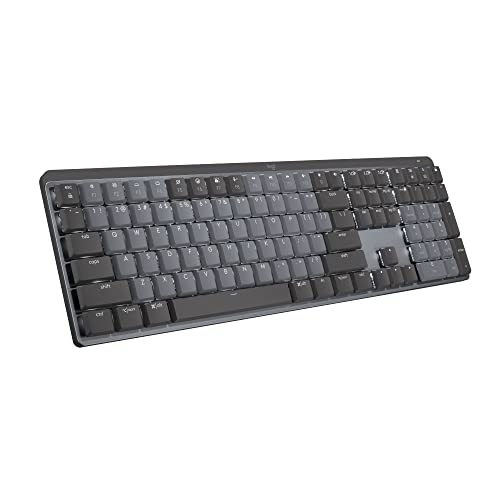
Logitech MX Mechanical wireless illuminated low-profile keyboard, tactile quietBest for OfficeLogitech MX Mechanical wireless illuminated low-profile keyboard, tactile quietFull-sizeBluetooth for up to 3 devicesLow-profile tactile quietOffice work across several devices
Corsair K70 CORE RGB wired mechanical keyboard with palmrestBest for Gaming ComfortCorsair K70 CORE RGB wired mechanical keyboard with palmrestFull-sizeWired USBPre-lubed MLX Red linearGaming and long typing sessions
AULA F75 Pro 75 percent wireless hot-swappable mechanical keyboard with knobBest Hot-Swap ValueAULA F75 Pro 75 percent wireless hot-swappable mechanical keyboard with knob75 percent compactTri-mode Bluetooth, 2.4 GHz and USB-CPre-lubed, hot-swappableCompact desks and first custom boards
Razer BlackWidow V4 X mechanical gaming keyboard with yellow switchesBest for MacrosRazer BlackWidow V4 X mechanical gaming keyboard with yellow switchesFull-size with 6 dedicated macro keysWiredRazer Yellow linearMMO and productivity macros
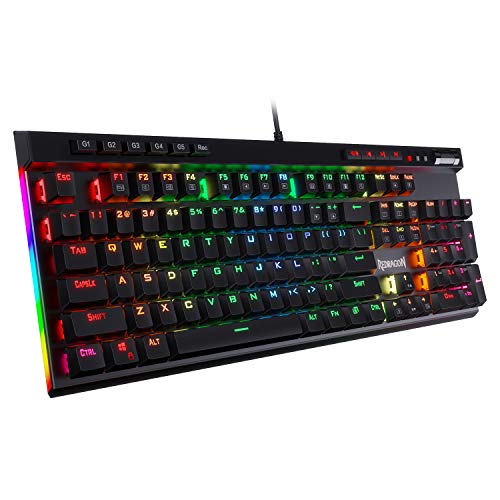
Redragon K580 wired RGB mechanical gaming keyboard with macro keys and media wheelBest ValueRedragon K580 wired RGB mechanical gaming keyboard with macro keys and media wheelFull-size with macro keysWired USBn/aBudget gaming and general use

A mechanical keyboard puts a separate switch under every key, which gives a distinct feel, longer life and a wide range of customization. Switches come in linear, tactile and clicky types, and the layout, case and keycaps change the sound as much as the switch does.

Product pages stress RGB and switch names, but daily comfort comes from layout size, wireless reliability, noise and how easily you can swap parts. We evaluated six mechanical keyboards from the candidate pool using published specifications, listing details and patterns in owner feedback, then ranked them by fit for real desks.

Before you buy

6 Criteria to Look For Before Buying a Mechanical Keyboard Under $50

  1. 01

    Switch type and feel

    Linear switches press smoothly without a bump, tactile switches add a bump at the actuation point and clicky switches add an audible click. Linear suits gaming, tactile suits typing and clicky suits those who like sound. Quiet variants reduce noise but not to membrane levels. The mistake is buying by color name rather than feel. If you can, type on a friend's board with the same switch family before you buy, because a few minutes tells you more than a name.

  2. 02

    Layout size

    Full-size boards have a number pad and take the most space. A 96 or 100 percent board keeps the number pad in less width, 75 percent keeps the arrows and function row and 60 percent drops most of them. A smaller board frees mouse space, but you lose dedicated keys. Match the layout to the keys you use daily. Before you settle on a layout, look at your own habits and count how often you touch the number pad and function row.

  3. 03

    Hot-swap and customization

    Hot-swappable boards let you change switches without soldering, which is useful to try different feels. Keycaps are also swappable on most boards. If you want to customize, check that the sockets and keycaps use standard mounts. Non-hot-swap boards lock you into the factory switches. If you plan to modify the board later, confirm the socket type and whether the keycap stems are a common cross shape.

  4. 04

    Wireless modes and latency

    2.4 GHz dongles have low latency and suit gaming, Bluetooth is convenient for multiple devices and USB-C wired is the most reliable. Wireless boards need charging and have a battery that fades. If you game competitively, use the dongle or wired. Check how long the battery lasts with lighting on. If you switch between a laptop and a desktop all day, prioritize Bluetooth multi-device switching over a dongle.

  5. 05

    Build, case and stabilizers

    A heavy case reduces rattle and makes typing sound deeper. Stabilizers under the space bar and large keys can rattle if poorly tuned. Foam and gaskets change the sound. Plastic cases are cheaper but can sound hollow. Metal plates feel stiffer. Test the space bar and enter key for rattle, because those large keys expose weak stabilizers first.

  6. 06

    Noise and where you type

    Mechanical boards are louder than membrane keyboards. Linear switches with foam are the quietest, and clicky switches are the loudest. If you share a space, consider quiet or low-profile switches and an O-ring or foam mod. Test before buying if you can. Choose the quietest build if anyone shares your room, since a thick case and foam matter as much as the switch.

Detailed reviews

The 6 best mechanical keyboards under $50, explained

01
Keychron V5 Max 96 percent wireless mechanical keyboard with QMK
96% layoutTri-mode wirelessQMK and VIANumber pad
Check price on Amazon
Best for: Typists and gamers who want a number pad, wireless modes and deep customization.

The Keychron V5 Max is a custom-style wireless keyboard in a 96 percent layout, which keeps the number pad but removes wasted gaps. It connects over a 2.4 GHz dongle, Bluetooth or USB-C, and supports QMK firmware for deep remapping. The case and switches are built for customization.

The tradeoff is learning curve and weight. The layout is compact but crowded, and QMK settings take time to understand. It also costs more than entry-level boards. Compared with the AULA F75 Pro, it keeps the number pad but is larger. Compared with the Logitech MX Mechanical, it is more customizable and less office-quiet.

Ownership is simple. Pick your connection mode, set up remapping if you want it and clean keycaps occasionally. Owner feedback patterns on Keychron boards say the build is solid and the firmware options are deep, while wireless range depends on the dongle and desk setup.

What works

  • 96 percent layout keeps the number pad in a smaller footprint
  • Tri-mode connection covers dongle, Bluetooth and wired
  • QMK and VIA firmware support remapping
  • Solid build with a customizable feel

Watch out for

  • Compact layout takes time to learn
  • QMK setup has a learning curve
  • Costs more than entry-level boards

Specs

Layout
96 percent with number pad
Connection
2.4 GHz, Bluetooth and USB-C
Firmware
QMK and VIA remapping support
Switches
Mechanical, pre-installed options
Best use
Typists and gamers who want a number pad
02
Logitech MX Mechanical wireless illuminated low-profile keyboard, tactile quiet
Low profileTactile quietBluetooth, 3 devicesSmart backlight
Check price on Amazon
Best for: Office users who switch between a laptop, desktop and tablet and want a quieter feel.

The Logitech MX Mechanical is a full-size, low-profile mechanical keyboard with tactile quiet switches. It connects to three devices over Bluetooth and switches between them with a key press. The low profile switches are shallower than standard mechanical switches, and the illuminated keys adjust to ambient light.

The tradeoff is enthusiast flexibility. The switches are not hot-swappable, the firmware is limited and the price is high for the feature set. Compared with the Keychron, it is quieter and more office-friendly but less customizable. Compared with the Corsair K70 Core, it is wireless and low profile, but not built for gaming.

Ownership is simple. Pair your devices, use the Logi software for backlight and keys and recharge over USB-C. Owner feedback patterns on the MX line say the build and multi-device switching are excellent, and the feel is a taste, so check that low profile suits you.

What works

  • Tactile quiet low-profile switches suit shared offices
  • Bluetooth switching among three devices
  • Smart illumination adjusts to the room
  • Premium build and polished software

Watch out for

  • Switches are not hot-swappable
  • High cost for a non-customizable board
  • Low-profile feel is not for everyone

Specs

Switches
Low-profile tactile quiet
Layout
Full-size
Connection
Bluetooth for up to 3 devices
Backlight
Illuminated keys
Best use
Office work across several devices
03
Corsair K70 CORE RGB wired mechanical keyboard with palmrest
Pre-lubed MLX RedWiredPalmrestRGB
Check price on Amazon
Best for: Gamers and typists who want a smooth linear wired board with a palmrest.

The Corsair K70 CORE is a wired, full-size gaming keyboard with pre-lubed MLX Red linear switches, RGB lighting and a palmrest. Linear switches have a smooth, direct feel without a bump, which suits fast gaming. The pre-lubed switches reduce scratchy sound.

The tradeoff is flexibility. It is wired only and the switches are not hot-swappable on this model, so you cannot change them without soldering. Compared with the Keychron, it has no wireless modes and no hot-swapping. Compared with the Razer BlackWidow V4 X, it has a palmrest and a simpler layout but fewer macro keys.

Ownership is easy. Use the iCUE software for lighting and keys, wipe the surface and clean the keycaps. Owner feedback patterns on Corsair keyboards say the build is solid, and the software is powerful but can be heavy on lower-end PCs.

What works

  • Pre-lubed linear switches feel smooth and quiet for linear
  • Detachable palmrest adds comfort for long sessions
  • Full-size layout with RGB lighting
  • Solid build from an established gaming brand

Watch out for

  • Wired only on this model
  • Switches are not hot-swappable
  • iCUE software can be heavy

Specs

Switches
Pre-lubed MLX Red linear
Layout
Full-size
Connection
Wired USB
Extras
Detachable palmrest, RGB lighting
Best use
Gaming and long typing sessions
04
AULA F75 Pro 75 percent wireless hot-swappable mechanical keyboard with knob
75% layoutHot-swappableTri-mode wirelessKnob
Check price on Amazon
Best for: Buyers who want a compact, wireless, hot-swappable board at a low cost.

The AULA F75 Pro is a 75 percent keyboard with a volume knob, hot-swappable switch sockets and tri-mode wireless connectivity. It ships with pre-lubed switches and an RGB backlight, and the sockets let you try other switches without soldering. The 75 percent layout keeps the arrow keys and function row while dropping the number pad.

The tradeoff is refinement. The case and stabilizers are good for the tier but less refined than premium boards, and software is basic. Compared with the Keychron V5 Max, it is smaller and cheaper but has no number pad. Compared with the Redragon K580, it is wireless and hot-swappable at a similar low tier.

Ownership requires basic care. Pair the device, update firmware if needed and swap switches using the included tool. Owner feedback patterns on AULA boards say they offer strong value, with the main caution being the less polished software and stabilizer tuning.

What works

  • Hot-swappable sockets let you change switches without soldering
  • Tri-mode wireless covers dongle, Bluetooth and USB-C
  • 75 percent layout saves desk space
  • Volume knob and pre-lubed switches add polish

Watch out for

  • No number pad
  • Software is basic
  • Case and stabilizers are less refined than premium boards

Specs

Layout
75 percent compact
Connection
Tri-mode Bluetooth, 2.4 GHz and USB-C
Switches
Pre-lubed, hot-swappable
Control
Volume knob
Best use
Compact desks and first custom boards
05
Razer BlackWidow V4 X mechanical gaming keyboard with yellow switches
Yellow linear6 macro keysFull-sizeWired
Check price on Amazon
Best for: MMO players and workers who benefit from dedicated macro keys.

The BlackWidow V4 X is a full-size wired gaming keyboard with Razer Yellow linear switches and six dedicated macro keys on the left. The macro keys let you bind commands for games and software without taking up regular keys. It also offers RGB lighting through Razer's software.

The tradeoff is flexibility and size. It is wired, not hot-swappable and large for small desks. Compared with the Corsair K70 CORE, it has dedicated macro keys but no palmrest. Compared with the Redragon K580, it has a better build and switch at a higher cost.

Ownership is simple. Install the Razer software for macros and lighting, and wipe the keys. Owner feedback patterns on Razer boards say the macro keys are useful for MMO and editing work, and the Synapse software is required for full features.

What works

  • Six dedicated macro keys speed repeated tasks
  • Yellow linear switches are smooth for gaming
  • Full-size layout with RGB lighting
  • Established gaming brand with wide software support

Watch out for

  • Wired only and not hot-swappable
  • Takes up a lot of desk space
  • Requires Razer software for full features

Specs

Switches
Razer Yellow linear
Layout
Full-size with 6 dedicated macro keys
Connection
Wired
Lighting
RGB with software control
Best use
MMO and productivity macros
06
Redragon K580 wired RGB mechanical gaming keyboard with macro keys and media wheel
Wired5 macro keysMedia wheelRGB
Check price on Amazon
Best for: Budget buyers who want macro keys and a media wheel on a mechanical board.

The Redragon K580 is the lowest-tier board in the lineup, a wired, full-size keyboard with five on-board macro keys, a media wheel and RGB lighting. The macro keys can record combos on the fly without software. It is meant for gamers who want features on a tight budget.

The tradeoff is refinement. The case is plastic, the stabilizers are basic and the switches are not hot-swappable. Compared with the AULA F75 Pro, it is wired and larger but has macro keys. Compared with the Razer, it costs far less but has a less refined feel.

Ownership is easy. Use the on-board recording for macros, wipe the surface and clean the keycaps. Owner feedback patterns on Redragon boards say they are good value, with the main compromises being build quality and sound.

What works

  • Low cost for a full-size mechanical board
  • Five on-board macro keys record combos without software
  • Media wheel adds convenience
  • RGB lighting with several modes

Watch out for

  • Plastic case and basic stabilizers
  • Wired only and not hot-swappable
  • Sound and feel are less refined than premium boards

Specs

Layout
Full-size with macro keys
Connection
Wired USB
Macros
5 on-board keybinding buttons
Extras
Media wheel
Best use
Budget gaming and general use

Spec decoder

What the listing measurements really mean

The numbers brands lead with, translated into what they tell you about fit, comfort and wear at home.

Linear, tactile, clicky

Linear is smooth, tactile has a bump and clicky has a bump and a sound. The type determines feel and noise. Linear switches suit repeated presses in games, while tactile switches help typing accuracy without a click.

Watch forThe Corsair and Razer use linear, the Logitech uses tactile quiet.

Hot-swappable

Sockets that let you pull and replace switches without soldering. They make customization easy. Replacement switches and keycap sets are cheap compared with a new board.

Watch forThe AULA F75 Pro and Keychron V5 Max are hot-swappable, others may not be.

Layout percentage

The size of the keyboard compared with a full-size board. 75 percent drops the number pad, 96 percent keeps it. A smaller board leaves more mouse room, which matters for low-sensitivity gamers.

Watch forThe Keychron is 96 percent and the AULA is 75 percent.

QMK and VIA

Open firmware and a graphical tool that let you remap keys and layers. They offer deep control. QMK is a deeper layer than most owners need, but it is useful for layers and macros.

Watch forThe Keychron V5 Max supports QMK and VIA.

Tri-mode wireless

A keyboard that supports Bluetooth, a 2.4 GHz dongle and USB-C wired in one board. Wireless modes differ in latency, so a dongle is best for competitive play.

Watch forThe AULA F75 Pro and Keychron V5 Max support tri-mode.

Methodology

How We Evaluated These Mechanical Keyboards Under $50

Spec sheet and listing review

We compared switch type, layout, connection modes and customization options as published by each maker. We checked that claims were stated on the same basis. For example, wireless modes differ in latency. We also checked whether each board lists the switch brand and whether the switches are hot-swappable.

Switch and layout fit

We matched switch feel and layout size to common use cases. These choices decide daily comfort. This explains the Keychron and Logitech picks. We read how owners describe stabilizer rattle and case sound, since those drive daily satisfaction.

Wireless and customization

We reviewed hot-swap sockets, firmware and wireless modes. These decide long-term flexibility. This shaped the AULA position. We compared the software requirements, since boards that need heavy apps are a nuisance on shared PCs.

Ownership and build

We read owner feedback patterns about stabilizers, battery life and software. We weighed build quality. This shaped the order of the lineup. We weighed repeated reports of battery fade on wireless boards.

Value for the user

We compared price tier against features for office, gaming and customization. A budget board suits casual use. This shaped the budget pick. We kept the order tied to how people actually use the board at a desk.

Decision guide

How to Choose the Right Mechanical Keyboards Under $50

By Use

SituationPickWhy
Office with several devicesLogitech MX MechanicalBluetooth switching and quiet switches
Typing and gaming with number padKeychron V5 Max96 percent with tri-mode
Gaming with palmrestCorsair K70 COREPre-lubed linear and palmrest
MMO and macrosRazer BlackWidow V4 XSix dedicated macro keys

By Budget

SituationPickWhy
Lowest costRedragon K580Lower tier with macros
Low to mid tier, compactAULA F75 ProHot-swappable and wireless
Mid tier, gamingCorsair K70 COREPre-lubed switches
Higher spend, flexibleKeychron V5 MaxQMK and tri-mode

Wired vs Wireless

Wired

The Corsair, Razer and Redragon are wired. They have no battery and the lowest latency.

Wireless

The Keychron, AULA and Logitech are wireless. They reduce cable clutter but need charging.

Choose wired for competitive gaming, and wireless for a tidy desk and multiple devices.

By Layout

SituationPickWhy
Need a number padKeychron V5 Max96 percent layout
Compact deskAULA F75 Pro75 percent with knob
Full-size with macrosRazer BlackWidow V4 XFull-size with macro keys
Standard full-sizeCorsair K70 COREFull-size with palmrest

For Quiet Typing Specifically

Look for

Tactile quiet or silent linear switches, a foam-filled case and an O-ring or gasket design. Heavier cases reduce rattle.

In this comparison

The Logitech MX Mechanical is the quietest. The Razer yellow linear is also relatively quiet. The others are louder.

When to Spend More

Spend more if

You type all day, want wireless and customization. The Keychron V5 Max and Logitech MX Mechanical are the clearest upgrades.

Save if

You want a mechanical feel on a budget. The Redragon or AULA covers it.

Ownership

Maintenance schedule

The upkeep that decides whether a piece still looks good in year five.

TaskIntervalWhy it matters
Brush or blow out debrisWeeklyCrumbs and dust get under keycaps and cause sticky keys. A brush or compressed air removes them. Use a keycap puller and keep a small tray for the caps.
Wipe the keycapsWeeklySkin oils make keys shiny and slick. A damp cloth keeps them clean. A soft, dry brush clears dust that compressed air misses.
Deep clean keycapsEvery 3 to 6 monthsPull the keycaps and wash them. Let them dry fully before refitting. Avoid sprays near the switches, since liquid can reach the contacts.
Check wireless battery healthMonthlyBatteries fade and may swell. Charge regularly and avoid heat. A small drop of lubricant on a sticky stabilizer is a common fix, but check the maker's advice first.
Update firmwareWhen the maker releases updatesUpdates fix bugs and connection issues. Follow the instructions carefully. Keep a spare cable, since a worn cable is a common cause of dropouts.

FAQ

Frequently Asked Questions

Are mechanical keyboards better than membrane?

They offer a more distinct feel, longer life and customization. They also cost more and are louder. If you like a heavy keyboard sound, tactile or clicky switches with a metal plate suit you best.

Which switch should I choose?

Linear for smooth gaming, tactile for typing feedback and clicky for audible feedback. Try them if you can. Some switches are quieter than others, so check the sound profile before buying.

What does hot-swappable mean?

You can pull out and replace switches without soldering. It lets you try different feels. Compare the switch sockets and keycap profile before buying accessories.

Is wireless as good as wired?

A 2.4 GHz dongle is close to wired for most gaming. Bluetooth has more latency, and wired is the most reliable. A keyboard with onboard memory keeps settings across computers.

Is a 75 percent keyboard too small?

It keeps arrows and the function row but drops the number pad. Many people adapt in a few days. If you also use a laptop keyboard, a low-profile mechanical board is an easier transition.

Are mechanical keyboards loud?

They are louder than membrane boards. Quiet switches and a foam case reduce the noise. Check the warranty on the switches and the case, since that tells you what the maker stands behind.

Bottom line

The short version

Browse more mechanical keyboards under $50on Amazon →
Brianna Cole, Lead Product Editor

About the author

Brianna Cole

Lead Product Editor, SenseiReview

Brianna Cole leads SenseiReview's buying guides, turning published specifications, documentation and owner feedback patterns into clear verdicts across home, tech, fitness, outdoor and DIY products.

More from Brianna →

Keep reading

Related guides