
Amazon affiliate links - we earn a commission.Affiliate disclosure

Buying guide · 12 min read · Updated 2026-11-26

Best Privacy Screen Filters for Laptops (2026)

Six laptop privacy screen filters compared on exact screen size, 16:9 versus 16:10, magnetic versus adhesive mounting, glare and blackout viewing angle.

Brianna Cole, Lead Product EditorBy Brianna ColeLead Product Editor6 picks comparedSpec-sheet verified
Best Privacy Screen Filters for Laptops

At a glance

Our top picks

Side by side

Spec comparison

PieceSizeAspect ratioMountingFilmTier
SightPro Magnetic Laptop Privacy Screen, 14 in 16:10, RemovableBest OverallSightPro Magnetic Laptop Privacy Screen, 14 in 16:10, Removable11 15/16 by 7 1/2 in, 14.1 in diagonal16:10Patented magnetic, removableMulti-layered, blacks out side viewMiddle in this guide
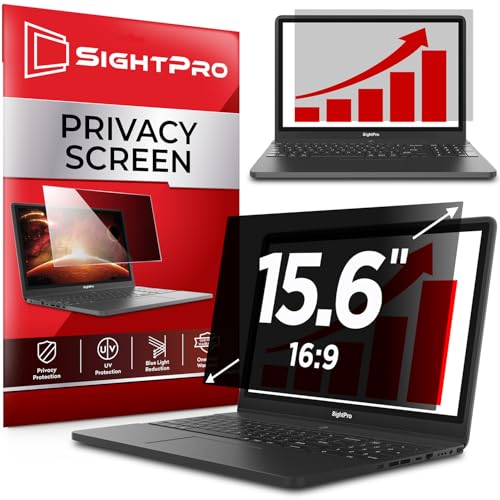
SightPro 15.6 in 16:9 Laptop Privacy Screen Filter, AdhesiveBest ValueSightPro 15.6 in 16:9 Laptop Privacy Screen Filter, Adhesive13 9/16 by 7 5/8 in, 15.6 in diagonal16:9Clear adhesive stripsMulti-layered, blocks side viewLowest in this guide
SightPro 14 in 16:10 Laptop Privacy Screen Filter, Adhesive StripsBest Adhesive 14 inSightPro 14 in 16:10 Laptop Privacy Screen Filter, Adhesive Strips11 15/16 by 7 1/2 in, 14.1 in diagonal16:10Two attachment options, adhesive strips firstSuperior privacy and anti glareLow in this guide
SightPro Magnetic Laptop Privacy Screen, 15.6 in 16:9, RemovableBest Magnetic 15.6 inSightPro Magnetic Laptop Privacy Screen, 15.6 in 16:9, Removable13 9/16 by 7 5/8 in, 15.6 in diagonal16:9Patented magnetic, removableMulti-layered blackout filmMiddle in this guide
SightPro Magnetic Laptop Privacy Screen, 16 in 16:10, RemovableBest 16 in MagneticSightPro Magnetic Laptop Privacy Screen, 16 in 16:10, Removable13.56 by 8.49 in, 16 in diagonal16:10Patented magnetic, removableMulti-layered blackout filmUpper in this guide
ANTOGOO V 16 in 16:10 Laptop Privacy Screen Filter, Anti Blue LightBest Anti Blue Light 16 inANTOGOO V 16 in 16:10 Laptop Privacy Screen Filter, Anti Blue Light16 in, 16:10 aspect ration/aAdhesive on the back side onlyLayered anti-blue light and anti-glaren/a

A privacy screen filter narrows the viewing angle of a laptop so that someone sitting beside you on a train or in a cafe sees a dark screen, while you see the picture straight on. It is a small purchase that is worth making for anyone who works with confidential documents in public.

The main problem with privacy filters is fit. The filter must match your screen's exact width and height, and the 16:9 and 16:10 aspect ratios are not interchangeable even at the same diagonal. The six filters below cover three sizes and three mounting methods.

Before you buy

6 Criteria to Look For Before Buying a Privacy Screen Filter for Laptops

  1. 01

    Exact screen size and aspect ratio

    A filter must match your screen's width and height, not just the diagonal, because 16:9 and 16:10 screens differ even at 14 or 16 inches. The SightPro 14 inch 16:10 measures 11 15/16 by 7 1/2 inches, while the 14 inch 16:9 is 12 3/16 by 6 7/8 inches. Measure your screen before buying. If you are unsure, look up the screen's native resolution: 1920 by 1200 and 2560 by 1600 panels are 16:10, while 1920 by 1080 panels are 16:9.

  2. 02

    Mounting method

    Adhesive strips hold flat and cost less but are hard to remove, while magnetic filters can be taken off for presentations and leave no residue. The SightPro Magnetic models use a patented magnetic system. Clip-on filters can stop the lid from closing, so check the clearance.

  3. 03

    Viewing angle and blackout

    A privacy filter blacks out the picture from roughly 30 degrees or more off-center. Multi-layered films reduce what a side viewer sees, but they also dim the picture for you. Do not rely on a filter against someone sitting directly behind you. In a seated cafe table setup the neighbor's angle is typically well past 45 degrees, which is where these films are most effective.

  4. 04

    Glare, brightness and color

    Privacy films reduce brightness and can slightly shift colors, which matters for photo work. Anti-glare coatings reduce reflections but can add a faint grain. Raise screen brightness a little after installing. Expect to run the display at a higher brightness setting, which uses more battery on the road.

  5. 05

    Touchscreen and lid clearance

    Most privacy filters are not designed for touchscreens, and an adhesive filter can stop a thin lid from closing fully. Check your laptop model and the filter's thickness. The ANTOGOO lists specific incompatibilities. A quick test is to place a sheet of paper the thickness of the filter on the keyboard and close the lid to see if it still sits flat.

  6. 06

    Removability and care

    A removable filter lets you share your screen with a colleague and clean the display. Store removable filters flat and wipe with a microfiber cloth. Permanent filters should be applied in a dust-free spot.

Detailed reviews

The 6 best privacy screen filters for laptops, explained

01
SightPro Magnetic Laptop Privacy Screen, 14 in 16:10, Removable
14.1 in diagonal16:10 ratioMagnetic removableAnti glare
Check price on Amazon
Best for: Commuters who want a removable privacy shield for a 14 inch 16:10 laptop.

The SightPro Magnetic 14 inch filter is a removable shield that is held on by a patented magnetic system. The listing gives its size as 11 15/16 by 7 1/2 inches with a 14.1 inch diagonal for a 16:10 screen, and describes a multi-layered film that blacks out the picture from the side. You place the shield on the screen and take it off whenever you want a full view.

Compared with the adhesive 14 inch SightPro, the magnetic version costs more but can be removed without residue, which suits shared or leased laptops. Against the 16 inch version it is smaller and a better fit for compact machines. The trade is a slightly less permanent fit: a magnetic filter can slide if bumped.

Check your screen's exact dimensions and its aspect ratio before ordering, since 14 inch laptops come in both 16:9 and 16:10. Clean with a soft cloth and store flat. For a laptop you use in public and in private, a removable filter is the most convenient. Because 14 inch 16:10 screens are common on thin business laptops, this size also suits travel, where a flat magnetic sheet slides into the same sleeve as the laptop without adding noticeable bulk.

What works

  • Patented magnetic mount removes in seconds
  • Leaves no adhesive residue
  • Multi-layered film blacks out side views
  • Anti-glare surface reduces reflections

Watch out for

  • Costs more than adhesive versions
  • Can shift if bumped
  • Only fits 16:10 14 inch screens

Specs

Size
11 15/16 by 7 1/2 in, 14.1 in diagonal
Aspect ratio
16:10
Mounting
Patented magnetic, removable
Film
Multi-layered, blacks out side view
Tier
Middle in this guide
02
SightPro 15.6 in 16:9 Laptop Privacy Screen Filter, Adhesive
15.6 in diagonal16:9 ratioAdhesive stripsAnti glare
Check price on Amazon
Best for: 15.6 inch 16:9 laptops where a permanent low-cost filter is enough.

This is the lowest-cost SightPro, a 15.6 inch 16:9 filter measuring 13 9/16 by 7 5/8 inches. The listing says it installs in minutes with clear adhesive strips that attach to any screen, and its multi-layered film blacks out the picture from side angles. It is the most common laptop screen size, which is why this is a popular fit.

Compared with the magnetic 15.6 inch SightPro, the adhesive version is cheaper and more secure, but you cannot swap it on and off as easily. Against the 14 inch filters it is for larger machines, and the adhesive strips give a flatter, more permanent look. The strips hold at the edge, so the filter stays flat against the screen without gaps.

Clean the screen before applying, align the filter and press the strips firmly. Keep the original strips in case you need to reposition. For a work laptop that stays at one spot, it is the most affordable way to add privacy. Since 15.6 inch 16:9 is the size most office laptops ship with, replacement stock is easy to find if a filter ever scratches, which makes the low cost a practical rather than a compromise choice.

What works

  • Lowest cost in the lineup
  • Fits the common 15.6 inch 16:9 screen
  • Adhesive strips install in minutes
  • Multi-layered film blocks side view

Watch out for

  • Less convenient to remove than magnetic
  • Needs a careful alignment on install
  • Only fits 16:9 15.6 inch screens

Specs

Size
13 9/16 by 7 5/8 in, 15.6 in diagonal
Aspect ratio
16:9
Mounting
Clear adhesive strips
Film
Multi-layered, blocks side view
Tier
Lowest in this guide
03
SightPro 14 in 16:10 Laptop Privacy Screen Filter, Adhesive Strips
14.1 in diagonal16:10 ratioTwo attachment optionsAnti glare
Check price on Amazon
Best for: 14 inch 16:10 laptops that need a fixed, low-cost filter.

The adhesive SightPro 14 inch filter measures 11 15/16 by 7 1/2 inches for 16:10 screens and offers two attachment options, the first being clear adhesive strips. The listing credits the film with superior privacy and anti-glare properties, and it installs in minutes without special tools.

Compared with the magnetic 14 inch filter, this one is cheaper and thinner, but it is harder to take on and off. Against the 14 inch 16:9 magnetic filter it is the right size for a 16:10 screen, and a mismatch in ratio leaves gaps or covers part of the display. Measure your screen before choosing.

Clean the screen and use the strips as the guide, applying even pressure on each edge. If the filter bubbles, lift and re-seat the strip. For a long-term filter on a 14 inch 16:10 laptop, it is the simple, secure choice. It makes the most sense on a work machine that rarely leaves the desk, where the main audience you want to block is the colleague walking behind the row of screens in an open-plan office.

What works

  • Low cost with two attachment options
  • Sized for 14 inch 16:10 screens
  • Anti-glare film reduces reflections
  • Quick install with strips

Watch out for

  • Harder to remove than magnetic
  • Ratio mismatch risk for 16:9 laptops
  • Strips can leave a mark on removal

Specs

Size
11 15/16 by 7 1/2 in, 14.1 in diagonal
Aspect ratio
16:10
Mounting
Two attachment options, adhesive strips first
Film
Superior privacy and anti glare
Tier
Low in this guide
04
SightPro Magnetic Laptop Privacy Screen, 15.6 in 16:9, Removable
15.6 in diagonal16:9 ratioMagnetic removableBlackout film
Check price on Amazon
Best for: 15.6 inch 16:9 laptops that move between private and public use.

This is the magnetic version for the most common laptop screen size, 15.6 inches in 16:9, at 13 9/16 by 7 5/8 inches. The same patented magnetic system lets you place the shield and remove it in seconds, and the multi-layered film blacks out the display from the side.

Compared with the adhesive 15.6 inch filter, it costs more but offers removability, which suits shared machines and anyone who wants to show a screen to a colleague. Against the 14 inch magnetic version, it is a larger sheet, so it needs a careful storage spot. A magnetic filter will not hold as tightly as adhesive, so avoid bumping it.

Clean both the shield and the screen to avoid dust specks, and store the filter in a flat sleeve. For a 15.6 inch laptop that moves between desk and cafe, it is the best balance of security and convenience. Magnetic filters work by pairing with a thin frame or strips along the bezel, so check that your laptop's bezel is wide enough to carry them and that no edge strip covers a webcam or sensor.

What works

  • Magnetic mount is removable in seconds
  • Fits the common 15.6 inch 16:9 size
  • Multi-layered film blacks out side views
  • No adhesive residue

Watch out for

  • Costs more than adhesive
  • Large sheet needs flat storage
  • Can shift if bumped

Specs

Size
13 9/16 by 7 5/8 in, 15.6 in diagonal
Aspect ratio
16:9
Mounting
Patented magnetic, removable
Film
Multi-layered blackout film
Tier
Middle in this guide
05
SightPro Magnetic Laptop Privacy Screen, 16 in 16:10, Removable
16 in diagonal16:10 ratioMagnetic removableBlackout film
Check price on Amazon
Best for: Larger 16 inch 16:10 laptops that need a removable filter.

The 16 inch SightPro Magnetic filter is for 16:10 screens that measure 13.56 by 8.49 inches, a size used by larger productivity and creator laptops. It uses the same patented magnetic mounting and multi-layered blackout film as the smaller models, so you can remove it for presentations or video calls.

Compared with the ANTOGOO 16 inch, the SightPro is magnetic and removable, while the ANTOGOO uses adhesive on the back. Against the smaller magnetic sizes it covers a larger display and costs more. Check that your laptop is 16:10 and not a 16.1 inch 16:9 model, because the dimensions differ.

Clean both surfaces and place the filter evenly so the edges align. Store it flat and avoid bending it. For a larger 16:10 laptop that you want to secure in public and show in private, it is the most flexible filter. Treat it as the choice for people who travel with a larger laptop and present from it, since the sheet is simple to lift off before connecting to a projector or sharing a screen in a meeting.

What works

  • Magnetic mount is quick to remove
  • Sized 13.56 by 8.49 inches for 16:10
  • Multi-layered film blacks out the side view
  • No adhesive residue

Watch out for

  • Highest cost per sheet in the lineup
  • Large sheet is easy to scratch in a bag
  • Fits only 16 inch 16:10 screens

Specs

Size
13.56 by 8.49 in, 16 in diagonal
Aspect ratio
16:10
Mounting
Patented magnetic, removable
Film
Multi-layered blackout film
Tier
Upper in this guide
06
ANTOGOO V 16 in 16:10 Laptop Privacy Screen Filter, Anti Blue Light
16 in 16:10Anti blue lightAnti scratchAdhesive back only
Check price on Amazon
Best for: 16 inch 16:10 laptops where a fixed filter with anti-blue light is wanted.

The ANTOGOO V filter is a 16 inch 16:10 sheet with a layered anti-blue light and anti-glare design, plus an anti-scratch surface. The listing carries an explicit warning that it is not for 16.1 inch 1920 by 1080 laptops or for the 16 inch MacBook Pro, which is a useful honest note about fit. Adhesive is on the back side only.

Compared with the SightPro 16 inch magnetic, the ANTOGOO is adhesive rather than removable, so it is a permanent fit, and it adds the anti-blue light layer. Against the other sizes it targets a larger laptop screen. The compatibility note is the point: always check your laptop's exact dimensions.

Before installing, clean the screen thoroughly and align the filter carefully, since adhesive is unforgiving. Wipe with a microfiber cloth. For a 16 inch 16:10 laptop where you want a fixed filter with some eye comfort, it is a solid choice. The explicit compatibility warning is worth respecting: a filter cut for a 16:10 panel will leave a band of uncovered screen on a 16:9 panel and cover part of the display on a taller one.

What works

  • Layered anti-blue light and anti-glare film
  • Anti-scratch surface protects the screen
  • Clear compatibility warnings on the listing
  • Fixed adhesive keeps it flat

Watch out for

  • Permanent adhesive is hard to reposition
  • Not for 16.1 inch 16:9 or MacBook Pro 16
  • Cannot be removed for presentations

Specs

Size
16 in, 16:10 aspect ratio
Film
Layered anti-blue light and anti-glare
Surface
Anti scratch
Mounting
Adhesive on the back side only
Compatibility
Not for 16.1 in 1920x1080 or MacBook Pro 16 in

Spec decoder

What the listing measurements really mean

The numbers brands lead with, translated into what they tell you about fit, comfort and wear at home.

Aspect ratio

The ratio of screen width to height. 16:9 and 16:10 screens have different proportions at the same diagonal.

Watch forThe SightPro 14 inch comes in both 16:9 and 16:10, and the 16 inch here is 16:10.

Diagonal and dimensions

The size of the filter in inches, with width and height. The exact width and height must match the screen.

Watch forThe SightPro 15.6 inch is 13 9/16 by 7 5/8 inches.

Magnetic mount

A removable attachment that holds the filter with magnets. It leaves no residue.

Watch forThe SightPro Magnetic models list a patented magnetic system.

Anti blue light

A layer that reduces blue wavelengths. It can slightly warm the screen colors.

Watch forThe ANTOGOO lists an anti blue light layer.

Viewing angle

The cone in which the screen is readable. Outside it the picture goes dark.

Watch forListings rarely give exact degrees, so treat blackout claims as qualitative.

Methodology

How We Evaluated These Privacy Screen Filters for Laptops

Fit and sizing

We compared listed dimensions and aspect ratios against common laptop screens. The SightPro range covers several sizes. The ANTOGOO compatibility warnings were credited.

Mounting and removability

We compared magnetic and adhesive mounts. Magnetic models earned credit for removability, while adhesive models were credited for a flat fit.

Privacy and film

We looked at multi-layered film, blackout claims and glare. Claims were treated qualitatively. Brightness loss was noted.

Compatibility notes

We read the listing notes about touchscreens, MacBooks and lid clearance. Clear warnings earned credit.

Ownership and care

We weighed owner feedback patterns on bubbles, residue and scratches. Magnetic filters avoid residue. Permanent filters need careful installation.

Decision guide

How to Choose the Right Privacy Screen Filters for Laptops

By Screen Size

SituationPickWhy
14 inch 16:10SightPro Magnetic 14 inRemovable, 16:10
14 inch 16:10 fixedSightPro 14 in adhesiveLower cost
15.6 inch 16:9SightPro 15.6 in adhesiveLowest cost
15.6 inch 16:9 removableSightPro Magnetic 15.6 inMagnetic
16 inch 16:10SightPro Magnetic 16 inRemovable, 16:10

By Budget

SituationPickWhy
Lowest tierSightPro 15.6 in adhesiveCheapest
Low tierSightPro 14 in adhesiveLow cost, 14 inch
Middle tierANTOGOO 16 inAnti blue light
Middle-upperSightPro Magnetic 14 or 15.6Magnetic
Top tierSightPro Magnetic 16 inLargest magnetic

Magnetic vs Adhesive

Magnetic (SightPro Magnetic)

Removable in seconds and residue free. Can shift if bumped and costs more.

Adhesive (SightPro, ANTOGOO)

Lies flat and costs less. Hard to remove and unforgiving on install.

Choose magnetic if you present or share your screen; choose adhesive if the laptop stays private.

By Aspect Ratio

SituationPickWhy
16:10 laptopsSightPro 14 and 16 in16:10 sizes
16:9 laptopsSightPro 15.6 in16:9 size
16:10 with blue lightANTOGOO 16 inLayered film
Check before orderingAny sizeMeasure width and height
Not for MacBook Pro 16ANTOGOOListed incompatibility

For Commuters Specifically

Look for

A removable filter, a snug fit for your exact screen size and a film that blacks out from the side.

In this comparison

The SightPro Magnetic in your screen size, stored flat in a sleeve.

When to Spend More

Spend more if

You present often and need a removable filter, or you have a larger laptop.

Save if

The laptop stays in one place, because an adhesive SightPro already does the job.

Ownership

Maintenance schedule

The upkeep that decides whether a piece still looks good in year five.

TaskIntervalWhy it matters
Wipe the filterWeeklyFingerprints and dust degrade clarity. Use a microfiber cloth.
Store removable filters flatAfter each useBending creases the film. A flat sleeve protects it.
Check the adhesiveMonthlyEdges can lift over time. Press them down.
Clean the screen before reapplyingWhen repositioningDust under the film causes specks.
Check lid clearanceAt installA thick filter can strain the lid. Close it gently.

FAQ

Frequently Asked Questions

How do I know my screen's aspect ratio?

Measure the screen's width and height or check the specification. A 14 inch laptop may be 16:9 or 16:10. When in doubt, the resolution listed in your laptop's display settings settles the question.

Do privacy filters dim the screen?

Yes. They reduce brightness and can shift colors a little, so raise brightness a bit. Raising brightness a notch or two usually compensates without causing eye strain.

Can I use one on a touchscreen laptop?

Most are not designed for touch. Check your model and the listing.

Does the filter stop someone behind me?

No. It works from side angles, not directly behind you.

Can I close the lid with the filter on?

Adhesive and magnetic filters are thin, but check clearance on thin lids.

Magnetic or adhesive?

Magnetic if you remove it often, adhesive for a permanent fit.

Bottom line

The short version

Browse more privacy screen filters for laptopson Amazon →
Brianna Cole, Lead Product Editor

About the author

Brianna Cole

Lead Product Editor, SenseiReview

Brianna Cole leads SenseiReview's buying guides, turning published specifications, documentation and owner feedback patterns into clear verdicts across home, tech, fitness, outdoor and DIY products.

More from Brianna →

Keep reading

Related guides