
Amazon affiliate links - we earn a commission.Affiliate disclosure

Buying guide · 12 min read · Updated 2026-11-21

Best Tablet Stands (2026)

Five tablet stands compared on stability, height range, folding design, clamp grip and tablet size support, with picks for desks, beds, floors and travel bags.

Brianna Cole, Lead Product EditorBy Brianna ColeLead Product Editor5 picks comparedSpec-sheet verified
Best Tablet Stands

At a glance

Our top picks

Side by side

Spec comparison

A tablet stand holds the screen at a useful height and angle so you are not craning your neck or balancing it on your lap. The three styles are desktop stands, clamp or gooseneck arms for beds and tables and floor stands for standing or lying use.

Stability and fit decide whether a stand is actually good. A light stand can tip when you tap the screen, a clamp can fail on thick surfaces and a bracket can be too small for a large tablet, so check the screen range and the base design before you buy.

Before you buy

6 Criteria to Look For Before Buying a Tablet Stand

  1. 01

    Stand type

    Desktop stands such as the COOPER and Lamicall foldable sit on a flat surface, gooseneck clamps like the Lamicall gooseneck attach to furniture and floor stands such as the SAMHOUSING and XXZU stand alone. Pick by where you use the tablet most, because the wrong type is the main reason stands get returned.

  2. 02

    Stability and base

    Weighted metal bases, as on the COOPER, hold steady when you tap and swipe. Light foldable bases wobble under pressure, and gooseneck arms sway. If you draw, type or tap often, base weight matters more than any other feature.

  3. 03

    Height and angle range

    Ranges run from the COOPER 7 to 10 inch arm to the XXZU 33 to 72 inch tripod. Eye level is the goal for desks, since a tablet flat on a desk puts strain on the neck. Check both the lowest and highest height against how you sit.

  4. 04

    Screen size support

    The SAMHOUSING lists 4.7 to 13 inch screens, while the COOPER lists large tablets like the iPad Pro 12.9. Thick cases and keyboards can exceed clamp widths, so measure your tablet and case together.

  5. 05

    Portability

    The Lamicall foldable stand folds to 0.59 inch, while weighted and tripod stands are bulky. Think about whether the stand lives on one desk or travels in a bag.

  6. 06

    Build and hinges

    Metal hinges and clamps last longer than plastic ones. Folding hinges loosen over time, while clamps lose grip pad texture. Look for replaceable pads and sturdy locking mechanisms.

Detailed reviews

The 5 best tablet stands, explained

01
COOPER TabHolder tablet stand for desk with weighted base and telescoping 7 to 10 inch arm
Weighted baseTelescoping arm270 degree tiltEye-level height
Check price on Amazon
Best for: Desk users who want a stable, eye-level stand for video calls and reading.

The COOPER TabHolder is a desktop tablet stand with a weighted metal base, a telescoping arm that extends across a 7 to 10 inch range and a tilt of up to 270 degrees. The goal is to bring the screen to eye level, which relieves neck strain during long video calls and reading sessions. It is compatible with large tablets such as the iPad Pro 12.9 and e-readers, according to the listing.

The tradeoff is portability. A weighted metal base is stable but heavy, so it is a desk fixture rather than a travel stand. Compared with the Lamicall foldable stand, it is more stable but much less pocketable. Against the SAMHOUSING floor stand, it works on a desk but does not reach standing height. It suits home offices and kitchens where the stand stays in place.

In ownership, check the arm joints and the clamp at the top now and then, since loose joints let the screen droop. Wipe the metal with a dry cloth, and keep the grip pads free of dust so the tablet does not slip. If you use a thick case, test the clamp width first.

What works

  • Weighted metal base resists tipping when you tap or swipe the screen
  • Telescoping arm raises a tablet to eye level and cuts neck strain
  • Wide tilt range suits typing, drawing and video calls
  • Supports large tablets such as the iPad Pro 12.9

Watch out for

  • Heavy base makes it a poor travel companion
  • Takes a fixed spot on the desk

Specs

Type
Desktop stand
Arm
Telescoping, 7 to 10 inch range
Tilt
270 degrees
Stability
Weighted metal base
Brand
COOPER
02
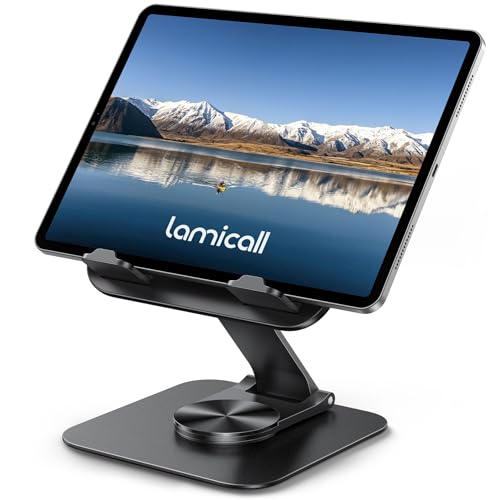
Lamicall adjustable ultra-slim foldable iPad stand with 360 degree rotating base
Folds to 0.59 in360 degree base2 hingesMetal build
Check price on Amazon
Best for: Travelers and commuters who want a stand that fits in a bag.

The Lamicall foldable stand is a slim metal desktop stand that folds down to just 0.59 inch thick, so it slips into a bag or sleeve. A rotating base turns a full 360 degrees, which helps you share the screen with someone beside you. Two hinges let you adjust tilt and height, and the metal build gives a solid feel for its size.

The tradeoff is that the folding mechanism sacrifices a bit of stiffness. Compared with the COOPER, the base is lighter, so a firm tap can wobble the tablet. Against the Lamicall gooseneck, it is for desks and tables only. It is the lowest price tier in the lineup, and it suits people who move between desks, cafes and meeting rooms.

For care, wipe the hinges and joints of dust and grit so they keep their grip, and avoid forcing the stand past its stops. Check the grip pads and replace them if they harden. Fold it flat when not in use to keep it from bending.

What works

  • Folds to 0.59 inch thick and slides into a laptop bag
  • 360 degree rotating base helps with sharing the screen
  • Two hinges adjust both tilt and height
  • Lowest price tier among the stands here

Watch out for

  • Lighter base can wobble when you tap the screen
  • Hinges loosen over time with repeated folding

Specs

Type
Foldable desktop stand
Folded thickness
0.59 inch
Rotation
360 degree base
Adjustment
Tilt and height, two hinges
Brand
Lamicall
03
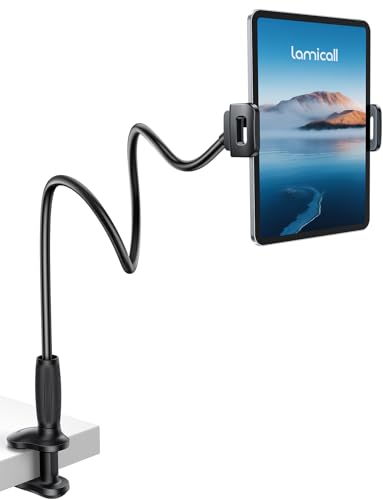
Lamicall gooseneck tablet holder for bed with wide clamp base and flexible arm
Gooseneck armClamp base360 degree headBed and desk
Check price on Amazon
Best for: Readers and viewers who want a tablet over the bed or at the edge of a table.

The Lamicall gooseneck holder uses a wide clamp base to attach to a desk, bed frame or table, with a tapered flexible arm that you bend into position. A 360 degree rotating head lets you switch between portrait and landscape. The wider base is meant to reduce shaking compared with older, narrower gooseneck designs.

The tradeoff is that goosenecks sag and sway. Even a good flexible arm will droop under a heavy tablet, and a thick headboard may not fit the clamp. Compared with the COOPER, it is far less stable for tapping, but it positions the tablet where a desk stand cannot reach. Against the SAMHOUSING floor stand, it uses the furniture you already have rather than a floor footprint.

Ownership tips: check the clamp thickness against your surface, tighten the clamp before each use and avoid overloading the arm. If the arm droops, shorten its reach by bending it closer. Wipe the clamp pads with a dry cloth.

What works

  • Wide clamp attaches to desks, beds and tables securely
  • Flexible arm positions the tablet where a stand cannot go
  • 360 degree head switches between portrait and landscape
  • Arm bends with no tools

Watch out for

  • Gooseneck arms sag and sway under a heavy tablet
  • Thick headboards or tables may exceed the clamp width

Specs

Type
Clamp with gooseneck arm
Mount
Wide clamp base for desks and beds
Arm
Flexible, tapered
Rotation
360 degree clamp head
Brand
Lamicall
04
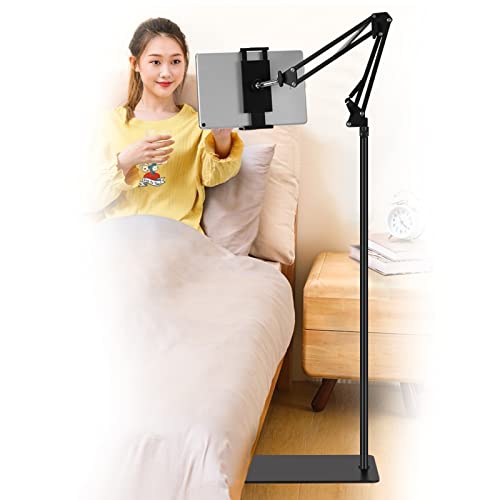
SAMHOUSING adjustable universal tablet floor stand with 360 degree rotatable holder
27.5 to 53 inches4.7 to 13 inch screens360 degree headNo tools
Check price on Amazon
Best for: People who want a tablet at chest or eye level while sitting, standing or lying down.

The SAMHOUSING floor stand adjusts from 27.5 to 53 inches high and holds phones and tablets with screens from 4.7 to 13 inches. The holder rotates 360 degrees, and the listing says it assembles without tools. It suits people who want to watch video while lying down, cooking or working at a standing height.

The tradeoff is stability and space. A floor stand with a light base can topple on soft carpet or when bumped, and it needs a clear spot beside the chair or bed. Compared with the XXZU tripod, it is shorter and simpler. Against the desktop options, it serves a different job, so it will not replace a desk stand. It is best for living rooms and bedrooms.

For care, tighten the height locks and joints regularly and check that the base sits flat. Do not hang bags from the stand. Avoid forcing the clamp onto a thick case.

What works

  • Height range of 27.5 to 53 inches suits sitting, standing and lying use
  • Supports 4.7 to 13 inch screens, so phones and tablets both fit
  • 360 degree head lets you switch orientation easily
  • No tools needed for assembly

Watch out for

  • Lighter base can tip on carpet or when bumped
  • Needs floor space beside the seat or bed

Specs

Type
Floor stand
Height
27.5 to 53 inches
Screen size
4.7 to 13 inches
Rotation
360 degrees
Brand
SAMHOUSING
05
XXZU 72 inch aluminum tablet floor stand tripod with 360 degree ball head
33 to 72 inchesAluminum tripodBall head3 angle levels
Check price on Amazon
Best for: Musicians, presenters and viewers who need a very tall floor stand.

The XXZU is an aluminum floor tripod that extends from 33.07 to 72 inches using flip locks, with a 360 degree ball head and a three-level angle adjustment on the legs for stability. The height range is the widest in the lineup, enough for sheet music, presentations or watching video from a recliner. The ball head allows landscape or portrait positions.

The tradeoff is bulk and wobble at full height. A tripod at 72 inches with a tablet on top is top-heavy, and the legs need room on the floor. Compared with the SAMHOUSING, it reaches much higher but costs more and is bigger to store. Against the desktop stands, it is not designed for tapping or typing.

In ownership, lock all flip clamps firmly before loading and spread the legs to the widest angle you can. Avoid knocking it in a busy room. Wipe the aluminum and check the ball head tightness periodically.

What works

  • Extends from 33 to 72 inches for standing and presentation use
  • Aluminum tripod is light yet rigid
  • Ball head rotates 360 degrees for any angle
  • Three leg angles allow wider stances for stability

Watch out for

  • Top-heavy at full height with a heavy tablet
  • Takes up floor space and storage room

Specs

Type
Floor tripod
Height
33.07 to 72 inches
Material
Aluminum
Head
360 degree ball head
Brand
XXZU

Spec decoder

What the listing measurements really mean

The numbers brands lead with, translated into what they tell you about fit, comfort and wear at home.

Height range

Height range is the lowest and highest position the stand reaches, such as 27.5 to 53 inches on the SAMHOUSING. It decides whether the stand suits sitting, standing or both.

Watch forCheck the lowest setting too, since some stands do not go low enough for a desk.

Screen size range

Screen size range is the smallest and largest screen the holder grips, such as 4.7 to 13 inches. Tablets with cases are larger than the listing screen size.

Watch forAdd the case thickness before trusting the range.

Weighted base

A weighted base uses dense metal to resist tipping. It adds weight but makes the stand stable.

Watch forOnly the COOPER here is described as weighted.

Ball head

A ball head allows a tablet to swivel and tilt in any direction, then lock in place. It gives flexible angles but can slip if overtightened or worn.

Watch forThe XXZU uses a ball head with a 360 degree range.

Clamp width

Clamp width is the thickness of the surface a clamp can grip. Desks and headboards vary a lot.

Watch forMeasure your surface before buying a clamp.

Methodology

How We Evaluated These Tablet Stands

Research basis

We evaluated each stand from published specifications, listing details and recurring patterns in owner feedback. Our opinions are editorial assessments rather than measurements. Heights, screen ranges and materials come from the listings.

Stability

We looked at base weight, leg design and arm type. The COOPER weighted base and the XXZU tripod angles were credited, while gooseneck sway was noted.

Range and fit

We compared height ranges and screen size support from 4.7 to 13 inches. We also considered cases and keyboards that increase clamp needs.

Portability

We weighed which stands travel, with the Lamicall foldable at 0.59 inch the clear leader.

Fit for uses

We matched each stand to a desk, bed, floor or travel use. Each pick states who should skip it.

Decision guide

How to Choose the Right Tablet Stands

By Location

SituationPickWhy
DeskCOOPER TabHolderWeighted base and eye-level arm.
TravelLamicall foldableFolds to 0.59 inch.
BedLamicall gooseneckClamps to the headboard or table.
Standing or lyingSAMHOUSING or XXZUFloor stands at multiple heights.

By Budget

SituationPickWhy
Lowest tierLamicall foldableBasic slim metal stand.
Lower to middleCOOPER TabHolderWeighted base at a modest price.
MiddleSAMHOUSINGFloor stand with a wide size range.
Higher tierLamicall gooseneck or XXZUClamp reach or a very tall tripod.

Desk Stand vs Floor Stand

Desk stand

The COOPER and Lamicall foldable put the tablet at eye level on a surface, with better stability.

Floor stand

The SAMHOUSING and XXZU hold a tablet near a chair or bed but are less stable and need floor space.

Choose a desk stand for work and tapping. Choose a floor stand for hands-free viewing away from a desk.

By Tablet Size

SituationPickWhy
Phones and small tabletsSAMHOUSINGSupports 4.7 to 13 inch screens.
Large 12.9 inch tabletsCOOPERListing names iPad Pro 12.9 support.
Standard iPadsLamicall foldableFits typical iPad sizes.
Any tablet in a bed clampLamicall gooseneckClamp head fits many sizes.

For Video Calls Specifically

Look for

Eye-level height, a stable base and a tilt that tilts the camera up. A low desk stand points the camera at your chin.

In this comparison

The COOPER telescoping arm and the Lamicall foldable adjustable height both help bring the camera to eye level.

When to Spend More

Spend more if

You use the stand daily for work or drawing and want a stable weighted base, as with the COOPER.

Save if

You use the stand occasionally or travel and a Lamicall foldable covers it.

Ownership

Maintenance schedule

The upkeep that decides whether a piece still looks good in year five.

TaskIntervalWhy it matters
Tighten hinges and locksMonthlyLoose joints let the screen droop or fall. A quick tighten keeps it steady.
Wipe grip padsEvery few weeksDust and oil reduce grip. A damp cloth restores friction.
Check clamp pressureBefore each useA loose clamp fails without warning. Confirm the grip before loading the tablet.
Inspect legs and baseEvery few monthsBent legs or loose rubber feet make a stand unstable. Replace worn parts.
Fold or collapse safelyWhen storingForcing a folding stand bends hinges. Fold it gently along its stops.

FAQ

Frequently Asked Questions

Do I need a tablet stand if my case has a kickstand?

Not always. A kickstand gives a fixed angle at table height, while a stand lets you adjust height and tilt. If you get neck strain or use video calls often, a stand helps.

Will a gooseneck holder hold a large tablet?

It depends on the arm. Goosenecks sag under heavy loads, so a large tablet may droop. Check the weight rating and keep the arm short.

Are floor stands stable?

They are less stable than desk stands. Wide legs and a heavy base help. Avoid placing them on soft carpet or in busy walkways.

What height should a tablet be?

Ideally at eye level, with the top of the screen at or slightly below eye height. A telescoping arm like the COOPER's helps achieve it.

Can a stand fit a tablet with a thick case?

Often yes, but measure first. Clamp width and holder range are listed for bare screens, so thick cases and keyboards may not fit.

How long do tablet stands last?

Metal stands with sturdy hinges last for years. Folding hinges and grip pads wear first, so clean them and fold gently.

Bottom line

The short version

Browse more tablet standson Amazon →
Brianna Cole, Lead Product Editor

About the author

Brianna Cole

Lead Product Editor, SenseiReview

Brianna Cole leads SenseiReview's buying guides, turning published specifications, documentation and owner feedback patterns into clear verdicts across home, tech, fitness, outdoor and DIY products.

More from Brianna →

Keep reading

Related guides