
Amazon affiliate links - we earn a commission.Affiliate disclosure

Buying guide · 12 min read · Updated 2026-11-21

Best Bluetooth Label Makers (2026)

Compare six Bluetooth label makers by print method, label width, battery, app and tape cost, with honest notes on fading direct thermal labels and tape lock-in.

Brianna Cole, Lead Product EditorBy Brianna ColeLead Product Editor6 picks comparedSpec-sheet verified
Best Bluetooth Label Makers

At a glance

Our top picks

Side by side

Spec comparison

PiecePrint methodConnectivityPosition in price orderApp
Brother P-touch Cube Plus PT-P710BT Bluetooth Label MakerBest OverallBrother P-touch Cube Plus PT-P710BT Bluetooth Label MakerThermal transfer on laminated tapeBluetooth to phone and PC11 of 12n/a
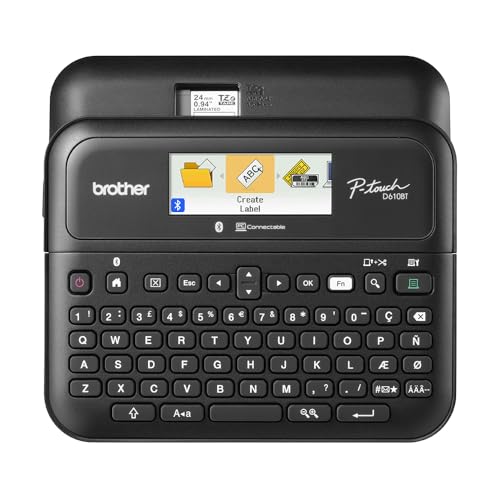
Brother P-touch PT-D610BT Business Label Maker, Bluetooth and USBBest Keyboard ModelBrother P-touch PT-D610BT Business Label Maker, Bluetooth and USBn/aBluetooth or USBHighest of 12n/a
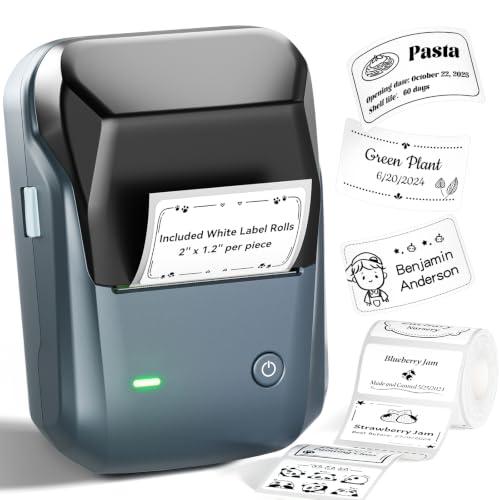
NIIMBOT B1 Bluetooth Label Printer, 2-inch Wide, RechargeableBest Wide LabelNIIMBOT B1 Bluetooth Label Printer, 2-inch Wide, RechargeableDirect thermal, no inkBluetooth to iOS, Android and PC4 of 12Auto-detects label size, 30+ fonts
Phomemo D30 Mini Bluetooth Label Maker, Inkless ThermalBest ValuePhomemo D30 Mini Bluetooth Label Maker, Inkless ThermalDirect thermal, BPA-freen/a2 of 12Print Master with free materials
Nelko P21 Handheld Bluetooth Label Maker with TapeBest Small BluetoothNelko P21 Handheld Bluetooth Label Maker with TapeDirect thermal, BPA-freeBluetooth to iOS and Android3 of 12Nelko app with templates
SUPVAN E11 Keyboard and Bluetooth Label Maker, 1200 mAhBest Keyboard BudgetSUPVAN E11 Keyboard and Bluetooth Label Maker, 1200 mAhn/an/a6 of 12n/a

A Bluetooth label maker is a small printer that you drive from a phone app or a built-in keyboard. It prints text, icons and barcodes on adhesive tape, which turns pantry jars, cable bundles, storage bins and shelf edges into an organized system instead of a guessing game.

The category splits into two printing methods that behave very differently over time, and the app, battery and tape cost vary just as much. Knowing which method a model uses is the most important decision, so this guide compares that first and then the details.

Before you buy

6 Criteria to Look For Before Buying a Bluetooth Label Maker

  1. 01

    Printing method

    Direct thermal prints by heating the label itself, with no ink, and is cheap but fades with heat, sunlight and rubbing. Thermal transfer on laminated tape, as on the Brother PT-P710BT and PT-D610BT, protects the print under a clear layer. The common mistake is labeling a freezer or garage with direct thermal labels that fade within months.

  2. 02

    Label width and tape cost

    Narrow tape suits cables and jars, and wide labels suit shipping and bins. The NIIMBOT B1 prints up to 2 inches, while the Phomemo D30 and Brother Cube Plus are narrow. Laminated tape costs more per label, so a cheap printer can cost more over time than the roll price suggests.

  3. 03

    App and keyboard

    App-only printers rely on a phone and the vendor's software, while keyboard models like the SUPVAN E11 and Brother PT-D610BT work alone. If you label often, a keyboard is faster. If an app needs an account or shows ads, you depend on the vendor.

  4. 04

    Battery and power

    Rechargeable printers like the SUPVAN E11 at 1200 mAh last about a month on a charge. Brother models may use AAA batteries or power adapters. A printer that is dead when you need it stays in a drawer, so a long battery matters.

  5. 05

    Tape lock-in

    Some printers use proprietary rolls, so check tape availability before you buy. Brother tape is widely stocked, while small brands rely on their own labels or third-party rolls. A printer is only useful while you can buy the consumable.

  6. 06

    Margins and waste

    Fixed margins can waste several millimeters of tape per label. The SUPVAN E11 quotes a 0.2 inch minimum margin and the Phomemo D30 supports continuous tape. Over hundreds of short labels, less waste adds up.

Detailed reviews

The 6 best bluetooth label makers, explained

01
Brother P-touch Cube Plus PT-P710BT Bluetooth Label Maker
Laminated tapeBluetoothBrother appsTemplates
Check price on Amazon
Best for: Anyone who needs labels that survive water, heat and handling.

The PT-P710BT prints on Brother's laminated TZe tape, which is a thermal transfer process with a protective layer over the print. That makes the labels resistant to water, heat, cold and rubbing, which is why this kind of tape is used on cables, tools and outdoor items. It connects by Bluetooth and works with three Brother applications and a library of home and office templates.

The tradeoff is cost and size. It is near the top of the price order among the twelve candidates, and laminated tape costs more per label than the direct thermal rolls on cheaper models. Against the Brother PT-D610BT, it relies on a phone or PC instead of a built-in keyboard. Compared with the Phomemo D30, it prints much more durable labels for much more money.

In ownership, the printer is simple and the tape is the running cost. Stock a few widths and colors you will actually use, and keep the tape cassette sealed. Brother tape is widely stocked, so refills are easy to find years later, which is an advantage over small brands.

What works

  • Laminated thermal transfer tape resists water, heat, cold and rubbing
  • Bluetooth works with three Brother applications and templates
  • Brother tapes are widely stocked, so refills stay easy to find
  • Compact body suits a drawer or a shelf at home or in a small office

Watch out for

  • Near the top of the price order among the twelve candidates
  • Laminated tape costs more per label than direct thermal rolls

Specs

Print method
Thermal transfer on laminated tape
Connectivity
Bluetooth to phone and PC
Software
Three Brother applications
Templates
Pre-designed home and office
Position in price order
11 of 12
02
Brother P-touch PT-D610BT Business Label Maker, Bluetooth and USB
KeyboardBluetooth + USB90-label memory160 frames
Check price on Amazon
Best for: Offices, workshops and teachers who label in volume and want a keyboard.

The PT-D610BT is the professional desktop model: a full keyboard for typing labels without a phone, Bluetooth or USB connection to a computer, and built-in memory for up to 90 frequently used labels. It offers 17 fonts, 17 styles, 160 frames and 900 symbols, plus an automatic cutter. It uses the same laminated tape family as the Cube Plus.

The tradeoff is that it is the highest in the price order of the twelve candidates and it is bigger and heavier than the phone-driven printers. It suits an office, workshop or classroom more than a kitchen drawer. Compared with the SUPVAN E11, it is more durable and faster to label in bulk but costs far more.

In ownership, the keyboard and cutter mean you can label quickly without opening an app. Keep the cutter blade clean, store a few widths of tape, and use the memory for repeated labels such as ports or shelf codes. It is a tool you buy once and keep for many years.

What works

  • Full keyboard prints labels without a phone or app at the desk
  • Bluetooth and USB give flexible links to phones and computers
  • Memory stores up to 90 labels for quick reprinting of common codes
  • Large design library with 160 frames and 900 symbols

Watch out for

  • Highest in the price order among all twelve candidates here
  • Larger and heavier than the pocket phone-driven label printers

Specs

Input
Keyboard plus app or PC
Connectivity
Bluetooth or USB
Design options
17 fonts, 17 styles, 160 frames, 900 symbols
Memory
Up to 90 labels
Position in price order
Highest of 12
03
NIIMBOT B1 Bluetooth Label Printer, 2-inch Wide, Rechargeable
2 in wideDirect thermalRechargeable30+ fonts
Check price on Amazon
Best for: Shipping, shelf and storage bin labels where width matters more than longevity.

The NIIMBOT B1 prints labels up to 2 inches wide using direct thermal technology, so there is no ink or ribbon. The app detects the loaded label size automatically, offers more than 30 fonts and works on iOS, Android and PC. A built-in rechargeable battery means no disposable cells.

The tradeoff is that direct thermal labels fade with heat, sunlight and rubbing, so they suit indoor storage and shipping, not outdoor tools or a freezer. It is the fourth cheapest of twelve, so the wide label comes at a low price. Against the Nelko P21 it prints wider labels, and against the Brother units it is cheaper per label but far less durable.

In ownership, the roll is the consumable, so confirm that you can buy labels easily in the size you need. Store labels away from heat, because a roll left in a hot car can darken. Keep the app updated, and check that you can design labels without making an account if privacy matters.

What works

  • Prints up to 2 inch wide labels, much wider than small label makers
  • Direct thermal means no ink, ribbon or cartridges to buy
  • App auto-detects the label size and offers 30 or more fonts
  • Fourth lowest in the price order for a wide-format printer

Watch out for

  • Direct thermal prints fade with heat, sun and rubbing over time
  • App dependence means features follow the vendor's software updates

Specs

Print method
Direct thermal, no ink
Label width
Up to 2 in
Connectivity
Bluetooth to iOS, Android and PC
App
Auto-detects label size, 30+ fonts
Position in price order
4 of 12
04
Phomemo D30 Mini Bluetooth Label Maker, Inkless Thermal
Mini sizeDirect thermalContinuous tapeRechargeable
Check price on Amazon
Best for: Home organizers who want a pocket-size label maker at a very low cost.

The Phomemo D30 is a mini label maker that supports both continuous tape and fixed-length labels, which helps you avoid wasting material on short labels. It uses BPA-free direct thermal printing and the Print Master app, which offers free templates and materials. It is small enough to carry in a pocket or a bag.

The tradeoff is label width, which is narrow, and the same fading limit as every direct thermal printer. It is the second cheapest of twelve, so it is easy to try. Compared with the NIIMBOT B1, it prints narrower labels but is lighter and smaller. Against the Nelko P21, it is similar in size and price, with a clearer statement about continuous and fixed-length tapes.

In ownership, the labels are narrow, so stick to short text and icons. Keep spare rolls handy, since the rolls are the main running cost. Because the printer is cheap, treat it as a tool for cables, jars and drawers, and keep the app updated for the latest templates.

What works

  • Second lowest in the price order among the twelve candidates
  • Supports continuous tape and fixed-length labels to reduce waste
  • Pocket size with a built-in rechargeable battery
  • Print Master app includes free templates and materials

Watch out for

  • Narrow labels limit text size and shelf or box use
  • Direct thermal labels fade with heat, sunlight and rubbing

Specs

Print method
Direct thermal, BPA-free
Tape types
Continuous and fixed-length labels
App
Print Master with free materials
Power
Built-in rechargeable battery
Position in price order
2 of 12
05
Nelko P21 Handheld Bluetooth Label Maker with Tape
HandheldDirect thermalInklessApp templates
Check price on Amazon
Best for: Casual home users who want a small, cheap label maker with app templates.

The Nelko P21 is a handheld inkless label maker that connects to iOS and Android over Bluetooth and uses the Nelko app. The listing says the 2026 version is about half the weight and size of traditional label makers and uses BPA-free direct thermal printing with high-speed chips. Templates in the app speed up simple labels.

The tradeoff is the same as other direct thermal models: labels fade and the app is a requirement. It is third cheapest of twelve and is meant for light home use. Compared with the Phomemo D30, it is similar, so choose on which app and label rolls you prefer. Against the Brother models, it lacks durability and a keyboard.

In ownership, test the app and the roll before relying on it, and confirm you can buy refills. Keep the printer clean and avoid heat. Keep a marker as backup for the day the app updates or the battery dies.

What works

  • Handheld size is light and easy to carry around the house
  • Third lowest in the price order among the twelve candidates
  • Inkless direct thermal printing avoids buying cartridges
  • App templates speed up simple labels for jars and bins

Watch out for

  • Direct thermal labels fade over time and in warm places
  • Needs the app to design every label, with no keyboard at all

Specs

Print method
Direct thermal, BPA-free
Size
Handheld, about half the size of older models
App
Nelko app with templates
Connectivity
Bluetooth to iOS and Android
Position in price order
3 of 12
06
SUPVAN E11 Keyboard and Bluetooth Label Maker, 1200 mAh
Keyboard + app1200 mAh0.2 in margin4 tapes
Check price on Amazon
Best for: Users who want a keyboard and a long battery without paying Brother prices.

The SUPVAN E11 combines a built-in keyboard with Bluetooth app printing, so you can type quick labels without a phone. A 1200 mAh battery gives up to a month of use per charge, and the minimal 0.2 inch margin wastes less tape per label. The listing mentions four tapes in the box, 30 or more fonts and more than 660 templates in the app.

The tradeoff is that it is a direct thermal-style budget printer, so labels do not match Brother laminated tape for durability, and the keyboard is small. It sits sixth in the price order, mid-range. Compared with the PT-D610BT, it is far cheaper but plainer. Against the Phomemo D30, it adds a keyboard and longer battery life.

In ownership, the keyboard is a convenience for repeated labels, and the margin saves tape. Keep spare tapes and use the app for design work. Charge it once a month, and expect to replace it sooner than a Brother.

What works

  • Built-in keyboard prints without a phone for quick, repeated labels
  • 1200 mAh battery lasts up to a month per charge
  • 0.2 inch minimum margin wastes much less tape
  • Four tapes included so you can start labeling immediately

Watch out for

  • Small keyboard is slower than a full-size business unit
  • Labels are less durable than laminated Brother tape

Specs

Input
Built-in keyboard or app
Battery
1200 mAh, up to a month per charge
Margin
0.2 in minimum
Included
4 tapes
Position in price order
6 of 12

Spec decoder

What the listing measurements really mean

The numbers brands lead with, translated into what they tell you about fit, comfort and wear at home.

Direct thermal

The label paper darkens when the print head heats it, so no ink is needed. It is cheap but fades with heat, light and abrasion.

Watch forThe NIIMBOT, Phomemo, Nelko and SUPVAN models use this style, so do not label outdoor items with them.

Thermal transfer

A ribbon transfers ink onto the tape and a laminate covers it. It resists water, heat and rubbing.

Watch forOnly the Brother models here use laminated tape, at a higher cost per label.

Label width

The maximum tape width the printer can feed. Wider labels carry more text and suit boxes.

Watch forThe NIIMBOT B1 lists up to 2 inches, while the Brother Cube Plus uses narrow tape.

Battery capacity

A mAh rating that shows how long a rechargeable unit runs between charges. Real life depends on print volume.

Watch forThe SUPVAN E11 lists 1200 mAh and up to a month per charge.

Resolution (dpi)

Dots per inch of the print head. Higher means sharper small text and barcodes.

Watch forMost budget models are around 203 dpi, and listings rarely state it.

Methodology

How We Evaluated These Bluetooth Label Makers

Print durability

We evaluated the print method first because it decides how long a label lasts. The Brother units use laminated tape and the others use direct thermal. We ranked laminated higher for lasting labels.

Label size and cost

We compared label width and the likely cost of rolls. The NIIMBOT B1 prints 2 inches wide and the Phomemo D30 is narrow. We weighed tape cost against printer price.

Input and software

We checked keyboards, app features and whether the app is required. The SUPVAN E11 and Brother PT-D610BT have keyboards, and the Nelko and Phomemo rely on apps. We favoured models that work without a phone.

Battery and portability

We reviewed battery capacity and size. The SUPVAN E11 lists 1200 mAh and the Nelko P21 is handheld. We treated runtime figures as best case.

Support and tape supply

We based this on brand history and owner feedback patterns, not in-house use. Brother has the longest record and the widest tape supply. We lowered rank where supply was unclear.

Decision guide

How to Choose the Right Bluetooth Label Makers

By Label Durability

SituationPickWhy
Cables, tools and outdoor itemsBrother PT-P710BTLaminated tape resists water and sun
Office and workshop labelingBrother PT-D610BTLaminated tape and keyboard
Indoor jars and binsPhomemo D30Cheap direct thermal
Shipping and shelf labelsNIIMBOT B12 inch wide direct thermal

By Budget

SituationPickWhy
Cheapest to tryPhomemo D30Second lowest in the price order
Low-cost handheldNelko P21Third lowest of twelve
Wide labels at a low priceNIIMBOT B1Fourth lowest in the price order
Premium durableBrother PT-D610BTHighest in the price order

App-Driven vs Keyboard

App-driven

The Phomemo D30, Nelko P21 and NIIMBOT B1 use a phone app for every label. They are light and cheap but depend on the vendor's software.

Keyboard models

The SUPVAN E11 and Brother PT-D610BT let you type labels at the printer. They are better for frequent labeling.

Choose a keyboard if you label weekly, and an app-driven printer for occasional home projects.

By Label Use

SituationPickWhy
Kitchen pantry jarsPhomemo D30Small direct thermal labels
Garage and tool storageBrother PT-P710BTWater-resistant tape
Classroom or office filingBrother PT-D610BTKeyboard and memory
Home office shippingNIIMBOT B1Wider labels

For Home Organizing Specifically

Look for

A printer that suits your surfaces: laminated tape for wet or hot places and direct thermal for dry storage. Check roll supply before buying.

In this comparison

The Brother PT-P710BT is the most durable, and the Phomemo D30 is the best low-cost choice for dry indoor use.

When to Spend More

Spend more if

You label cables, tools or outdoor items, or you label in bulk and want a keyboard and tape that lasts.

Save if

You label dry pantry or craft items. The Phomemo D30 or Nelko P21 cost little and do the job.

Ownership

Maintenance schedule

The upkeep that decides whether a piece still looks good in year five.

TaskIntervalWhy it matters
Clean the print headEvery few monthsDust and adhesive residue cause streaks. A cotton swab with isopropyl alcohol clears them.
Store tape away from heatAlwaysDirect thermal rolls darken in warm places. Keep them in a drawer, not a car.
Charge the batteryMonthlyA flat or deeply discharged lithium cell ages faster. A regular top-up keeps it ready.
Update the appEvery few monthsApp updates add templates and fix connection bugs. Check the store for updates.
Clean the cutterEvery few monthsAdhesive builds up on the blade and causes jams. Wipe it carefully with alcohol.

FAQ

Frequently Asked Questions

Do direct thermal labels fade?

Yes, with heat, sunlight and rubbing. They suit indoor dry storage, not outdoor tools or freezers.

Are Brother label makers worth the extra cost?

If you need durable labels, yes, because the laminated tape resists water, heat and rubbing. For dry jars, a cheaper direct thermal printer is enough.

Do I need an app?

App-driven printers do, while keyboard models like the SUPVAN E11 and Brother PT-D610BT can print without a phone.

Can I use third-party label rolls?

Sometimes, but fit and jam risk vary. Use the maker's size specification and test a small roll first.

How wide can labels be?

Small models print about 12 to 15 mm, and the NIIMBOT B1 prints up to 2 inches. Check the width for your use.

How long does the battery last?

The SUPVAN E11 lists up to a month per charge. Heavy printing shortens that.

Bottom line

The short version

Browse more bluetooth label makerson Amazon →
Brianna Cole, Lead Product Editor

About the author

Brianna Cole

Lead Product Editor, SenseiReview

Brianna Cole leads SenseiReview's buying guides, turning published specifications, documentation and owner feedback patterns into clear verdicts across home, tech, fitness, outdoor and DIY products.

More from Brianna →

Keep reading

Related guides