

Amazon affiliate links - we earn a commission.Affiliate disclosure

Buying guide · 13 min read · Updated 2026-11-21

Best Wireless Mice (2026)

Six wireless mice compared on grip and hand size, sensor DPI, battery life, Bluetooth versus dongle, click noise and button layout, with picks by work and play.

Brianna Cole, Lead Product EditorBy Brianna ColeLead Product Editor6 picks comparedSpec-sheet verified
Best Wireless Mice

At a glance

Our top picks

Side by side

Spec comparison

PieceSensorClicksConnectionBest use
Logitech MX Master 3S Bluetooth wireless mouse with MagSpeed scrollingBest OverallLogitech MX Master 3S Bluetooth wireless mouse with MagSpeed scrolling8000 DPI trackingQuiet click switchesBluetooth, multi-deviceAll-day office and creative work
Logitech Lift vertical ergonomic wireless mouse with Bluetooth or Logi BoltBest ErgonomicLogitech Lift vertical ergonomic wireless mouse with Bluetooth or Logi Boltn/aSilent click switchesBluetooth or Logi Bolt USB receiverRelieving wrist and forearm strain
Logitech M720 Triathlon full-size multi-device wireless mouseBest for Switching DevicesLogitech M720 Triathlon full-size multi-device wireless mousen/an/aBluetooth or included USB receiverSwitching between laptop, desktop and tablet
Logitech G305 Lightspeed wireless gaming mouse with Hero 12K sensorBest Wireless Gaming ValueLogitech G305 Lightspeed wireless gaming mouse with Hero 12K sensorHero 12K, up to 12,000 DPIn/an/aGaming on a budget
Razer Basilisk V3 X HyperSpeed wireless gaming mouse with 9 controlsBest for ButtonsRazer Basilisk V3 X HyperSpeed wireless gaming mouse with 9 controls5G advanced optical sensorn/an/aMMO and productivity gaming
Logitech M330 Silent Plus full-size wireless mouse with SilentTouchBest ValueLogitech M330 Silent Plus full-size wireless mouse with SilentTouchn/aSilentTouch technology for quieter clicks2.4 GHz USB-A nano receiverQuiet everyday computing

A wireless mouse is the part of your setup that your hand touches most. A good one disappears into daily work, and a bad one causes wrist strain, missed clicks and constant battery worries.

Specs like DPI and button counts are easy to compare, but shape, weight, battery type and connection method decide how a mouse feels after a week. We evaluated six wireless mice from the candidate pool using published specifications, listing details and patterns in owner feedback, then ranked them by fit for real use rather than feature count.

Before you buy

6 Criteria to Look For Before Buying a Wireless Mice

  1. 01

    Grip, shape and hand size

    Mice come in palm, claw and fingertip styles, and the right one depends on your hand and grip. A large shaped mouse like the MX Master 3S suits a palm grip, and a small light mouse like the G305 suits claw and fingertip. Vertical mice reduce forearm twist. The mistake is buying on features without checking that the size matches your hand. Hold your hand flat on the desk and measure from the wrist crease to the tip of the middle finger, since a longer hand usually wants a larger shell.

  2. 02

    Sensor and DPI

    DPI measures how far the cursor moves per inch of hand movement. Most modern sensors are accurate across a range, and higher numbers like 12,000 or 18,000 are beyond what most people use. Tracking quality on different surfaces matters more than peak DPI. Look for adjustable DPI and reliable tracking on glass or wood. Check how you grip on a typical day, because the same mouse can feel perfect in a palm grip and awkward in a claw grip.

  3. 03

    Connection: Bluetooth vs dongle

    A 2.4 GHz dongle gives low latency, which suits gaming, and it does not need Bluetooth on the computer. Bluetooth works without a dongle and pairs with phones and tablets but can have more latency. Many mice offer both. Check that your computer has a free USB-A port if the mouse uses a dongle. If you move a lot between a home and an office, keep a spare dongle or use Bluetooth to avoid hunting for ports.

  4. 04

    Battery type and life

    AA battery mice like the M720 and M330 last months or longer. Rechargeable mice such as the MX Master 3S last weeks and charge over USB-C. Rechargeable batteries fade after a few years. Pick based on whether you would rather swap a battery or plug in a cable. Think about the surface you work on, since a clear glass desk or a dark wood top can trip a poor sensor.

  5. 05

    Click noise and switch type

    Silent switches such as the M330's SilentTouch and the Lift's quiet clicks suit shared spaces. Mechanical switches like the Razer's have a crisper click but louder. If you work near others or at night, choose silent. Gamers often prefer crisp clicks. Look at where the side buttons sit, because a button under the thumb that you press by accident is worse than none.

  6. 06

    Buttons and customization

    Extra buttons can speed work, but only if you use them. The MX Master 3S and Basilisk offer many programmable controls. The M330 has few. Software like Logi Options or Razer Synapse is needed for custom bindings. Check that the software works on your operating system. Consider whether you work in a quiet room, because click noise is surprisingly tiring over a full day.

Detailed reviews

The 6 best wireless mice, explained

01
Logitech MX Master 3S Bluetooth wireless mouse with MagSpeed scrolling
8000 DPIMagSpeed wheelQuiet clicksMulti-device
Check price on Amazon
Best for: Office and creative workers with medium to large hands who want a premium all-day mouse.

The MX Master 3S is Logitech's flagship work mouse. The shaped body supports the whole hand with a thumb rest, an 8000 DPI sensor tracks accurately on a wide range of surfaces and the MagSpeed wheel switches between a ratcheted feel and a free-spin mode. Quiet click switches cut click noise, and the mouse connects to multiple devices over Bluetooth.

The tradeoff is size and cost. It is large and heavy for small hands, it is right-handed only and it costs more than most mice here. Compared with the Logitech Lift, it fits larger hands and has more buttons but a conventional wrist angle. Compared with the M720, it adds a premium scroll wheel and quiet clicks.

Ownership is easy. Pair it with up to three devices, customize buttons in the Logi software and recharge over USB-C. Owner feedback patterns on the MX line say the build is excellent and the battery lasts weeks, while the shape suits medium to large hands best.

What works

  • Shaped thumb rest supports the hand during long sessions
  • MagSpeed wheel offers precise or free-spin scrolling
  • Quiet click switches suit shared spaces
  • Bluetooth pairing with multiple devices

Watch out for

  • Large and heavy for small hands
  • Right-handed only design
  • Costs more than most mice

Specs

Sensor
8000 DPI tracking
Scrolling
MagSpeed electromagnetic wheel
Clicks
Quiet click switches
Connection
Bluetooth, multi-device
Best use
All-day office and creative work
02
Logitech Lift vertical ergonomic wireless mouse with Bluetooth or Logi Bolt
Vertical gripSmall to medium handsBluetooth or Logi BoltSilent clicks
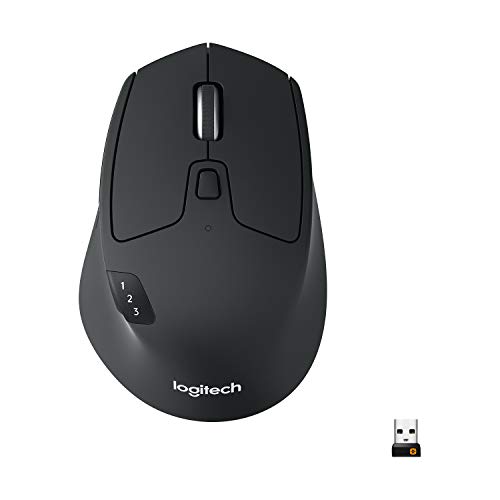
Check price on Amazon
Best for: People with wrist or forearm discomfort and small to medium hands.

The Lift is a vertical mouse that lets the hand rest in a handshake position, which reduces forearm twist. It is built for small to medium hands, connects by Bluetooth or a Logi Bolt receiver and uses quiet clicks. The base is a standard width for most desks.

The tradeoff is adaptation. A vertical mouse feels strange for the first week, and it can be harder for precise pointer work such as photo editing. Compared with the MX Master 3S, it is more comfortable for some people but less precise for others. Compared with the M330, it offers an ergonomic posture rather than a flat shape.

Ownership requires patience. Use it for a week before judging, and consider a smaller hand size to avoid slipping. Owner feedback patterns on vertical mice say that the angle helps with wrist pain for many users but takes time to master.

What works

  • Vertical posture reduces forearm twist
  • Quiet click switches suit shared spaces
  • Bluetooth or Logi Bolt connection options
  • Right-handed shaped for small to medium hands

Watch out for

  • Takes a week or more to adapt to the grip
  • Less precise for fine pointer work
  • Not suited to large hands

Specs

Grip
Vertical posture at about a 57 degree angle
Hand size
Small to medium hands
Connection
Bluetooth or Logi Bolt USB receiver
Clicks
Silent click switches
Best use
Relieving wrist and forearm strain
03
Logitech M720 Triathlon full-size multi-device wireless mouse
3 devicesBluetooth or receiverHyper-fast scrollingLong battery
Check price on Amazon
Best for: Users who switch between laptop, desktop and tablet on a budget.

The M720 Triathlon is a full-size mouse that pairs with up to three devices and switches between them with an Easy-Switch button. It connects by Bluetooth or a USB receiver, and the shaped body fits larger hands comfortably. A hyper-fast scroll wheel speeds up long documents.

The tradeoff is that it uses a replaceable AA battery and lacks the premium finish of the MX line. Compared with the MX Master 3S, it costs less but has no electromagnetic scroll wheel or quiet clicks. Compared with the M330, it is larger and multi-device, but louder.

Ownership is simple. Pair it with up to three devices, replace the AA battery occasionally and keep the receiver in the mouse for travel. Owner feedback patterns on the M720 say it offers great value for multi-device users.

What works

  • Easy-Switch pairs with up to three devices
  • Bluetooth or USB receiver connection
  • Hyper-fast scroll wheel for long documents
  • Replaceable AA battery lasts a very long time

Watch out for

  • Louder clicks than quiet models
  • Less premium build than the MX line
  • Replaceable AA adds weight

Specs

Devices
Pairs with up to 3 devices
Connection
Bluetooth or included USB receiver
Scroll
Hyper-fast scroll wheel
Battery
Single AA battery, very long life per the maker
Best use
Switching between laptop, desktop and tablet
04
Logitech G305 Lightspeed wireless gaming mouse with Hero 12K sensor
12,000 DPILightspeed wireless6 buttonsLightweight
Check price on Amazon
Best for: Gamers who want a light, reliable wireless mouse at a low cost.

The G305 is a lightweight wireless gaming mouse with the Hero 12K sensor and Logitech's Lightspeed 2.4 GHz connection, designed for low latency. It has six programmable buttons and runs on a single AA battery. The light body suits fast flicks and claw or fingertip grips.

The tradeoff is features. It has no rechargeable battery, no side grips and a simple button layout. Compared with the Razer Basilisk V3 X, it is lighter and cheaper but has fewer controls. Compared with the MX Master 3S, it is built for games rather than long work sessions.

Ownership is simple. Plug in the receiver, install the G Hub software and replace the AA battery occasionally. Owner feedback patterns on the G305 say it offers excellent value, with the plastic build and small size being the main compromises.

What works

  • Hero 12K sensor tracks accurately
  • Lightspeed wireless is low latency for gaming
  • Lightweight body suits fast movements
  • Low cost for a name-brand gaming mouse

Watch out for

  • Plastic build and basic buttons
  • Small size does not suit large hands
  • Uses a replaceable AA battery

Specs

Sensor
Hero 12K, up to 12,000 DPI
Wireless
Lightspeed 2.4 GHz
Buttons
6 programmable buttons
Weight
Lightweight design
Best use
Gaming on a budget
05
Razer Basilisk V3 X HyperSpeed wireless gaming mouse with 9 controls
9 controlsMechanical switchesHyperSpeed wireless5G sensor
Check price on Amazon
Best for: Gamers who want many programmable buttons and a shaped body.

The Basilisk V3 X HyperSpeed is a wireless gaming mouse with nine customizable controls, second-generation mechanical switches and a 5G advanced optical sensor. It connects over HyperSpeed 2.4 GHz or Bluetooth and has a shaped body that suits palm and claw grips. The extra buttons let you bind actions for games and software.

The tradeoff is weight and software. The body is larger than the G305 and the Razer software is needed for full customization. Compared with the G305, it has more buttons and a more shaped body. Compared with the MX Master 3S, it targets gamers more than office workers.

Ownership is easy. Install Razer Synapse, assign buttons and recharge or replace the battery according to the model. Owner feedback patterns on Razer mice say the shape suits many hands, and the software is powerful but a large install.

What works

  • Nine customizable controls suit MMO and productivity macros
  • Mechanical switches have a crisp click
  • HyperSpeed and Bluetooth connection options
  • Shaped body suits palm and claw grips

Watch out for

  • Heavier than the G305
  • Razer software required for full customization
  • Louder clicks than silent mice

Specs

Controls
9 customizable controls
Switches
Second generation mechanical switches
Wireless
HyperSpeed 2.4 GHz and Bluetooth
Sensor
5G advanced optical sensor
Best use
MMO and productivity gaming
06
Logitech M330 Silent Plus full-size wireless mouse with SilentTouch
SilentTouch2.4 GHz receiverFull-sizeLong battery
Check price on Amazon
Best for: Shared offices and homes that want a quiet, dependable mouse at a low cost.

The M330 Silent Plus is a lightweight, full-size mouse with SilentTouch technology, which reduces click noise considerably. It connects via a 2.4 GHz nano receiver and the maker advertises a very long battery life from a single battery. The shape is comfortable for right-handed users.

The tradeoff is simplicity. There is no Bluetooth, no multi-device switching and the build is basic. Compared with the MX Master 3S, it costs far less but lacks the premium wheel and shape. Compared with the M720, it is quieter but not multi-device.

Ownership is easy. Plug in the receiver, replace the battery rarely and use it on most surfaces. Owner feedback patterns on the M330 say it is a quiet, dependable mouse for home and shared offices.

What works

  • SilentTouch clicks suit shared spaces
  • 2.4 GHz receiver connects reliably
  • Very long battery life per the maker
  • Low cost and light weight

Watch out for

  • No Bluetooth or multi-device switching
  • Basic build and shape
  • Right-handed shape only

Specs

Clicks
SilentTouch technology for quieter clicks
Connection
2.4 GHz USB-A nano receiver
Size
Full-size, lightweight
Battery
Very long battery life per the maker
Best use
Quiet everyday computing

Spec decoder

What the listing measurements really mean

The numbers brands lead with, translated into what they tell you about fit, comfort and wear at home.

DPI

Dots per inch, a measure of sensor sensitivity. Higher DPI moves the cursor farther per movement. Your cursor speed also depends on the operating system setting, so adjust both until it feels natural.

Watch forThe G305 lists up to 12,000 DPI and the MX Master 3S 8000, but most people use a fraction of that.

Lightspeed or HyperSpeed

Maker names for low latency 2.4 GHz wireless links. They aim to match wired mice for gaming. Latency is mostly noticeable in fast games and rarely in spreadsheets or documents.

Watch forThe G305 uses Lightspeed and the Razer uses HyperSpeed.

SilentTouch

A Logitech feature that reduces click noise. The mouse still clicks but much more quietly. The quieter switch reduces the click but not the scroll wheel, which can still make a sound.

Watch forThe M330 uses SilentTouch.

Vertical angle

The tilt of the mouse body, with a steeper angle putting the hand in a handshake position. A steep angle takes the strain off the forearm, but it moves the hand away from the keyboard.

Watch forThe Lift lists about 57 degrees.

Easy-Switch

A button that changes the mouse's connection between paired devices. Pairing multiple devices works best with the maker's own software installed.

Watch forThe M720 and MX Master 3S support multi-device pairing.

Methodology

How We Evaluated These Wireless Mice

Spec sheet and listing review

We compared sensor ratings, connection types, battery type and button counts as published by each maker. We checked that claims were stated on the same basis. For example, DPI numbers are not a measure of accuracy. We also noted which mice ship with a receiver and which rely on Bluetooth alone.

Grip and fit

We reviewed body shape, hand size guidance and vertical designs. Fit decides comfort. This explains the MX Master and Lift picks. We read how owners describe the scroll wheel and side buttons after a year of use.

Connection and battery

We looked at Bluetooth, dongle and battery options. These affect convenience and reliability. This shaped the M720 and M330 positions. We compared battery claims with the type of battery each model uses.

Ownership and durability

We read owner feedback patterns about scroll wheels, double-clicking and battery life. We weighed brand support. This shaped the order of the lineup. We checked whether the shape is left or right handed, since that limits who can use the mouse.

Value for the user

We compared price tier against comfort and features for office, gaming and shared spaces. A basic mouse suits light use. This shaped the budget pick. We kept the final order tied to fit and long-term comfort.

Decision guide

How to Choose the Right Wireless Mice

By Use

SituationPickWhy
All-day office workLogitech MX Master 3SShaped body and quiet clicks
Wrist discomfortLogitech LiftVertical posture
Several devicesLogitech M720 TriathlonEasy-Switch pairing
Shared quiet spaceLogitech M330 Silent PlusSilentTouch clicks

By Budget

SituationPickWhy
Lowest costLogitech M330 Silent PlusLower tier and quiet
Low to mid tier, gamingLogitech G305Hero 12K and Lightspeed
Mid tier, multi-deviceLogitech M720 TriathlonThree devices and Bluetooth
Higher spend, premiumLogitech MX Master 3SPremium scroll wheel and shape

Standard vs Vertical

Standard

The MX Master 3S, M720 and M330 use a conventional posture. They are familiar and precise.

Vertical

The Lift tilts the hand to reduce forearm twist. It takes adjustment and suits small to medium hands.

Choose standard for precision and familiarity, and vertical if you have wrist strain.

By Gaming Needs

SituationPickWhy
Fast shootersLogitech G305Lightweight with Lightspeed
MMO and macrosRazer Basilisk V3 XNine controls
Casual gaming and workLogitech MX Master 3SPrecise and comfortable
Budget gamingLogitech G305Low cost

For Small Hands Specifically

Look for

A compact body, light weight and a shape with a low profile. Check the grip type that suits you.

In this comparison

The G305 and Lift are the best for small hands. The MX Master 3S and M720 are large.

When to Spend More

Spend more if

You work at a computer all day and want comfort and precision. The MX Master 3S is the clearest upgrade.

Save if

You use a mouse casually. The M330 or G305 covers it.

Ownership

Maintenance schedule

The upkeep that decides whether a piece still looks good in year five.

TaskIntervalWhy it matters
Wipe the mouse and feetWeeklySkin oils and dust affect tracking and glide. A damp cloth keeps the surface clean. A drop of isopropyl alcohol on a cloth clears grease from the shell.
Clean the sensor windowMonthlyDust on the sensor causes jitter. Blow gently or use a dry swab. Peel and replace the feet when you notice a scratchy slide.
Replace worn feetEvery 1 to 2 yearsWorn glides cause scratchy movement. Replacement feet are inexpensive. Keep the receiver in a sealed bag when traveling.
Check battery or rechargeAs neededWeak batteries cause lag. Replace AA batteries or charge rechargeables before they die. Remove AA batteries if you will not use the mouse for months.
Update firmware and softwareWhen promptedUpdates fix connection and tracking issues. Follow the maker's instructions. Reset the pairing if the mouse starts to lose its connection.

FAQ

Frequently Asked Questions

Is Bluetooth or a USB dongle better?

A dongle gives lower latency and no need for Bluetooth, while Bluetooth is convenient for laptops and tablets. Many mice offer both. If you only need one connection, a dongle mouse is often easier to set up than Bluetooth.

Do I need a gaming mouse?

Only if you play fast games. For office work, a comfortable shape and quiet clicks matter more than a high DPI. If you game casually, a comfortable mouse often matters more than a very high DPI.

What DPI should I use?

Most people use 800 to 1600 DPI. Higher numbers suit large or high-resolution screens. A mat or a good desk surface improves tracking more than a higher DPI number.

Are vertical mice worth it?

They help some people with wrist pain, but take time to adapt. Try one for a week before judging. Rechargeable models suit people who hate buying batteries, and AA models suit those who prefer to swap.

Do wireless mice have lag?

Modern 2.4 GHz and Bluetooth mice have very little lag for office use. Gamers often prefer a dongle for the lowest latency. Always check the left-handed option, since many shaped mice are right-handed only.

How long do batteries last?

AA models can last months to years, and rechargeable models last weeks per charge. Battery life depends on use and lighting. Wipe the mouse before you diagnose lag, since dust on the sensor is a common cause.

Bottom line

The short version

Browse more wireless miceon Amazon →
Brianna Cole, Lead Product Editor

About the author

Brianna Cole

Lead Product Editor, SenseiReview

Brianna Cole leads SenseiReview's buying guides, turning published specifications, documentation and owner feedback patterns into clear verdicts across home, tech, fitness, outdoor and DIY products.

More from Brianna →

Keep reading

Related guides