
Amazon affiliate links - we earn a commission.Affiliate disclosure

Buying guide · 12 min read · Updated 2026-11-21

Best Budget Conference Speakerphones (2026)

Budget conference speakerphones compared on microphone pickup, USB and Bluetooth, noise reduction and battery, so small-room calls sound clear.

Brianna Cole, Lead Product EditorBy Brianna ColeLead Product Editor5 picks comparedSpec-sheet verified
Best Budget Conference Speakerphones

At a glance

Our top picks

Side by side

Spec comparison

PieceConnectionMicrophoneUseSetup
Jabra Speak 510 portable USB and Bluetooth speakerphoneBest OverallJabra Speak 510 portable USB and Bluetooth speakerphoneUSB and BluetoothOmnidirectionalSmall groupsPlug and play
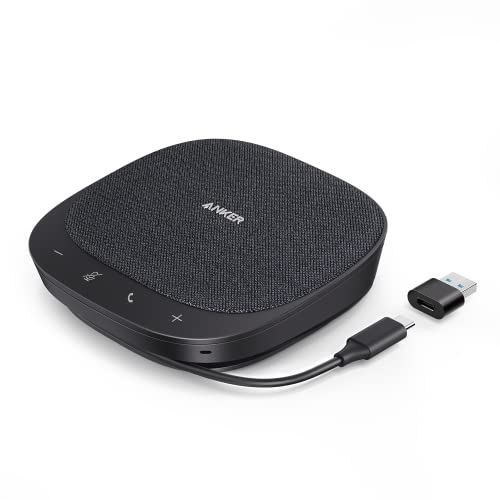
Anker PowerConf S330 USB speakerphone, plug and playBest ValueAnker PowerConf S330 USB speakerphone, plug and playUSBConference mic arrayHome office and small meetingsPlug and play
Yealink SP92 Teams certified speakerphone, AI noise reductionBest Battery and CertificationYealink SP92 Teams certified speakerphone, AI noise reductionUSB and wirelessn/aSmall meeting roomsn/a
Lenovo Teams certified Bluetooth conference speakerphoneBest Teams WirelessLenovo Teams certified Bluetooth conference speakerphoneBluetoothn/aOffice and home meetingsPair and play
Jabra Speak 410 USB corded speakerphone, plug and playBest Cheap CordedJabra Speak 410 USB corded speakerphone, plug and playUSB cordedOmnidirectionalSoftphones and callsPlug and play

A conference speakerphone is a speaker and a microphone array in one puck, built so a few people around a table or a desk can hear and be heard on a call. At the budget end the differences that matter are microphone pickup, how well the unit suppresses echo and background noise and how it connects.

This guide focuses on the lower half of the price range and is honest about the limits. We evaluated each model from published specifications and patterns in owner feedback, with attention to pickup range, battery behaviour and year-three reliability. Speakerphones are sized for small rooms, and no puck can fix a large, echoey space.

Before you buy

6 Criteria to Look For Before Buying a Budget Conference Speakerphone

  1. 01

    Microphone pickup and range

    A single omnidirectional microphone suits one or two people at a desk, while an array of several microphones can cover a table of four to six. The Jabra Speak 510 uses a single omnidirectional microphone and the Anker S330 a small conference array, so both are sized for a desk or a small huddle. The mistake is expecting a single puck to cover a large conference table, and no puck at this tier replaces a ceiling or table microphone system for a bigger group.

  2. 02

    Echo and noise handling

    Full duplex audio lets both sides talk at once, and noise reduction filters fans and keyboard clicks. The Yealink SP92 uses AI noise cancelling, while the Jabra units rely on tuned speech processing. Hard rooms with glass and bare walls cause echo that no budget puck fully fixes, so soft furnishings matter as much as the device.

  3. 03

    Connection type

    USB is the most reliable connection and powers the unit from the computer. Bluetooth removes the cable but adds pairing and battery management. The Jabra Speak 510 offers both, while the Speak 410 and Anker S330 are USB only. Choose based on whether the device will move between rooms. Bluetooth range is usually short, so keep the unit within a few metres of the computer to avoid dropouts mid-call.

  4. 04

    Platform certification

    Teams and Zoom certification mean the buttons and call controls integrate with those apps. The Yealink SP92 and Lenovo are Teams certified. If your company uses a particular platform, certification saves setup time, but it is not required for basic audio.

  5. 05

    Battery and power

    Battery life matters for wireless units. The Yealink lists around 20 hours, which covers long days, while USB-only models have no battery to wear out. Batteries lose capacity over time, so a unit that can run from USB is more future-proof. If you rely on battery power, plan a charge after each long day rather than waiting for the unit to run flat.

  6. 06

    Room size and use case

    Speakerphones are sized for small rooms. A desk or a table of three to four people is the sweet spot for single pucks, and a table of five or six is about the limit even for the better units here, such as the Yealink SP92. Beyond that, a ceiling microphone or room system is a better fit than a bigger puck, and adding a second unit is rarely as clean as it sounds.

Detailed reviews

The 5 best budget conference speakerphones, explained

01
Jabra Speak 510 portable USB and Bluetooth speakerphone
USB and BluetoothPortableFull duplexPlug-and-play
Check price on Amazon
Best for: Small groups and mobile workers who want USB and Bluetooth flexibility.

The Jabra Speak 510 is a portable speakerphone that connects over USB or Bluetooth, which makes it flexible for a laptop on a desk or a phone in a hallway meeting. The design approach is a compact puck with an omnidirectional microphone and a speaker tuned for speech, plus simple controls for volume and muting. Jabra's brand track record in this category is the main reason it tops the list.

Compared with the Speak 410, the 510 adds Bluetooth, which removes the cable from the table. Compared with the Anker S330, it is better for groups of a few people but costs more. It is not built for a large conference table, and for rooms beyond a small huddle space you will want a bigger system.

Ownership is easy. Charge it, pair it once and keep the USB cable handy for when Bluetooth is not ideal. Wipe the speaker grille with a dry cloth, and keep the firmware updated through the maker's software if you use it often. Place it in the middle of the table rather than at one end, because the microphone hears evenly only when everyone sits at a similar distance.

What works

  • USB and Bluetooth connections cover laptops and phones
  • Compact puck is easy to carry to a meeting room
  • Omnidirectional microphone suits a few people around a table
  • Well-known brand with consistent speech tuning

Watch out for

  • Costs more than the simplest USB-only options
  • Not suited to large conference tables

Specs

Connection
USB and Bluetooth
Microphone
Omnidirectional
Use
Small groups
Setup
Plug and play
Portability
Carry-friendly puck
02
Anker PowerConf S330 USB speakerphone, plug and play
USBPlug-and-playConference micHome office
Check price on Amazon
Best for: Home office workers who want a low-cost USB speakerphone for calls.

The Anker PowerConf S330 is the simplest and cheapest speakerphone in this lineup, built for home offices and small meetings. It connects over USB and uses a conference microphone array to pick up a few voices around a desk. The design approach is plug-and-play with no battery management, which keeps the product straightforward.

Compared with the Jabra Speak 510, the S330 lacks Bluetooth, so it ties you to a cable. Compared with the Yealink SP92, it has a smaller feature list and no noise reduction or certification, but a lower price and simpler setup. It is a good fit for someone who takes video calls from a desk and occasionally has a colleague join.

Ownership requires little. Plug it in, set it as the default audio device and check the volume. Keep the cable tidy, and wipe the grille occasionally. If the microphone sounds quiet, check the operating system input level rather than blaming the unit. Because it draws power from the computer, a laptop on battery will drain a little faster during a long call, so keep the charger nearby.

What works

  • Plug-and-play USB setup requires no drivers or batteries
  • Conference microphone array handles a few voices
  • Lowest price among the better-known brands here
  • Compact enough to leave on a desk permanently

Watch out for

  • No Bluetooth, so it needs a cable to a computer
  • Less suited to a room larger than a small desk group

Specs

Connection
USB
Microphone
Conference mic array
Use
Home office and small meetings
Setup
Plug and play
Power
USB powered
03
Yealink SP92 Teams certified speakerphone, AI noise reduction
Teams certifiedAI noise reduction20H batteryUSB and wireless
Check price on Amazon
Best for: Teams users who want certified controls and noise reduction.

The Yealink SP92 is a Microsoft Teams certified speakerphone with AI noise reduction and a long battery life listed at around 20 hours. The design approach is to handle noisy rooms by filtering background sound before it reaches the call. For offices that standardize on Teams, certification means the buttons and call controls work out of the box.

Compared with the Jabra Speak 510, the SP92 leans harder on noise reduction and certification, while the Jabra leans on brand polish and portability. Compared with the Lenovo, it adds a more mature conferencing brand but costs a little more. It is a good fit for a small room where fan noise or street noise would otherwise intrude.

Ownership is simple. Charge it fully before long days and keep a USB cable on hand. Check the maker's software for firmware updates, and clean the grille with a dry cloth. If the noise reduction seems aggressive on music, switch to a mode that suits your calls. Set the noise reduction level in the maker's software before an important call, since the strongest setting can clip soft speech.

What works

  • Teams certification gives integrated call buttons
  • AI noise cancelling handles fans and room noise
  • Battery life listed around 20 hours supports long days
  • Conferencing brand with a record in meeting rooms

Watch out for

  • Aggressive noise reduction can clip quiet speakers
  • Costs more than the simplest USB-only unit

Specs

Certification
Teams certified
Noise handling
AI noise cancelling
Battery
About 20 hours listed
Connection
USB and wireless
Use
Small meeting rooms
04
Lenovo Teams certified Bluetooth conference speakerphone
Teams certifiedBluetoothWirelessConference
Check price on Amazon
Best for: Office and home workers who use Teams and want a wireless unit.

The Lenovo speakerphone is a Teams certified Bluetooth unit aimed at offices and home workers. It combines a wireless connection with certified controls, so it works with Teams without extra setup. The design approach is straightforward: a compact body, call controls and a speaker tuned for voices.

Compared with the Yealink SP92, the Lenovo costs a little less and has a smaller feature list. Compared with the Jabra Speak 510, it is less established in the category but comparable in concept. It makes sense as a company-standard pick for Lenovo laptops and Teams users.

Ownership is minimal. Pair it, charge it and check the firmware. Clean the speaker grille with a dry cloth, and keep it away from heat. If Bluetooth drops, try re-pairing or move the unit closer to the computer. Pair it before the meeting starts and check the volume on both ends, because a first-time Bluetooth connection is not the moment to troubleshoot.

What works

  • Teams certification gives integrated call controls
  • Bluetooth connection removes the cable from the table
  • Pair-and-play setup keeps things simple
  • Compact body suits a desk or small table

Watch out for

  • Smaller brand reputation in conference audio than Jabra
  • Bluetooth adds some latency compared with USB

Specs

Certification
Teams certified
Connection
Bluetooth
Type
Wireless speakerphone
Use
Office and home meetings
Setup
Pair and play
05
Jabra Speak 410 USB corded speakerphone, plug and play
USB cordedPlug-and-playWorks with PCsPortable
Check price on Amazon
Best for: Desk workers who want a reliable corded speakerphone.

The Jabra Speak 410 is an older, corded USB speakerphone that remains a dependable choice for desk calls. The design approach is simple: plug it in, set it as the audio device and take calls. There is no battery and no Bluetooth, so reliability is its main selling point.

Compared with the Speak 510, the 410 is cheaper but ties you to a cable. Compared with the Anker S330, it has a longer track record but a more dated look. It suits an office desk where the computer stays put and you want a unit that just works.

Ownership is trivial. Keep the cable from kinking, wipe the grille and check the volume in the operating system. Because it is older, firmware updates are rare, so what you buy is what you get. Keep the cable out of the walking path, since a tug on the cord is the most common way a corded unit ends up on the floor.

What works

  • Corded USB connection is simple and reliable
  • No battery to wear out or charge
  • Jabra reputation for speech clarity in small groups
  • Plug-and-play with most computers and softphones

Watch out for

  • No Bluetooth or wireless freedom
  • Older design with fewer modern features

Specs

Connection
USB corded
Microphone
Omnidirectional
Use
Softphones and calls
Setup
Plug and play
Power
USB powered

Spec decoder

What the listing measurements really mean

The numbers brands lead with, translated into what they tell you about fit, comfort and wear at home.

Full duplex

The ability for both sides of a call to talk at the same time without cutting each other off. It depends on good echo cancellation.

Watch forThe Jabra and Yealink units claim it, but hard rooms can still cause echo.

Omnidirectional microphone

A microphone that picks up sound from all around. It suits round tables and small groups.

Watch forThe Jabra Speak 510 uses one, which limits coverage in large rooms.

Microphone array

A group of microphones that can focus on a speaker and reject noise. More microphones usually mean better coverage.

Watch forThe Anker S330 lists a conference microphone array, but the actual range depends on room acoustics and where you place the puck.

Teams certification

A label showing the device was approved for Microsoft Teams, with integrated call controls. It does not change the audio quality.

Watch forThe Yealink SP92 and Lenovo carry it, but other platforms may need drivers.

Noise cancelling

Processing that reduces steady background sounds such as fans or air conditioning. Aggressive settings can clip quiet speech.

Watch forThe Yealink uses AI noise cancelling, which may over-filter in some rooms.

Methodology

How We Evaluated These Budget Conference Speakerphones

Microphone coverage

We compared microphone designs and what owners say about pickup range. The Yealink SP92 and Anker S330 lead on array features, while the Jabra Speak 510 suits small groups. We weighted coverage highly for meeting rooms.

Speech clarity

We read feedback on speaker tuning and echo handling. Jabra's speech tuning gets steady praise, while the Yealink's noise cancelling draws mixed notes. Room acoustics changed every result.

Connection and setup

We looked at USB and Bluetooth behaviour and what owners say about pairing. The USB-only models are the most reliable, while Bluetooth units add pairing steps. Setup simplicity was a key score.

Certification and software

We considered Teams certification and support software. The Yealink and Lenovo carry Teams certification, while the Jabra and Anker work as generic audio devices. Software updates were treated as a bonus.

Value in context

We placed each unit in the lower half of the price range and asked what it gives up. The Anker is the cheap, simple choice, the Jabra Speak 510 is the all-rounder and the Yealink gives the best noise handling and certification. Battery wear on wireless models was a long-term concern.

Decision guide

How to Choose the Right Budget Conference Speakerphones

By Room Size

SituationPickWhy
One or two people at a deskAnker PowerConf S330Simple USB unit suited to desk calls
Three to four peopleJabra Speak 510Omnidirectional mic and balanced speaker
Five to six peopleYealink SP92Noise handling and certified controls for a small table
Noisy small roomYealink SP92AI noise cancelling filters background sound

By Budget

SituationPickWhy
Lowest costAnker S330Simple USB unit at the cheap end
Cheap and cordedJabra Speak 410Reliable USB with no battery
Best balanceJabra Speak 510USB and Bluetooth in a proven design
Spend for featuresYealink SP92Certification, noise reduction and battery

USB vs Bluetooth

USB

The Anker S330 and Jabra Speak 410 are USB only. They are simpler, always powered and stable, but tied to a cable.

Bluetooth

The Jabra Speak 510, Yealink SP92 and Lenovo can connect wirelessly. They add flexibility but need pairing and a battery.

Desk users do well with USB, while people who move between rooms benefit from Bluetooth.

Platform Fit

SituationPickWhy
Teams officeYealink SP92 or LenovoCertified controls for Teams
Mixed platformsJabra Speak 510Works as a generic audio device
Zoom and softphonesJabra Speak 410Plug-and-play USB with no certification needed
Home office deskAnker S330Simple setup with any platform

For Home Office Calls Specifically

Look for

A reliable USB connection, good echo handling and a unit that stays out of the way on a desk.

In this comparison

The Anker S330 is the simplest, the Jabra Speak 510 adds Bluetooth, and the Yealink SP92 handles noisy rooms.

When to Spend More

Spend more if

You meet with several people regularly or need certification. The Yealink SP92 is the sturdier option, while the Jabra Speak 510 adds flexibility.

Save if

You mostly take solo calls from a desk. The Anker S330 or Jabra Speak 410 is enough.

Ownership

Maintenance schedule

The upkeep that decides whether a piece still looks good in year five.

TaskIntervalWhy it matters
Wipe the speaker grilleMonthlyDust and skin oils collect on the mesh and muffle sound. A dry cloth or soft brush is enough.
Charge wireless unitsBefore long meetingsBatteries run down during idle periods. A full charge avoids mid-call shutdowns.
Check the volume settingsWhen audio sounds offOperating system volume and input levels often cause quiet audio. Checking them is quicker than blaming the unit. Operating system volume and input levels often cause quiet audio. Checking them is quicker than blaming the unit, and a test call to a colleague confirms both directions work.
Update firmware if offeredYearlySome makers release updates that improve Bluetooth stability or noise handling. Use the maker's software.
Place away from wallsWhen positioningNearby walls reflect sound and cause echo. Centering the unit on the table improves clarity.

FAQ

Frequently Asked Questions

Is a speakerphone better than a headset?

A speakerphone is better for groups, while a headset is better for a single person in a noisy area. For desk calls with one person, a headset usually gives clearer audio. If you share the room with others who are not on the call, a headset keeps your conversation private, which a speakerphone cannot do.

How much should a budget speakerphone cost?

Prices move, so check the current listing. The simplest USB models are the cheapest, Bluetooth and certified units sit in the middle, and larger kits cost more. Pay for features you will actually use.

How many people can a speakerphone cover?

Single pucks suit one to four people, while the better units like the Yealink SP92 stretch to five or six. Beyond that, a dedicated room system or a ceiling microphone is a better fit, because a puck on a long table leaves the far end of the room too distant from the microphones to be understood reliably.

Does Teams certification matter?

It matters if you use Teams and want integrated call buttons. The audio quality does not change, so skip it if you use other platforms. Check that your meeting app lists the device in its audio settings, since a certified unit still needs to be selected as the speaker and microphone.

Why does my speakerphone echo?

Hard walls and glass reflect sound back into the microphone. Soft furnishings, a smaller room or a unit with better echo cancellation help. Placing the unit away from walls also reduces echo. Soft furnishings such as a rug, curtains or a bookshelf behind the speaker absorb a surprising amount of reflected sound.

Is USB or Bluetooth better?

USB is more reliable and powers the unit, while Bluetooth is more flexible. If the unit stays on one desk, USB is the safer choice.

Bottom line

The short version

Browse more budget conference speakerphoneson Amazon →
Brianna Cole, Lead Product Editor

About the author

Brianna Cole

Lead Product Editor, SenseiReview

Brianna Cole leads SenseiReview's buying guides, turning published specifications, documentation and owner feedback patterns into clear verdicts across home, tech, fitness, outdoor and DIY products.

More from Brianna →

Keep reading

Related guides