
Amazon affiliate links - we earn a commission.Affiliate disclosure

Buying guide · 12 min read · Updated 2026-11-27

Best Conference Speakerphones (2026)

Conference speakerphones compared on microphone arrays, USB versus Bluetooth, certification and room size, so everyone in the meeting can be heard clearly.

Brianna Cole, Lead Product EditorBy Brianna ColeLead Product Editor6 picks comparedSpec-sheet verified
Best Conference Speakerphones

At a glance

Our top picks

Side by side

Spec comparison

A conference speakerphone puts a speaker and microphones in a single unit for a table, so a group can join a call without headsets. The hard part is hearing everyone at the table, not just the person closest to the unit.

This guide compares speakerphones for small and medium meeting spaces and home offices. We evaluated each on published specifications, microphone arrays, connection options, certification and owner feedback patterns, and we explain where a single unit stops being enough.

Before you buy

6 Criteria to Look For Before Buying a Conference Speakerphone

  1. 01

    Room size and seat count

    A single speakerphone suits a small group around one table, usually a handful of people. A longer table needs a kit with an extra microphone, such as the EMEET Luna Plus satellite. Large rooms need a ceiling or bar system. The common mistake is buying a personal speakerphone for a room that needs more coverage. Count the seats at the far end of the table, because that is where pickup fails first, and place the unit so no one sits more than a short reach away.

  2. 02

    Microphone array

    More microphones help only if the processing is good. The Jabra Speak2 55 uses four beamforming mics, and the EMEET lists 8 plus 1. Beamforming focuses on the current speaker. The Jabra Speak 410 has a simpler design. Evaluate coverage, echo handling and noise suppression together, not the microphone count alone. Listen to a recording of a test call with two people talking, since overlapping speech is where weak arrays struggle.

  3. 03

    USB, Bluetooth or both

    USB is the most reliable and avoids pairing, as with the Jabra Speak 410 and Anker S330. Bluetooth adds flexibility for phones and laptops, as with the Speak2 55 and Speak 510, but adds pairing and battery management. Having both is the most flexible. Check what your computer ports support. If you share the unit between computers, a USB cable you can unplug and move is easier than re-pairing Bluetooth.

  4. 04

    Certification and software

    Teams or Zoom certification means the maker has confirmed integration with call controls. The Yealink SP92 is Teams certified. In managed offices, certification can be a requirement. At home, any USB device that appears as an audio device will work. Check that firmware updates are available.

  5. 05

    Speaker volume and clarity

    The speaker must be loud enough for the room without distortion, and full duplex handling lets people talk at the same time without cutting each other off. A 50 mm driver, as on the Yealink SP92, is larger than the small speakers on personal pucks. For small rooms, clarity matters more than volume.

  6. 06

    Battery and power

    Wireless units depend on a battery, and claims like the Yealink 20 hours are maker figures. Corded USB units, such as the Jabra Speak 410 and Anker S330, never run out. For regular meetings, a unit that can stay plugged in is simpler. Plan charging for portable units. A unit that charges over USB-C can share a charger with your laptop or phone.

Detailed reviews

The 6 best conference speakerphones, explained

01
Jabra Speak2 55 Wireless Bluetooth Speakerphone, 4 Beamforming Mics
4 beamforming micsBluetooth and USBUSB-C chargingPortable
Check price on Amazon
Best for: Small meeting rooms and home offices that need a portable wireless speakerphone with a strong mic array.

The Jabra Speak2 55 is a portable speakerphone with four beamforming microphones that pick up voices from all directions. The 2025 edition adds a USB-C charging adaptor, and it connects over Bluetooth or USB. It is the premium option in this guide and the one with the strongest array.

Beamforming lets the unit focus on whoever is speaking, which helps when several people sit around a table. Compared with the Speak 510, it offers a stronger speaker and a more capable microphone array. Compared with the Anker S330, it adds Bluetooth and portability with a battery. It suits a small meeting room or a home office with visitors.

In use, place the unit in the middle of the table, away from laptop fans and projectors. Set it as the default audio device in your meeting software, and check the volume level before the meeting. The battery will age, so keep it plugged in for long sessions. Update the firmware through the maker's software, which can improve call quality.

What works

  • Four beamforming microphones pick up speakers around a table
  • Bluetooth and USB connection options
  • USB-C charging adaptor included in the 2025 edition
  • Portable for moving between rooms

Watch out for

  • Highest cost tier in the lineup
  • Battery ages and long sessions need power
  • Not designed for large rooms

Specs

Microphones
Four beamforming mics
Connection
Bluetooth and USB
Charging
USB-C
Design
Portable speakerphone
Class
Highest tier here
02
Jabra Speak 410 USB Corded Speakerphone, Plug and Play
USB cordedPlug and playWorks with all PCsNo battery
Check price on Amazon
Best for: Small groups around a laptop who want a low-cost, plug-in speakerphone with no battery.

The Jabra Speak 410 is a corded USB speakerphone that plugs into a computer and works with softphones and meeting software. There is no battery, no pairing and no app. It sits at the low end of this guide's cost range and has been a go-to for small rooms for years.

The corded design is its strength: no charging, no Bluetooth dropouts and a simple setup. Compared with the Speak2 55, it has fewer microphones and no wireless connection, so it suits a table with a computer near it. Compared with the Anker S330, it is similar in concept, and the choice often comes down to preference. It is a good fit for a huddle of a few people around a laptop.

Ownership is straightforward. Plug it in, select it as the audio device and place it centrally. The cord limits placement, and USB-A may need an adapter on newer laptops. Without modern noise handling, background noise can leak into calls in a busy room.

What works

  • Lowest cost tier with a long record
  • Plug and play with no battery or pairing
  • USB powered and works with softphones
  • Simple and reliable for small huddles

Watch out for

  • Fewer microphones and basic noise handling
  • Cord limits placement
  • USB-A may need an adapter on newer laptops

Specs

Connection
USB cable
Setup
Plug and play
Compatibility
Works with PCs and softphones
Power
USB powered, no battery
Class
Low tier
03
Anker PowerConf S330 USB Speakerphone, 360 Degree Voice Pickup
360 degree pickupUSB-C plug and playVoice enhancementNoise reduction
Check price on Amazon
Best for: Home office workers and small huddles who want modern noise handling with a simple cable.

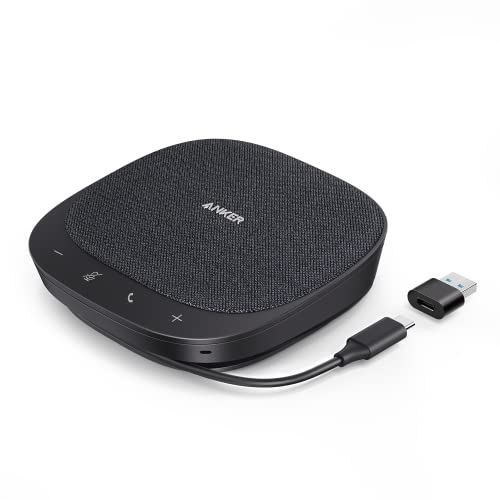
The Anker PowerConf S330 is a USB speakerphone for home offices that connects over USB-C and includes a standard USB adapter. It offers 360 degree voice pickup and voice enhancement that suppresses background noise while boosting voices. It is a plug-and-play solution that joins meetings in seconds.

The voice enhancement is the useful feature for a home office where background noise from a street or a fan can leak into calls. Compared with the Jabra Speak 410, it adds modern noise processing and a USB-C connection. Compared with the Speak2 55, it is cabled and has no Bluetooth, which makes it simpler and cheaper. It suits one to a few people.

In practice, place it on the desk near the speakers, and choose it as the default device in your meeting app. USB-C and adapters add connection points that can loosen. The cabled design is reliable, but it ties the unit to the computer. For small groups, check that the pickup covers everyone, since a single puck has limits.

What works

  • 360 degree pickup with voice enhancement
  • Plug and play over USB-C with a USB-A adapter
  • Noise reduction helps in a noisy home office
  • Low to mid cost tier

Watch out for

  • Cabled design ties it to the computer
  • No Bluetooth for phones
  • Single unit has limited coverage for larger groups

Specs

Pickup
360 degree voice pickup
Connection
USB-C with USB-A adapter
Processing
Voice enhancement and background noise reduction
Setup
Plug and play
Class
Low to mid tier
04
Jabra Speak 510 (2025 Edition) Portable USB and Bluetooth Speakerphone
USB and BluetoothPortableClear callsQuick setup
Check price on Amazon
Best for: People who split time between desk and meeting room and want a Jabra speakerphone with Bluetooth.

The Jabra Speak 510 (2025 edition) is a portable speakerphone that connects by USB or Bluetooth and is built for meetings and calls. The maker highlights clear audio and quick setup. It is a step up from the corded Speak 410 because it adds wireless flexibility.

It sits between the 410 and the Speak2 55 in the Jabra line. Compared with the Speak 410, it adds Bluetooth and a portable design. Compared with the Speak2 55, it has fewer microphones and a more modest feature set, with a lower cost. It is a good choice for people who move between a desk and a conference table.

Ownership is easy: pair by Bluetooth with a phone, or plug into a laptop by USB. Keep it charged, and place it in the center of the table. A wireless speakerphone suffers when the battery is low, so charge before important meetings. The microphone array is built for small groups, not large rooms.

What works

  • USB and Bluetooth connection options
  • Portable with quick setup
  • Jabra audio quality for calls
  • Mid-tier cost from an established brand

Watch out for

  • Fewer microphones than the Speak2 55
  • Battery needs charging for wireless use
  • Built for small groups only

Specs

Connection
USB or Bluetooth
Portability
Portable conference speaker
Setup
Ready in seconds
Use
Meetings and calls
Class
Mid tier
05
EMEET Luna Plus Kit Conference Speaker with Satellite Microphone, 8+1 Mics
8+1 microphonesSatellite mic360 degree pickupBluetooth
Check price on Amazon
Best for: Longer tables where one speakerphone cannot reach every seat.

The EMEET Luna Plus kit includes a conference speaker and a dedicated satellite microphone, for 8 plus 1 microphones in total with 360 degree pickup. The maker calls it its first Bluetooth speakerphone with a satellite mic. The satellite extends the pickup to a second spot, which helps with a longer table.

The satellite microphone is the practical difference. Compared with the Jabra Speak2 55, it offers more microphones and a way to cover a longer table. Compared with the Yealink SP92, it is more of a kit than a single device. It suits meeting rooms where one puck cannot reach everyone.

In use, place the main unit in the middle and the satellite at the far end of the table, so every seat has a nearby mic. Connect by Bluetooth or USB, and set it as the default audio device. The satellite adds a cable or wireless link to manage, and more parts to charge or lose. Check the manual for how many people it is intended to serve.

What works

  • Dedicated satellite microphone extends pickup
  • 8 plus 1 microphones with 360 degree coverage
  • Bluetooth and USB connection
  • Works as a kit for medium rooms

Watch out for

  • Extra part to place, power and keep track of
  • Less established brand than Jabra
  • More complex than a single puck

Specs

Microphones
8 plus 1 satellite mic
Pickup
360 degree
Connection
Bluetooth and USB
Special feature
Dedicated satellite microphone
Class
Mid tier
06
Yealink SP92 Conference Speaker and Microphone, Teams Certified
Teams certifiedAI noise cancelling50 mm speaker20 h call time
Check price on Amazon
Best for: Teams-based offices that want a certified speakerphone with a larger speaker.

The Yealink SP92 is a conference speaker with a 50 mm speaker, a 360 degree omnidirectional microphone, AI noise cancelling and Microsoft Teams certification. The maker lists up to 20 hours of call time. It is aimed at small to medium rooms and managed corporate setups.

Teams certification matters in offices where IT teams require certified hardware, since it confirms integration with Teams controls. Compared with the Jabra Speak2 55, it targets enterprise buyers with certification and a larger speaker. Compared with the Anker S330, it is a bigger unit with more battery. It is less about home use and more about the meeting room.

Ownership is about the usual routine: charge it, place it in the center of the table and set it as the default device. A 20 hour call claim is a manufacturer figure, and real life depends on volume and use. Check firmware through the maker's tools, and confirm that your meeting app recognizes the unit. If you are not in a Teams environment, the certification adds less.

What works

  • Certified for Microsoft Teams
  • 50 mm speaker fills a small room
  • AI noise cancelling and 360 degree mic
  • Up to 20 hours of call time claimed

Watch out for

  • Certification matters mostly in Teams environments
  • Larger and less portable than a puck
  • Battery claim is a maker figure

Specs

Certification
Certified for Microsoft Teams
Noise handling
AI noise cancelling
Speaker
50 mm
Pickup
360 degree omnidirectional mic
Battery
Up to 20 hours of calls

Spec decoder

What the listing measurements really mean

The numbers brands lead with, translated into what they tell you about fit, comfort and wear at home.

Beamforming microphones

An array that focuses on the person speaking and reduces sound from other directions.

Watch forThe Jabra Speak2 55 lists four beamforming microphones.

360 degree pickup

Microphones arranged to hear all around the unit. Pickup distance is limited, so seat distance matters.

Watch forThe Anker S330, EMEET Luna Plus and Yealink SP92 list 360 degree pickup.

Full duplex

Both sides can talk at once without the audio cutting out. It depends on echo cancellation.

Watch forCheck that the unit lists full duplex or echo cancellation.

Teams certified

A program confirming the device works with Teams features. It does not make the audio better.

Watch forThe Yealink SP92 is listed as certified for Microsoft Teams.

Satellite microphone

An extra microphone placed away from the main unit to cover far seats.

Watch forThe EMEET Luna Plus kit includes a satellite mic.

Methodology

How We Evaluated These Conference Speakerphones

Pickup and coverage

We compared microphone arrays, from the four beamforming mics of the Jabra Speak2 55 to the 8 plus 1 of the EMEET Luna Plus. Coverage claims were treated as claims. Our scores are editorial assessments based on published specifications and owner feedback patterns.

Connection

We compared USB, Bluetooth and dual connections and weighed reliability against flexibility.

Speaker and clarity

We read speaker sizes, such as the 50 mm driver on the Yealink SP92, and noise handling, such as the Anker voice enhancement.

Certification and fit

We considered Teams certification and which environments need it.

Value and honesty

We judged each unit by relative cost tier and avoided price figures. Room-size limits were stated plainly.

Decision guide

How to Choose the Right Conference Speakerphones

By Room

SituationPickWhy
Home office with visitorsAnker PowerConf S330360 degree pickup and USB.
Small meeting roomJabra Speak2 55Beamforming array.
Long tableEMEET Luna Plus KitSatellite microphone.
Teams officeYealink SP92Certified for Teams.

By Budget

SituationPickWhy
Lowest spendJabra Speak 410Corded and simple.
Low to midAnker PowerConf S330Noise handling.
MidJabra Speak 510Bluetooth and USB.
HighestJabra Speak2 55Strongest array.

Corded vs Wireless

Corded USB

The Jabra Speak 410 and Anker S330 need no battery and give the most reliable connection.

Wireless

The Speak2 55, Speak 510 and Yealink SP92 move between rooms, but rely on batteries and pairing.

Choose corded for a fixed desk. Choose wireless if you move between rooms.

By Use

SituationPickWhy
Daily huddlesJabra Speak2 55Reliable array and battery.
Occasional callsJabra Speak 410Simple and cheap.
Corporate Teams roomsYealink SP92Certified.
Mixed phone and computerJabra Speak 510Bluetooth and USB.

For Conference Calls Specifically

Look for

Microphone coverage that matches your seats, echo cancellation, a connection that suits your computer and a unit you can place centrally.

In this comparison

The Jabra Speak2 55 leads on balance, the Speak 410 on value and the EMEET Luna Plus on table length.

When to Spend More

Spend more if

You run meetings daily, have a longer table or need certification. The Speak2 55 or Yealink pays back in clarity.

Save if

You have occasional small calls. The Speak 410 or Anker S330 is enough.

Ownership

Maintenance schedule

The upkeep that decides whether a piece still looks good in year five.

TaskIntervalWhy it matters
Place it centrallyEvery meetingDistance from speakers affects pickup. Put the unit in the middle of the table, away from fans and projectors.
Update firmwareEvery few monthsUpdates can improve noise handling and fix bugs. Use the maker's software. Check the release notes to see what changed before you install.
Charge the batteryBefore important meetingsWireless units drop out when the battery is low. Keep them plugged in for long sessions.
Check the audio device settingBefore callsMeeting apps can switch to the laptop speakers. Confirm the speakerphone is selected.
Wipe the grilleMonthlyDust and dirt reduce clarity. Wipe gently with a dry cloth.

FAQ

Frequently Asked Questions

How many people can one speakerphone cover?

A single unit suits a small group around a table. Larger groups need a kit with extra microphones or a room system. Seat distance matters as much as seat count, so measure the table before you decide.

Is Bluetooth good enough for meetings?

Usually, but USB is more reliable. Bluetooth adds pairing and battery management.

Do I need a certified speakerphone?

Only in managed offices that require it. At home, any USB audio device works.

Why do others hear an echo?

Echo happens when speaker sound feeds back into a microphone. Lower the volume, keep other devices muted and use a unit with echo cancellation. Using a headset for the other participants on the same call in the room also causes feedback, so use only one audio device per room.

Can I use it with my phone?

Bluetooth models like the Jabra Speak2 55 and Speak 510 can pair with a phone. Corded USB models cannot.

How long do these last?

Corded units last many years. Wireless batteries age, and speaker clarity depends on keeping the grille clean.

Bottom line

The short version

Browse more conference speakerphoneson Amazon →
Brianna Cole, Lead Product Editor

About the author

Brianna Cole

Lead Product Editor, SenseiReview

Brianna Cole leads SenseiReview's buying guides, turning published specifications, documentation and owner feedback patterns into clear verdicts across home, tech, fitness, outdoor and DIY products.

More from Brianna →

Keep reading

Related guides