
Amazon affiliate links - we earn a commission.Affiliate disclosure

Buying guide · 12 min read · Updated 2026-11-21

Best Desk Pads for Home Offices (2026)

Seven desk pads for home offices compared on PU leather versus cloth, size, non-slip backing and mouse tracking, with honest tradeoffs for each desk setup.

Brianna Cole, Lead Product EditorBy Brianna ColeLead Product Editor7 picks comparedSpec-sheet verified
Best Desk Pads for Home Offices

At a glance

Our top picks

Side by side

Spec comparison

PieceSizeSurfaceBackingPrice position
Aothia Leather Desk Pad 36 x 17 Inch Non-Slip PU Leather BlotterBest OverallAothia Leather Desk Pad 36 x 17 Inch Non-Slip PU Leather Blotter36 x 17 inchPU leatherSuede, non-slipLower-middle of the group
Aothia Leather Office Desk Pad 31.5 x 15.7 Inch Non-Slip PU BlotterBest Mid-Size LeatherAothia Leather Office Desk Pad 31.5 x 15.7 Inch Non-Slip PU Blotter31.5 x 15.7 inchPU leatherSuede, non-slipLower-middle of the group
31.5 x 15.7 Inch Waterproof Fabric Desk Pad with Stitched Edges Non-Slip BaseBest Cloth Pad31.5 x 15.7 Inch Waterproof Fabric Desk Pad with Stitched Edges Non-Slip Base31.5 x 15.7 inchSmooth waterproof fabricn/aSecond lowest here
YSAGi Leather Desk Pad Protector Large Mouse Pad Waterproof Writing PadBest Value LeatherYSAGi Leather Desk Pad Protector Large Mouse Pad Waterproof Writing Padn/aPU leatherNon-slipMiddle of the group
AFIING Desk Pad Protector 23.6 x 13.7 Inch Non-Slip Waterproof PU LeatherBest ValueAFIING Desk Pad Protector 23.6 x 13.7 Inch Non-Slip Waterproof PU Leather23.6 x 13.7 inchPU leatherSoft suedeLowest in the group
CORSAIR MM350 PRO Extended XL Spill-Proof Cloth Mouse Pad 36.6 x 15.7 InchBest Cloth XLCORSAIR MM350 PRO Extended XL Spill-Proof Cloth Mouse Pad 36.6 x 15.7 Inch36.6 x 15.7 inch (930 x 400 mm)Micro-weave clothn/aUpper-middle of the group
SteelSeries QcK XXL Gaming Mouse Pad Micro-Woven Cloth Never-SlipBest Established Cloth MatSteelSeries QcK XXL Gaming Mouse Pad Micro-Woven Cloth Never-SlipXXLMicro-woven clothn/aUpper end of the group

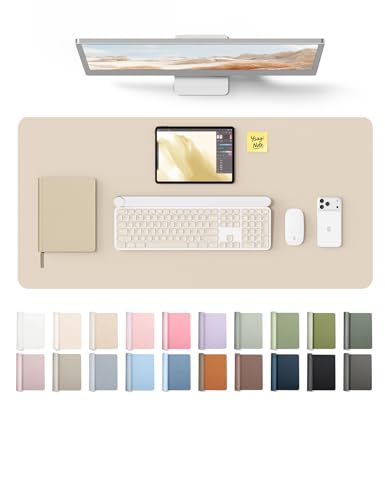
A desk pad is a large mat that sits under your keyboard and mouse. It protects the desk from scratches and spills, softens keyboard noise and gives your mouse a consistent surface, which makes a home office feel tidier and more finished.

This guide compares PU leather pads and cloth pads on size, surface material, non-slip backing and mouse tracking. We also cover the small details that decide long-term satisfaction, such as odor out of the box, edge wear and how easy each pad is to clean.

Before you buy

6 Criteria to Look For Before Buying a Desk Pad for Home Offices

  1. 01

    Surface material

    PU leather, as on the Aothia, AFIING and YSAGi pads, is waterproof and wipes clean but is glossy. Cloth, as on the Corsair and SteelSeries, gives better mouse control and absorbs spills. Choose leather for looks and cleaning, cloth for mouse use. If you also keep a notebook or paperwork on the desk, lean toward the larger sizes, since a pad that is too small ends up as a mouse pad with a fancy name. Measure the depth of your desk as well as the width.

  2. 02

    Size

    A 23.6 by 13.7 inch pad fits a keyboard and mouse. A 31.5 by 15.7 inch pad adds room for a phone or drink, and a 36 inch pad covers a full-width setup. Measure your desk and keyboard first. Think about how you hold your mouse. A light, relaxed grip is forgiving, while a fast flick or low-sensitivity setting makes a consistent cloth surface worth having.

  3. 03

    Mouse tracking

    Some optical mice track poorly on glossy leather. Cloth pads such as the Corsair MM350 PRO use a micro-weave surface that suits most sensors. Check your mouse before committing. Rubber and suede backings behave differently on glass and metal desks, so test grip on your own surface and keep the receipt for a few days. A pad that slides at every keystroke is a daily irritation.

  4. 04

    Backing and grip

    Suede backing, as on the Aothia and AFIING pads, and rubber, as on the fabric pad and Corsair, grip the desk. Rubber can mark delicate finishes. A pad that slides is annoying. Edges are the first place wear shows, so look at close-up photos if you can. Stitched cloth edges and clean-cut leather edges both age well when the pad is kept flat.

  5. 05

    Edges and durability

    Stitched edges, as on the fabric pad and anti-fray edges on the Corsair, resist fraying. Leather pads can peel at the edges after years. Thin pads feel firm, thick pads cushion more. If you spill coffee near your keyboard, favor a waterproof leather pad and wipe it immediately. Cloth coatings help but are not a license to leave a spill sitting.

  6. 06

    Cleaning and odor

    Leather wipes clean with a damp cloth, while cloth needs hand washing. New PU can smell for a few days. Air it out and lay it flat. Set the pad on a clean, dry desk, and wipe the back of the pad if dust accumulates. A clean pad is also much better for mouse sensors.

Detailed reviews

The 7 best desk pads for home offices, explained

01
Aothia Leather Desk Pad 36 x 17 Inch Non-Slip PU Leather Blotter
36 x 17 inPU leatherSuede backingWaterproof
Check price on Amazon
Best for: Wide desks that need full keyboard, mouse and notebook coverage.

The Aothia 36 by 17 inch pad is the largest leather option in the lineup, big enough for a laptop, keyboard, mouse and notebook at once. The PU leather surface is waterproof and wipes clean with a damp cloth, and a suede backing is designed to grip the desk. It protects a wood or laminate desk from scratches, coffee rings and pen marks.

The tradeoff is surface feel. PU leather is smooth and can give some optical mice trouble, and a large pad needs a desk wide enough to carry it. Compared with the 31.5 inch Aothia, it adds width for a full setup but costs more. It suits home office workers with a wide desk who want a clean, neutral look.

Air the pad out for a day or two if it arrives with a chemical smell. Lay it flat under a book if it curls. Use a coaster for hot mugs and wipe spills quickly. Check the edges after a year or two for peeling.

What works

  • 36 by 17 inch surface covers a full-width setup
  • Waterproof PU leather wipes clean
  • Suede backing grips the desk
  • Protects against scratches, stains and spills

Watch out for

  • Smooth surface can confuse some optical mice
  • Large size needs a wide desk

Specs

Size
36 x 17 inch
Surface
PU leather
Backing
Suede, non-slip
Protection
Waterproof, scratch and stain resistant
Price position
Lower-middle of the group
02
Aothia Leather Office Desk Pad 31.5 x 15.7 Inch Non-Slip PU Blotter
31.5 x 15.7 inPU leatherSuede backingWaterproof
Check price on Amazon
Best for: Standard desks with a laptop or keyboard and mouse.

The 31.5 by 15.7 inch Aothia pad is the middle size in the family, large enough for a laptop, keyboard and mouse. It uses the same waterproof PU leather and non-slip suede backing as the larger version. The surface protects the desk and wipes clean.

The tradeoff is that it leaves less room than the 36 inch pad for notebooks and phones. Compared with the cloth pad of the same width, it is easier to wipe but less friendly to mice. It suits standard desks where a keyboard and mouse fit within the pad.

It shares the care of the larger one: air out odor, flatten curls and avoid heat. Check for mouse tracking on your sensor before throwing out the old pad.

What works

  • 31.5 by 15.7 inch size suits most desks
  • Waterproof surface wipes clean
  • Suede backing grips the desktop
  • Protects against scratches and stains

Watch out for

  • Less room than the 36 inch model for extras
  • Smooth surface can affect mouse tracking

Specs

Size
31.5 x 15.7 inch
Surface
PU leather
Backing
Suede, non-slip
Use
Laptop, keyboard and mouse
Price position
Lower-middle of the group
03
31.5 x 15.7 Inch Waterproof Fabric Desk Pad with Stitched Edges Non-Slip Base
31.5 x 15.7 inFabric topStitched edgesRubber base
Check price on Amazon
Best for: Heavy mouse users who want a fabric surface with stitched edges.

This fabric desk pad is 31.5 by 15.7 inch with a smooth, slightly textured top, stitched edges and a non-slip rubber base. The stitching locks the fabric and rubber together and helps the pad resist fraying. The fabric surface glides a mouse more predictably than glossy leather.

The tradeoff is cleaning. Fabric absorbs more than PU leather, so spills need a quick wipe and may stain, and the rubber base can mark some wood finishes. Compared with the Aothia leather pads, it offers better mouse tracking but less wipe-clean convenience. It suits users who rely on a mouse all day.

Wipe spills at once, and hand wash with mild soap if needed. Let it dry flat. Check the base against delicate finishes before leaving it for months.

What works

  • Fabric surface gives predictable mouse glide
  • Stitched edges resist fraying
  • Non-slip rubber base
  • Second lowest price position in this comparison

Watch out for

  • Fabric stains more than PU leather
  • Rubber base can mark delicate finishes

Specs

Size
31.5 x 15.7 inch
Surface
Smooth waterproof fabric
Edges
Stitched edge to edge
Base
Non-slip rubber
Price position
Second lowest here
04
YSAGi Leather Desk Pad Protector Large Mouse Pad Waterproof Writing Pad
PU leatherNon-slipWaterproofLarge
Check price on Amazon
Best for: Users who want a large leather pad to replace a separate mouse pad.

YSAGi sells a large PU leather desk pad aimed at replacing both a separate mouse pad and a blotter. The leather surface is waterproof and wipes clean, and the pad protects the desk from scratches and stains. A non-slip base helps keep it in place.

The tradeoff is that it is less documented than the Aothia pads on size and backing, and a pad from a smaller brand gives fewer signs of long-term quality. Compared with the AFIING, it offers a larger area but a higher price position. It suits users who want a leather look with large coverage.

Check the listing for the exact size before ordering. Air it out and lay it flat. Keep hot items off the surface.

What works

  • Large leather surface replaces a separate mouse pad
  • Waterproof and easy to wipe
  • Non-slip base keeps the pad steady
  • Protects against scratches and stains

Watch out for

  • Less size and backing detail than the Aothia pads
  • Glossy PU surface may not suit every optical mouse

Specs

Surface
PU leather
Backing
Non-slip
Protection
Scratches, stains and spills
Cleaning
Wipe with a cloth
Price position
Middle of the group
05
AFIING Desk Pad Protector 23.6 x 13.7 Inch Non-Slip Waterproof PU Leather
23.6 x 13.7 inPU leatherSuede backingCompact
Check price on Amazon
Best for: Small desks and dorm rooms that need basic protection at the lowest cost.

The AFIING pad is the smallest and cheapest in the lineup at 23.6 by 13.7 inch, with waterproof PU leather and a soft suede backing. The size fits a keyboard and a mouse on a small desk or a laptop setup. The surface protects the desk and wipes clean.

The tradeoff is space. You will not fit a notebook and phone beside the keyboard, and a small pad can slide if the keyboard hangs over the edge. Compared with the Aothia 31.5, it is cheaper but offers less room. It suits small desks, dorm rooms and compact home offices.

Check the pad size against your keyboard before buying. Air out any odor and wipe spills quickly.

What works

  • Lowest price position in this comparison
  • Compact size fits small desks
  • Waterproof PU leather wipes clean
  • Soft suede backing grips the desk

Watch out for

  • Small area leaves little room for extras
  • Leather finish can confuse basic mouse sensors

Specs

Size
23.6 x 13.7 inch
Surface
PU leather
Backing
Soft suede
Use
Mouse, keyboard, laptop
Price position
Lowest in the group
06
CORSAIR MM350 PRO Extended XL Spill-Proof Cloth Mouse Pad 36.6 x 15.7 Inch
36.6 x 15.7 inMicro-weave clothSpill-proofAnti-fray
Check price on Amazon
Best for: Heavy mouse users who want a large cloth mat with spill resistance.

The Corsair MM350 PRO is an extended cloth mat that covers a full-width desk area at 36.6 by 15.7 inch. The micro-weave fabric creates a dense surface for smooth mouse glide, and a spill-proof, stain-resistant coating makes liquids slide off. Anti-fray edges help it hold shape.

The tradeoff is that cloth surfaces absorb more over time and the coating wears with washing. Compared with the Aothia leather pads, it offers better mouse control but a more gaming look. It suits users who mouse heavily and want a big surface without a leather feel.

Wipe spills quickly and hand wash gently if needed. Avoid hot items. Let it dry flat.

What works

  • 36.6 by 15.7 inch surface covers a full desk width
  • Micro-weave cloth gives predictable mouse glide
  • Spill-proof stain-resistant coating
  • Anti-fray edges help it hold shape

Watch out for

  • Gaming styling may not suit every office
  • Coating can wear with repeated washing

Specs

Size
36.6 x 15.7 inch (930 x 400 mm)
Surface
Micro-weave cloth
Coating
Spill-proof, stain-resistant
Edges
Anti-fray
Price position
Upper-middle of the group
07
SteelSeries QcK XXL Gaming Mouse Pad Micro-Woven Cloth Never-Slip
XXLMicro-woven clothNever-slip baseEsports
Check price on Amazon
Best for: Users who want a well-known large mouse mat with a stable base.

The SteelSeries QcK XXL is a large micro-woven cloth mat, positioned as a does-it-all surface with a never-slip base. The maker says the high thread count surface supports pinpoint mouse accuracy and cites a long record of sales. It covers a full desk area in the XXL size.

The tradeoff is that it is a gaming mat first, so it lacks the blotter look and water-resistant finish of leather pads. Compared with the Corsair, it has a longer product history but fewer spill details in the listing. It suits users who want a proven mat for heavy mouse use.

Hand wash gently and let it dry flat. Avoid folding. Replace it when the surface starts to fray or the base peels.

What works

  • Micro-woven cloth surface for accurate mouse tracking
  • Never-slip base keeps it steady
  • Long product history per the maker
  • XXL size covers a full desk area

Watch out for

  • Gaming style is less suited to a formal office
  • Less spill protection detail than the Corsair

Specs

Size
XXL
Surface
Micro-woven cloth
Base
Never-slip
Track record
Over 10 million sold, per maker
Price position
Upper end of the group

Spec decoder

What the listing measurements really mean

The numbers brands lead with, translated into what they tell you about fit, comfort and wear at home.

PU leather

A synthetic leather that is waterproof and wipeable.

Watch forGlossy surfaces can confuse some optical mice. Measure first, then compare pad width and depth.

Micro-weave cloth

A dense fabric weave for smooth mouse glide, used on the Corsair and SteelSeries.

Watch forCloth absorbs more over time. Glossy and matte are both used, so read the finish.

Size (inches)

The pad's dimensions, from 23.6 x 13.7 to 36.6 x 15.7.

Watch forCheck your desk depth and keyboard. Check your sensor type if tracking matters.

Non-slip backing

A suede or rubber base that grips the desk.

Watch forRubber can mark some finishes. Thin pads feel firm, thick pads feel soft.

Anti-fray edges

Stitched or sealed edges that stop fabric from unravelling.

Watch forLeather pads can peel instead. Look for a clear description of the edge finish.

Methodology

How We Evaluated These Desk Pads for Home Offices

Specification review

We compared published sizes, surface materials, backing and edge finishes. We read each listing for waterproof and spill claims. We set the 36 inch Aothia against the 36.6 inch Corsair. We also looked at how each listing describes mouse use.

Owner feedback patterns

We looked at recurring themes in owner feedback such as mouse tracking, odor and edge peeling. Single complaints were set aside. We did not use star ratings. We also noted differences in size options within each family.

Design approach

We considered how each pad protects the desk, from leather blotters to cloth mats. We also looked at backing and edge construction. We also kept in mind that finish and feel are personal.

Value and price position

We ordered the pads by relative price tier and asked what each step up adds. We did not quote prices. We also compared edge details across the lineup.

What we did not do

We did not use these pads at a desk or test mouse tracking. Scores are editorial judgments built on published information. Waterproof and spill-proof statements remain makers' claims. We also noted that glossy surfaces are a recurring complaint.

Decision guide

How to Choose the Right Desk Pads for Home Offices

By Desk Size

SituationPickWhy
Small deskAFIING 23.6 x 13.7Compact
Standard deskAothia 31.5 x 15.7Mid size
Wide deskAothia 36 x 17Largest leather
Full-width clothCorsair MM350 PRO36.6 x 15.7

By Budget

SituationPickWhy
Lowest spendAFIINGLowest in the group
Low, fabricFabric pad 31.5Second lowest
Lower-middle, leatherAothia 31.5Mid size
Upper, clothSteelSeries QcK XXLEstablished mat

PU Leather vs Cloth

PU leather

The Aothia, AFIING and YSAGi pads wipe clean and look tidy, but are glossy and can confuse some mice.

Cloth

The Corsair, SteelSeries and fabric pads give better mouse control, but absorb spills and need washing.

Pick leather for a clean office look. Pick cloth if you use a mouse for hours.

By Mouse Use

SituationPickWhy
Light mouse useAothia 36 x 17Leather
Heavy mouse useCorsair MM350 PROMicro-weave
Gaming and workSteelSeries QcK XXLNever-slip base
Mixed, mid-sizeFabric pad 31.5Fabric

For Spill Risk Specifically

Look for

A waterproof or spill-proof surface, edges that do not wick liquid and a base that does not trap moisture.

In this comparison

The Aothia and YSAGi leather pads wipe clean, while the Corsair adds a spill-proof coating on cloth.

When to Spend More

Spend more if

You want a large cloth mat from an established maker or full-width coverage on a wide desk.

Save if

You have a small desk, in which case the AFIING or fabric pad is enough.

Ownership

Maintenance schedule

The upkeep that decides whether a piece still looks good in year five.

TaskIntervalWhy it matters
Wipe the surfaceWeeklyDust and skin oils affect mouse tracking. A damp cloth keeps leather clean. Remember to move items from the desk before lifting the pad.
Wipe spills right awayAs neededCloth absorbs liquid and stains. Leather is safer but still benefits from quick action. A fine brush clears crumbs from stitched edges.
Hand wash cloth padsEvery few monthsMild soap and air drying flat restore the surface. Never use a dryer. A paper towel is enough for most spills on leather.
Check the edgesEvery few monthsLeather edges can peel and cloth edges can fray. Replace worn pads. Replace the pad when the edges lift or the surface turns slick.
Lift and clean the deskEvery 6 monthsDust collects under the pad. Wiping the desk prevents marks. Rotate or flip dual-sided pads if the product allows it.

FAQ

Frequently Asked Questions

Do mice work on leather desk pads?

Many do, but some optical mice track poorly on glossy surfaces. A cloth pad is safer for heavy mouse use. If your mouse jumps on a leather pad, try a mouse with a more tolerant sensor or lay a thin cloth pad on top for mouse use only.

What size should I buy?

Match the pad to your desk and keyboard. 23.6 inch fits a keyboard and mouse, while 31.5 to 36 inch covers a full setup. A pad that is too long for your desk may overhang and curl, so measure the usable width and leave a little room at each end.

Will it damage my desk?

Suede backing is gentle, but rubber can mark delicate finishes. Test on a small area. If the rubber base leaves a mark, a thin sheet of paper between the pad and the desk usually prevents it.

How do I get rid of the smell?

Air the pad out for a day or two before use. New PU leather often has a chemical odor. To remove the smell faster, leave the pad flat in a ventilated room, not in a closed closet or box.

Can I wash a desk pad?

Cloth pads can be hand washed with mild soap. Leather pads should be wiped with a damp cloth. Wipe leather pads with a barely damp cloth and dry them, since soaking can damage the backing. Avoid strong solvents or bleach.

Why does my pad curl?

Pads shipped rolled can curl. Lay it flat under a book for a day or two. Uncurling a rolled pad takes patience, so unroll it right away and weigh down the corners, instead of leaving it coiled for weeks.

Bottom line

The short version

Browse more desk pads for home officeson Amazon →
Brianna Cole, Lead Product Editor

About the author

Brianna Cole

Lead Product Editor, SenseiReview

Brianna Cole leads SenseiReview's buying guides, turning published specifications, documentation and owner feedback patterns into clear verdicts across home, tech, fitness, outdoor and DIY products.

More from Brianna →

Keep reading

Related guides