
Amazon affiliate links - we earn a commission.Affiliate disclosure

Buying guide · 12 min read · Updated 2026-11-21

Best Monitor Light Bars (2026)

Compare six monitor light bars by lux, color temperature range, CRI, asymmetric optics, clip fit and extras like backlight, plus honest notes on glare.

Brianna Cole, Lead Product EditorBy Brianna ColeLead Product Editor6 picks comparedSpec-sheet verified
Best Monitor Light Bars

At a glance

Our top picks

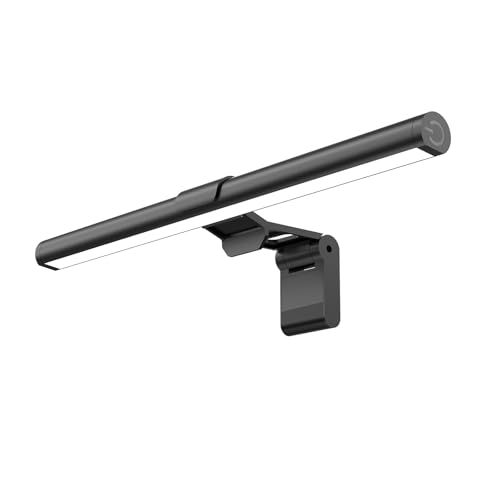
A monitor light bar is a slim LED lamp that clips on top of a screen and throws light down onto the desk, so you can see a keyboard, notebook or papers without a lamp taking up desk space. Done well, it adds light to the desk without bouncing it off the screen.

The design that matters is the optics: the light should aim at the desk at an angle and stay out of your eyes and off the glass. Beyond that, brightness, color range, clip fit and optional backlight decide whether a bar suits your monitor. This guide compares those points.

Before you buy

6 Criteria to Look For Before Buying a Monitor Light Bar

  1. 01

    Optics and glare

    The point of a light bar is to light the desk, not the screen or your eyes. An asymmetric optic, like the 45 degree beam on the SAMPHON bars and the Quntis models, aims light down and forward. A bar with a flat diffuser can reflect off the screen, so look for asymmetric optics rather than a high brightness number.

  2. 02

    Brightness in lux

    Lux measures light on a surface, and the central peak is higher than the average. The SAMPHON 15.7 inch quotes 900 lux and the 11.8 inch quotes 800 lux, but those are peak figures. The common mistake is comparing lux to lumens, as the YEELIGHT quotes 250 lumens, which is a different measure.

  3. 03

    Color temperature range

    Warm light near 3000K suits evenings and cool light near 6500K suits daytime. The SAMPHON models give three set points and the Quntis models give stepless adjustment between 3000K and 6500K. Buyers often leave the lamp on cool white at night, which feels harsh.

  4. 04

    Color accuracy (CRI)

    CRI measures how truly colors look under the lamp, with 95 or more considered high. The Quntis RGB models list Ra95 and the others do not state it. A low CRI can make paper and skin tones look dull, which matters for design and photo work.

  5. 05

    Clip fit and monitor size

    The bar must sit stable on your monitor top. The Quntis sliding weighted clip is built for thin bezels and curved screens, and the Govee lists a bezel range of 0.12 to 6.3 inches. A bar that tips forward or blocks the webcam is a daily annoyance.

  6. 06

    Backlight and extras

    A rear light, a remote and presence sensing add comfort and cost. The Govee has an RGBIC backlight and mmWave sensor, and the Quntis with backlight adds a remote. Decide whether you need them, because they raise the price without improving the task light.

Detailed reviews

The 6 best monitor light bars, explained

01
Quntis Monitor Light Bar with Auto-Dimming Sensor, USB
Auto-dimmingAsymmetric opticFlicker-freeUSB powered
Check price on Amazon
Best for: Desk workers who want a light that adapts automatically as the day changes.

The Quntis auto-dimming bar is built around a sensor that watches room brightness and raises or lowers the lamp to match, then lets you override it with stepless manual dimming. Its asymmetric optics are designed to light only the desk area, which keeps light off the screen. The listing cites the IEC/TR 62778 blue light assessment and the IEC/EN 62471 photobiological safety standards, which are real standards, though a citation is a claim by the maker.

The tradeoff is the price, which is mid to upper of ten candidates, and an auto sensor that reacts to a sudden change like a cloud passing, which some users find distracting. Against the SAMPHON 11.8 inch, you pay for automatic adjustment rather than brightness, and the Quntis does not offer the backlight of the Govee. It is lamp-first, not decoration-first.

In ownership, the clip and the sensor are what matter. Keep the sensor clean and unblocked, and set a manual level if the auto behavior bothers you. Check that the clip sits on your bezel and does not scratch it, and use a USB port that supplies steady power so the lamp does not flicker off.

What works

  • Auto-dimming sensor matches the lamp to the room as light changes
  • Asymmetric optic sends light to the desk and away from the screen
  • Stepless manual control lets you override the sensor when needed
  • Cited IEC standards for flicker and photobiological safety are listed

Watch out for

  • Mid-to-upper position in the price order among ten candidates
  • Sensor can react to short changes in room light in a distracting way

Specs

Dimming
Auto sensor plus stepless manual
Optics
Asymmetric, desk-only light
Standards cited
IEC/TR 62778 and IEC/EN 62471
Power
USB
Position in price order
6 of 10
02
SAMPHON 11.8-inch Monitor Light Bar, 800 Lux, 3 Color Temps
11.8 in800 lux center3000-6500KMemory
Check price on Amazon
Best for: Budget-minded users with a standard-size monitor and a dim desk.

The SAMPHON 11.8 inch is the cheapest bar in the lineup and still covers the basics: a 45 degree asymmetric beam, three color temperatures from warm 3000K to cool 6500K and stepless brightness with a memory that remembers your last setting. The listing quotes up to 800 lux of central illumination, which is a central peak figure, not an average across the desk.

The tradeoff is length and coverage. At 11.8 inches it covers a smaller area than the 15.7 inch SAMPHON, so it suits a standard monitor but leaves the sides of a wide desk dim. It has no auto sensor and no backlight, so you control it by touch. Compared with the Quntis auto-dimming model, it is the simpler lamp and the cheaper one.

In ownership, the points are clip fit and heat. Check that the clip grips your monitor top without tipping and that the cable does not dangle into the keyboard. LEDs run warm, so the lamp heats a little over long sessions, and a dusty bar loses brightness, which a soft cloth fixes.

What works

  • Cheapest of the ten candidates, with the key features intact
  • 45 degree asymmetric beam lights the desk instead of the screen
  • Three color temperatures from 3000K to 6500K for day or evening
  • Memory function recalls your last brightness and color setting

Watch out for

  • At 11.8 inches it covers less desk width than a 15.7 inch bar
  • No auto sensor or backlight, so the lamp is purely manual

Specs

Length
11.8 in
Brightness
Up to 800 lux central
Color temperatures
3000, 4000 and 6500K
Light angle
45° asymmetric
Position in price order
Cheapest of ten
03
SAMPHON 15.7-inch Ultrawide Monitor Light Bar, 900 Lux
15.7 in900 lux center3000-6500KStepless dimming
Check price on Amazon
Best for: Users with a wide or curved monitor who want even desk coverage.

The SAMPHON 15.7 inch is the wider sibling of the 11.8 inch bar, with a stated 900 lux of central output and three color temperatures from 3000K to 6500K. It keeps the 45 degree asymmetric beam, stepless dimming and USB power. The extra length spreads the beam across more of the desk, which suits wide monitors and curved screens better.

The tradeoff is that it is wider and may not fit a monitor with a shallow top edge or a bezel-less design. Against the 11.8 inch version it adds coverage for a small increase in position on the price order. Compared with the Quntis 15.7 inch backlight bar, it is a lamp without the colored backlight, and it is cheaper.

In ownership, check that the clip is stable on a thin monitor and keep the USB cable behind the stand. Take care that a longer bar does not sag at one side, and check for flicker on a low brightness setting. It is a solid, no-decoration choice for a wider desk.

What works

  • 15.7 inch length spreads light across a wider desk area
  • Stated 900 lux central output is the brightest among the plain bars
  • Second lowest in the price order among the ten candidates
  • Asymmetric 45 degree beam keeps glare off the monitor

Watch out for

  • Longer body can sit awkwardly on thin or curved monitor tops
  • No auto-dimming or backlight, so it is a manual lamp only

Specs

Length
15.7 in
Brightness
900 lux central
Color temperatures
3000K to 6500K
Light angle
45° asymmetric patent
Position in price order
2 of 10
04
Quntis Monitor Light Bar with Backlight, Remote, Weighted Clip
Front + back lightRemoteSliding clipNo glare
Check price on Amazon
Best for: Users with thin-bezel or curved monitors who like a soft backlight.

This Quntis combines a front task light with a backlight that fills the wall behind the monitor, and a remote lets you change modes from your chair. The headline feature is the patented sliding weighted clip, which hangs the bar in a second on ultra-thin bezels and curved monitors where a normal clip struggles. The three lighting modes combine front, rear or both.

The tradeoff is that the backlight is a comfort feature, not a necessity, and it pushes the cost toward the upper end of the lineup. A remote is one more thing to lose, and a bar with a backlight adds weight on top of the monitor. Against the Govee, it has no color effects or presence sensing, and compared with the SAMPHON models it adds the backlight for extra money.

In ownership, set the sliding clip so the bar sits level and does not nudge the monitor tilt. A rear light that bounces on a white wall can add glare on the screen if it is too bright, so keep it dim. Store the remote in a drawer and use the buttons on the bar as backup.

What works

  • Sliding weighted clip sits securely on thin bezels and curved monitors
  • Rear backlight adds ambient light behind the screen
  • Remote lets you change light mode without reaching the monitor
  • Three lighting modes cover task, ambient and combined use

Watch out for

  • Rear light adds cost and is a comfort extra, not a need
  • Remote is easy to lose and the bar adds weight to the monitor top

Specs

Lighting
Front task light and rear backlight
Control
Remote
Clip
Sliding weighted clip
Modes
3 lighting modes
Position in price order
7 of 10
05
Govee RGBIC Monitor Light Bar, Presence Sensing, 22-34 in
RGBIC backlightmmWave presence22 to 34 inTÜV listed
Check price on Amazon
Best for: Gamers and tinkerers who want presence sensing and colored backlight.

The Govee is the feature-rich model: a front task strip, a rear RGBIC backlight that covers an area about 45 by 80 cm behind the monitor, and a presence sensor based on mmWave radar that turns the lamp on when you sit down and off when you leave. The listing mentions TÜV Rheinland eye comfort and RG0 blue light safety, and it fits monitors 22 to 34 inches in size, flat or curved.

The tradeoff is that it is the highest in the price order of the ten candidates, and a lot of the cost is in decoration and smart control. If you only want task light, the SAMPHON or Quntis models cost less and do the job. The presence sensor can also switch the lamp off if you sit very still, so check its sensitivity setting.

In ownership, plan for the app and Wi-Fi: smart features need a phone setup, and you depend on the maker's app staying supported. The RGBIC backlight is fun for gaming, but keep it dim during work to avoid screen glare. Use the physical buttons as a backup when the app is not working.

What works

  • mmWave presence sensing turns the lamp on and off with you
  • RGBIC backlight covers a large area behind the monitor
  • Fits monitors from 22 to 34 inches, flat or curved
  • TÜV Rheinland eye comfort listing adds a third-party reference

Watch out for

  • Highest in the price order, with much of the cost in decoration
  • Smart features depend on an app and phone setup to work well

Specs

Monitor size
22 to 34 in, flat or curved
Bezel thickness
0.12 to 6.3 in
Backlight
Dual-sided RGBIC
Sensor
mmWave presence radar
Position in price order
Highest of ten
06
YEELIGHT Monitor Light Bar, 250 Lumen No-Glare Task Lamp
250 lumensNo glareStepless dimUSB
Check price on Amazon
Best for: Buyers who want a simple, low-cost light bar without extra features.

The YEELIGHT is a plain task lamp: it states 250 lumens, stepless dimming and a no-glare design with a focus on color accuracy. It sits third cheapest of the ten candidates and keeps the formula simple, with no backlight or smart features. Lumens measure total light output, which differs from the lux numbers that other listings quote, so the two are not directly comparable.

The tradeoff is that the listing gives little detail on color temperature range or CRI, so you know less about what you are buying than with the Quntis or SAMPHON models. It is also a less distinctive product, and the brand sells many designs. Against the 11.8 inch SAMPHON, it is similar in price but lists fewer specifics.

In ownership, confirm that the clip fits your monitor and that the light does not reflect on the screen. Keep the lamp clean, and use a stable USB power source. Treat it as a simple lamp for a small desk and expect to replace it rather than repair it if the LED strip fails.

What works

  • Third lowest in the price order among the ten candidates
  • Stepless dimming lets you set brightness to the task
  • No-glare design is stated for use with a screen
  • Simple build with no app, remote or backlight to manage

Watch out for

  • Listing gives little detail on color range and CRI
  • Less distinctive than the SAMPHON and Quntis models at a similar price

Specs

Output
250 lumens
Dimming
Stepless
Glare control
No-glare optics stated
Power
USB
Position in price order
3 of 10

Spec decoder

What the listing measurements really mean

The numbers brands lead with, translated into what they tell you about fit, comfort and wear at home.

Lux

A measure of light that lands on a surface, so it describes how bright the desk looks. It depends on distance, and peak numbers are higher than the average.

Watch forThe SAMPHON models quote 800 and 900 lux at the center, which is a peak.

Lumens

Total light output from the source, regardless of where it goes. It does not say how much reaches the desk.

Watch forThe YEELIGHT quotes 250 lumens, so compare it with the others by beam, not by number.

Color temperature (K)

Warm light is lower in kelvin and cool light is higher. Most desk lamps run from 3000K to 6500K.

Watch forThe SAMPHON bars use three set points and the Quntis models use stepless control.

CRI or Ra

A score out of 100 for how accurately a lamp shows colors. Higher is better, and 95 or more is high.

Watch forOnly the Quntis RGB models list Ra95 here.

Asymmetric optics

A lens that angles light onto the desk and away from the screen. It reduces glare on the glass.

Watch forThe SAMPHON and Quntis bars list a 45 degree design, while the Govee lists asymmetric optics.

Methodology

How We Evaluated These Monitor Light Bars

Glare control

We evaluated the optics each listing describes, since glare is the main reason to buy a light bar. The SAMPHON bars cite a 45 degree asymmetric beam and the Quntis models a no-glare design. We favoured clear optical descriptions.

Brightness and coverage

We compared the stated lux or lumen figures against bar length. The SAMPHON 15.7 inch lists 900 lux and covers a wider desk. We treated all peak numbers as best case.

Color control

We looked at color temperature range and any CRI claims. The Quntis RGB models list Ra95 and the SAMPHON bars list three color points. We gave credit for stated figures.

Clip and fit

We reviewed the clip design and monitor size range. The Quntis sliding clip and the Govee bezel range are the clearest. We checked the likely fit on thin and curved monitors.

Extras and ownership

We checked remote, backlight, app and sensor features, based on listings and owner feedback patterns. The Govee has the most extras, and we weighed them against its cost.

Decision guide

How to Choose the Right Monitor Light Bars

By Monitor Type

SituationPickWhy
Standard 24 to 27 inch monitorSAMPHON 11.8 inchRight size and the lowest cost
Wide or ultrawide monitorSAMPHON 15.7 inchWider beam across the desk
Thin bezel or curved screenQuntis with backlightSliding weighted clip
Large 22 to 34 inch gaming screenGovee RGBICStated size and bezel range

By Budget

SituationPickWhy
Cheapest optionSAMPHON 11.8 inchLowest in the price order
Wide and low costSAMPHON 15.7 inchSecond lowest of ten
Simple mid-priceYEELIGHT 250 lumenThird lowest, no extras
Premium smartGovee RGBICHighest in the price order

Task Light vs Backlight

Task light only

The SAMPHON bars and the YEELIGHT focus on lighting the desk. They are simpler, cheaper and have fewer parts to fail.

Task plus backlight

The Quntis backlight bar and the Govee add a rear light for ambience. It looks good but adds cost and can reflect on the screen.

Choose task light for work and reading, and a backlight bar if you want gaming ambience.

By Control Style

SituationPickWhy
Automatic adjustmentQuntis auto-dimmingSensor adjusts to room light
Remote from the chairQuntis with backlightIncluded remote
App and presence sensingGovee RGBICmmWave presence radar
Touch controls onlySAMPHON 11.8 inchSimple manual control with memory

For a Desk Setup Specifically

Look for

Asymmetric optics, a color range of 3000K to 6500K, a clip that fits your monitor and a length that matches the desk. Avoid bars that tip your webcam.

In this comparison

The Quntis auto-dimming bar is the best overall, and the SAMPHON 11.8 inch and 15.7 inch bars cover standard and wide desks.

When to Spend More

Spend more if

You want automatic dimming, presence sensing or a backlight, or you have a thin-bezel or curved monitor that needs a better clip.

Save if

You just need desk light. The SAMPHON 11.8 inch or the YEELIGHT do the main job.

Ownership

Maintenance schedule

The upkeep that decides whether a piece still looks good in year five.

TaskIntervalWhy it matters
Dust the light stripMonthlyDust dims the diffuser and spreads light unevenly. A dry microfiber cloth restores output.
Check the clip positionEvery few monthsA clip that shifts can tip the bar forward and add glare. Reposition it so it sits level.
Inspect the USB cableEvery few monthsThe cable bends at the connector and can fray. Replace it if the light flickers.
Reset the sensorWhen behavior changesAuto or presence sensors can drift. A reset and a clean sensor window restore normal behavior.
Keep the backlight dimDuring workA bright rear light on a pale wall can bounce onto the screen. Lower it for work and raise it for play.

FAQ

Frequently Asked Questions

Do monitor light bars cause glare on the screen?

A good one with asymmetric optics lights the desk and keeps light off the glass. A poorly aimed bar can reflect, so check the angle.

Is a higher lux number always better?

No. Lux is a peak at one point, and a bar that is too bright for a dim room can cause eye strain. Choose a bar with stepless dimming.

Will it fit a curved monitor?

Some do. The Quntis sliding clip and the Govee list curved monitor support, so check the clip before buying.

Do I need a backlight?

No, it is a comfort feature. It adds ambient light and cost, and it can reflect on a pale wall.

Does a light bar replace a desk lamp?

For most screen work, yes, because it lights the desk without taking space. A wide desk may still benefit from a second lamp.

Do light bars work with a webcam on the monitor?

A bar can block a webcam if the clip sits in front of it. Pick a design with a low profile or place it to the side.

Bottom line

The short version

Browse more monitor light barson Amazon →
Brianna Cole, Lead Product Editor

About the author

Brianna Cole

Lead Product Editor, SenseiReview

Brianna Cole leads SenseiReview's buying guides, turning published specifications, documentation and owner feedback patterns into clear verdicts across home, tech, fitness, outdoor and DIY products.

More from Brianna →

Keep reading

Related guides