
Amazon affiliate links - we earn a commission.Affiliate disclosure

Buying guide · 12 min read · Updated 2026-11-21

Best Split Ergonomic Keyboards (2026)

Six split ergonomic keyboards compared: split angle, tenting, palm rest, wired versus wireless, key switches, layout learning curve and desk space fit.

Brianna Cole, Lead Product EditorBy Brianna ColeLead Product Editor6 picks comparedSpec-sheet verified
Best Split Ergonomic Keyboards

At a glance

Our top picks

Side by side

Spec comparison

A split keyboard divides the keys into a left and right half, so your hands sit at shoulder width instead of crowded together in front of you. The goal is to straighten the wrists and open the elbows, which many typists find more comfortable over a long day.

The category ranges from familiar curved boards to radical column-staggered designs. Split angle, tenting, key feel and layout decide whether a board will become a habit or a drawer item. We evaluated six models from the candidate pool using spec sheets, listing details and patterns in owner feedback, and ranked them by how easy they are to adopt and live with.

Before you buy

6 Criteria to Look For Before Buying a Split Ergonomic Keyboard

  1. 01

    Split angle and separation

    A fixed split, as on the Logitech Ergo K860 and Perixx, angles two halves outward but keeps them joined. A fully split design, like the Kinesis Freestyle2, lets you place the halves at shoulder width, up to 9 inches apart. Wider separation helps broad shoulders, but it takes desk space and a setup session.

  2. 02

    Tenting and wrist slope

    Tenting raises the inner edges so that the hands turn toward a handshake position. The VIP3 lifters on the Freestyle2 add it, and the K860 offers a negative slope with feet. A flat, low board with a tall wrist rest can bend the wrist upward, so adjust the height of your chair and desk first.

  3. 03

    Layout familiarity

    A curved split board like the K860 keeps the standard staggered layout, so you can type at your old speed within days. A column layout like the Corne removes stagger and moves keys to layers, and it takes weeks. Choose by how much relearning you will accept.

  4. 04

    Key switch and feel

    Membrane boards, like the Freestyle2, are soft and quiet, while mechanical boards, like the Freestyle Edge and Corne, are crisp and louder. Hotswap sockets let you change switches. A quiet office suits membrane, and an enthusiast may prefer linear or tactile mechanical.

  5. 05

    Wired or wireless

    Wireless boards like the K860 clear the desk and connect to several devices, while wired boards never need batteries. Check that the wireless link works with your computer, since a USB-A receiver needs an adapter on a USB-C only laptop.

  6. 06

    Palm rest and desk space

    A built-in wrist rest, as on the K860 and Perixx, supports the palms during rests, not while typing. A fully split board needs width, and a compact Corne leaves the most room for a mouse. Measure your desk and keyboard tray before buying.

Detailed reviews

The 6 best split ergonomic keyboards, explained

01
Logitech Ergo K860 wireless ergonomic split keyboard with wrist rest
Curved split frameWrist restWirelessFull-size layout
Check price on Amazon
Best for: A typist who wants a split design without relearning the key layout.

The Ergo K860 keeps the familiar layout of a full-size keyboard but bends the key frame into a gentle split. The two halves angle outward from the center, and the board slopes slightly, which reduces wrist extension and the inward twist of the forearm.

A pillowed wrist rest is built in, and feet let you tilt the board to your preferred angle. Compared with the Kinesis Freestyle2, it is a single connected frame, so there is no gap to adjust, and next to the Arteck, it has a more refined key feel and a more mature support network. Because the key positions are almost unchanged, there is little relearning.

In year three, the wear points are the wrist rest surface, which can pick up grime, and the battery. Wipe the rest with a mild cleaner and replace the batteries when the indicator warns you. The board is large, so check your desk space.

What works

  • Curved split frame keeps a familiar layout with minimal relearning
  • Pillowed wrist rest supports the palms and reduces extension
  • Wireless connection frees up the desk and works with several devices
  • Tilt feet allow a negative slope for a flatter wrist angle

Watch out for

  • Large footprint takes real desk space
  • The split is fixed, so you cannot adjust separation or tenting

Specs

Layout
Full-size with number pad
Split
Curved split keyframe
Rest
Pillowed wrist rest
Connectivity
Bluetooth and Logi Bolt
Tilt
Negative tilt option with feet
02
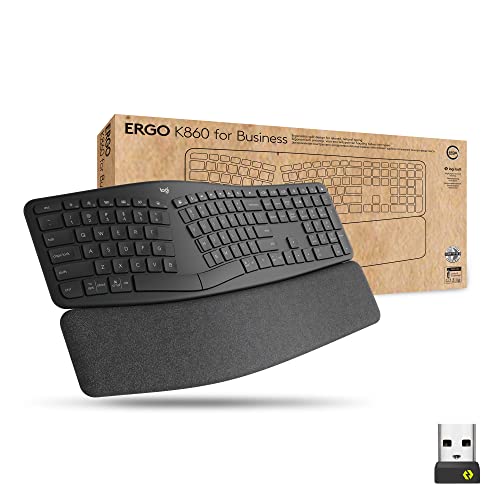
Logitech Ergo K860 Split for Business wireless keyboard, secured Logi Bolt
Business editionLogi Bolt securedSplit layoutWrist rest
Check price on Amazon
Best for: An office user whose employer requires a secured wireless receiver.

The business edition of the Ergo K860 adds a secured Logi Bolt receiver, which uses an encrypted link and is aimed at managed office environments. The keyboard itself is the same curved split design as the standard model.

For an individual home user, the extra security matters little, and the standard K860 is a better value. Compared with the standard model, it costs more and gives corporate IT teams the tools they want. Next to the Perixx, it is wireless and more polished. It is the right choice if your employer specifies business-grade devices.

Care is the same as the K860: wipe the wrist rest, keep the receiver plugged in and replace batteries on schedule.

What works

  • Secured Logi Bolt link meets managed office requirements
  • Same curved split frame as the standard K860
  • Wrist rest supports a neutral wrist angle
  • Wireless connection suits a clean desk

Watch out for

  • Costs more than the standard K860 for features a home user rarely needs
  • Same large footprint and fixed split angle as the standard model

Specs

Edition
For Business
Connectivity
Secured Logi Bolt
Split
Curved split frame
Rest
Wrist rest included
Cost tier
Upper middle
03
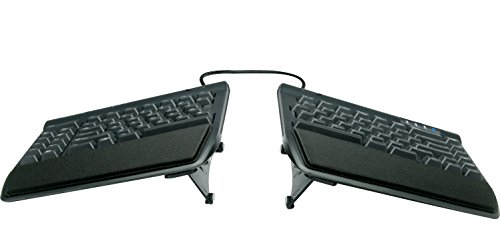
Kinesis Freestyle2 USB-A ergonomic keyboard with VIP3 lifters, 9 inch separation
Two halves9 inch separationVIP3 liftersWired
Check price on Amazon
Best for: A typist who wants full control over separation and tenting angle.

The Freestyle2 is two keyboard halves joined by a flexible cable that lets you move them apart by up to 9 inches. With the VIP3 lifters fitted, each half tilts into a tented position, with the thumbs lower than the pinkies, which reduces forearm rotation.

This is the most adjustable board here and the one with the longest track record among ergonomists. Compared with the Ergo K860, it offers real separation and tenting, but it takes more desk space and needs a setup session. Next to the Kinesis Freestyle Edge, it has a quieter, softer key feel, and it is wired.

In year three, the wear is minimal. Keep the halves clean and check the cable joint. The key action is a soft membrane, which some typists find mushy compared with mechanical switches.

What works

  • Halves move apart up to 9 inches to match shoulder width
  • VIP3 lifters add tenting to straighten the forearm
  • Long track record in ergonomic workplaces
  • Wired USB connection avoids batteries and pairing

Watch out for

  • Membrane key feel is softer than mechanical switches
  • Two halves need more desk space and some setup

Specs

Layout
Two separate halves
Separation
Up to 9 inches
Tenting
VIP3 lifters add tenting
Connection
Wired USB-A
Platform
PC version
04
Kinesis Freestyle Edge RGB Plus split mechanical keyboard, hotswap linear switches
MechanicalHotswap switchesRGBDetachable palm pads
Check price on Amazon
Best for: A typist who wants a split mechanical board with switch choice.

The Freestyle Edge combines a fully split design with mechanical switches. The hotswap sockets let you change switches without soldering, which suits a typist who wants to try different feels.

It keeps the adjustability of the Freestyle2, with the two halves positioned as you like, and adds RGB lighting and detachable palm pads. Compared with the Freestyle2, it has a crisper mechanical feel, and next to the Corne, it keeps a familiar number row and layout. It is the premium choice for a typist who wants a mechanical board with an ergonomic frame.

Switches can be replaced as they wear, and the keycaps can be cleaned or swapped. The cost is the highest here, so weigh it against the Freestyle2.

What works

  • Hotswap sockets let you change switches without soldering
  • Mechanical switches give a crisp, consistent key feel
  • Halves position freely to match shoulders and tenting
  • Detachable palm pads support the hands during rests

Watch out for

  • Highest cost tier among the split boards in this group
  • Mechanical switches are louder in a shared office

Specs

Switches
Hotswap linear mechanical
Lighting
RGB
Split
Two separate halves
Rests
Detachable palm pads
Cost tier
Highest in this group
05
Perixx PERIBOARD-512B wired ergonomic split keyboard with wrist rest
Wired USBSplit frameWrist restNatural typing
Check price on Amazon
Best for: A first split keyboard at a low cost with a wired connection.

The Perixx PERIBOARD-512B is a wired split keyboard with a curved frame and a wrist rest, in the same style as the Ergo K860 at a lower cost tier. It is an easy way to try the split shape.

A wired USB connection means no batteries and no pairing, and the full-size layout includes a number pad. Compared with the Logitech board, it is less refined in key feel and build, and next to the Arteck, it has a longer record. It suits a desktop user who wants a split frame for a low cost.

Keep the wrist rest clean and check the cable for wear. If you do not like the key feel, the return window is the time to find out. Plan to use it as your only keyboard for at least a week inside that window, since a quick test on day one tells you little about whether the split angle will feel natural once your hands have settled into it.

What works

  • Low cost tier for a curved split frame with a wrist rest
  • Wired connection needs no batteries or pairing
  • Full-size layout keeps the number pad and familiar keys
  • Natural typing angle reduces wrist twist

Watch out for

  • Key feel and build are less refined than the Logitech boards
  • Fixed split angle with no adjustability

Specs

Connection
Wired USB
Split
Curved split frame
Rest
Included wrist rest
Layout
Full-size
Cost tier
Low
06
SZRKBD Corne 4x6 wired ergonomic mechanical keyboard, 60 percent ortholinear
Corne layoutOrtholinearMechanicalKnobs
Check price on Amazon
Best for: An enthusiast who wants a compact column-staggered layout and will learn layers.

The Corne is a compact split keyboard with keys in straight columns instead of the staggered rows of a standard board. Columns match how fingers move, and the thumb keys take on functions like space and shift.

It is a radical layout with no number row or function row on the main layer, so you use layers to reach them. Compared with the Freestyle Edge, it is much smaller but far harder to learn, and next to the Ergo K860, it demands real relearning. It rewards a patient typist who values minimal finger travel.

Expect a few weeks to reach your old speed. Keep a reference sheet of the layers and be ready to remap keys in firmware. Most boards of this kind use open firmware that you configure through a free tool on your computer, so you can move the most used keys under the strongest fingers and the thumbs, and that tuning is part of the appeal for people who enjoy shaping a tool to their own hands. It is a poor choice for a casual user.

What works

  • Column layout reduces lateral finger travel and strain
  • Compact size leaves room for the mouse and shoulder width
  • Mechanical switches give a crisp key feel
  • Thumb keys share the workload with the fingers

Watch out for

  • Steep learning curve with layers and no dedicated number row
  • Not suited to quick switching between machines or shared desks

Specs

Layout
Corne 4x6 ortholinear
Size
Compact 60 percent
Switches
Mechanical
Extras
Rotary knobs
Connection
Wired

Spec decoder

What the listing measurements really mean

The numbers brands lead with, translated into what they tell you about fit, comfort and wear at home.

Split angle

The angle at which the two halves of the key frame angle away from each other. It reduces the inward turn of the wrists.

Watch forThe K860 and Perixx use a fixed angle, and the Freestyle2 lets you set it.

Tenting

Raising the inner edge of each half so the hands tilt toward a handshake position. It reduces forearm rotation.

Watch forThe Freestyle2 needs the VIP3 lifters, and the K860 does not tent the same way.

Ortholinear

A layout with keys in straight vertical columns and no row stagger. It matches natural finger motion.

Watch forThe Corne uses it, and it makes touch typing relearning necessary.

Hotswap

Switch sockets that let you pull and replace key switches without soldering. They let you change the key feel.

Watch forThe Freestyle Edge lists hotswap linear switches, and most membrane boards offer nothing similar.

Negative tilt

Tilting the board so that the far edge is lower than the near edge. It keeps the wrist flatter.

Watch forThe K860 offers it through its feet, which helps if your desk is high.

Methodology

How We Evaluated These Split Ergonomic Keyboards

Adoption ease

We compared how much relearning each layout needs. The K860 and Perixx keep the standard layout, and the Corne demands weeks. This is based on the spec sheet and patterns in owner feedback.

Adjustability

We looked at separation, tenting and tilt. The Kinesis boards lead for fit. A fixed split suits a smaller range of body shapes.

Key feel and noise

We compared membrane and mechanical designs. The Freestyle2 is quiet, and the Edge and Corne are crisper. Feel is personal, so return policy counted.

Connectivity and desk fit

We looked at wired and wireless options and footprint. The K860 offers multi-device wireless, and the Corne leaves desk room. Wired boards need no batteries.

Honest limits

We noted that a split keyboard does not cure pain and that posture and desk height matter. We ranked on usability and fit, not on medical claims.

Decision guide

How to Choose the Right Split Ergonomic Keyboards

By Typing Habit

SituationPickWhy
Want minimal relearningLogitech Ergo K860Standard layout with a gentle split
Managed office deviceLogitech Ergo K860 for BusinessSecured receiver
Want full adjustabilityKinesis Freestyle2Separation and tenting
Want mechanical feelKinesis Freestyle Edge RGB PlusHotswap switches and a split frame
Enthusiast, small footprintSZRKBD CorneCompact column layout

By Budget

SituationPickWhy
Lowest cost tierPerixx PERIBOARD-512BWired curved split
Low, compact enthusiastSZRKBD CorneColumn layout at a modest tier
Middle, adjustableKinesis Freestyle2Two halves and lifters
Upper middle, wirelessLogitech Ergo K860Polished and wireless
Top tier, mechanicalKinesis Freestyle Edge RGB PlusMechanical and hotswap

Fixed Split vs Fully Split

Fixed split

The K860 and Perixx join the halves in one frame. They are easy to adopt, but the angle and width cannot change.

Fully split

The Kinesis boards and Corne separate the halves. You place them at shoulder width, but you need space and setup time.

Choose a fixed split for quick adoption, and a fully split design if you have broad shoulders or want tenting.

By Workspace

SituationPickWhy
Shared open officeKinesis Freestyle2Quiet membrane keys
Home desktop, big deskLogitech Ergo K860Full-size and wireless
Small deskSZRKBD CorneCompact footprint
Laptop on a dockLogitech Ergo K860Multi-device wireless
Gaming or hobby useKinesis Freestyle Edge RGB PlusMechanical switches

For Split Keyboards Specifically

Look for

A split angle you can live with, a key feel you enjoy, a layout you can learn and a desk that fits it. Give it two to four weeks before judging.

In this comparison

The K860 is the easiest to adopt, the Freestyle2 is the most adjustable and the Corne is the most radical.

When to Spend More

Spend more if

You type most of the day and want adjustability or a mechanical feel. The Kinesis boards or the K860 earn their price.

Save if

You want to try a split shape. The Perixx or Arteck boards cost little and show if it suits you.

Ownership

Maintenance schedule

The upkeep that decides whether a piece still looks good in year five.

TaskIntervalWhy it matters
Wipe keys and frameWeeklySkin oils and dust build up on keys. A damp cloth with mild cleaner keeps them clean.
Clean the wrist restEvery 1 to 2 weeksPadded rests collect sweat and grime. Wipe with a mild cleaner and let it dry.
Replace batteries or chargeAs indicatedA weak battery causes missed keystrokes. Replace it when the light warns you.
Check cables and jointsEvery few monthsA stressed cable between halves can fail. Keep it from sharp bends.
Review desk and chair heightOccasionallyA keyboard cannot fix a poor setup. Keep elbows near 90 degrees and wrists straight.

FAQ

Frequently Asked Questions

How long does it take to adapt to a split keyboard?

A curved split like the K860 takes a few days, and a fully split board a week or two. A column layout like the Corne can take a month. During the switch, many typists keep their old keyboard on hand for urgent work and practice on the new one for short daily sessions with an online typing tutor, because speed drops sharply at first and the frustration of missing a deadline is the most common reason people give up on a split board in the first week.

Will a split keyboard cure wrist pain?

Not by itself. It may reduce strain for some people, and it works best with good posture and breaks. See a doctor for persistent pain.

Is tenting necessary?

Not for everyone. It reduces forearm rotation, and many people like it, but a gentle split with a flat wrist works for many typists.

Can I use a split keyboard with a laptop?

Yes, with USB or Bluetooth. A wireless board like the K860 is easiest, and a wired board needs a USB port or hub.

Are mechanical switches better for ergonomics?

Not necessarily. Lighter switches reduce finger force, but feel is personal. Choose by comfort and noise. Linear switches feel smooth and quiet-ish, tactile switches give a small bump that some typists use to avoid bottoming out, and clicky switches are loud enough to bother a coworker, so a shared office is usually the one place where the switch type matters more than the board shape.

What is the difference between split and curved?

A split separates the halves, while a curved frame bends the layout in one piece. Some boards, like the K860, combine a gentle split and curve.

Bottom line

The short version

Browse more split ergonomic keyboardson Amazon →
Brianna Cole, Lead Product Editor

About the author

Brianna Cole

Lead Product Editor, SenseiReview

Brianna Cole leads SenseiReview's buying guides, turning published specifications, documentation and owner feedback patterns into clear verdicts across home, tech, fitness, outdoor and DIY products.

More from Brianna →

Keep reading

Related guides