
Amazon affiliate links - we earn a commission.Affiliate disclosure

Buying guide · 12 min read · Updated 2026-11-26

Best Tablet Stands Under $25 (2026)

Five tablet stands under $25 compared on stability, height range, tilt and case fit, with picks for desk, bed, floor and travel use.

Brianna Cole, Lead Product EditorBy Brianna ColeLead Product Editor5 picks comparedSpec-sheet verified
Best Tablet Stands Under $25

At a glance

Our top picks

A tablet stand looks like the simplest accessory you can buy, yet it decides whether a tablet becomes a useful second screen or a slab you keep propping on a pile of books. The difference comes down to a few mechanical details: how wide the base is, how the joints hold friction, and how much weight the arm is really built to carry.

A spending cap narrows the field in a useful way. At this level you are choosing between a handful of proven mechanical designs, not chasing features, so the job is matching the design to the place you actually use the tablet. Prices move, and the cap reflects listing prices when the guide was updated.

Before you buy

6 Criteria to Look For Before Buying a Tablet Stand Under $25

  1. 01

    Weight rating including the case

    A stand's capacity has to cover the tablet plus its case, because a rugged case can add half a pound or more. Budget stands often cope with a roughly 1 pound slab, while a 12.9 inch tablet in a case can pass 2 pounds. The usual mistake is buying a phone-class stand and expecting it to carry a large tablet. In this lineup the SAMHOUSING floor stand and the XXZU tripod are the ones that accept screens up to 13 inches.

  2. 02

    Base footprint and stability

    Tipping resistance comes from base width and base weight, not from a rating on the box. A base under about 5 inches across struggles with a large tablet in portrait mode. The COOPER TabHolder uses a weighted metal base for exactly this reason, while the XXZU spreads three legs. Buyers often look at the arm and forget the base, which is the part that actually prevents a fall.

  3. 03

    Tilt and height range

    Typing wants a near-flat angle, drawing wants a gentle slope, and video calls want near upright. The COOPER lists 270 degrees of tilt and the Lamicall foldable stand uses two hinges for tilt and height. Floor stands change height instead, with the SAMHOUSING covering 27.5 to 53 inches. Pick the range you will use daily, not the longest range on a listing.

  4. 04

    Mount type: desk, clamp or floor

    A weighted desk stand suits a desk that never changes, a clamp suits a headboard or table edge, and a floor stand frees you from furniture altogether. Clamps need a flat edge of suitable thickness and cannot grip a rounded or very thick slab. The Lamicall gooseneck uses a wide clamp base to cover varied thickness, but it will bounce more than a base-weighted stand.

  5. 05

    Case and screen size compatibility

    Listing size ranges are measured on bare devices, so a thick case reduces the usable opening. Check the maximum clamp width and the side button positions on your tablet. The SAMHOUSING lists 4.7 to 13 inches and the COOPER lists 7 to 10 inches, so a 12.9 inch tablet is outside the COOPER range. A snug fit with a case is more important than a universal claim.

  6. 06

    Joint quality and long-term hold

    The parts that fail on a budget stand are hinges, ball heads and sliding tubes, because they depend on friction. A friction joint that holds today can drift after months of adjustment, so look for a stand with a tension screw you can tighten. A foldable stand like the Lamicall has more joints than a fixed post, which is a convenience trade for portability. Metal joints hold friction longer than plastic ones.

Detailed reviews

The 5 best tablet stands under $25, explained

01
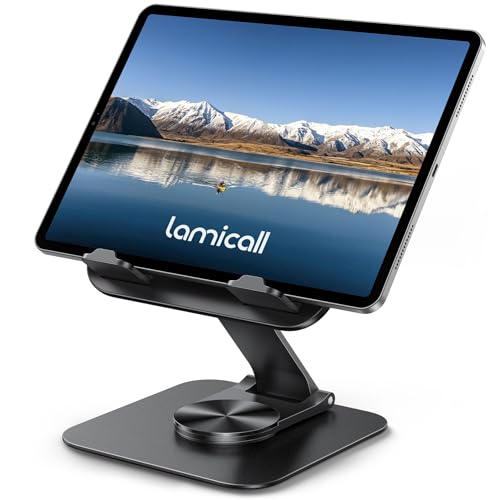
Lamicall Ultra-Slim Foldable Desk Tablet Stand, 360 Rotation
Folds to 0.59 in360 degree baseTwo-hinge tiltMetal build
Check price on Amazon
Best for: Commuters and desk users who want one stand that packs flat and rotates to share the screen.

This is a hinged metal desk stand that collapses almost flat, and that single trait explains most of its design. Two adjustable hinges let you set both the tilt of the tablet and the height of the cradle, while a rotating metal base turns the whole screen through a full 360 degrees. The listing sets it at 0.59 inches thick when folded, which means it slides into a sleeve or a laptop bag next to the tablet itself.

Compared with the COOPER TabHolder below, the Lamicall gives up a weighted base and the telescoping neck in exchange for portability. The COOPER is steadier on a wobbly table, but it is a lump you leave on the desk, while this stand packs flat in a bag side pocket. Against the XXZU tripod it is far shorter, so it suits a desk, a kitchen counter or a tray table rather than standing-height viewing. The 360 degree base is a real advantage for sharing a screen across a table, which the fixed-direction stands do not allow.

Expect to adjust the two hinges every so often, because a hinge is the part that loosens first on any folding stand. The metal base gives enough counterweight for a tablet of ordinary size, although a very large tablet in a thick case will lean the stand forward at steep angles. Wipe the rubber contact points occasionally, since dust on them is what makes a stand creep on a polished desk. For daily desk and travel use it is the most flexible stand in this price band.

What works

  • Folds to 0.59 inches for bags
  • Full 360 degree rotating metal base
  • Tilt and height set independently
  • Metal construction feels solid at this tier

Watch out for

  • Hinges need occasional tightening over time
  • Short reach, not for standing-height use
  • Large cased tablets lean it forward at low angles

Specs

Type
Foldable desk stand
Folded thickness
0.59 in
Base rotation
360 degrees
Adjustment
Two hinges, tilt and height
Base material
Metal
02
COOPER TabHolder Weighted-Base Tablet Stand, 270 Degree Tilt
Weighted metal base7 to 10 in telescoping270 degree tiltDesk stand
Check price on Amazon
Best for: Desk workers who leave the tablet in one spot and want a steady, eye-level screen.

The COOPER TabHolder is built around a weighted metal base and a neck that telescopes from 7 to 10 inches, which raises the tablet toward eye level so you stop craning your neck. The listing describes a 270 degree tilt, so the cradle can lie nearly flat for typing or drawing, or stand upright for video calls. The weight in the base is the point of the design, because it keeps the stand from tipping when you tap the screen.

The tradeoff against the Lamicall foldable stand is size. The COOPER does not fold flat, so it is a permanent desk resident rather than a travel companion, but in exchange it stays put on a bumpy table. It also tends to be the lowest cost option for a neck that actually extends, which is why it earns the value badge. Compared with the Lamicall gooseneck clamp, it needs no table edge, so it works on a glass desk or a thick wooden slab that a clamp cannot grip.

The telescoping neck is a sliding tube, so keep the tube clean and dry; dust in a sliding joint is what makes height settings creep downward. Check the clamp pads on the cradle if you switch cases, since a thick rubberized case can exceed the opening. This is the stand to buy if one tablet lives permanently at one desk and stability matters more than packing flat.

What works

  • Weighted base resists tipping on taps
  • Neck telescopes from 7 to 10 inches
  • 270 degree tilt covers typing to upright
  • Works on any flat surface, no clamp needed

Watch out for

  • Does not fold, poor for travel bags
  • Fixed footprint takes real desk space
  • Cradle opening limits very thick cases

Specs

Type
Weighted desk stand
Telescoping range
7 to 10 in neck
Tilt range
270 degrees
Base
Weighted metal
Cheapest tier
Second lowest in this guide
03
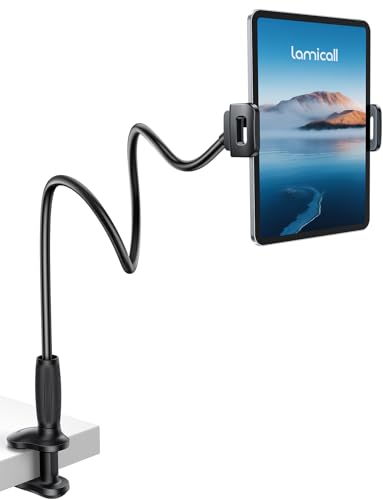
Lamicall Gooseneck Tablet Holder with Wide Clamp Base
Flexible gooseneckWide clamp base360 degree headBed or desk mount
Check price on Amazon
Best for: Bed and couch readers, or anyone mounting a tablet to a desk edge.

A gooseneck clamp solves a problem that a standing stand cannot: it gets the tablet off your lap and floats it over a bed, a couch arm or a desk edge. The tapered flexible arm bends into any position without tools, and the clamp head rotates 360 degrees so you can swing between portrait and landscape. The enlarged clamp base is designed to grip flat surfaces of varied thickness, which matters because most headboards and nightstands differ.

The honest tradeoff with this design is bounce. Compared with the COOPER weighted base, a gooseneck will wobble if you tap or swipe heavily, because the arm is a long flexible lever. It is therefore best for watching video, reading or following a recipe, and a poor choice for drawing or typing on the glass. A shorter bend in the arm reduces the wobble, and looping the arm in a gentle S shape adds stiffness, so position it close to the clamp rather than at full reach.

After a few months of use, check that the clamp screw has not backed off and that the arm still holds its shape; a gooseneck that sags has been overloaded, and a plastic clamp can crack if you over-tighten it. Padding the clamp jaws with a thin cloth protects furniture finishes. If you read in bed, this is the stand that actually fits that use.

What works

  • Clamps to beds, desks and table edges
  • Tool-free bending to any angle
  • 360 degree head swaps portrait and landscape
  • Wide base grips varied edge thickness

Watch out for

  • Arm bounces when you tap the screen
  • Needs an edge to clamp, not for glass slabs
  • Heavy tablets can cause arm droop over time

Specs

Type
Gooseneck clamp
Mounting
Clamp to flat edges
Clamp head
360 degree rotation
Arm
Tapered flexible gooseneck
Use
Bed, desk, table
04
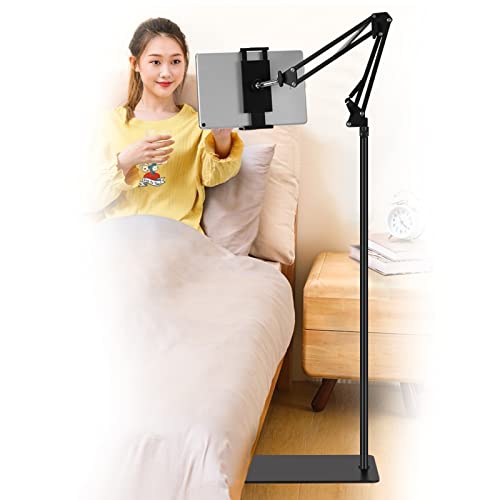
SAMHOUSING Adjustable Floor Tablet Stand, 27.5 to 53 in
27.5 to 53 in height4.7 to 13 in screens360 degree headTool-free setup
Check price on Amazon
Best for: People who want a free-standing screen by a bed, recliner or kitchen corner.

This metal floor stand raises a screen anywhere between 27.5 and 53 inches, which covers a seated bed-side view at the low end and a standing view at the high end. The holder accepts screens from 4.7 to 13 inches, so the same stand carries a phone for video calls or a large tablet for a recipe or workout. A rotating head turns the screen between portrait and landscape, and assembly needs no tools according to the listing.

Against the XXZU tripod below, this is the simpler and shorter option: a single post on a base rather than three legs, and a 53 inch ceiling rather than 72. That makes it better for a bedside or a kitchen corner and worse for a music stand or a presentation to standing viewers. The downside of a tall single post is leverage, so keep the base clear of foot traffic and avoid the full 53 inches with a 13 inch tablet.

Ownership is mostly a matter of tightening the height clamp every few weeks and keeping the base on a flat floor. Rubber feet protect hardwood, and the post can be collapsed for a closet. If you want a hands-free screen next to a bed or recliner without a table, this stand is the practical fit.

What works

  • Height from 27.5 to 53 inches
  • Holds phones and tablets up to 13 inches
  • No tools required for assembly
  • Rotating head switches orientation quickly

Watch out for

  • Tall post leans if overloaded at full height
  • Base footprint takes floor space
  • Not as portable as the desk folding models

Specs

Type
Floor stand
Height range
27.5 to 53 in
Screen range
4.7 to 13 in
Head
360 degree rotation
Assembly
Tool-free
05
XXZU 72 in Aluminum Tripod Tablet Floor Stand, Ball Head
33 to 72 in heightAluminum tripod3 angle levels360 degree ball head
Check price on Amazon
Best for: Presenters, musicians and standing-height viewers who need a tall stable stand.

The XXZU is an aluminum tripod stand that extends from 33.07 to 72 inches with flip locks, so it works for a seated reader, a standing presenter and a musician reading sheet music. A ball head turns through 360 degrees and allows vertical or horizontal use, and a special angle lock sets three levels of leg spread to improve stability as height increases. The three-leg footprint is wider than a single-post base, which is why a tripod is the safer choice at high extension.

Compared with the SAMHOUSING single post, the XXZU reaches 19 inches higher and spreads its weight over three legs, so it is the one to pick for presentations, video calls at standing height or reading music. The cost is bulk: with the legs open it needs a floor circle of several feet, and it is the least desk friendly stand here. Compared with the Lamicall foldable stand it is closer to camera equipment than a desk accessory.

Flip locks wear with use, so check that each leg lock still clicks firmly and tighten the ball head before loading a heavy tablet. Keep the leg spread at the widest setting when the neck is fully extended. If you need a screen at standing height more than a screen on a desk, this is the stand to choose.

What works

  • Extends from 33 to 72 inches
  • Aluminum tripod resists tipping when tall
  • Three angle lock levels for stability
  • Ball head turns portrait or landscape

Watch out for

  • Wide leg spread needs floor space
  • Overkill for a desk or a bed
  • Flip locks need checking over time

Specs

Type
Tripod floor stand
Height range
33.07 to 72 in
Material
Aluminum
Angle lock
3 levels
Head
360 degree ball head

Spec decoder

What the listing measurements really mean

The numbers brands lead with, translated into what they tell you about fit, comfort and wear at home.

Screen size range

The range of diagonal sizes the cradle or clamp can grip, usually measured on a bare device. A case adds width and thickness that can push a tablet outside the range.

Watch forThe COOPER's 7 to 10 inch range excludes 12.9 inch tablets, while the SAMHOUSING reaches 13 inches.

Height range

The minimum and maximum height of the screen above the base or floor. A wider range gives more positions but a taller stand has more leverage.

Watch forThe XXZU goes from 33.07 to 72 inches, far beyond the SAMHOUSING at 27.5 to 53 inches.

Tilt range

The arc through which the cradle can rotate, from flat to upright. Typing and drawing need the flat end, calls need the upright end.

Watch forThe COOPER lists 270 degrees, which is the widest tilt claim among the desk stands here.

Rotation

How far the head or base turns to switch landscape to portrait or to share the screen. A 360 degree head also allows turning the screen to a viewer across the table.

Watch forThe Lamicall foldable stand rotates its base, while the SAMHOUSING and the XXZU rotate the head.

Folded thickness

How thin the stand packs for a bag. Folding stands trade extra joints for portability.

Watch forThe Lamicall foldable stand lists 0.59 inches, which the weighted COOPER and the floor stands cannot match.

Methodology

How We Evaluated These Tablet Stands Under $25

Stability by design

We evaluated each stand by its base: weighted, clamped, tripod or single post. We compared base footprint and weight against the maximum screen size each listing claims. The XXZU's three-leg design and the COOPER's weighted base score above a single thin post.

Adjustment range

We compared listed height, tilt and rotation against real tasks like typing, reading and video calls. A wide range only counts if the joints can hold it. The SAMHOUSING at 27.5 to 53 inches and the XXZU at 33.07 to 72 inches were credited for reach.

Case and size fit

We read the listed screen range and clamp opening against common tablet sizes with cases. A stand that fits only bare devices lost points. The COOPER range of 7 to 10 inches limits it more than the 4.7 to 13 inch SAMHOUSING.

Ownership and joints

We weighed owner feedback patterns on loosening hinges, clamp cracking and sagging arms, plus whether the design has a tension screw or a plastic clamp. Metal joints and wide clamp bases earned credit. Heavy gooseneck use was marked down.

Portability and value

We looked at packed size and how many places each stand works. The Lamicall foldable stand at 0.59 inches folded leads on portability. Value was judged inside the cap, so cost-per-use mattered more than features.

Decision guide

How to Choose the Right Tablet Stands Under $25

By Where You Use It

SituationPickWhy
Desk that stays putCOOPER TabHolderWeighted base resists tipping
Bag and travelLamicall foldable standFolds to 0.59 inches
Bed or couchLamicall gooseneckClamps to edges, bends freely
Bedside or kitchen floorSAMHOUSING floor stand27.5 to 53 inch post
Standing view or musicXXZU tripodExtends to 72 inches

By Budget

SituationPickWhy
Lowest cost in the guideLamicall foldable standLowest tier and still metal
Low tier with weighted baseCOOPER TabHolderSecond lowest tier
Middle tier floor optionSAMHOUSING floor standMid tier for a floor stand
Upper tier with clampLamicall gooseneckWide clamp base costs more
Top tier for heightXXZU tripodAluminum tripod at the top of the cap

Weighted Base vs Gooseneck Clamp

Weighted base (COOPER)

Stands on any flat surface and stays stable when you tap. It takes desk space and cannot reach over a bed. Best for one fixed station.

Gooseneck clamp (Lamicall)

Floats a screen over a bed or desk edge with tool-free bending. It bounces when tapped and needs an edge to grip. Best for watching and reading.

Choose the COOPER if you tap, type or draw on the screen; choose the Lamicall gooseneck if you mostly watch or read from bed.

By Tablet Size

SituationPickWhy
Small tablet or phoneSAMHOUSING floor standGrips from 4.7 inches
7 to 10 inch tabletCOOPER TabHolderTelescoping range matches
Up to 13 inch tabletSAMHOUSING or XXZUBoth list 13 inch-class capacity
Large tablet in a caseLamicall foldable standMetal base counterweight
Any size at a bedLamicall gooseneckWide clamp holds varied weights

For Bed Reading Specifically

Look for

A clamp base that fits your headboard thickness, a flexible arm that holds position, and a lightweight tablet so the neck does not droop.

In this comparison

The Lamicall gooseneck is the dedicated bed pick, and the SAMHOUSING floor stand is the no-clamp alternative if your headboard has no flat edge.

When to Spend More

Spend more if

You use a large tablet in a heavy case daily, draw on the screen, or need a stand that holds an exact angle for years. Stands above this cap use thicker steel joints and larger bases.

Save if

You read, watch video or follow recipes, because the Lamicall foldable stand or the COOPER already covers those jobs with solid metal.

Ownership

Maintenance schedule

The upkeep that decides whether a piece still looks good in year five.

TaskIntervalWhy it matters
Tighten hinges and ball headsMonthlyFriction joints drift as the metal wears. A small tightening restores the angle hold and prevents the screen from slowly lowering.
Check clamp screw and padsEvery 2 monthsA clamp that loosens lets the tablet fall. Over-tightening can crack a plastic clamp, so snug it firmly but gently.
Wipe the telescoping tubeEvery 3 monthsDust inside a sliding neck makes the height setting creep. A dry cloth keeps the friction consistent.
Inspect rubber feet and padsEvery 3 monthsWorn pads let a stand slide on polished surfaces. Replace or clean them so the base grips again.
Re-check leg locks and height clampsEvery 2 monthsFlip locks and height clamps loosen with repeated use. Test them before loading a heavy tablet at full height.

FAQ

Frequently Asked Questions

Should I choose a weighted base or a clamp stand?

A weighted base like the COOPER suits one fixed desk and stays steady when you tap. A clamp like the Lamicall gooseneck suits a bed or a table edge, but it bounces more.

Is a stand under $25 good enough?

Yes for reading, video and recipes, because those jobs need modest stability. Prices move, and the cap reflects listing prices when the guide was updated, so treat the cap as a ceiling for choosing between designs.

Will these stands hold my tablet in a case?

Often yes, but check the clamp opening against the case thickness and the weight rating against tablet plus case. The SAMHOUSING lists 4.7 to 13 inch screens, while the COOPER lists 7 to 10 inches.

Does a taller stand mean a less stable stand?

Generally yes, because a tall single post adds leverage. The XXZU tripod spreads three legs to counter this, while a post like the SAMHOUSING should not carry a large tablet at full height.

Why does my gooseneck keep drooping?

The arm is probably holding more than it is built for, or the arm has been bent repeatedly. Use a lighter tablet, shorten the reach and bend the arm into a gentle S for more stiffness.

Can I use a floor stand for a phone?

Yes, the SAMHOUSING lists a 4.7 to 13 inch range, so it carries a phone for video calls as well as a tablet. Check that the clamp pads grip a slim phone firmly.

Bottom line

The short version

Browse more tablet stands under $25on Amazon →
Brianna Cole, Lead Product Editor

About the author

Brianna Cole

Lead Product Editor, SenseiReview

Brianna Cole leads SenseiReview's buying guides, turning published specifications, documentation and owner feedback patterns into clear verdicts across home, tech, fitness, outdoor and DIY products.

More from Brianna →

Keep reading

Related guides