
Amazon affiliate links - we earn a commission.Affiliate disclosure

Buying guide · 12 min read · Updated 2026-11-21

Best USB-C Cables for Fast Charging (2026)

Six USB-C to USB-C cables compared on 60W, 100W and 240W ratings, e-marker chips, length, jackets and data speed, with honest notes on what the charger decides.

Brianna Cole, Lead Product EditorBy Brianna ColeLead Product Editor6 picks comparedSpec-sheet verified
Best USB-C Cables for Fast Charging

At a glance

Our top picks

Side by side

Spec comparison

PiecePower ratingCountLengthPrice positionJacket
Anker USB C to USB C Cable 100W Fast Charging 2-Pack 6 ftBest OverallAnker USB C to USB C Cable 100W Fast Charging 2-Pack 6 ftUp to 100 W2 cables6 ft eachUpper-middle of the groupn/a
Anker USB C to USB C Cable 60W Fast Charging 2-Pack 6 ft NylonBest ValueAnker USB C to USB C Cable 60W Fast Charging 2-Pack 6 ft NylonUp to 60 W2 cables6 ft eachLowest in the groupReinforced nylon
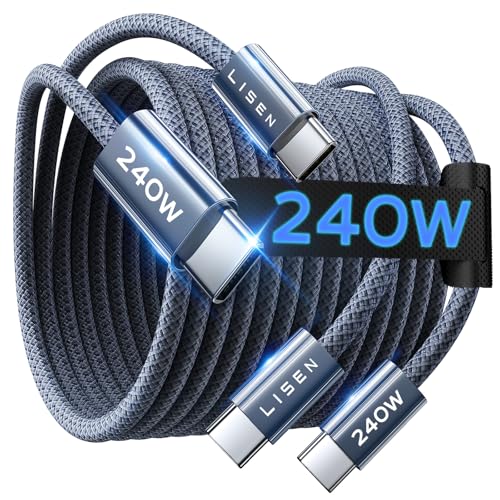
LISEN USB C to USB C Cable 240W Fast Charging 2-Pack 6.6 ftBest 240W PairLISEN USB C to USB C Cable 240W Fast Charging 2-Pack 6.6 ftUp to 240 W2 cables6.6 ft eachLower-middle of the groupn/a
INIU 240W USB C to USB C Cable Nylon Braided with LED IndicatorBest IndicatorINIU 240W USB C to USB C Cable Nylon Braided with LED IndicatorUp to 240 Wn/an/aLower-middle of the groupNylon braided
LISEN 10FT USB C Cable 240W Fast Charging Soft Silicone with E-MarkerBest Long CableLISEN 10FT USB C Cable 240W Fast Charging Soft Silicone with E-MarkerUp to 240 W, PD 3.1 EPRn/a10 ftMiddle of the groupSoft silicone, 6 mm thick
LISEN USB C to USB C Cable 60W 5-Pack PD 3.0 QC 4.0Best Multi-PackLISEN USB C to USB C Cable 60W 5-Pack PD 3.0 QC 4.0Up to 60 W (20 V at 3 A)5 cablesn/aLower-middle of the groupn/a

A USB-C cable looks the same from the outside whether it can carry a trickle or a laptop-sized load. The difference sits inside the plug, in an e-marker chip and in the thickness of the conductors, and it decides whether a laptop charges at full speed or crawls.

This guide compares USB-C to USB-C cables on power rating, data speed, length, jacket construction and the claims on each listing. We also explain why the charger and device negotiate the speed, so you can choose a cable that fits your gear without paying for power you will never use.

Before you buy

6 Criteria to Look For Before Buying an USB-C Cable for Fast Charging

  1. 01

    Power rating

    60 W cables suit phones, tablets and small laptops, while 100 W and 240 W cables need an e-marker chip and suit larger laptops. The Anker 60W pair, Anker 100W pair and LISEN 240W pair cover those tiers. Pick the rating of your most power-hungry device. A quick way to choose is to find the charger you already own and read its highest port wattage, then buy a cable that meets or beats it. Spending more on the cable than the charger can supply does not speed anything up.

  2. 02

    Charger and device

    The charger and the device negotiate the power, and the cable only sets the ceiling. A 240 W cable on a 30 W charger delivers 30 W. Match your charger to the cable and check what your phone accepts. Cables often come in two or more pack sizes, so check the count in the title when comparing price. Two cables in a pack halve the cost per cable and give you a spare for the car.

  3. 03

    Data speed

    Many charging cables carry only USB 2.0 data at 480 Mbps. They sync slowly and do not carry video. The Anker 100W listing notes no video output. If you need data or monitors, look for a cable rated for faster data. If a laptop dock or monitor connects over the same cable, look for a listing that states video output support, because a charging cable will not carry a display signal. The Anker 100W listing states this limit plainly.

  4. 04

    Length

    A 6 ft cable suits most uses, and the LISEN 10 ft reaches farther. Longer cables lose more power to resistance. Choose the shortest length that works. Pick the length for where the cable lives, not for the longest reach you might need once a year. A cable that is too long tangles and gets damaged.

  5. 05

    Jacket and strain relief

    Braided nylon, as on the Anker and INIU cables, resists abrasion, and soft silicone on the LISEN 10 ft resists tangles. Bend-life claims such as 5,000 or 50,000 are lab figures. Strain relief at the plug matters most. Soft jackets resist kinking and tangles but can attract lint, while braided jackets resist scuffs but can fray at the ends. Look closely at the strain relief rather than the jacket alone.

  6. 06

    Brand and certification

    Cheap unbranded cables may lack proper e-markers and risk damage. Anker is a long-established brand, and LISEN and INIU are newer. Buy from makers that state clear specifications. Be cautious with cables sold under no brand at all, especially at very low prices, since some skip safety components. A named maker with clear specs is the safer path.

Detailed reviews

The 6 best usb-c cables for fast charging, explained

01
Anker USB C to USB C Cable 100W Fast Charging 2-Pack 6 ft
100W2-pack6 ftNylon braided
Check price on Amazon
Best for: Laptop and phone owners who want one trusted 100 W cable for everything.

The Anker 100W two-pack gives you two 6 ft USB-C to USB-C cables rated for up to 100 watts, enough for most laptops and every phone. The listing notes it works with any USB-C device and does not support video output, which is a useful honest disclosure. Anker is a recognized accessory brand with a long record in charging gear.

The tradeoff is that 100 W is a ceiling, not a guarantee: your charger and device decide the actual speed. Data is typically USB 2.0 speed on cables like this, so it is a charging cable first. Compared with the Anker 60W pair, it carries more power for laptops and costs more. It suits anyone with a 65 W or 100 W laptop charger and phones that use the same cables.

Plug the cable fully into both ends and check that the connector sits flush. Retire a cable with a frayed jacket or ends that run hot. Avoid sharp bends at the plug, where cables fail first.

What works

  • 100 W rating covers most laptops and every phone
  • Two 6 ft cables in the pack
  • Recognized brand with long charging experience
  • Honest note that video output is not supported

Watch out for

  • No video output, so it will not drive a monitor
  • Data speed is limited to USB 2.0 level on this type

Specs

Power rating
Up to 100 W
Count
2 cables
Length
6 ft each
Video
Not supported
Price position
Upper-middle of the group
02
Anker USB C to USB C Cable 60W Fast Charging 2-Pack 6 ft Nylon
60W2-pack6 ft5,000 bends
Check price on Amazon
Best for: Phone and tablet owners who want two reliable cables at the lowest cost.

The Anker 60W pair is the lowest-priced option here and covers phones, tablets, earbuds cases and small laptops. The reinforced nylon exterior is rated by the maker for up to 5,000 bends, a lab figure not comparable across brands. It supports USB Power Delivery up to 60 W when paired with a USB-C charger.

The tradeoff is the ceiling. At 60 W it cannot feed a 100 W laptop at full speed, and many models charge slowly on it. Compared with the 100W Anker, it saves money but limits power. It suits phones, tablets and ultrabooks.

Use a charger that matches your device and replace the cable if the jacket frays. Do not twist the plug against a bend. A 6 ft cable is long enough for bedside use but loses a little power over distance.

What works

  • Lowest price position in the lineup
  • Reinforced nylon exterior with a 5,000 bend claim
  • Power Delivery up to 60 W
  • Two 6 ft cables

Watch out for

  • 60 W ceiling limits larger laptops
  • Bend-life figure is a maker claim

Specs

Power rating
Up to 60 W
Count
2 cables
Length
6 ft each
Jacket
Reinforced nylon
Price position
Lowest in the group
03
LISEN USB C to USB C Cable 240W Fast Charging 2-Pack 6.6 ft
240W2-pack6.6 ftUSB-C to C only
Check price on Amazon
Best for: Buyers who want future-proof 240 W headroom in a two-pack.

The LISEN 240W pair gives you two 6.6 ft cables rated for up to 240 watts, with smart protocol matching described by the maker. The listing warns that it connects two USB-C ports and will not fit a USB-A port, which is the honest note buyers need. A 240 W rating means the cable can carry the current if the charger and device ask for it.

The tradeoff is that few devices use 240 W, and a 240 W cable on a 30 W charger still delivers 30 W. A newer, lesser-known brand also gives less long-term track record than Anker. Compared with the Anker 100W, it offers more headroom for future gear at a slightly lower price position. It suits owners of high-power gaming laptops or buyers who want future-proof cables.

Check your charger's wattage before buying and confirm that the device supports the rating. Retire any cable with a loose plug. Keep the ends from bending sharply.

What works

  • 240 W rating gives headroom for high-power laptops
  • Two 6.6 ft cables
  • Maker notes it is USB-C to C only
  • Lower-middle price position for a 240 W pair

Watch out for

  • Few devices use more than 100 W
  • Newer brand with less long-term track record

Specs

Power rating
Up to 240 W
Count
2 cables
Length
6.6 ft each
Type
USB-C to USB-C only
Price position
Lower-middle of the group
04
INIU 240W USB C to USB C Cable Nylon Braided with LED Indicator
240WBraided nylonLED indicatorData cable
Check price on Amazon
Best for: Users who want an LED power indicator on a braided 240 W cable.

The INIU 240W cable adds an LED indicator to a braided nylon jacket, which shows when power is flowing. The maker markets it as the fastest charging cable and claims it can take an iPhone from 20 percent far quicker, which depends entirely on the charger and phone. INIU notes millions of global users.

The tradeoff is marketing language. Fast claims depend on your charger, and LED indicators do not charge faster. Compared with the LISEN pair, it is a single cable with an indicator. It suits people who like feedback on whether a cable is powering the device.

Use a matching charger and check the plug fit. Replace the cable if the jacket frays or the plug runs hot. Avoid yanking by the cord.

What works

  • LED indicator shows power flow
  • Braided nylon jacket resists abrasion
  • 240 W rating supports high-power devices
  • Lower-middle price position

Watch out for

  • Speed claims depend on charger and device
  • LED adds no charging benefit

Specs

Power rating
Up to 240 W
Jacket
Nylon braided
Indicator
LED
Data
Data transfer, speed per maker
Price position
Lower-middle of the group
05
LISEN 10FT USB C Cable 240W Fast Charging Soft Silicone with E-Marker
10 ft240WDual E-Marker50,000 bends
Check price on Amazon
Best for: Couch, bedside and desk setups where the outlet is far away.

The LISEN 10 ft cable is a long 240 W option with dual E-Marker 3.1 chips, which tell the charger the cable can carry high current, and a soft silicone jacket that is 6 mm thick. The maker cites a bend life of 50,000 and says it supports PD 3.1 EPR and QC 4.0 fast charging.

The tradeoff is length. Long cables lose more power to resistance, and a thick cable is stiffer to coil and store. Compared with the 6 ft options, it reaches across a room but costs more. It suits couch, bedside and desk setups where the outlet is far.

Coil it loosely. Keep it out of door hinges and under chair wheels. Retire it if the jacket splits near the plug.

What works

  • 10 ft length reaches distant outlets
  • Dual E-Marker 3.1 chips for 240 W
  • Soft silicone jacket resists tangles
  • PD 3.1 EPR support for high-power devices

Watch out for

  • Thick, stiff cable is harder to coil
  • Long length loses more power than a 6 ft cable

Specs

Length
10 ft
Power rating
Up to 240 W, PD 3.1 EPR
Chips
Dual E-Marker 3.1
Jacket
Soft silicone, 6 mm thick
Price position
Middle of the group
06
LISEN USB C to USB C Cable 60W 5-Pack PD 3.0 QC 4.0
60W5-packPD 3.0QC 4.0
Check price on Amazon
Best for: Households that need five cables for rooms, cars and bags.

The LISEN 60W five-pack supports PD 3.0, QC 3.0 and QC 4.0 fast charging up to 60 W at 20 V and 3 A. Five cables in one purchase suit a house with several chargers, a car, a bag and an office. It is a USB-C to USB-C cable, not a USB-A cable.

The tradeoff is power and build detail. 60 W is enough for phones and tablets but not for large laptops, and the listing gives less detail on strain relief than the Anker pair. Compared with the Anker 60W two-pack, it gives more cables for similar money. It suits families that need many cables to cover rooms and cars.

Label the cables so you know which is which. Keep one for the car and one in a bag. Replace any cable with a frayed jacket.

What works

  • Five cables cover several rooms and devices
  • Supports PD 3.0, QC 3.0 and QC 4.0 up to 60 W
  • USB-C to USB-C works with most modern chargers
  • Lower-middle price position for a multi-pack

Watch out for

  • 60 W ceiling limits larger laptops
  • Less build detail than the Anker cables

Specs

Power rating
Up to 60 W (20 V at 3 A)
Count
5 cables
Protocols
PD 3.0, QC 3.0, QC 4.0
Type
USB-C to USB-C
Price position
Lower-middle of the group

Spec decoder

What the listing measurements really mean

The numbers brands lead with, translated into what they tell you about fit, comfort and wear at home.

Watts (W)

The maximum power a cable can carry, such as 60, 100 or 240 W.

Watch forThe charger and device set the actual speed. Read the charger label for its top port rating.

E-marker chip

A chip inside high-power cables that tells the charger the cable can carry more than 60 W.

Watch forCheap cables may skip it. Check the listing for video support if you need a display.

PD 3.1 EPR

USB Power Delivery 3.1 Extended Power Range, the standard for up to 240 W at 48 V.

Watch forFew devices use this level. Compare cable thickness with its rating.

USB 2.0 data

A data speed of 480 Mbps, common on charging cables.

Watch forSlow for large file transfers. Treat very high cycle claims as marketing.

Bend lifespan

A maker's lab figure for how many bends a cable survives, such as 5,000 or 50,000.

Watch forNot comparable between brands. Look for the e-marker mention on any 100 W or 240 W cable.

Methodology

How We Evaluated These USB-C Cables for Fast Charging

Specification review

We compared published wattage ratings, lengths, jackets and data notes. We read each listing for e-marker and protocol details. We set the Anker 100W against the LISEN 240W pair. We also compared how clearly each listing states limits such as video support.

Owner feedback patterns

We looked at recurring themes in owner feedback such as frayed jackets, loose plugs and slow charging. Single complaints were set aside. We did not use star ratings. We also noted whether the pack count changed the value.

Design approach

We considered how each cable is built, from braided nylon to soft silicone, and how each is marked for power. We also noted pack counts. We also considered how each jacket is likely to wear.

Value and price position

We ordered the cables by relative price tier and asked what each step up adds. We did not quote prices. We also kept in mind that charger choice matters as much as cable choice.

What we did not do

We did not charge devices or measure power with these cables. Scores are editorial judgments built on published information. Speed and bend-life statements remain makers' claims. We also avoided drawing conclusions from slogans.

Decision guide

How to Choose the Right USB-C Cables for Fast Charging

By Device Power

SituationPickWhy
Phone and tabletAnker 60W pair60 W is enough
Laptop up to 100 WAnker 100W pair100 W rating
High-power laptopLISEN 240W pair240 W headroom
Many devicesLISEN 60W 5-packFive cables

By Budget

SituationPickWhy
Lowest spendAnker 60W pairLowest in the group
Low, many cablesLISEN 60W 5-packFive cables
Lower-middle, 240 WLISEN 240W pairHeadroom
Upper-middle, trustedAnker 100W pairBrand record

60W vs 240W

60W cables

The Anker 60W and LISEN 5-pack are enough for phones, tablets and small laptops.

240W cables

The LISEN pair, INIU and LISEN 10 ft carry more current but only matter for devices that ask for it.

Pick 60 W for phones. Pick 100 W or 240 W only if your laptop or charger needs it.

By Length

SituationPickWhy
Standard deskAnker 100W pair6 ft
Bedside or couchLISEN 10 ft10 ft
Car and bagLISEN 60W 5-packFive cables
Slightly longer than 6 ftLISEN 240W pair6.6 ft

For Phones Specifically

Look for

A cable that matches your phone's charging protocol and a charger that supports it, with a jacket that survives a bag.

In this comparison

Any cable here works, but the Anker 60W pair and LISEN 5-pack cost least for phones.

When to Spend More

Spend more if

You own a laptop that uses 100 W or more, or want a long cable with e-marker chips.

Save if

You mainly charge phones, in which case a 60 W cable pair is enough.

Ownership

Maintenance schedule

The upkeep that decides whether a piece still looks good in year five.

TaskIntervalWhy it matters
Check the plugsEvery few monthsLoose plugs cause slow charging. Retire cables with wobble. Avoid pulling the cable by the cord when unplugging.
Coil looselyEvery useTight coils stress the jacket. A loose loop extends life. Replace any cable that feels loose in the port.
Inspect the jacketEvery few monthsFraying near the plug is the first sign of failure. Replace before it exposes wires. Keep a spare in the bag so a failure does not leave you stranded.
Clean the portsYearlyPocket lint blocks contacts. A wooden toothpick clears it. A soft dry brush also clears dust from the plug.
Match cable to chargerWhen buying chargersA mismatch caps speed. Check wattage on both ends. Label chargers and cables so they stay paired.

FAQ

Frequently Asked Questions

Does a 240W cable charge my phone faster?

No, the phone and charger set the speed. A 240 W cable simply carries what the devices ask for. If your laptop charges slowly, check the charger wattage first, then the cable, because a weak charger is more common than a weak cable.

What is an e-marker chip?

A small chip in high-power cables that tells the charger the cable can carry more than 60 W. If you need to move files quickly, buy a cable that lists a 5, 10 or 20 Gbps data rating, because most charging cables do not carry that speed.

Can I use a USB-A to USB-C cable for fast charging?

Not at laptop wattages. A-to-C cables are limited by the A port, often to about 18 W. A cable that feels hot at the plug is a warning, so stop using it and replace it with a rated one. Normal warmth under load is fine, but heat that is uncomfortable to touch is not.

Do these cables transfer data fast?

Many carry only USB 2.0 data at 480 Mbps. Check the listing if you need faster transfers or video. The same cable works with iPhones with USB-C and Android phones, though each phone sets its own charging limit. A phone never draws more than it is designed for.

How long do USB-C cables last?

Lifespan depends on use. Fraying near the plug is the usual failure point. Wrap the cable around your hand in a loose loop instead of tight coils, and avoid bending it sharply near the plug. These habits do more for lifespan than any jacket.

Is a longer cable slower?

Longer cables lose a little more power to resistance, but a good 10 ft cable works fine for most devices. Do not rely on LED claims to judge speed. A bright light shows power is flowing, not how much.

Bottom line

The short version

Browse more usb-c cables for fast chargingon Amazon →
Brianna Cole, Lead Product Editor

About the author

Brianna Cole

Lead Product Editor, SenseiReview

Brianna Cole leads SenseiReview's buying guides, turning published specifications, documentation and owner feedback patterns into clear verdicts across home, tech, fitness, outdoor and DIY products.

More from Brianna →

Keep reading

Related guides