

Amazon affiliate links - we earn a commission.Affiliate disclosure

Buying guide · 12 min read · Updated 2026-11-21

Best Vertical Mice (2026)

Six vertical ergonomic mice compared: grip angle, hand size fit, sensor DPI, wireless and Bluetooth options, battery and the adjustment period.

Brianna Cole, Lead Product EditorBy Brianna ColeLead Product Editor6 picks comparedSpec-sheet verified
Best Vertical Mice

At a glance

Our top picks

Side by side

Spec comparison

PieceAngleConnectivityPowerCost tierDPI
Logitech Lift vertical ergonomic wireless mouse, Bluetooth or Logi BoltBest OverallLogitech Lift vertical ergonomic wireless mouse, Bluetooth or Logi BoltAbout 57 degreesBluetooth or Logi Bolt receiverAA batteryn/an/a
Logitech MX Vertical wireless ergonomic mouse, multi-deviceBest for Larger HandsLogitech MX Vertical wireless ergonomic mouse, multi-deviceAbout 57 degreesBluetooth and receiver, multi-deviceRechargeable batteryn/an/a
ProtoArc EM11 NL wireless ergonomic vertical mouse, rechargeable, 58 degreeBest Value RechargeableProtoArc EM11 NL wireless ergonomic vertical mouse, rechargeable, 58 degreeAbout 58 degreesWirelessRechargeable batteryLow to middlen/a
UGREEN ergonomic wireless mouse, Bluetooth and 2.4G, quiet clicks, 4000 DPIBest Quiet Budget PickUGREEN ergonomic wireless mouse, Bluetooth and 2.4G, quiet clicks, 4000 DPIn/aBluetooth and 2.4G wirelessn/aLowest in this groupUp to 4000
Anker 2.4G wireless ergonomic vertical mouse, right hand, 800 1200 1600 DPIBest Proven Budget ShapeAnker 2.4G wireless ergonomic vertical mouse, right hand, 800 1200 1600 DPIn/a2.4G wireless USB receivern/aLow800, 1200 and 1600
Anker USB wired vertical mouse, 5 buttons, 1000 and 1600 DPIBest Wired OptionAnker USB wired vertical mouse, 5 buttons, 1000 and 1600 DPIn/an/aUSB, no batteryLow1000 and 1600

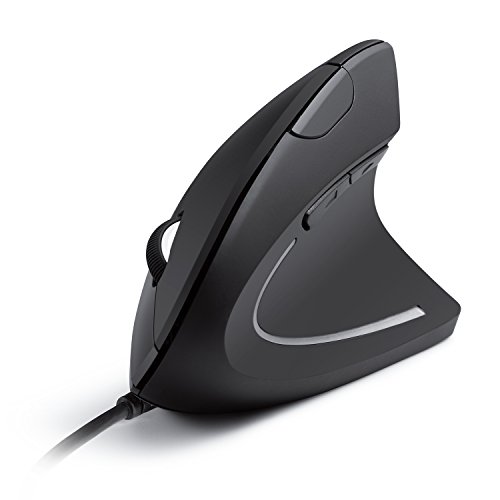
A vertical mouse turns your hand to a handshake position instead of palm-down. That position reduces the twist in the forearm, which many people link to wrist and forearm discomfort during long desk sessions.

A vertical shape is a strong change of habit, and the angle, size and button layout decide whether you stick with it. We evaluated six models from the candidate pool using spec sheets, listing details and patterns in owner feedback, and ranked them by comfort fit, connectivity and daily usability.

Before you buy

6 Criteria to Look For Before Buying a Vertical Mice

  1. 01

    Grip angle and the learning curve

    A vertical mouse tilts the hand between about 50 and 90 degrees, and a steeper angle straightens the forearm more but feels stranger at first. The Logitech Lift at about 57 degrees and the ProtoArc at about 58 are moderate. Most people need one to two weeks to adapt, so choose a gentle angle if you are new to the shape.

  2. 02

    Hand size and fit

    A mouse that is too small makes you grip with the fingertips, and one that is too large strains the thumb. The Lift is made for small to medium hands, and the MX Vertical for medium to large. Measure from the wrist crease to the tip of the middle finger, and read the maker's sizing guide before buying.

  3. 03

    Handedness

    Most vertical mice are right-handed, and left-handed versions are less common. The Anker 2.4G model lists right hand. If you use your left hand, check that a mirrored model exists before you buy, since an ambidextrous vertical design is rare.

  4. 04

    Connectivity and power

    Bluetooth suits laptops with few ports, a 2.4G receiver gives a stable link on a desktop and a wired model never needs charging. Rechargeable batteries, as on the MX Vertical and ProtoArc, avoid disposable cells, while AA models run for months. Multi-device pairing helps if you switch between a laptop and a desktop.

  5. 05

    Sensor and DPI

    DPI sets how far the pointer moves per inch of mouse travel. Most office work is fine at 1000 to 1600, and high figures like 4000 help on large or high-resolution screens. A very high DPI is rarely useful, and the sensor quality matters more than the number.

  6. 06

    Buttons and clicks

    A vertical mouse should have back and forward buttons within thumb reach and a scroll wheel that is easy to turn. Quiet clicks matter in a shared space. Check that the button layout suits the way you use your thumb. On a vertical body the thumb sits low and to the side, so side buttons that are placed too high get missed, and a mouse with a deep thumb groove can make the back and forward buttons awkward to reach, which is worth checking in owner photos before you decide.

Detailed reviews

The 6 best vertical mice, explained

01
Logitech Lift vertical ergonomic wireless mouse, Bluetooth or Logi Bolt
57 degree angleBluetooth and BoltQuiet clicksSmall to medium hands
Check price on Amazon
Best for: A first-time vertical mouse user with a small to medium hand.

The Lift is built for people who want a vertical grip without the steep shape of older designs. It sits at about 57 degrees, which is a moderate tilt, and its body is sized for small to medium hands, so it feels less like a tall fin and more like a compact tool.

The buttons are quiet, a plus in a shared office, and the thumb rest is soft. Connectivity is flexible, with Bluetooth or a Logi Bolt USB receiver. Compared with the MX Vertical, the Lift is smaller and lighter, and next to the ProtoArc, it has a more mature software and support network. It is the easiest first vertical mouse to adapt to.

In year three, the wear points are the thumb rest surface and the battery door. Use a quality AA battery, wipe the base to clear dust from the feet and update the software if you rely on custom buttons. The mouse comes in several colors, so choose by looks and by the hand fit rather than just by price.

What works

  • Moderate angle makes the switch from a flat mouse easier
  • Compact body fits small to medium hands without stretching
  • Quiet clicks suit an office or a shared room
  • Bluetooth or receiver gives flexible connection options

Watch out for

  • Larger hands may find the body too small for long sessions
  • Uses a replaceable AA battery, not a rechargeable cell

Specs

Angle
About 57 degrees
Connectivity
Bluetooth or Logi Bolt receiver
Hand size
Small to medium
Clicks
Quiet
Power
AA battery
02
Logitech MX Vertical wireless ergonomic mouse, multi-device
57 degree angleMulti-deviceRechargeableLarge body
Check price on Amazon
Best for: A heavy desk user with a medium to large hand who works across several devices.

The MX Vertical is the larger, more feature-packed sibling. It is built for medium to large hands, with a tall body that fills the palm and a high-end sensor with several buttons for shortcuts.

It uses a rechargeable battery with USB charging, which suits a heavy user who does not want to buy cells. It can pair with several devices and move content between them, a feature suited to people who work across a laptop and a desktop. Compared with the Lift, it is larger and costs more. Next to the Anker vertical mice, it is a premium unit with deeper software.

Care is simple: charge it when the light warns you, wipe the thumb rest and keep the base clean. The body is large, so it is a poor fit for a small hand or for travel.

What works

  • Larger body fills a medium to large hand without cramping
  • Rechargeable battery avoids buying AA cells
  • Multi-device pairing suits a laptop and desktop workflow
  • Programmable buttons support shortcuts and workflows

Watch out for

  • Too large for a small hand or a travel bag
  • Higher cost tier than the simple vertical mice

Specs

Angle
About 57 degrees
Connectivity
Bluetooth and receiver, multi-device
Power
Rechargeable battery
Body
Larger, full-size hand
Feature
Moves content between 3 devices
03
ProtoArc EM11 NL wireless ergonomic vertical mouse, rechargeable, 58 degree
58 degree angleRechargeableWirelessNatural wrist
Check price on Amazon
Best for: A budget buyer who wants a rechargeable vertical mouse with a firm angle.

The ProtoArc EM11 offers a vertical design at about 58 degrees with a rechargeable battery and wireless connection. It aims at the same user as the Logitech models at a lower cost tier.

The angle is similar to the MX Vertical, so the learning curve is steeper than with the Lift, and the sensor and software are simpler. Compared with the Lift, it is less refined but cheaper and rechargeable, and next to the UGREEN mouse, it has a steeper angle. It suits a budget buyer who is ready for a strong vertical tilt.

Charge it regularly, clean the base and check that the wireless connection is stable. A newer brand is less proven, so confirm the return policy in the first weeks, which is when you learn if the shape suits your hand.

What works

  • Rechargeable battery avoids disposable cells
  • Firm 58 degree angle keeps the forearm in a neutral twist
  • Wireless connection frees the desk of cables
  • Low to middle cost tier undercuts the Logitech models

Watch out for

  • Newer brand with less proven long-term support
  • Steeper angle needs more time to adapt

Specs

Angle
About 58 degrees
Power
Rechargeable battery
Connectivity
Wireless
Design
Supports a natural wrist position
Cost tier
Low to middle
04
UGREEN ergonomic wireless mouse, Bluetooth and 2.4G, quiet clicks, 4000 DPI
Bluetooth and 2.4GQuiet clicks4000 DPI3 devices
Check price on Amazon
Best for: A trial purchase to see whether a vertical shape suits you.

The UGREEN is the lowest cost vertical mouse here, with quiet clicks, adjustable DPI up to 4000 and pairing for up to three devices. For a buyer who wants to try a vertical shape without a large outlay, it is a fair start.

A DPI of 4000 is more than most office users need, and the adjustable levels let you tune the pointer speed. Compared with the Anker 2.4G, it adds Bluetooth and multi-device pairing, and next to the Logitech Lift, it is simpler and less refined. The angle and body shape are less documented, so check owner photos for hand fit.

Care is basic: replace the battery on schedule, wipe the base and keep the receiver in the mouse when you travel. Verify the return policy, since fit is personal.

What works

  • Lowest cost tier makes it a low-risk first vertical mouse
  • Quiet clicks suit a shared office or bedroom desk
  • Bluetooth and 2.4G options with pairing for three devices
  • Adjustable DPI up to 4000 suits many screens

Watch out for

  • Angle and shape details are less documented than the Logitech models
  • Build and software are simpler than on premium mice

Specs

Connectivity
Bluetooth and 2.4G wireless
DPI
Up to 4000
Clicks
Quiet
Devices
Up to 3
Cost tier
Lowest in this group
05
Anker 2.4G wireless ergonomic vertical mouse, right hand, 800 1200 1600 DPI
2.4G wirelessRight hand3 DPI levelsUSB receiver
Check price on Amazon
Best for: A right-handed desktop user who wants a proven shape at a low cost.

The Anker wireless vertical mouse is a long-running design that many people use as their first vertical mouse. It is right-handed, uses a 2.4 GHz receiver and offers three DPI levels from 800 to 1600.

It is a plain tool without Bluetooth or rechargeable power, but the shape has been refined over years of production. Compared with the UGREEN, it lacks Bluetooth and multi-device switching, and next to the Lift, it is larger and less polished. It makes sense for a desktop user who plugs the receiver in and forgets it.

Care means replacing the AA batteries when they run low, keeping the receiver plugged in and wiping the base. If you use a laptop with few ports, a Bluetooth model is the better pick.

What works

  • Long-running design with years of owner experience
  • Three DPI levels cover typical office and light design work
  • USB receiver gives a stable connection with no pairing
  • Low cost tier among the wireless vertical mice

Watch out for

  • No Bluetooth, so it needs a USB port on a laptop
  • Right-handed only and larger than the Lift

Specs

Connectivity
2.4G wireless USB receiver
DPI
800, 1200 and 1600
Hand
Right hand
Design
Vertical, ergonomic
Cost tier
Low
06
Anker USB wired vertical mouse, 5 buttons, 1000 and 1600 DPI
Wired USB5 buttons1000 and 1600 DPINo battery
Check price on Amazon
Best for: A fixed desk where a cable is fine and reliability matters most.

The wired Anker removes the battery and the pairing step. It plugs into a USB port and works, and it will not run out of power in the middle of a meeting.

It offers five buttons and two DPI levels, which suits office work. Compared with the wireless Anker, it removes the receiver and the AA battery, and next to the UGREEN, it lacks Bluetooth but also lacks lag. For a desk where you do not move the mouse far, a cable is not a burden.

Care is simple: keep the cable from snagging, wipe the base and check the USB plug for wear. It is a fine choice for a shared desk or a fixed workstation.

What works

  • No battery or pairing, so it always works
  • Five buttons support back and forward navigation
  • Low cost tier among the vertical mice
  • Wired link avoids wireless interference and lag

Watch out for

  • Cable limits placement and can snag on a desk
  • Only two DPI levels and a basic feature set

Specs

Connection
Wired USB
Buttons
5
DPI
1000 and 1600
Power
USB, no battery
Cost tier
Low

Spec decoder

What the listing measurements really mean

The numbers brands lead with, translated into what they tell you about fit, comfort and wear at home.

Degrees of tilt

The angle between the mouse base and the hand position. Higher means more vertical and a more neutral forearm twist.

Watch forThe Lift is about 57 degrees and the ProtoArc about 58, so they are close.

DPI

Dots per inch, a measure of pointer sensitivity. A higher DPI moves the cursor farther for the same hand movement.

Watch forThe UGREEN lists up to 4000, which is more than most office users need.

Logi Bolt

A Logitech secure wireless receiver that works over a 2.4 GHz link. It is a USB-A dongle.

Watch forThe Lift lists Bluetooth or Bolt, so a USB-C only laptop needs a hub or Bluetooth.

2.4G wireless

A radio link using a USB receiver. It is stable and needs no pairing.

Watch forThe Anker and UGREEN models use it, and the receiver can be lost when traveling.

Multi-device pairing

The ability to remember several computers and switch between them with a button.

Watch forThe MX Vertical and UGREEN support it, which suits a laptop and a desktop.

Methodology

How We Evaluated These Vertical Mice

Angle and ease of adaptation

We compared tilt angles and body sizes. The Lift suits a first-time user, and steeper models need more time. This is based on the spec sheet and patterns in owner feedback.

Hand fit

We looked at the maker's sizing and owner comments about hand fit. The Lift suits small and medium hands, and the MX Vertical suits larger ones. Fit is personal, so return policy mattered.

Connectivity and battery

We compared Bluetooth, receiver and wired options, and rechargeable and AA power. The MX Vertical and ProtoArc offer rechargeable power. A wired model has no battery issue. We also noted that a rechargeable mouse that cannot be used while charging is a nuisance in the middle of a workday, so a cable that doubles as a backup connection counts for something, and a mouse that runs for months on one AA battery avoids the problem altogether.

Buttons and software

We looked at button layout and software. Logitech leads on software and button support. Budget mice are simpler.

Honest limits

We noted that a vertical mouse does not fix a poor desk setup. Comfort claims are based on common design reasoning, not on a medical study. We ranked on fit and usability.

Decision guide

How to Choose the Right Vertical Mice

By Hand Size

SituationPickWhy
Small to medium handLogitech LiftCompact body sized for smaller hands
Medium to large handLogitech MX VerticalLarger body fills the palm
Medium hand, budgetProtoArc EM11Rechargeable at a lower tier
Any hand, trialUGREEN ergonomic mouseLowest cost to test the shape
Right hand, desktopAnker 2.4G vertical mouseProven shape with a receiver

By Budget

SituationPickWhy
Lowest cost tierUGREEN ergonomic mouseBluetooth, 2.4G and quiet clicks
Low, wiredAnker USB wired vertical mouseNo battery or pairing
Low, wirelessAnker 2.4G vertical mouseUSB receiver and a long record
Middle, rechargeableProtoArc EM11Rechargeable battery
Upper, polishedLogitech LiftQuiet clicks and software support

Gentle Angle vs Steep Angle

Gentle angle

The Logitech Lift sits at about 57 degrees on a compact body. It is easier to adapt to and feels closer to a normal mouse.

Steeper, larger shape

The MX Vertical and ProtoArc are taller and fill the hand. They straighten the forearm more but take longer to learn.

Choose a gentler, smaller body if you are new to vertical mice, and a larger one if you have a big hand and want a firm angle.

By Connection

SituationPickWhy
Laptop with few portsLogitech LiftBluetooth built in
Laptop and desktop switchingLogitech MX VerticalMulti-device pairing
Fixed workstationAnker USB wired vertical mouseNo battery or pairing
Desktop with free USB portAnker 2.4G vertical mouseReceiver and no pairing
Budget multi-deviceUGREEN ergonomic mouseUp to three devices

For Vertical Mice Specifically

Look for

A moderate angle, a body that fits your hand, the right handedness and a connection that suits your computer. Give it a week or two before judging.

In this comparison

The Lift is the easiest start, the MX Vertical suits larger hands and the Anker and UGREEN models are low-cost trials.

When to Spend More

Spend more if

You use a mouse for many hours a day and want quiet clicks and strong support. The Lift or MX Vertical is worth it.

Save if

You want to test the vertical shape. The UGREEN or Anker models cost little and show whether it suits you.

Ownership

Maintenance schedule

The upkeep that decides whether a piece still looks good in year five.

TaskIntervalWhy it matters
Replace or recharge the batteryEvery few weeks to monthsA weak battery causes lag and dropouts. AA models last months, and rechargeable ones need a charge cycle.
Wipe the base and feetMonthlyDust on the feet and sensor makes the pointer jittery. A dry cloth restores smooth movement.
Clean the thumb restMonthlySkin oil wears the surface and collects grime. A damp cloth with mild soap keeps it clean.
Check the receiver and cableEvery few monthsA loose receiver or frayed cable causes dropouts. Replace damaged parts.
Review your postureOccasionallyA mouse is one part of a desk setup. Keep your elbow near your side and your wrist straight.

FAQ

Frequently Asked Questions

Do vertical mice reduce wrist pain?

They reduce the forearm twist that a flat mouse requires, and many people find them more comfortable. They are not a medical treatment, so see a doctor for persistent pain.

How long does it take to adapt?

Most people need one to two weeks of regular use. Precision tasks like photo editing may feel awkward longer. A sensible way to switch is to use the vertical mouse for an hour or two a day in the first week and build up, lowering the pointer speed slightly at first, because the unfamiliar grip makes fine movements feel clumsy even when the sensor is perfectly capable.

Can I use a vertical mouse for gaming?

Casual gaming is fine, but fast shooters usually prefer a lightweight flat mouse. A vertical shape suits office work better.

Are there left-handed vertical mice?

Some exist, but most are right-handed. Check the exact listing before buying.

What DPI should I use?

Between 1000 and 1600 DPI works for most office use. Higher settings help on large or high-resolution screens.

Is a wired or wireless mouse better?

Wired never needs charging and has no lag, while wireless frees your desk of cables. Choose by how you use your desk. If you move between a laptop and a monitor often, a wireless model with multi-device pairing saves cable swapping, while a fixed desk setup is the best home for a wired mouse because there is no battery to fail and no radio link that can drop in a busy office full of competing wireless signals.

Bottom line

The short version

Browse more vertical miceon Amazon →
Brianna Cole, Lead Product Editor

About the author

Brianna Cole

Lead Product Editor, SenseiReview

Brianna Cole leads SenseiReview's buying guides, turning published specifications, documentation and owner feedback patterns into clear verdicts across home, tech, fitness, outdoor and DIY products.

More from Brianna →

Keep reading

Related guides