
Amazon affiliate links - we earn a commission.Affiliate disclosure

Buying guide · 12 min read · Updated 2026-11-21

Best Wireless Chargers Under $25 (2026)

Four wireless charging pads and stands compared on magnetic alignment, real charging speed, coil design, heat and adapters, with picks by phone type.

Brianna Cole, Lead Product EditorBy Brianna ColeLead Product Editor4 picks comparedSpec-sheet verified
Best Wireless Chargers Under $25

At a glance

Our top picks

Side by side

Spec comparison

PiecePowerLightFormBest useDevices
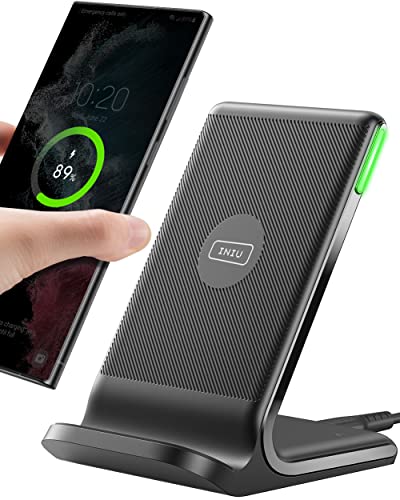
INIU 15W wireless charger with dual coils and sleep-friendly LEDBest OverallINIU 15W wireless charger with dual coils and sleep-friendly LEDUp to 15W wireless chargingSelf-adaptive LED that dims in the darkStand style charging stationNightstands and desks for Qi phonesn/a
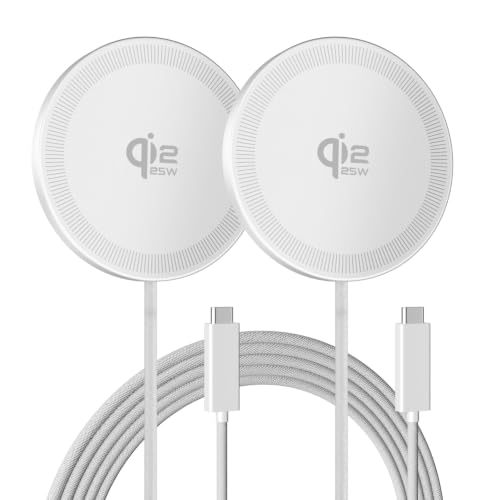
SMILE STATION 25W magnetic wireless charger 2-pack for iPhoneBest for iPhoneSMILE STATION 25W magnetic wireless charger 2-pack for iPhoneListed up to 25W wireless fast chargingn/an/aiPhone owners who want magnetic alignment on two desksiPhone 12 through newer models and compatible AirPods
Ouotoo 3-in-1 magnetic wireless charger stand for iPhone, Apple Watch and AirPodsBest 3-in-1 StandOuotoo 3-in-1 magnetic wireless charger stand for iPhone, Apple Watch and AirPodsUp to 15W for iPhoneAdjustable blue ambient lightn/aApple users who want one station for three devicesiPhone, Apple Watch and AirPods
AILKIN 15W wireless charging pad for Samsung Galaxy and Google PixelBest for AndroidAILKIN 15W wireless charging pad for Samsung Galaxy and Google PixelUp to 15W wireless outputn/aFlat charging padAndroid owners who want a complete kitn/a

A wireless charger sends power from a coil in the pad to a coil in the phone through a magnetic field, so you place the phone down instead of plugging in a cable. It is a convenience feature, ideal for a nightstand or a desk, and it removes wear on the phone's charging port.

The convenience has costs. Wireless charging is slower than a cable, wastes more energy as heat and is fussy about alignment unless the charger uses magnets. We evaluated four wireless chargers from the candidate pool using published specifications, listing details and patterns in owner feedback, then ranked them by fit for real daily use rather than by the headline wattage.

Before you buy

6 Criteria to Look For Before Buying a Wireless Charger Under $25

  1. 01

    Real charging speed and efficiency

    Wireless charging is slower and less efficient than a cable, and a lot of energy is lost as heat. A 15 or 25 watt rating is a maximum under ideal conditions, and many phones charge at lower rates. The common mistake is expecting wired speeds. Treat wireless charging as a convenience for overnight and desk top-ups. Check the phone's manual or settings for the maximum wireless speed it supports, because the charger can never exceed it.

  2. 02

    Magnets and alignment

    Magnetic chargers snap the phone to the coil so it stays aligned, which improves speed and prevents missed charges. Without magnets, you rely on a wider coil area. Magnet strength matters, and a heavy case can reduce grip. If you use a case, choose a magnetic-compatible one. Put a hand on the phone after an hour of charging, and if it feels hot to the touch, move the pad to a cooler spot with space around it.

  3. 03

    Coil design and charging area

    Single coil pads need accurate placement. Dual coil stands and multi-coil pads widen the sweet spot. A wide area helps if you plug the phone in half asleep. The INIU's dual coils are an example. A larger area often means a larger pad. If you use a case, try charging with and without it for one night, and compare the percentage you wake up with.

  4. 04

    Heat and phone protection

    Wireless charging warms both the phone and the pad, and heat shortens battery life over time. Good chargers include temperature control and foreign object detection. Avoid charging under a pillow or in a hot car. If the phone feels very hot, stop and reposition. Look at the spacing of the magnets if you choose a magnetic pad, and make sure the phone and any case use the same ring.

  5. 05

    Adapter, cable and certification

    A wireless charger needs a suitable power adapter to reach its rated speed, and some include one. A cheap or underpowered adapter limits the charge. Look for safety certifications on the charger and adapter. Third-party chargers vary in quality. If you travel, choose a pad that can be powered from a common USB adapter, since hotel outlets and power banks vary.

  6. 06

    Stand, pad and multi-device use

    Stands keep the screen visible for notifications and video calls, while flat pads are slim and travel friendly. 3-in-1 stands charge a phone, watch and earbuds from one spot, but are bulky and share power. Pick the form that fits your bedside or desk. Read the listing for foreign object detection, because a wallet card or ring on the pad should shut charging off.

Detailed reviews

The 4 best wireless chargers under $25, explained

01
INIU 15W wireless charger with dual coils and sleep-friendly LED
15WDual coilsAdaptive LEDCase friendly
Check price on Amazon
Best for: Nightstand and desk users with Qi phones who want a forgiving charging area.

The INIU is a stand-style wireless charger with dual coils, which widen the charging area so the phone does not have to sit in one exact spot. The listing says it supports up to 15 watts and uses a self-adapting LED that dims in the dark and brightens during the day, which suits light sleepers. The stand angle lets you see the screen while charging.

The tradeoff is that 15 watt speeds depend on the phone, and many phones charge more slowly on a wireless pad than the headline suggests. It also lacks magnets, so alignment can drift if the phone is nudged. Compared with the SMILE STATION, it is not magnetic but has a larger charging area. Compared with the AILKIN, it is a stand rather than a flat pad and has a nicer light.

Ownership is simple. Use a suitable power adapter, place the phone on the stand and keep metal objects away. Owner feedback patterns on wireless stands say that thick cases and metal plates reduce charging speed, and that the pad warms during use, which is normal but a reason to avoid covering it. If you often place the phone half asleep, set it down on the stand before you plug in anything else, so you can see whether the charging icon appears.

What works

  • Dual coils make the charging area more forgiving
  • Adaptive LED dims in the dark for bedrooms
  • Stand angle keeps the screen visible
  • Up to 15W for compatible phones

Watch out for

  • No magnets, so alignment can drift
  • Real charging speed depends on the phone and adapter
  • Thick cases and metal plates reduce speed

Specs

Power
Up to 15W wireless charging
Coils
Dual coils for a wider charging area
Light
Self-adaptive LED that dims in the dark
Form
Stand style charging station
Best use
Nightstands and desks for Qi phones
02
SMILE STATION 25W magnetic wireless charger 2-pack for iPhone
25W magnetic2-packiPhone compatibleAirPods compatible
Check price on Amazon
Best for: iPhone owners who want a magnetic, aligned pad on two desks.

The SMILE STATION pack gives you two magnetic charging pads that snap onto iPhones with magnets and keep the phone aligned with the coil. The listing says each pad supports up to 25 watts, and claims it can charge up to 20 minutes faster than a traditional 15 watt wireless charger. It also works with compatible AirPods cases.

The tradeoff is that the headline speed requires a phone and adapter that support that level, and many cases block the magnets unless they are magnetic. The brand is also less established than the big names, so long-term support is thinner. Compared with the INIU, it adds magnetic alignment but a smaller coil. Compared with the Ouotoo, it is a single-device pad rather than a 3-in-1 stand.

Ownership requires matching accessories. Use a suitable power adapter, remove thick non-magnetic cases and check the cable. Owner feedback patterns on magnetic pads say that alignment is the main benefit, and that the pads warm during charging, so keep them uncovered. Keep a spare cable and a spare adapter in a drawer, because a charger that quietly slows down is usually an adapter problem, not a pad problem.

What works

  • Magnetic alignment snaps the phone onto the coil
  • Listed up to 25W for supported phones
  • Two chargers in one pack for two locations
  • Works with compatible AirPods cases

Watch out for

  • Speed claims depend on the phone and adapter
  • Thick non-magnetic cases block the magnets
  • Less established brand with thinner support

Specs

Power
Listed up to 25W wireless fast charging
Alignment
Magnetic compatibility for snap-on charging
Pack
2 chargers
Devices
iPhone 12 through newer models and compatible AirPods
Best use
iPhone owners who want magnetic alignment on two desks
03
Ouotoo 3-in-1 magnetic wireless charger stand for iPhone, Apple Watch and AirPods
3-in-115W iPhoneApple WatchAirPods
Check price on Amazon
Best for: Apple users who want to charge a phone, watch and earbuds from one station.

The Ouotoo is a 3-in-1 stand that charges an iPhone, an Apple Watch and an AirPods case at once. The listing says it supports up to 15 watts for the iPhone, has a smart chip for temperature control and includes an adjustable blue ambient light. A three-year coverage promise is listed.

The tradeoff is that a 3-in-1 stand is bulky and the three slots share power, so charging more than one device may slow each. The blue light may be too bright for some bedrooms, though it is adjustable. Compared with the SMILE STATION, it covers three devices but is less portable. Compared with the INIU, it adds the Watch and AirPods but costs more.

Ownership is easy. Place each device on its slot, use a power adapter and adjust the light. Owner feedback patterns on 3-in-1 stands say that the convenience is real, and the main caution is that the Watch charger is a plastic puck that may need careful alignment. Think of the three slots as a shared budget of power, and charge the watch at the end of the day rather than all at once.

What works

  • One stand charges iPhone, Apple Watch and AirPods
  • Up to 15W for the iPhone
  • Adjustable ambient light for bedrooms
  • Three-year coverage listed by the seller

Watch out for

  • Bulkier than a single pad
  • Power is shared between devices
  • Blue light may be too bright for some sleepers

Specs

Devices
iPhone, Apple Watch and AirPods
Power
Up to 15W for iPhone
Light
Adjustable blue ambient light
Warranty
3-year coverage per the listing
Best use
Apple users who want one station for three devices
04
AILKIN 15W wireless charging pad for Samsung Galaxy and Google Pixel
15WAndroidPad styleAdapter and cable
Check price on Amazon
Best for: Android owners who want a low-cost kit with an adapter included.

The AILKIN is a flat 15 watt wireless pad aimed at Samsung Galaxy S and Google Pixel owners. It ships with a QC 3.0 USB adapter and a braided cable, so you do not need to buy a separate power block. The listing says it adapts charging to the phone.

The tradeoff is that a flat pad with no magnets and one coil needs careful placement, and the speed depends on the phone. Compared with the INIU, it has one coil and no stand but includes an adapter. Compared with the SMILE STATION, it suits Android rather than iPhone and has no magnets.

Ownership is simple. Plug the adapter into the wall, place the phone in the center and avoid thick cases. Owner feedback patterns on flat pads say that placement matters, and that the pad warms during charging. Place the pad on a hard, flat surface rather than a soft cloth, since a pad that tilts can lose contact with the coil.

What works

  • Includes a QC 3.0 adapter and braided cable
  • Up to 15W for Samsung Galaxy and Pixel phones
  • Low cost for a complete kit
  • Flat design suits desks and nightstands

Watch out for

  • Single coil requires careful placement
  • No magnets for alignment
  • Speed depends on the phone and case

Specs

Power
Up to 15W wireless output
Phones
Samsung Galaxy S series and Google Pixel
Included
Pad, QC 3.0 adapter and braided cable
Form
Flat charging pad
Best use
Android owners who want a complete kit

Spec decoder

What the listing measurements really mean

The numbers brands lead with, translated into what they tell you about fit, comfort and wear at home.

Qi and magnetic Qi2

Qi is the common wireless charging standard, and Qi2 adds magnetic alignment. The standard determines what phones are supported. Real charging speed rises and falls during a session as the phone manages heat.

Watch forCheck that the charger lists your phone model and any magnetic requirement.

Watts (W)

The maximum power the charger can send. The phone sets the real speed, and heat reduces it. Standards and brand names change quickly, so check the phone model on the listing rather than the family name.

Watch forThe SMILE STATION lists 25W, the INIU and AILKIN list 15W.

Dual coil

Two charging coils that widen the area where a phone can charge. They reduce alignment problems. A wider charging area helps if you often place the phone in a hurry.

Watch forThe INIU uses dual coils.

Foreign object detection

A safety feature that stops charging when metal is detected between the phone and pad. It prevents overheating. Heat controls and detection are what keep a pad safe when a coin lands on it by mistake.

Watch forLook for it on any charger you buy.

QC 3.0 adapter

A fast charging adapter standard that supplies higher voltage. It helps a charger reach its rated speed. Fast adapters only help if the charger and the phone can both use the higher voltage.

Watch forThe AILKIN includes a QC 3.0 adapter.

Methodology

How We Evaluated These Wireless Chargers Under $25

Spec sheet and listing review

We compared power ratings, coil design, alignment and included accessories as published by each seller. We checked that claims were stated on the same basis. For example, wattage is a maximum and phones decide real speed. We also noted what each listing says about case compatibility, since that is the most common reason a charger seems slow. We also considered noise from coil whine on a quiet nightstand.

Alignment and coil design

We reviewed magnets and dual coils. Alignment decides whether the phone charges at all. This explains the INIU and SMILE STATION positions. We read how owners describe heat, noise from coil whine and how often the phone fell off the pad overnight.

Heat and safety

We looked at temperature control and detection features. Heat matters for battery health. This shaped our cautions. We compared the kit contents, since an included adapter changes the true cost of a charger.

Ownership and brand support

We read owner feedback patterns about heat, case compatibility and warranty. We weighed brand maturity. This shaped the order of the lineup. We checked the warranty terms printed on each listing and weighed them as a small plus.

Value for the user

We compared price tier against included accessories and form for iPhone and Android owners. A kit with an adapter can be better value. This shaped the AILKIN pick. We kept the order tied to the phone, the case and where the charger will live.

Decision guide

How to Choose the Right Wireless Chargers Under $25

By Phone

SituationPickWhy
iPhone with magnetsSMILE STATION 25W 2-packMagnetic alignment
iPhone, Watch and AirPodsOuotoo 3-in-1One stand for three devices
Samsung Galaxy or PixelAILKIN 15WAdapter and cable
Any Qi phone, bedroomINIU 15WDual coils and adaptive LED

By Budget

SituationPickWhy
Lowest cost per chargerSMILE STATION 2-packTwo pads in one pack
Low tier, complete kitAILKIN 15WAdapter and cable included
Mid tier, bedroomINIU 15WDual coils and soft light
Higher spend, 3 devicesOuotoo 3-in-1Phone, watch and earbuds

Pad vs Stand

Flat pad

The SMILE STATION and AILKIN are slim and travel friendly. They suit desks and drawers.

Stand

The INIU and Ouotoo keep the screen visible for notifications and calls. They suit nightstands.

Choose a pad for portability, and a stand for bedside viewing.

By Use

SituationPickWhy
BedsideINIU 15WLight dims at night
DeskSMILE STATIONMagnetic alignment
TravelAILKIN 15WSlim pad with adapter
Apple ecosystemOuotoo 3-in-1Phone, watch and earbuds

For Heat Control Specifically

Look for

Temperature control, foreign object detection and a design with airflow. Avoid thick cases and covering the pad.

In this comparison

The Ouotoo lists temperature control. All four warm in use, so keep them uncovered.

When to Spend More

Spend more if

You want a multi-device stand or a strong magnetic charger from a known brand. The Ouotoo or a certified magnetic charger is the clearest upgrade.

Save if

You charge overnight and speed does not matter. The INIU or AILKIN covers it.

Ownership

Maintenance schedule

The upkeep that decides whether a piece still looks good in year five.

TaskIntervalWhy it matters
Wipe the pad surfaceWeeklyDust and oils can interfere with contact and alignment. A dry cloth keeps it clean. Wipe the surface with a soft, dry cloth and never use liquid on the coil area. Keep the pad away from credit cards and key fobs, since the magnetic field can disturb some of them.
Check the cable and adapterEvery few monthsWorn cables cause slow charging. Replace damaged cables. Unplug the charger during storms to protect the electronics.
Remove metal objects from the padAlwaysMetal heats up and can stop charging. Keep cards and rings off the pad. Check that nothing metallic is stuck to the pad, including magnets from accessories.
Inspect for heat damageEvery few monthsDiscoloration or warping suggests overheating. Replace the charger. Coil the cable loosely rather than tightly, which protects the wires inside.
Check case compatibilityWhen changing casesThick or metal cases block charging. Use a case rated for wireless charging. Replace a charger that makes a buzzing noise that was not there before.

FAQ

Frequently Asked Questions

Is wireless charging as fast as wired?

No. It is slower and less efficient, and generates more heat. If the phone does not charge, try removing the case, then try a different adapter before replacing the pad. Wireless charging is slower than a cable for the same phone, so judge it by convenience.

Does wireless charging damage the battery?

Heat shortens battery life over time. Good chargers manage heat, and avoiding covering the phone helps. If the pad gets hot, move it to a place with airflow and avoid covering it.

Do I need a magnetic charger?

Magnets improve alignment but are optional. They are useful for iPhones and magnetic cases. If you want the fastest charge, use a cable, and use wireless when convenience matters more.

Will a case block wireless charging?

Thick or metal cases can. Use a thin or wireless-compatible case. If you use a magnetic case, check that its magnets line up with the charger, or alignment will drift.

Can I charge AirPods and a watch on the same pad?

Only with a multi-device stand. A single pad charges one device. If you share the stand with a partner, a 3-in-1 saves one outlet but may be crowded with more than one phone.

Do I need a special adapter?

Often yes, for the rated speed. Some chargers include one. If you own a phone from the last few years, check its manual for the wireless standard before you shop.

Bottom line

The short version

Browse more wireless chargers under $25on Amazon →
Brianna Cole, Lead Product Editor

About the author

Brianna Cole

Lead Product Editor, SenseiReview

Brianna Cole leads SenseiReview's buying guides, turning published specifications, documentation and owner feedback patterns into clear verdicts across home, tech, fitness, outdoor and DIY products.

More from Brianna →

Keep reading

Related guides