A smart plug, a motion sensor and a thermostat bought in the same month can arrive speaking three different technical languages, needing three different apps and, in the worst case, three separate hubs. The packaging rarely says why. Behind the brand names and the friendly icons lie a handful of wireless protocols, each with its own habits, strengths and limitations, and understanding them explains most of the frustrations of a smart home.
This guide explains the main protocols in plain terms: Wi-Fi, Zigbee, Z-Wave, Thread and Matter. It covers hubs and why some devices need one, reliability and range, how mesh networking works for these devices, the ecosystem lock-in problem, what Matter fixes and what it does not yet, and how to choose if you rent your home and cannot drill holes or run wires.
Wi-Fi devices
Wi-Fi smart devices connect straight to your home router, the same way a phone or laptop does. They need no extra hub, which makes them the easiest to set up, and they work well for devices that are plugged into the mains and need a lot of data, such as cameras, video doorbells and smart speakers. Almost any home already has the infrastructure.
The drawbacks appear as the number of devices grows. Every Wi-Fi device uses a connection slot on the router and sends traffic over the same radio as your laptops. Cheap routers handle a limited number of simultaneous clients, and a home with dozens of Wi-Fi gadgets can see dropouts. Wi-Fi also uses more power, which is a problem for battery devices such as sensors and door locks, whose batteries drain faster.
Most Wi-Fi smart devices also use only the 2.4 GHz band, which is more crowded than newer bands but reaches further. If your router merges the bands under one name, a device may refuse to join, and splitting them temporarily during setup is a common fix. Newer routers handle many devices better, as covered in Wi-Fi 6 versus Wi-Fi 7, and signal coverage across the home matters, as covered in mesh Wi-Fi versus range extender.
Zigbee and Z-Wave
Zigbee and Z-Wave were designed for low power, small messages and long battery life, which suits sensors, switches, bulbs and locks. Both create a mesh network, where mains powered devices such as plugs and bulbs repeat messages for others, so coverage extends as you add devices. Each needs a hub or a gateway that acts as the coordinator and connects the network to your home network and the internet.
Zigbee runs on the 2.4 GHz band, the same band as Wi-Fi and Bluetooth, and a wide range of manufacturers use it, which gives a large choice of devices. Because it shares the band, interference can be a factor in crowded areas, and a poorly chosen Zigbee channel can clash with Wi-Fi. Reliability is generally good in a well built mesh with several mains powered repeaters.
Z-Wave uses a lower radio frequency band, which varies by region, so devices bought in one region may not work in another. A lower band avoids Wi-Fi interference and penetrates walls well, and the standard is tightly managed, so devices from different makers are certified to work together. The choice of devices is smaller and individual devices tend to cost more. Range per hop is good, but the number of hops in a mesh is limited.
| Protocol | Radio | Needs a hub | Typical strength | Typical limit |
|---|---|---|---|---|
| Wi-Fi | 2.4 or 5 GHz | No | Easy setup, high data, cameras | Router load, battery drain |
| Zigbee | 2.4 GHz mesh | Yes, a coordinator | Wide device choice, low power | Can clash with Wi-Fi, ecosystem variation |
| Z-Wave | Sub-GHz mesh, region specific | Yes, a controller | Reliable, little interference | Fewer devices, regional versions |
| Thread | 2.4 GHz mesh | A border router | Low power, self healing, IP based | Newer, needs a border router |
| Matter | Runs over Wi-Fi, Thread, Ethernet | A Matter controller | Cross brand compatibility | Incomplete device and feature coverage |
Thread and border routers
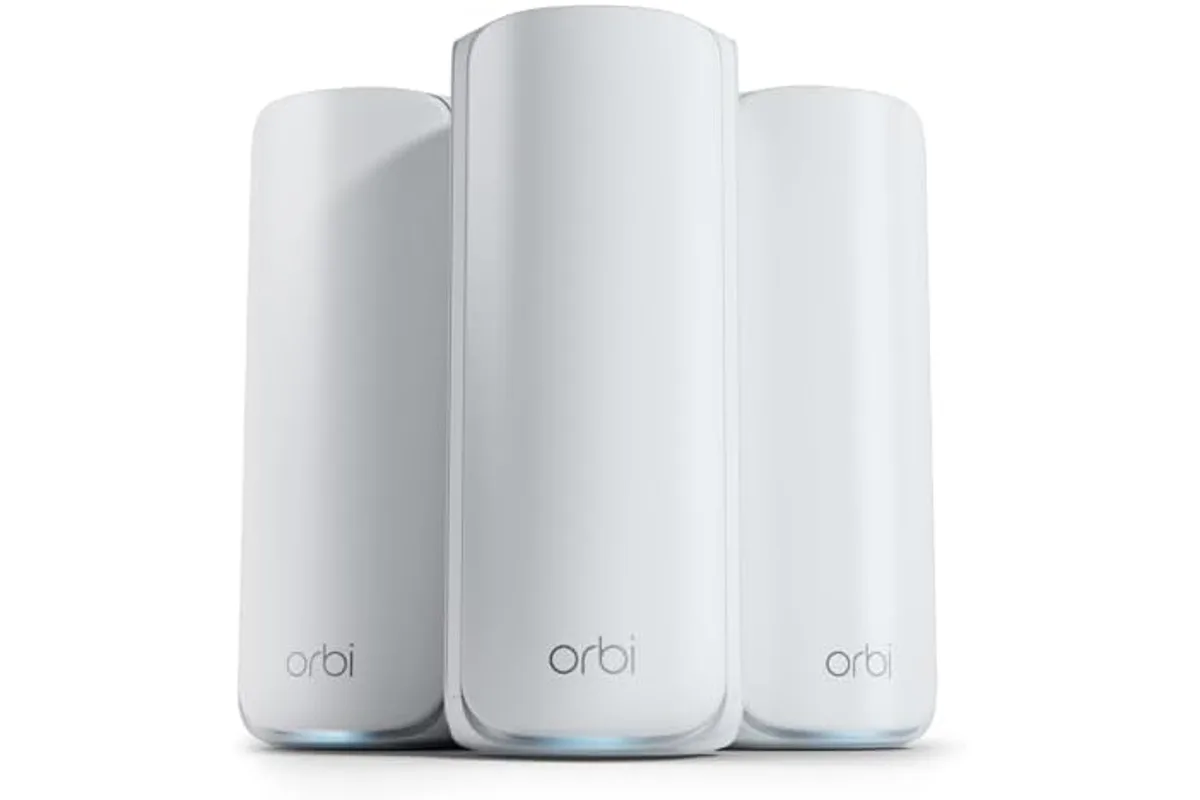
Thread is a newer low power mesh protocol built on the same radio technology as Zigbee, but carrying standard internet protocol addresses, which makes it easier to connect to the wider network. Thread devices form a mesh that heals itself, since if one repeater fails, the others reroute messages around it. A Thread network needs a border router to link it to your home network, and many smart speakers, displays and routers now include one.
Thread is mostly invisible to users, because it is used as a transport for Matter devices. You do not choose Thread directly. You buy a Matter over Thread sensor, and it joins through any border router in your home. Several border routers from different makers can work together on one network, which improves resilience, though compatibility between them is still maturing.
A practical point is that Thread needs mains powered devices acting as routers to extend coverage, and battery devices sleep and do not relay. A home with few mains powered Thread devices may have weak coverage. If you add Thread sensors, add a few Thread capable plugs or bulbs in the middle of the home. No source documents a universal count of devices needed, so test the signal and add repeaters where coverage is poor.
Hubs versus hubless
A hub is a small box that speaks Zigbee or Z-Wave and connects them to your network. It also runs automations locally in many systems, so lights and sensors keep working when the internet is down. Hubless Wi-Fi devices depend on the manufacturer's cloud in many cases, and an outage or a discontinued service can leave a device useless, which is a risk that is easy to overlook when buying.
Hubs add cost and one more device to set up, but they give reliability for a larger system. For a handful of devices, such as a few plugs and cameras, hubless Wi-Fi is simpler and cheaper. For a home with many sensors, locks and switches, a hub with a mesh protocol is the more robust foundation, since the traffic stays off your Wi-Fi.
Where the hub sits matters. Place it centrally, away from metal and the router if you use Zigbee, to reduce interference. Keep firmware updated, and choose a hub with local control where you can. Look at how long the maker has supported its products, and whether it publishes a security policy. Devices that need an account and a cloud for basic functions carry a long term risk. Browse the tech and electronics category for related guides.
Reliability, range and mesh behaviour
In a mesh network, each mains powered device can relay messages, so reliability improves as you add devices, up to a point. A single sensor at the far end of the house may be out of range of the hub but reach a nearby plug, which passes its message on. The main weakness is a dead zone with no repeaters, where a battery sensor cannot reach anything.
Range per hop depends on walls and interference, and indoors is typically a few metres to a few tens of metres. Dense walls of concrete, brick or metal reduce it sharply. Wi-Fi devices have a longer range to the router but depend on a good signal, and a weak spot causes dropouts. For a large home, mesh protocols with repeaters often deliver better coverage for small devices than Wi-Fi.
Battery devices should be low power, and the protocol is a large factor. Zigbee, Z-Wave and Thread sensors can run on a coin cell for a year or more, according to makers, while Wi-Fi sensors often need frequent charging or battery changes. Bluetooth is a further option for simple devices near a phone, but its range and connectivity are limited, and the way it handles audio is covered in Bluetooth headphone codecs explained.
Ecosystem lock-in
Many smart home brands run on a closed ecosystem: their devices work well together and badly with others. A switch from one maker may be controllable only through that maker's app and hub, and exporting your automations to another system is hard or impossible. Over several years, that lock-in raises the cost of changing and leaves you exposed if the maker raises prices or stops support.
Voice assistants and platforms add a second layer. A device may work with one assistant but not another, or with limited features. Check which platforms a device supports before buying, and whether the features you want are available on yours. A device that works only with a particular phone's ecosystem is a poor choice if the household uses different phones.
Open protocols such as Zigbee and Z-Wave reduce lock-in, since many hubs can use devices from many makers, but there are variations in how well each hub supports each device. Matter aims to reduce lock-in further by providing a single language across brands, and is the next topic. In practice, choosing a platform that supports open standards and local control is the best protection.
What Matter does and does not fix
Matter is a standard created by a group of major technology companies to let smart devices from different makers work together. It is not a new radio. It is an application layer that runs over Wi-Fi, Thread and Ethernet, and it defines how devices describe themselves and respond to commands. A Matter device can be added to several ecosystems at once, so a bulb can work with more than one voice assistant and app.
What Matter fixes is the entry barrier and some lock-in. You can buy a Matter certified device and expect it to work with any Matter compatible controller, with a simple setup using a code. It also encourages local control, since devices talk over your network and not only through a cloud. Over time, it should make mixed brand homes simpler.
What Matter does not yet fix is coverage and depth. Not every device type is supported, and some features remain proprietary, so a Matter device may offer only basic controls in a third party app, with advanced settings staying in the maker's app. Early versions had bugs and uneven support among controllers. Treat Matter as a good sign when buying, not as a guarantee of perfect interoperability, and keep your expectations moderate.
Security differs across the protocols in ways buyers seldom see. Zigbee and Z-Wave devices join a network with a key exchange at setup, and newer certified devices use stronger methods than older ones. Matter requires a secure commissioning step using a printed code or a QR code, and keeps traffic encrypted on your network. Older, uncertified devices may use weaker joining methods, which is another reason to prefer current certified products for locks and alarms.
Power cuts and restarts are worth planning for. A hub or border router that loses power takes its mesh down until it restarts, and some devices fail to rejoin by themselves afterwards, forcing a manual reset. A small uninterruptible power supply for the router and hub keeps essential automations alive through short outages, and costs little compared with the lock or alarm it protects.
Finally, resist adding a device just because it can be connected. Each addition is another account, another battery to change and another thing to fail. Start with a clear purpose, such as lighting scenes, a heating schedule or a door sensor, and expand only when the first set has proved reliable for a few months. Fewer, well chosen devices on a sound network are easier to live with.
Choosing as a renter
A renter wants devices that are easy to install, easy to remove and independent of the home's wiring. Plug-in smart plugs, bulbs, stick-on sensors and battery powered devices fit, while hardwired switches and thermostats usually need permission and electrical work. Choose items that you can take with you when you move, and that use standard fittings.
For a small set of devices, hubless Wi-Fi or Matter over Wi-Fi plugs and bulbs are simple. As the number grows, consider a compact hub or a speaker that includes a border router, since a self contained system moves easily. Avoid devices that depend on a tenant account that cannot be transferred or that need a specific router setting you cannot change in a shared building.
Privacy and security deserve attention in a shared building. Use strong, unique passwords, enable two factor authentication, keep firmware updated and put smart devices on a separate guest network if the router allows it. Cameras and locks deserve extra caution. Read the maker's statement of how long it will support the device, since a device that stops getting updates becomes a risk.
Frequently asked questions
Do I need a hub for a smart home?
Not for a few Wi-Fi devices. A hub helps when you have many sensors, locks and bulbs on Zigbee or Z-Wave, since it keeps their traffic off your Wi-Fi and runs automations locally. Some speakers and routers include hub functions.
Is Matter better than Zigbee?
They are different layers. Matter is a shared language, while Zigbee is a radio and network protocol. Matter can run over Thread or Wi-Fi, and some hubs bridge Zigbee devices into Matter. Zigbee has a wide range of existing devices, so it remains useful.
What happens when the internet goes down?
Devices with local control keep working, often through a hub. Devices that depend on a cloud service may stop responding. Check whether a device works locally, particularly for locks and lights, before you buy.
Will Matter devices work with my existing smart home?
Often yes, if your controller supports Matter, but support varies by device type and feature. Update your hub and apps, and check compatibility lists. Older devices may need bridging through a hub.
Is Wi-Fi bad for smart home devices?
Not bad, but it scales poorly. A few devices are fine, while dozens can strain a router and drain batteries. Use Wi-Fi for cameras and plugged in gadgets, and a low power mesh protocol for battery sensors.
Can I mix Zigbee, Z-Wave and Wi-Fi devices?
Yes, through a hub or platform that supports each, though you need the right radios. Many hubs support Zigbee and Z-Wave. Check what a hub supports before buying it, and keep the number of platforms small.
The bottom line
Match the protocol to the device. Use Wi-Fi for cameras, doorbells and plugged in gadgets, and a low power mesh such as Zigbee, Z-Wave or Thread for battery sensors, locks and switches. A hub or border router gives reliability and local control as the number of devices grows.
Look for Matter support as a way to reduce lock-in, but do not expect it to fix everything today. Check which device types and features are covered, and keep your controller updated. Prefer devices that work locally and come from makers with a clear support policy.
If you rent, favour plug-in, stick-on and battery devices that you can take with you. Start small, make sure the network is solid, and add devices gradually. A modest system that works reliably beats a large one that does not.