
Amazon affiliate links - we earn a commission.Affiliate disclosure

Buying guide · 12 min read · Updated 2026-11-21

Best Budget KVM Switches (2026)

Budget KVM switches compared on HDMI 4K@60Hz support, EDID emulation, USB 3.0 ports and monitor count, so one keyboard and mouse can run two or more PCs.

Brianna Cole, Lead Product EditorBy Brianna ColeLead Product Editor6 picks comparedSpec-sheet verified
Best Budget KVM Switches

At a glance

Our top picks

Side by side

Spec comparison

A KVM switch lets one keyboard, mouse and monitor control several computers, which saves desk space and cable clutter. At the budget end, the differences that matter are the video standard supported, how many monitors each computer can feed and whether the switch hides the disconnected computer from the operating system.

This guide focuses on the lower half of the price range and is honest about what you give up. We evaluated each model from published specifications and patterns in owner feedback, paying attention to resolution limits, USB behaviour and year-three reliability. A cheap KVM that flickers or drops the keyboard on switching is worse than no KVM at all.

Before you buy

6 Criteria to Look For Before Buying a Budget KVM Switch

  1. 01

    Resolution and refresh rate

    HDMI 2.0 is needed for 4K at 60Hz. A switch that only supports HDMI 1.4 caps 4K at 30Hz, which feels sluggish. Check that your computers, cables and monitors all support the same standard. The UGREEN, Hearvo, PVBCTCSID and Acer list 4K@60Hz, while the mismatch usually comes from the cable.

  2. 02

    Number of monitors

    A single-monitor KVM serves one screen per computer. A dual-monitor KVM, such as the Acer or Unitek, doubles the video connections. Count monitors and computers before buying, since the cable count rises quickly. A common mistake is buying a single-monitor switch for a dual-monitor desk and ending up with one blank screen.

  3. 03

    EDID emulation

    EDID emulation tells the computer a monitor is still connected when you switch away. Without it, windows can shuffle onto a single screen or lose position. The UGREEN and the PVBCTCSID 4-port list it, while cheaper units may not. This feature matters most for desktop computers with multi-window workflows.

  4. 04

    USB ports and behaviour

    KVM switches share USB peripherals between computers. USB 3.0 ports are handy for drives, while keyboard and mouse use dedicated ports on many models. The UGREEN has six USB ports, while the Hearvo and PVBCTCSID list USB 3.0. Check whether the switch passes high-speed devices cleanly, since cheap hubs can drop connections.

  5. 05

    Switching method

    Most budget KVMs switch with a front-panel button, and some add keyboard hotkeys. A button is simple and reliable, while hotkeys are convenient but can conflict with software shortcuts. The speed of switching matters too: a few seconds is normal, but long delays suggest handshake problems.

  6. 06

    Cables and power

    A KVM needs a set of cables for each computer, and quality matters. Use certified HDMI cables at the right length and plug in the power adapter if included. Underpowered USB hubs cause dropouts, which is the most common complaint about budget switches.

Detailed reviews

The 6 best budget kvm switches, explained

01
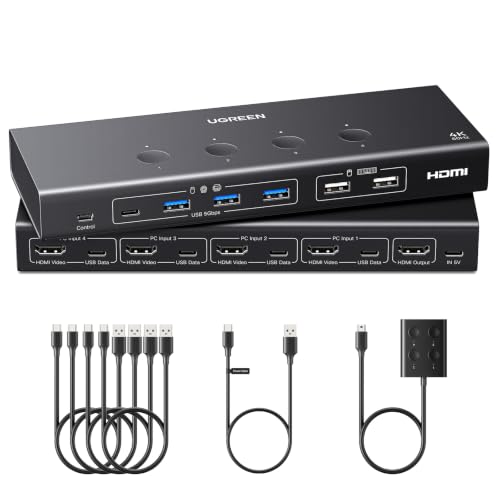
UGREEN 4-port HDMI KVM, 4K@60Hz, 6 USB ports, EDID
4 computers1 monitor4K@60HzEDID emulation
Check price on Amazon
Best for: Users with three or four computers sharing a single monitor.

The UGREEN is the most capable single-monitor KVM in this list, with four computer inputs, one HDMI output at 4K@60Hz and six USB ports. EDID emulation is the feature that separates it from cheaper switches, because it makes each computer think the monitor is still attached when you switch away. That keeps windows in place instead of reshuffling across virtual displays.

Compared with the Hearvo, which handles two computers, the UGREEN serves a bigger setup but needs more cables, since each input needs its own HDMI and USB lead. Compared with the dual-monitor Acer, the UGREEN is limited to a single screen, so it will not suit anyone who works with two monitors on each machine. It is a good fit for a desk with a gaming PC, a work laptop, a home server and a spare machine.

Ownership is mostly about cables and power. Use the cables the manufacturer recommends, and plug the power adapter in if the unit has one, as USB-only power can be marginal for extra ports. If the keyboard drops out on switching, try a different USB port or a powered hub.

What works

  • Four computer inputs cover a mixed desk of laptops and towers
  • EDID emulation keeps window layouts intact when you switch away
  • Six USB ports handle keyboard, mouse and a couple of drives
  • 4K@60Hz output works for sharp text and smooth video

Watch out for

  • Single monitor only, so no dual-screen workflows
  • Four sets of cables can clutter the back of a small desk

Specs

Computers
4
Monitors
1
Video
HDMI, 4K@60Hz
USB ports
6
Extras
EDID emulation
02
Hearvo USB 3.0 HDMI KVM, 2 computers, 1 monitor, 4K@60Hz
2 computers1 monitor4K@60HzUSB 3.0
Check price on Amazon
Best for: Two-computer desks that want a simple plug-and-play KVM.

The Hearvo is the simplest way to share a keyboard, mouse and screen between two computers. It offers HDMI at 4K@60Hz and USB 3.0 ports for peripherals, with a layout that keeps cable runs short. For a home office with a desktop and a laptop, this is often all you need.

Compared with the UGREEN, the Hearvo has two inputs rather than four, so it will not suit larger setups. Compared with the PVBCTCSID 2-port, the Hearvo is a similar proposition, with brand and port details differing slightly. The design approach is plain and small, with buttons on the front panel that make switching obvious.

Ownership is straightforward. Plug in the cables, test the switching and keep the power adapter on hand. If one computer wakes slowly after switching, check whether the monitor is signalling a lost input, and consider turning on any sleep-mode settings in the operating system.

What works

  • Straightforward two-computer layout with front-panel switching
  • 4K@60Hz HDMI output suits modern monitors
  • USB 3.0 ports allow quick sharing of a drive or hub
  • Low price makes it easy to try the KVM idea

Watch out for

  • Only two computers, so it will not scale to a bigger desk
  • Does not list EDID emulation, so windows may reshuffle on switching

Specs

Computers
2
Monitors
1
Video
HDMI, 4K@60Hz
USB
USB 3.0 ports
Extras
Peripheral sharing
03
PVBCTCSID HDMI KVM, 2 computers, 1 monitor, 4K@60Hz, USB 3.0
2 computers1 monitor4K@60Hz4 USB 3.0
Check price on Amazon
Best for: Budget buyers who want the lowest-cost 4K@60Hz two-computer switch.

The PVBCTCSID 2-port is the cheapest way into a 4K@60Hz KVM on this list. It supports two computers on one monitor, with four USB 3.0 ports for a keyboard, mouse and a couple of peripherals. The design approach is minimal, with a small body and a button for switching.

Compared with the Hearvo, the specification is nearly identical, so the choice often comes down to price and availability. Compared with the PVBCTCSID 4-port, this unit is simpler but limited to two inputs. It is a reasonable pick for a first KVM or a secondary desk that does not need heavy use.

Ownership requires attention to cable quality. Use certified HDMI cables, test the setup before you hide cables, and keep the power adapter plugged in. If the monitor flickers, try a shorter cable or a different USB port on the computer.

What works

  • Lowest price among the 4K@60Hz options in this lineup
  • Four USB 3.0 ports cover a keyboard, mouse and drives
  • Simple button switching is easy to understand
  • Small body fits behind a monitor or on a desk

Watch out for

  • Brand has less track record than the larger names
  • No EDID emulation listed, so window layouts may shift

Specs

Computers
2
Monitors
1
Video
HDMI, 4K@60Hz
USB 3.0 ports
4
Switching
Button
04
PVBCTCSID USB 3.0 HDMI KVM, 4 computers, EDID, 4K@60Hz
4 computers1 monitor4K@60HzEDID
Check price on Amazon
Best for: Budget buyers who need four inputs and EDID support.

The PVBCTCSID 4-port gives you four computer inputs and EDID support for less than most competitors. It shares one monitor and four USB ports, with 4K@60Hz output. The design approach is a straight copy of the standard four-port KVM layout, aimed at keeping the price low.

Compared with the UGREEN, the PVBCTCSID 4-port has a similar feature list but a smaller track record and fewer USB ports. Compared with the two-port version from the same brand, it adds inputs and EDID, but also more cables. It is a decent choice for a home lab or a desk with a gaming PC, a work laptop and a couple of other machines.

Ownership comes down to cable management. Label each cable, use certified HDMI leads and test every input before tucking cables away. If a computer fails to wake after switching, check the sleep settings and the USB port assignments.

What works

  • Four computer inputs at a lower price than most four-port rivals
  • EDID support helps keep window layouts in place
  • 4K@60Hz HDMI output suits modern monitors
  • USB 3.0 ports allow shared peripherals

Watch out for

  • Smaller brand with less owner feedback than UGREEN
  • Four sets of cables are bulky on a small desk

Specs

Computers
4
Monitors
1
Video
HDMI, 4K@60Hz
USB
USB 3.0 ports
Extras
EDID support
05
Acer dual monitor HDMI KVM, 2 computers, 4K@60Hz, 4 USB 3.0
2 computers2 monitors4K@60Hz4 USB 3.0
Check price on Amazon
Best for: People with two monitors who share them between two computers.

The Acer dual-monitor KVM is for a desk with two screens that need to switch together between two computers. It supports extended display, 4K@60Hz and four USB 3.0 ports. The design approach is to double the video path, so each computer sends two HDMI signals into the switch.

Compared with the UGREEN, the Acer offers a second monitor but only two computers. That means four video cables per setup and a total of eight connections to manage. Compared with the Unitek, which mixes HDMI and DisplayPort, the Acer is HDMI-only, so check your monitors and computers support it.

Ownership is mostly about cable length and consistency. Use matching cables, plug in the power adapter and test extended display on both computers before final routing. If one monitor goes blank on switching, try swapping cable ports.

What works

  • Dual-monitor switching keeps a two-screen workflow intact
  • Extended display mode preserves separate screens per monitor
  • Four USB 3.0 ports cover peripherals and drives
  • Brand recognition adds some confidence at the price

Watch out for

  • Eight video connections make cable management harder
  • Limited to two computers

Specs

Computers
2
Monitors
2
Video
HDMI, 4K@60Hz
USB 3.0 ports
4
Display mode
Extended
06
Unitek dual monitor KVM, HDMI and DisplayPort, 2 PCs, 4K@60Hz
2 computers2 monitorsHDMI and DP4K@60Hz
Check price on Amazon
Best for: Dual-monitor desks where the computers use different video ports.

The Unitek dual-monitor KVM mixes HDMI and DisplayPort connections, which helps if your computers or monitors use different standards. It supports two computers and two monitors at 4K@60Hz. The design approach is flexible, aimed at desks where one computer is a laptop with HDMI and another is a desktop with DisplayPort.

Compared with the Acer, the Unitek's mixed ports make it more versatile but also more confusing to wire. Compared with the single-monitor UGREEN, it costs more but suits dual-screen work. A good fit for a hybrid desk with a work laptop and a personal tower.

Ownership is about careful cable labeling. Note which input maps to which monitor, test both computers before routing cables behind the desk and confirm each monitor is set to the correct input. Firmware updates, when available, can help with compatibility.

What works

  • Mixed HDMI and DisplayPort inputs fit varied computers
  • Dual-monitor support suits a two-screen desk
  • 4K@60Hz output keeps text sharp
  • Flexible wiring options reduce adapter use

Watch out for

  • Mixed ports can make the cable map confusing
  • Costs more than the single-monitor options

Specs

Computers
2
Monitors
2
Video
HDMI and DisplayPort
Refresh
4K@60Hz
Use
Dual-monitor desk

Spec decoder

What the listing measurements really mean

The numbers brands lead with, translated into what they tell you about fit, comfort and wear at home.

4K@60Hz

The resolution and refresh rate the switch can pass without compression. It requires HDMI 2.0 or newer on every link.

Watch forThe Hearvo and UGREEN list 4K@60Hz, but cables and computer outputs must also support it.

EDID emulation

The switch stores the monitor's identity and presents it to each computer. This keeps the computers from reconfiguring when you switch.

Watch forThe UGREEN lists it, while some cheaper units do not.

USB 3.0 hub

A pass-through port that shares drives or other peripherals between computers. It supports faster transfers than USB 2.0.

Watch forThe Acer lists four USB 3.0 ports, but keyboard and mouse may use separate ports.

Extended display

A mode where the two monitors act as one wide desktop on each computer. It requires the KVM to pass both video streams.

Watch forThe Acer and Unitek support dual monitors, but check how each handles extended mode.

HDMI vs DisplayPort

Two video standards with different connectors. Some computers and monitors only use one.

Watch forThe Unitek mixes both, which helps with varied equipment but complicates wiring.

Methodology

How We Evaluated These Budget KVM Switches

Video standards

We compared published resolution and refresh rate claims, then looked at owner feedback on flicker. The UGREEN, Hearvo and PVBCTCSID list 4K@60Hz. We treated confirmation of HDMI 2.0 as a baseline.

Monitor and computer count

We matched each switch to desk setups, from two computers on one monitor to dual-monitor workflows. The Acer and Unitek serve two screens, while the UGREEN and PVBCTCSID 4-port serve more computers. Cable count was part of the score.

EDID and window behaviour

We looked for EDID emulation and what owners say about windows moving. The UGREEN and PVBCTCSID 4-port list it. Lack of EDID is a common source of frustration in budget switches.

USB reliability

We considered USB 3.0 ports and reports of dropouts. Power quality and cable choice appear in many owner notes. A switch that drops the keyboard on switching was scored down.

Value in context

We placed each switch in the lower half of the price range and asked what it gives up. The Hearvo is the simple pick, the UGREEN has the best feature set and the Acer solves dual monitors. Brand track record was treated as a tiebreaker.

Decision guide

How to Choose the Right Budget KVM Switches

By Computer Count

SituationPickWhy
Two computers, one monitorHearvo or PVBCTCSID 2-portSimple and cheap for a laptop plus tower
Three or four computersUGREEN 4-portFour inputs with EDID and six USB ports
Four inputs on a tight budgetPVBCTCSID 4-portCheaper four-port option with EDID
Two computers, two monitorsAcer or UnitekDual-monitor switching in one box

By Budget

SituationPickWhy
Lowest costPVBCTCSID 2-portCheapest 4K@60Hz option here
Simple and reliableHearvoPlain two-port layout with USB 3.0
Best feature setUGREENEDID, six USB ports and four inputs
Dual-monitor needsAcerTwo screens with a known brand

Single vs Dual Monitor

Single monitor

The UGREEN, Hearvo and PVBCTCSID models share one screen between several computers. They use fewer cables and cost less.

Dual monitor

The Acer and Unitek switch two screens together. They double the video cable count but preserve a two-screen workflow.

Choose single for simple desks and dual for people who live on two monitors.

Video Connections

SituationPickWhy
All HDMI equipmentAcer or UGREENStraight HDMI cabling throughout
Mixed HDMI and DisplayPortUnitekAccepts both standards
Older HDMI 1.4 equipmentCheck the monitor first4K@60Hz needs HDMI 2.0 on every link
Many USB peripheralsUGREENSix USB ports reduce hub use

For Home Office Use Specifically

Look for

4K@60Hz support, EDID emulation, enough USB ports and a switching method that is quick and reliable.

In this comparison

The UGREEN covers three or four machines, the Hearvo handles a laptop plus tower, and the Acer suits two-screen workers.

When to Spend More

Spend more if

You need dual monitors, many computers or the most reliable USB behaviour. The Acer and UGREEN are the sturdier options.

Save if

You have two computers and one monitor. The Hearvo or PVBCTCSID 2-port does the job.

Ownership

Maintenance schedule

The upkeep that decides whether a piece still looks good in year five.

TaskIntervalWhy it matters
Check cable seatingMonthlyLoose HDMI or USB cables cause flicker and dropouts. A firm push on each connector often cures sudden issues.
Update firmware if offeredYearlySome KVMs release updates that fix compatibility with newer monitors or computers. Check the maker's support page.
Keep the power adapter plugged inAlwaysUSB bus power can be marginal for several drives. A dedicated adapter prevents random disconnects.
Dust the ventsEvery few monthsDust builds up and traps heat in small metal cases. A quick brush helps keep the unit stable.
Label cablesAt setupA labeled cable map saves time when one input fails. It also prevents swapping video and USB leads.

FAQ

Frequently Asked Questions

Do I need a KVM or a docking station?

A KVM switches one set of peripherals between computers, while a docking station connects one computer to many peripherals. If you use two computers at one desk, a KVM is the better fit. Laptops alone may be better served by a dock.

How much should a budget KVM cost?

Prices move, so check the current listing. The cheapest two-port 4K@60Hz units suit simple desks, four-port and dual-monitor models cost more, and premium docking KVMs sit above this range. Only pay extra for features you will use.

Why do my windows move when I switch?

Without EDID emulation, the computer thinks the monitor was unplugged and rearranges your desktop. A KVM with EDID, such as the UGREEN, avoids this. Some operating systems also have settings to keep window positions.

Will a cheap KVM work at 4K@60Hz?

Yes, if the switch, cables and computers all support HDMI 2.0 or newer. Many 4K problems come from older cables, so replace them before blaming the switch.

Can a KVM share a printer or external drive?

Many can, using the USB ports. USB 3.0 ports are better for drives, but behaviour varies, so check whether the switch passes mass storage reliably.

Is a remote KVM like the GL.iNet the same thing?

No. A remote KVM streams a computer over a network for remote control, while a desktop KVM shares a keyboard, mouse and monitor locally. They solve different problems.

Bottom line

The short version

Browse more budget kvm switcheson Amazon →
Brianna Cole, Lead Product Editor

About the author

Brianna Cole

Lead Product Editor, SenseiReview

Brianna Cole leads SenseiReview's buying guides, turning published specifications, documentation and owner feedback patterns into clear verdicts across home, tech, fitness, outdoor and DIY products.

More from Brianna →

Keep reading

Related guides