
Amazon affiliate links - we earn a commission.Affiliate disclosure

Buying guide · 12 min read · Updated 2026-11-27

Best Capture Cards for Streaming (2026)

HDMI capture cards compared on capture resolution versus pass-through, latency, USB bandwidth and console support, so you pay only for what your stream needs.

Brianna Cole, Lead Product EditorBy Brianna ColeLead Product Editor6 picks comparedSpec-sheet verified
Best Capture Cards for Streaming

At a glance

Our top picks

Side by side

Spec comparison

PieceCaptureClassPass-throughInterface
Elgato 4K S Capture Card, 4K60 HDR10, USBBest OverallElgato 4K S Capture Card, 4K60 HDR10, USB4K at 60 fps with HDR10Highest tier alongside the 4K Xn/an/a
Elgato 4K X Capture Card, 4K144 Ultra-Low LatencyBest High-Refresh CardElgato 4K X Capture Card, 4K144 Ultra-Low Latency4K at up to 144 HzHighest tier heren/an/a
Guermok USB 3.0 HDMI Capture Card, 1080p60, 4K Pass-ThroughBest Value PickGuermok USB 3.0 HDMI Capture Card, 1080p60, 4K Pass-Through1080p at 60 fps and 2K at 30 fpsLow tierUp to 4K at 60 Hz input with loop-outUSB 3.0
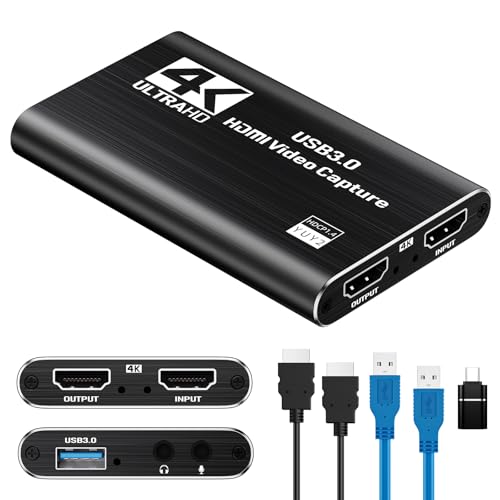
XIIXMASK USB 3.0 HDMI Capture Card, 1080p60, 4K Pass-ThroughBest Aluminum-Body Budget CardXIIXMASK USB 3.0 HDMI Capture Card, 1080p60, 4K Pass-Through1080p at 60 fps, 2K optionLow tier4Kn/a
VIXLW 4K HDMI Capture Card, 1080p60, USB 3.0, Loop-OutBest Plug-and-Play BasicVIXLW 4K HDMI Capture Card, 1080p60, USB 3.0, Loop-Out1080p at 60 fpsLow tiern/aUSB 3.0 single channel
Papeaso USB 3.0 HDMI Capture Card, 2K30 and 1080p60, 4K Pass-ThroughBest Camera Capture OptionPapeaso USB 3.0 HDMI Capture Card, 2K30 and 1080p60, 4K Pass-Through2K at 30 fps and 1080p at 60 fpsLow tier4KUSB 3.0

A capture card takes the video from a console or camera over HDMI and delivers it to your computer so you can stream or record it. The key detail that listings blur is the difference between what a card captures and what it merely passes through to your screen.

This guide compares USB and external capture cards for streaming. We evaluated each on published specifications, capture resolution, pass-through, frame rates, latency claims and owner feedback patterns, and we explain which spec matters for the kind of stream you plan to run.

Before you buy

6 Criteria to Look For Before Buying a Capture Card for Streaming

  1. 01

    Capture vs pass-through

    Capture is the resolution and frame rate the card records, while pass-through is what it sends to your monitor. The Guermok, XIIXMASK, VIXLW and Papeaso accept 4K and pass it through, but they capture at 1080p or 2K. The Elgato 4K S and 4K X capture at true 4K. Many buyers see 4K in a product name and assume the recording is 4K, which is rarely true at low cost. Read the capture line of the specification, not the product title.

  2. 02

    Resolution and frame rate needs

    Most streams run at 1080p60 or lower, because platforms cap bitrate and frame rate. A card that captures 1080p60 is enough for console streaming. Higher specs such as 1440p120, 1080p240 or 4K144 help only if you record for editing or your source outputs them. Pay for the resolution you will use.

  3. 03

    Latency and pass-through

    A loop-out or pass-through port lets you play on a monitor without the delay of the capture path. All the cards here offer some form of pass-through, and the Elgato cards claim near-zero latency. High latency in the capture path causes audio and video to drift out of sync in the stream. Check whether you play from the pass-through or the computer preview.

  4. 04

    USB bandwidth and ports

    USB 3.0 is needed for 1080p60 capture, and 4K capture needs faster ports. A card in a USB 2.0 port will fail or drop to a lower mode. Use the short cable provided, and avoid hubs. The XIIXMASK offers USB-A and USB-C options for flexibility.

  5. 05

    Console and HDCP support

    Some consoles and devices apply content protection that can blank a capture. Settings often let you turn it off for gameplay. Elgato lists PS5, Xbox Series and Switch, while budget cards rely on you to check. Streaming protected video is not allowed, so use the card for gameplay and your own camera.

  6. 06

    Heat and software

    Small cards run warm, and metal bodies like the XIIXMASK aluminum case help. Software matters, since a card that appears as a standard video device works with most programs. Elgato offers its own software, and budget cards usually act as plain video sources. Check the compatibility list for your streaming software.

Detailed reviews

The 6 best capture cards for streaming, explained

01
Elgato 4K S Capture Card, 4K60 HDR10, USB
4K60 HDR101440p1201080p240Near-zero latency
Check price on Amazon
Best for: Creators who record and stream at 4K60 or at high frame rates from current consoles.

The Elgato 4K S captures 4K at 60 fps with HDR10, and also supports high frame rate capture at 1440p120 or 1080p240. The maker claims near-zero latency and lists compatibility with current consoles such as the PS5, Xbox Series X and S and Switch. It is a compact USB device that works with the major streaming software.

The resolution and frame rate options cover most creators: 4K60 for polished recording, and 1440p120 or 1080p240 for fast action. Compared with the 4K X, it tops out at 4K60 and not 4K144, which is lower on paper and fine for most. Compared with the budget cards, it captures at true 4K and not at 1080p with 4K pass-through, which matters if you want a 4K recording.

In use, connect it to a fast USB port, such as a USB 3.2 port, and use the short supplied cable. Install the maker's software for settings. Consoles with content protection can blank the capture unless you turn off the protection in the console's settings, and 4K recording produces large files that need fast storage. Keep the firmware updated.

What works

  • Captures 4K at 60 fps with HDR10
  • High frame rate modes at 1440p120 and 1080p240
  • Near-zero latency claimed
  • Works with major streaming software

Watch out for

  • Highest cost tier in the lineup
  • Needs a fast USB port and a capable computer
  • 4K recordings consume large amounts of storage

Specs

Capture
4K at 60 fps with HDR10
High frame rate
1440p120 or 1080p240
Latency
Near-zero latency claimed
Targets
PS5, Xbox Series X and S, Switch
Class
Highest tier alongside the 4K X
02
Elgato 4K X Capture Card, 4K144 Ultra-Low Latency
4K144Ultra-low latencyUSB 3.2PS5 Xbox Switch
Check price on Amazon
Best for: PC streamers and creators who want the highest refresh rates and resolution.

The Elgato 4K X is the highest-spec card in this guide, with capture up to 4K at 144 Hz and an ultra-low latency claim. It is aimed at creators who want the highest refresh rates from a PC or console and want to stream or record them. The maker highlights seamless broadcasting with major apps.

A 144 Hz capture matters only if your source can output it, such as a gaming PC with a fast monitor. Compared with the 4K S, it adds the top frame rates at a higher cost. Compared with the Guermok or Papeaso, it captures at true 4K at higher refresh rates and not at 1080p. For many streamers, the extra spec will not be visible to viewers, since streaming platforms limit bitrate.

Ownership notes: you need a fast USB connection and a capable computer to use the full spec. Use the short cable provided, since cheap cables drop speeds. Check the firmware and software updates. The card is overkill for a console streamer at 1080p, so check what your audience and platform will really show.

What works

  • 4K capture up to 144 Hz
  • Ultra-low latency claimed
  • Works with consoles and PC
  • Major streaming software support

Watch out for

  • Highest cost tier, with specs most streams cannot use
  • Needs a fast USB port and strong PC
  • Streaming platforms cap bitrate and frame rate

Specs

Capture
4K at up to 144 Hz
Latency
Ultra-low latency claimed
Targets
PS5, Xbox Series X and S, Switch and PC
Software
Works with major streaming apps
Class
Highest tier here
03
Guermok USB 3.0 HDMI Capture Card, 1080p60, 4K Pass-Through
1080p60 capture2K30 capture4K60 inputHDMI loop-out
Check price on Amazon
Best for: 1080p streamers who want a low-cost card with a lag-free pass-through to a 4K monitor.

The Guermok card supports 1080p at 60 fps and 2K at 30 fps capture over USB 3.0, with an HDMI loop-out that accepts up to 4K at 60 Hz for real-time display. It is the key budget pattern: capture at 1080p, pass through at higher resolution. The loop-out lets you play on a monitor with no lag while the card records.

Pass-through is not capture. The listing says 4K input, but the recording is 1080p or 2K, so your recording will not be 4K. Compared with the Elgato 4K S, it costs far less and captures at lower resolution. Compared with the XIIXMASK, it is similar in concept, so the choice is about brand support and warranty.

In practice, use a USB 3.0 port, not a USB 2.0 port, or the card will not reach 1080p60. Keep the card cool, since small cards can run warm. Plug and play drivers vary, so check the software support list. For a console streamer at 1080p, it is enough.

What works

  • 1080p60 capture at a low cost tier
  • HDMI loop-out gives lag-free play on your monitor
  • 4K input passes through to a 4K display
  • Simple USB 3.0 connection

Watch out for

  • Recording is 1080p or 2K, not 4K
  • Lesser-known brand with variable support
  • Small body can run warm

Specs

Capture
1080p at 60 fps and 2K at 30 fps
Pass-through
Up to 4K at 60 Hz input with loop-out
Interface
USB 3.0
Use
Gaming and camera streaming
Class
Low tier
04
XIIXMASK USB 3.0 HDMI Capture Card, 1080p60, 4K Pass-Through
1080p60 capture4K pass-throughUSB-A and USB-CAluminum body
Check price on Amazon
Best for: Budget streamers who want a metal-body card with USB-A and USB-C options.

The XIIXMASK is a USB 3.0 HDMI capture card with 1080p60 capture, 4K pass-through and dual USB-A and USB-C connections. The body is aluminum alloy to help dissipate heat, which is a real concern for small capture cards. The listing mentions multiple ports, which gives flexibility with consoles and cameras.

The aluminum body is the main practical difference at this tier, since a cooler card is less likely to drop frames in a long stream. Compared with the Guermok, it adds the dual connector options and a metal case. Compared with the VIXLW, it is a similar approach with a different build. As with the others, the capture is 1080p, and the 4K applies only to pass-through.

Ownership notes: confirm that your computer has a USB 3.0 port and use the right cable. Heat management is easier with a metal body, but give the card some airflow. Check that your streaming software recognizes the card as a standard video device. Consider a short, quality HDMI cable, since long cables can introduce signal problems.

What works

  • Aluminum alloy body helps spread heat
  • Dual USB-A and USB-C connection options
  • 1080p60 capture with 4K pass-through
  • Low cost tier

Watch out for

  • Capture is 1080p, not true 4K
  • Lesser-known brand with limited support
  • Still needs a USB 3.0 port for full speed

Specs

Capture
1080p at 60 fps, 2K option
Pass-through
4K
Connection
Dual-port USB-A and USB-C
Body
Aluminum alloy for heat dissipation
Class
Low tier
05
VIXLW 4K HDMI Capture Card, 1080p60, USB 3.0, Loop-Out
1080p60 captureUSB 3.0Loop-outNo driver needed
Check price on Amazon
Best for: First-time streamers who want the simplest, lowest-friction way to capture 1080p.

The VIXLW is a USB 3.0 HDMI capture card that needs no driver or external power and offers a loop-out for lag-free live gameplay. It captures at 1080p and 60 fps, and the listing mentions 4K, which applies to the input and pass-through. The pitch is simplicity.

A plug-and-play card is useful for a first stream or for capturing a camera in a pinch. Compared with the XIIXMASK, it lacks the metal body and the dual connectors. Compared with the Guermok, it is a similar low cost option. Because the 4K label appears in the product name, the main risk is buying it expecting a 4K recording.

In use, plug the card into a USB 3.0 port, connect your source and monitor, and select it in your streaming software. Check that your source does not use content protection that blocks capture. Use a short, good HDMI cable. If you see lag or dropped frames, try another USB port and check the computer's load.

What works

  • Plug and play with no drivers or external power
  • Loop-out keeps gameplay lag-free on your monitor
  • 1080p60 capture is enough for most streams
  • Low cost tier

Watch out for

  • 4K label refers to input, not capture
  • Plastic or lighter build than metal models
  • Less support than major brands

Specs

Capture
1080p at 60 fps
Setup
Plug and play, no drivers or external power
Loop-out
Lag-free HDMI loop-out for live gameplay
Interface
USB 3.0 single channel
Class
Low tier
06
Papeaso USB 3.0 HDMI Capture Card, 2K30 and 1080p60, 4K Pass-Through
2K30 capture1080p60 capture4K pass-throughUSB 3.0
Check price on Amazon
Best for: Camera and presentation capture where 2K30 or 1080p60 is enough.

The Papeaso is a USB 3.0 HDMI capture card with capture at 2K and 30 fps or 1080p at 60 fps and 4K pass-through. It targets recording and streaming from a game console or a camera. The simple USB design makes it a straightforward way to bring an HDMI feed into a computer.

The 2K30 mode is a middle option, with higher resolution at a lower frame rate, which suits slower content like talks or camera feeds. Compared with the Guermok, it offers a similar feature set. Compared with the Elgato cards, it captures at much lower resolution or frame rate. For fast action games, 1080p60 is the mode to use.

Ownership steps: set the card to the mode that matches your content, and connect it to a USB 3.0 port. Confirm your software reads the card as a video device. Because it is a low cost product from a smaller brand, check return terms. It is a good tool for camera capture in meetings or events.

What works

  • 2K30 and 1080p60 capture modes
  • 4K pass-through for the display
  • Works with consoles, cameras and other HDMI devices
  • Low cost tier

Watch out for

  • Lower capture quality than Elgato cards
  • 2K runs at only 30 fps
  • Smaller brand with limited support

Specs

Capture
2K at 30 fps and 1080p at 60 fps
Pass-through
4K
Interface
USB 3.0
Sources
Consoles, cameras and other HDMI devices
Class
Low tier

Spec decoder

What the listing measurements really mean

The numbers brands lead with, translated into what they tell you about fit, comfort and wear at home.

4K60 HDR10

Capture at 3840 by 2160 pixels at 60 frames per second with high dynamic range. It needs a fast port and a strong computer.

Watch forThe Elgato 4K S lists 4K60 HDR10.

Pass-through

The card sends the signal through to your monitor without processing. It does not mean the card records at that resolution.

Watch forThe Guermok, XIIXMASK, VIXLW and Papeaso list 4K pass-through with 1080p or 2K capture.

1440p120 and 1080p240

High frame rate capture modes for fast games. They need a source that outputs those modes.

Watch forThe Elgato 4K S lists these modes.

Loop-out

An HDMI output that mirrors the input so you can play on a monitor with no capture delay.

Watch forThe Guermok and VIXLW list loop-out.

USB 3.0

A 5 Gbps connection needed for 1080p60 capture. USB 2.0 is too slow.

Watch forThe budget cards list USB 3.0.

Methodology

How We Evaluated These Capture Cards for Streaming

Capture specs

We separated capture resolution and frame rate from pass-through, noting that four of the six cards capture at 1080p or 2K. Our scores are editorial assessments based on published specifications and owner feedback patterns.

Latency and pass-through

We looked at loop-out and latency claims, such as the near-zero claim on the Elgato 4K S.

Connection

We compared USB 3.0 and faster connections and noted port requirements.

Build and heat

We considered aluminum bodies, such as on the XIIXMASK, and heat behavior.

Value and honesty

We judged each card by relative cost tier and avoided price figures. Marketing that leads with 4K on a 1080p capture card was discounted.

Decision guide

How to Choose the Right Capture Cards for Streaming

By Stream Quality

SituationPickWhy
4K60 recordingElgato 4K STrue 4K60 with HDR10.
Highest refresh ratesElgato 4K XUp to 4K144.
Console streaming at 1080pGuermok USB 3.01080p60 at a low tier.
Camera or talksPapeaso USB 3.02K30 and 1080p60.

By Budget

SituationPickWhy
Lowest spendVIXLWBasic plug and play.
LowGuermok or Papeaso1080p60 with pass-through.
Low to midXIIXMASKMetal body.
HighestElgato 4K S or 4K XTrue 4K capture.

True 4K vs 4K Pass-Through

True 4K capture

The Elgato 4K S and 4K X record at 4K, but cost more and need faster ports and bigger storage.

4K pass-through

The budget cards show 4K on your monitor but record at 1080p or 2K, which is enough for most streams.

Choose true 4K if you record for editing. Choose pass-through if you only stream at 1080p.

By Source

SituationPickWhy
PS5 or Xbox SeriesElgato 4K SConsole support listed.
Nintendo SwitchGuermok USB 3.01080p60 matches Switch output.
Camera feedPapeaso USB 3.02K30 option.
Second PCElgato 4K XHigh refresh capture.

For Streaming Specifically

Look for

A capture mode that matches your stream, a loop-out for lag-free play, a USB 3.0 or faster port and software your streaming app supports.

In this comparison

The Elgato 4K S leads on capture, the Guermok on value and the XIIXMASK on build.

When to Spend More

Spend more if

You record 4K for editing, play at high refresh rates or want brand software. The Elgato cards justify the cost.

Save if

You stream at 1080p. A Guermok, XIIXMASK or VIXLW does the job.

Ownership

Maintenance schedule

The upkeep that decides whether a piece still looks good in year five.

TaskIntervalWhy it matters
Update firmware and softwareEvery few monthsUpdates fix bugs and improve compatibility with consoles and streaming apps.
Use a short, good HDMI cableSetupLong or cheap cables cause signal dropouts. Replace damaged cables. Keep a spare cable in the bag for travel.
Give the card airflowDuring long streamsSmall cards run warm and may drop frames when hot. Keep vents clear.
Check the USB portWhen dropouts occurLoose ports and hubs cause disconnects. Try a direct USB 3.0 port.
Clear storage for recordingsBefore each sessionHigh-resolution recordings fill drives quickly. Keep free space for the session.

FAQ

Frequently Asked Questions

Do I need a capture card to stream a console?

Usually yes, unless the console streams directly. A capture card lets you stream or record through your PC and add overlays. A card also lets you record clean gameplay without the console's own overlays.

Is 4K pass-through the same as 4K capture?

No. Pass-through sends 4K to your monitor, but the recording may be 1080p or 2K.

Will a cheap card add lag?

Play from the loop-out and not the computer preview to avoid lag. Capture latency affects stream sync, not your gameplay.

Why is my capture black?

Content protection may be on. Check your console settings, and use gameplay, not protected video. A different HDMI cable or port on the source is also worth trying.

What USB port do I need?

A USB 3.0 or faster port. A USB 2.0 port is too slow for 1080p60.

Is an internal card better?

Internal cards avoid an extra USB device and can be faster, but need a desktop slot. External cards are portable.

Bottom line

The short version

Browse more capture cards for streamingon Amazon →
Brianna Cole, Lead Product Editor

About the author

Brianna Cole

Lead Product Editor, SenseiReview

Brianna Cole leads SenseiReview's buying guides, turning published specifications, documentation and owner feedback patterns into clear verdicts across home, tech, fitness, outdoor and DIY products.

More from Brianna →

Keep reading

Related guides