
Amazon affiliate links - we earn a commission.Affiliate disclosure

Buying guide · 12 min read · Updated 2026-11-21

Best E-Ink Tablets for Note-Taking (2026)

Compare six e-ink tablets for note-taking by screen size, color or black and white, stylus type, app access and cloud plans, plus notes on lag and ghosting.

Brianna Cole, Lead Product EditorBy Brianna ColeLead Product Editor6 picks comparedSpec-sheet verified
Best E-Ink Tablets for Note-Taking

At a glance

Our top picks

Side by side

Spec comparison

PieceScreenFront lightPenPosition in price order
reMarkable Paper Pro 11.8-inch Color E-Ink Tablet, Marker PlusBest OverallreMarkable Paper Pro 11.8-inch Color E-Ink Tablet, Marker Plus11.8 in color e-inkBuilt-in reading lightMarker Plus, with eraser endHighest of 12
reMarkable Paper Pure 10.3-inch E-Ink Tablet, Marker Plus, FolioBest Black and WhitereMarkable Paper Pure 10.3-inch E-Ink Tablet, Marker Plus, Folio10.3 in black and whiten/aMarker Plus8 of 12
reMarkable 2 10.3-inch Paper Tablet, Marker Plus, Leather FolioBest Proven ModelreMarkable 2 10.3-inch Paper Tablet, Marker Plus, Leather Folio10.3 in black and white e-inkn/aMarker Plus7 of 12
BOOX Note Air6 C 10.3-inch Color E-Ink Android TabletBest for Apps and ReadingBOOX Note Air6 C 10.3-inch Color E-Ink Android Tablet10.3 in Kaleido 3 color, 4,096 colorsn/an/a9 of 12
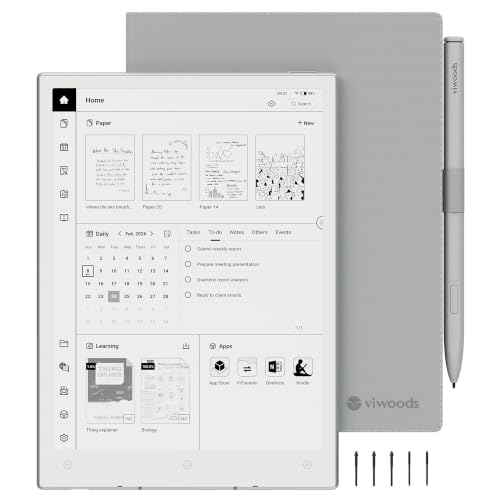
VIWOODS AiPaper Mini 8.2-inch E-Ink Tablet with W2 Pen, 230 gBest PortableVIWOODS AiPaper Mini 8.2-inch E-Ink Tablet with W2 Pen, 230 g8.2 in E Ink, 292 PPIAdjustable warm lightW2 Stylus Pro included5 of 12
Huion Ink EB1011 10.3-inch E-Ink Notebook, Dual Front LightBest ValueHuion Ink EB1011 10.3-inch E-Ink Notebook, Dual Front Light10.3 in E Ink, 1404 by 1872Dual colorBattery-free, 8192 pressure levels4 of 12

An e-ink note-taking tablet uses a paper-like screen that reflects light instead of emitting it, which makes it easy on the eyes and very efficient on battery. You write with a stylus, mark up PDFs and keep notebooks in one place, without the glare and notifications of an ordinary tablet.

The tradeoffs are real. E-ink refreshes slowly, so video and fast scrolling are poor, and ghosting can leave faint traces. The main choice is between a locked-down writing device and an Android-based tablet with app access. This guide compares screen, stylus, software and cloud plans so you can pick the right side of that divide.

Before you buy

6 Criteria to Look For Before Buying an E-Ink Tablet for Note-Taking

  1. 01

    Closed or open software

    A closed system like the reMarkable models has no app store and no notifications, which protects focus. An Android system like the BOOX Note Air6 C opens up cloud drives and note apps but invites distraction. The common mistake is buying open and then wishing it were quiet, or buying closed and then missing an app.

  2. 02

    Screen size and resolution

    Size sets how much of a page you see, and resolution sets sharpness. The reMarkable Paper Pro is 11.8 inches, the Paper Pure, reMarkable 2, Huion and BOOX Air6 C are 10.3 inches, and the AiPaper Mini is 8.2 inches. A smaller tablet is portable but poor for full-page PDFs.

  3. 03

    Color or black and white

    Color e-ink, as on the Paper Pro and the BOOX Air6 C, shows highlights and charts but has lower contrast and a slower refresh than black and white. A black and white panel looks sharper on text. Decide whether color matters for your notes before you pay for it.

  4. 04

    Stylus and writing feel

    The stylus decides the feel. The Marker Plus on the reMarkable models has an eraser end, the Huion pen is battery-free with 8192 levels and the AiPaper Mini ships with the W2 Stylus Pro. A glass surface feels slicker than a textured one, so try one if you can.

  5. 05

    Front light

    A built-in light lets you use the tablet in a dark room. The Paper Pro, BOOX, Huion and AiPaper Mini have one, while the reMarkable 2 and Paper Pure do not. Without one, you need a lamp, which defeats part of the point of e-ink.

  6. 06

    Cloud plans and exports

    Some features, such as cloud sync and handwriting conversion, may need a paid plan. Check what is included with the tablet. Make sure you can export notes as PDF or standard formats so you are not locked in.

Detailed reviews

The 6 best e-ink tablets for note-taking, explained

01
reMarkable Paper Pro 11.8-inch Color E-Ink Tablet, Marker Plus
11.8 in colorReading lightMarker PlusNo app store
Check price on Amazon
Best for: People who want the best paper-like writing in color with no distractions.

The reMarkable Paper Pro is the first model from the brand to write, sketch and read in color, on an 11.8 inch display with a built-in reading light. It uses a Marker Plus pen designed for the color display, and the software is deliberately locked: there is no app store, no ads and no social media. The listing positions it as a pure thinking device.

The tradeoff is that it is the highest in the price order of the twelve candidates we reviewed, and the pen is bought with the tablet, not borrowed from a cheaper stylus. Color e-ink is slower and less saturated than a normal LCD screen. Compared with the reMarkable Paper Pure, it adds color and a front light, while the Pure is cheaper and lighter. Against the BOOX Note Air6 C, it has a calmer, more consistent writing experience but no Android apps.

In ownership, the points are the cloud plan and nib wear. Check which features, such as cloud sync or handwriting conversion, need a paid plan before you buy. Marker nibs wear and need replacing every few months of heavy use, and a folio keeps the screen safe in a bag.

What works

  • Color e-ink with a built-in reading light covers writing and reading
  • No app store, ads or notifications keeps the device focused on writing
  • Marker Plus has an eraser end, like a pencil, so correction is natural
  • Large 11.8 inch screen gives room for full-page notes and PDFs

Watch out for

  • Highest in the price order among the twelve candidates
  • Color e-ink is slower and less saturated than a normal tablet screen

Specs

Screen
11.8 in color e-ink
Front light
Built-in reading light
Pen
Marker Plus, with eraser end
Software
Closed, no app store or ads
Position in price order
Highest of 12
02
reMarkable Paper Pure 10.3-inch E-Ink Tablet, Marker Plus, Folio
10.3 inBlack and white3rd-gen displayMarker Plus
Check price on Amazon
Best for: Writers who do not need color and want the best black and white reMarkable display.

The Paper Pure is the black and white model in the newer reMarkable lineup. Its third-generation 10.3 inch display is described as whiter with more contrast than earlier panels, and it is sold with a Marker Plus pen and a sleeve folio. It keeps the closed, distraction-free software and focuses on writing, marking up documents and sketching.

The tradeoff is that there is no color and no front light, so you need a lamp to use it in a dark room. It sits eighth in the price order of twelve, so it is not cheap. Compared with the reMarkable 2, it has a better display for a higher cost. Against the Paper Pro, it is smaller and cheaper but lacks color and the reading light.

In ownership, check the cloud plan and whether handwriting conversion is included. Keep spare nibs for the Marker Plus, and use the folio to protect the screen. Ghosting on e-ink fades with a refresh, so do not panic if you see a faint trace after erasing.

What works

  • Third-generation display is whiter with more contrast than older panels
  • Marker Plus and folio come with the tablet so it is ready to use
  • No app store or ads keeps the focus on writing and reading
  • 10.3 inch size balances page space and portability

Watch out for

  • No front light, so you need a lamp in the dark
  • Eighth in the price order, so not cheap for a black and white tablet

Specs

Screen
10.3 in black and white
Display
Third generation, whiter and higher contrast
Pen
Marker Plus
Bundle
Ocean Blue sleeve folio
Position in price order
8 of 12
03
reMarkable 2 10.3-inch Paper Tablet, Marker Plus, Leather Folio
10.3 inBlack and whiteNo adsMarker Plus
Check price on Amazon
Best for: Writers who want a proven, closed black and white tablet at a lower cost than the newest models.

The reMarkable 2 is the long-running model that made the category popular: a 10.3 inch black and white e-ink tablet with a paper-like surface and no app store, no pop-up ads, no notifications and no social media. This bundle adds a Marker Plus and a leather book folio. It is the tablet that many reviewers and users still compare others against.

The tradeoff is age: it is an older design than the Paper Pure and the Paper Pro, so it has an earlier display and no front light. It sits seventh in the price order of twelve. Compared with the Paper Pure, it costs a bit less but has a less contrasty screen. Against the Huion Ink EB1011, it has a more refined writing experience and a larger ecosystem, but no front light.

In ownership, the pen nibs wear, and the tablet depends on reMarkable's software updates and cloud services. Check what the cloud plan includes, and back up your notes by exporting PDFs. Use the folio to protect the screen from scratches in a bag.

What works

  • Mature design with a long track record among note-takers
  • No app store, ads or notifications keeps attention on writing
  • Marker Plus and a leather folio come in the bundle
  • Seventh in the price order, lower than the Paper Pure and Paper Pro

Watch out for

  • Older display than the Paper Pure and no front light
  • Cloud features may need a paid plan, so check what is included

Specs

Screen
10.3 in black and white e-ink
Software
No app store, no notifications
Pen
Marker Plus
Bundle
Black leather book folio
Position in price order
7 of 12
04
BOOX Note Air6 C 10.3-inch Color E-Ink Android Tablet
10.3 in colorAndroid 166GB/64GBmicroSD
Check price on Amazon
Best for: Readers and researchers who want Android apps, a microSD slot and a color screen.

The BOOX Note Air6 C is the open option: a 10.3 inch Kaleido 3 color e-ink screen running Android 16, with 6GB of RAM, 64GB of storage and a microSD slot. It supports a long list of document formats including PDF, EPUB, MOBI, DOCX and CBZ, and has a fingerprint power button. Resolution is 2480 by 1860 in black and white at 300 ppi, with lower color resolution.

The tradeoff is that Android access means distractions and a busier writing experience, and the color layer lowers contrast and sharpness compared with a black and white panel. It is ninth in the price order of twelve. Compared with the reMarkable Paper Pro, it opens to apps like cloud drives and note apps but feels less polished. Against the Huion Ink, it has a bigger software ecosystem and a more powerful chip.

In ownership, plan to tune the refresh modes, since e-ink on Android trades speed for ghosting. Keep the firmware updated and choose apps designed for e-ink. The microSD slot helps with large libraries, and the open system suits readers who want one device for books and notes.

What works

  • Android 16 gives access to cloud drives, note apps and e-book stores
  • Kaleido 3 color screen shows highlights and charts in color
  • 6GB RAM and 64GB storage with a microSD slot for large libraries
  • Supports many formats such as PDF, EPUB, MOBI, DOCX and CBZ

Watch out for

  • Android adds distractions and a busier writing experience
  • Color layer lowers contrast and sharpness compared with black and white

Specs

Screen
10.3 in Kaleido 3 color, 4,096 colors
Resolution
2480 by 1860 black and white, 300 ppi
OS
Android 16
Memory
6GB RAM and 64GB storage
Position in price order
9 of 12
05
VIWOODS AiPaper Mini 8.2-inch E-Ink Tablet with W2 Pen, 230 g
8.2 in230 g292 PPIWarm light
Check price on Amazon
Best for: Commuters and readers who want a light tablet that fits a coat pocket.

The VIWOODS AiPaper Mini is a pocketable 8.2 inch e-ink tablet at 230 grams, with a 292 PPI display, an adjustable warm front light and an included W2 Stylus Pro pen. The listing describes handwriting to text and AI meeting summaries, and says it works as a reader, notebook and e-paper tablet. It is closer in size to a paperback than a legal pad.

The tradeoff is page size, because 8.2 inches is small for large sketches or two-column PDFs. AI features depend on software and may need an account or a plan, which the listing does not detail. It sits fifth in the price order of twelve. Compared with the BOOX Tablet Go Color 7, it is larger. Against the reMarkable 2, it is far lighter but offers less writing space.

In ownership, check which AI functions work offline and which require a cloud service. Keep spare nibs and use the warm light at night. The size is a strength for commuting, but zoom in on PDFs to read small text.

What works

  • At 230 g it is the lightest tablet in the lineup for carrying around
  • 292 PPI display and adjustable warm light suit reading as well as writing
  • W2 Stylus Pro pen is included in the box
  • Fifth in the price order, mid-range for a feature-rich small tablet

Watch out for

  • 8.2 inch screen is small for large sketches and two-column PDFs
  • AI features and any account requirements are not detailed in the listing

Specs

Screen
8.2 in E Ink, 292 PPI
Weight
230 g
Front light
Adjustable warm light
Pen
W2 Stylus Pro included
Position in price order
5 of 12
06
Huion Ink EB1011 10.3-inch E-Ink Notebook, Dual Front Light
10.3 in1404x1872Dual front lightBattery-free pen
Check price on Amazon
Best for: Budget-conscious note-takers who want a front light and a battery-free pen.

The Huion Ink EB1011 is a 10.3 inch e-ink notebook with a 1404 by 1872 display, a dual-color front light and a full-laminated anti-glare glass surface. The included stylus needs no charging and supports 8192 pressure levels. It offers a front light that the plain reMarkable 2 lacks, at a lower position in the price order.

The tradeoff is brand maturity in this category: Huion is better known for drawing tablets, and the software and cloud ecosystem are less proven than reMarkable's or BOOX's. It sits fourth cheapest of twelve. Compared with the reMarkable 2, it has a front light and a lower cost but a less polished app. Against the BOOX Note Air6 C, it is simpler and cheaper but less open.

In ownership, check the file formats the tablet reads and the export options for notes. Keep spare nibs, and test the pen on the surface to see if you like the feel of the glass. Update the firmware when released, and back up your notes regularly.

What works

  • Dual-color front light makes it usable in a dark room
  • Battery-free pen with 8192 pressure levels never needs charging
  • Full-laminated anti-glare glass reduces reflections and parallax
  • Fourth lowest in the price order among the twelve candidates

Watch out for

  • Software and cloud ecosystem are less proven than reMarkable or BOOX
  • Glass surface feels less like paper than a textured screen

Specs

Screen
10.3 in E Ink, 1404 by 1872
Front light
Dual color
Pen
Battery-free, 8192 pressure levels
Surface
Full-laminated anti-glare glass
Position in price order
4 of 12

Spec decoder

What the listing measurements really mean

The numbers brands lead with, translated into what they tell you about fit, comfort and wear at home.

Kaleido 3 color

A color filter layer on an e-ink panel that shows about 4,096 colors. It lowers the resolution and contrast of color content compared with black and white.

Watch forThe BOOX Air6 C lists 4,096 colors and 150 ppi color, versus 300 ppi black and white.

PPI

Pixels per inch, a measure of sharpness. Higher means finer text, though writing feel depends on the pen and surface too.

Watch forThe BOOX lists 300 ppi black and white and the AiPaper Mini 292 PPI.

Pressure levels

The number of steps the pen can sense in how hard you press. Higher is smoother for line weight, but software support matters too.

Watch forThe Huion lists 8192 levels and others do not state a number.

Front light

A built-in LED that lights the screen from the edge. It lets you read and write in the dark without glare.

Watch forThe reMarkable 2 and Paper Pure have none, and the others list one.

Android on e-ink

A full phone-style operating system that lets you install apps. It adds flexibility but also ghosting and slower refresh in some modes.

Watch forOnly the BOOX Air6 C runs Android here, and the reMarkable models run closed software.

Methodology

How We Evaluated These E-Ink Tablets for Note-Taking

Writing experience

We evaluated the pen, the surface and the lag from the listings and owner feedback patterns. The reMarkable models are built around the writing feel and the Huion uses glass. We favoured models known for low lag.

Software focus

We compared closed and open systems. The reMarkable models have no app store, and the BOOX runs Android 16. We weighed focus against flexibility.

Screen and light

We looked at size, resolution and front light. The Paper Pro has color and a light, and the Paper Pure and reMarkable 2 do not have a light. We noted that color lowers contrast.

Cloud and exports

We checked what cloud plans and export formats each listing describes. Several features may need a paid plan. We ranked clear listings higher.

Value and support

We considered brand history and price order, not in-house use. reMarkable and BOOX have longer records than the newer brands. We lowered rank where support looked thin.

Decision guide

How to Choose the Right E-Ink Tablets for Note-Taking

By Screen Size

SituationPickWhy
Large pages and PDFsreMarkable Paper Pro11.8 in color screen
Standard notebook sizereMarkable Paper Pure or Huion10.3 in screens
Pocket and commuteVIWOODS AiPaper Mini8.2 in and 230 g
Apps and books on one deviceBOOX Note Air6 C10.3 in Android with microSD

By Budget

SituationPickWhy
Cheapest 10.3 inch with lightHuion Ink EB1011Fourth lowest of twelve
Mid-range portableVIWOODS AiPaper MiniFifth in the price order
Proven black and whitereMarkable 2Seventh in the price order
Premium colorreMarkable Paper ProHighest in the price order

Closed vs Android Tablet

Closed writing tablets

The reMarkable models have no app store or notifications. They suit people who want to think and write without distraction.

Android tablets

The BOOX runs Android and installs apps. It suits readers and researchers who want one flexible device.

Choose closed for focus and Android for flexibility, and accept the ghosting that comes with open apps.

By Light and Colour

SituationPickWhy
Color highlights and chartsreMarkable Paper Pro or BOOX Air6 CColor e-ink screens
Sharpest textreMarkable Paper PureWhiter, higher-contrast black and white
Dark room useHuion Ink EB1011Dual front light
Plain and provenreMarkable 2Black and white, no light

For Note-Takers Specifically

Look for

A pen with an eraser or battery-free design, a screen with low lag, export to PDF, and a clear cloud plan. Try the pen feel if you can.

In this comparison

The reMarkable Paper Pro is the best overall, the Huion Ink is the best value, and the BOOX is best for reading and apps.

When to Spend More

Spend more if

You write daily, want color, or want a polished ecosystem with long software support.

Save if

You mostly want to try e-ink. The Huion Ink or reMarkable 2 cover the basics at a lower position in the price order.

Ownership

Maintenance schedule

The upkeep that decides whether a piece still looks good in year five.

TaskIntervalWhy it matters
Replace pen nibsEvery few monthsNibs wear with friction on the screen. A worn nib scratches and feels rough.
Update the firmwareEvery few monthsUpdates improve lag and fix bugs. Check the settings menu.
Back up the notesMonthlyDo not rely on a single device. Export PDFs or sync to cloud storage.
Refresh the screenWhen ghosting appearsA full refresh clears faint traces from earlier writing. Use the refresh button.
Protect the screenAlwaysE-ink glass can scratch in a bag. A folio or sleeve prevents that.

FAQ

Frequently Asked Questions

Is an e-ink tablet better than an iPad for note-taking?

It is better for focus, reading outside and battery life. An iPad is better for color, apps and video.

Do e-ink tablets need a subscription?

Some cloud features and handwriting conversion may need a paid plan. Check what the tablet includes before buying.

Why is there ghosting?

E-ink pixels can leave faint traces after erasing. A full refresh clears it.

Can I read books on these tablets?

Yes. The BOOX supports many formats and the reMarkable models read PDFs and EPUBs. Check the format list.

Is color e-ink as good as black and white?

No. Color e-ink has lower contrast and a slower refresh. It is useful for highlights, not for sharp text.

Can I use the tablet in the dark?

Only with a front light. The Paper Pro, BOOX, Huion and AiPaper Mini have one.

Bottom line

The short version

Browse more e-ink tablets for note-takingon Amazon →
Brianna Cole, Lead Product Editor

About the author

Brianna Cole

Lead Product Editor, SenseiReview

Brianna Cole leads SenseiReview's buying guides, turning published specifications, documentation and owner feedback patterns into clear verdicts across home, tech, fitness, outdoor and DIY products.

More from Brianna →

Keep reading

Related guides