
Amazon affiliate links - we earn a commission.Affiliate disclosure

Buying guide · 13 min read · Updated 2026-11-21

Best NAS Drives for Home Media (2026)

NAS drives for home media compared on bay count, included disks, streaming and transcoding ability, and network speed, so movies and photos stay in one place.

Brianna Cole, Lead Product EditorBy Brianna ColeLead Product Editor6 picks comparedSpec-sheet verified
Best NAS Drives for Home Media

At a glance

Our top picks

Side by side

Spec comparison

PieceBaysKitUseSoftwareAudience
UGREEN DXP2800 2-bay NAS home media server, disklessBest OverallUGREEN DXP2800 2-bay NAS home media server, diskless2Diskless, bring your own drivesMedia streaming and file sharingVendor NAS operating systemHome and creators
UGREEN DXP4800 GT 4-bay NAS for media servers and creatorsBest 4-Bay GrowthUGREEN DXP4800 GT 4-bay NAS for media servers and creators4DisklessMedia, creators, officeVendor NAS operating systemLarge libraries
Asustor Drivestor 2 Gen 2 AS1202T 2-bay NAS for home usersBest Established BrandAsustor Drivestor 2 Gen 2 AS1202T 2-bay NAS for home users2DisklessPersonal home storageADM operating systemBeginners
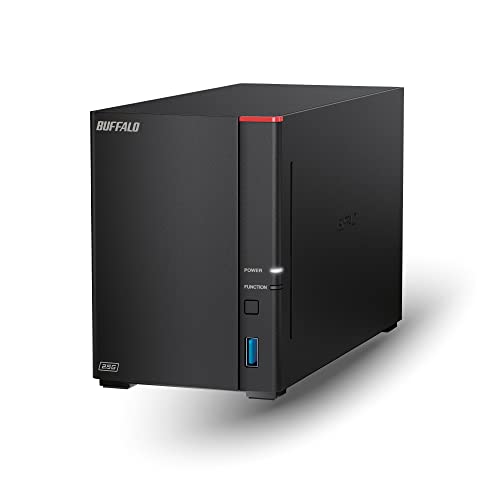
Buffalo LinkStation 220 4TB 2-bay NAS with included drivesBest Value With DisksBuffalo LinkStation 220 4TB 2-bay NAS with included drives2Drives includedHome file storagen/an/a
Buffalo LinkStation 720 8TB 2-bay home office private cloudBest Private CloudBuffalo LinkStation 720 8TB 2-bay home office private cloud2Drives includedPrivate cloud storagen/aHome office
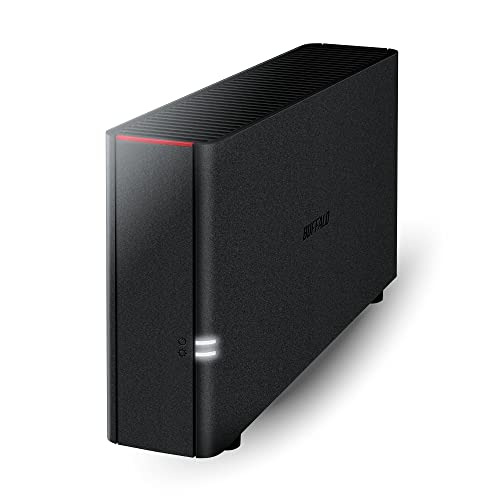
Buffalo LinkStation 210 4TB 1-bay NAS with included driveBest Single-Bay EntryBuffalo LinkStation 210 4TB 1-bay NAS with included drive1Drive includedBasic file sharingn/an/a

A network attached storage box is a small computer with one or more disk bays that serves files, photos and video to every device on your network. For home media the questions are how many bays you need, whether the box can handle video transcoding and whether disks come included.

This guide focuses on home media use and is honest about the limits. We evaluated each model from published specifications and patterns in owner feedback, with attention to bay count, processor class, network speed and year-three disk and software reliability. A NAS with disk redundancy protects against one drive failing. It is not a backup, so a second copy somewhere else still matters.

Before you buy

6 Criteria to Look For Before Buying a NAS Drive for Home Media

  1. 01

    Bay count and growth

    Two bays allow mirrored storage, which protects against one drive failing, while four bays allow more capacity and levels like RAID 5. A single bay offers no redundancy. The UGREEN DXP4800 GT offers four bays, the DXP2800 and Asustor offer two, and the LinkStation 210 offers one. Pick the bay count you can grow into, since you cannot add bays later. As a guide, two bays with mirrored disks suit most families, and four bays make sense only once a library passes what two large disks can hold.

  2. 02

    Disks included or diskless

    Buffalo LinkStations ship with drives, which simplifies setup. Diskless boxes like the UGREEN and Asustor let you choose NAS-rated drives and capacity. Diskless costs more upfront but is more flexible. Included drives may be harder to upgrade.

  3. 03

    Processor and transcoding

    Streaming to a TV on the same network usually needs little processing. Transcoding video for phones or remote viewing needs a stronger processor. Check whether the box supports hardware transcoding if you stream away from home. Older boxes like the LinkStation struggle with it. A device with a slower processor can still play a movie to a TV that supports the file format directly, which is called direct play and needs almost no processing.

  4. 04

    Network speed

    A gigabit port tops out around 110 megabytes per second in practice. Faster ports, such as 2.5 gigabit, help only if your network supports them. For streaming movies, gigabit is plenty. Wi-Fi often becomes the bottleneck. Cheap switches and long thin cables can also cap speed, so check the whole path from the NAS to the TV rather than just the NAS.

  5. 05

    Software and apps

    Operating system quality decides how easy the box is to use. Mature systems like Asustor ADM are easy to learn, while newer systems add features. Check for photo backup, media server apps and remote access. Poor software makes good hardware frustrating.

  6. 06

    Protection and backups

    Mirroring protects against one drive failing but not against deletion, malware or fire. Keep a second copy offsite or in the cloud. A NAS is a convenience, not a backup. Plan for both. The 3-2-1 rule is a good habit: three copies, on two kinds of storage, with one off site.

Detailed reviews

The 6 best nas drives for home media, explained

01
UGREEN DXP2800 2-bay NAS home media server, diskless
2 baysMedia serverDisklessShare and stream
Check price on Amazon
Best for: Households that want a flexible two-bay media server.

The UGREEN DXP2800 is a two-bay home media server sold without disks. The design approach is a compact box that runs a vendor operating system with media apps, file sharing and photo backup, and lets you choose the drives you want. For a home with a movie library and family photos, two bays is the sensible starting point.

Compared with the larger UGREEN DXP4800 GT, the DXP2800 is smaller and cheaper but has less room to grow. Compared with the Buffalo LinkStation units, it is more capable as a media server, but you must buy disks separately. It suits people who want to build a proper media server on a budget.

Ownership is about disks and backups. Choose NAS-rated drives, set up mirrored storage for protection and keep an offsite copy of what you cannot replace. Update the operating system on a schedule and keep the vents clear of dust. A second drive of the same size makes mirroring simple, and buying two different batches of disks reduces the chance that both fail at once.

What works

  • Two bays suit mirrored storage for a media library
  • Diskless design lets you choose your own drives
  • Media server apps handle streaming to TVs and phones
  • Compact body fits on a shelf

Watch out for

  • You must buy disks separately
  • Vendor software is newer than the long-established rivals

Specs

Bays
2
Kit
Diskless, bring your own drives
Use
Media streaming and file sharing
Software
Vendor NAS operating system
Audience
Home and creators
02
UGREEN DXP4800 GT 4-bay NAS for media servers and creators
4 baysMedia serverDisklessExpandable
Check price on Amazon
Best for: Large libraries and households that expect to grow.

The UGREEN DXP4800 GT is a four-bay NAS aimed at larger libraries and creators. The design approach gives you room for four disks, which allows more capacity or protection levels such as RAID 5. For a family with a growing video collection, extra bays mean you will not outgrow it quickly.

Compared with the DXP2800, the GT offers more bays and more capacity but costs more and takes more space. Compared with the Asustor, it is a bigger machine with newer branding. It suits households with a lot of video or those who want to add storage over time.

Ownership requires a plan for disks and backups. Buy NAS-rated drives, consider a protection level that fits your capacity and keep an offsite copy. A four-bay box draws more power and makes more noise, so place it where you will not mind the hum. Plan for a UPS or at least a surge protector too, since a power cut during a write is a common cause of array trouble.

What works

  • Four bays allow more capacity and protection options
  • Room to expand without replacing the box
  • Media server apps support streaming and sharing
  • Diskless design lets you choose your drives

Watch out for

  • More expensive than a two-bay box
  • Draws more power and takes more space

Specs

Bays
4
Kit
Diskless
Use
Media, creators, office
Software
Vendor NAS operating system
Audience
Large libraries
03
Asustor Drivestor 2 Gen 2 AS1202T 2-bay NAS for home users
2 baysPhoto backupHome usersDiskless
Check price on Amazon
Best for: Beginners who want an easy NAS for photos and files.

The Asustor Drivestor 2 Gen 2 is a two-bay NAS aimed at home users who want photo backup and file sharing. The design approach is simple hardware with a mature operating system known for ease of use. It does not try to be a heavy media server, but it covers the essentials.

Compared with the UGREEN DXP2800, the Asustor has a longer software record but less media muscle. Compared with the Buffalo LinkStation 220, it is diskless, so you choose your own drives. It suits users who want a reliable, easy-to-use box for photos and files.

Ownership is about drives and updates. Choose NAS-rated drives, set up mirrored storage and apply operating system updates. Keep the box ventilated and back up important data elsewhere. Its app store is smaller than some rivals, but the core jobs of file sharing, backup and photo albums are handled cleanly.

What works

  • Mature operating system is easy to learn
  • Two bays suit mirrored storage
  • Photo backup features work well for families
  • Established brand with a long track record

Watch out for

  • Less media transcoding power than a dedicated media server
  • Diskless, so you must buy drives

Specs

Bays
2
Kit
Diskless
Use
Personal home storage
Software
ADM operating system
Audience
Beginners
04
Buffalo LinkStation 220 4TB 2-bay NAS with included drives
2 bays4TB includedDrives includedSimple setup
Check price on Amazon
Best for: First-time buyers who want a plug-and-play NAS.

The Buffalo LinkStation 220 is a two-bay NAS that ships with 4 TB of disks installed. The design approach is to make setup simple, so you plug it in, connect to the network and start copying files. For a first NAS, that simplicity is the main attraction.

Compared with the LinkStation 210, the 220 has two bays, so you can mirror drives for protection. Compared with the UGREEN DXP2800, it is less capable as a media server and has older hardware. It suits people who want a plug-and-play box for photos and files.

Ownership requires attention to protection and backups. Set the box to mirror mode if you want redundancy, keep firmware updated and keep an offsite copy. Disks are included but not easily upgraded, so plan for the capacity you need. Because the disks are fixed to the model, a failed drive means a warranty claim rather than a quick swap from a spare.

What works

  • Drives are included, so setup is simple
  • Two bays allow mirrored protection
  • Established brand with a long NAS track record
  • Lower price than building your own

Watch out for

  • Older hardware limits media transcoding
  • Included disks are less flexible than a diskless box

Specs

Bays
2
Capacity
4 TB included
Kit
Drives included
Protection
Mirror or stripe
Use
Home file storage
05
Buffalo LinkStation 720 8TB 2-bay home office private cloud
2 bays8TB includedPrivate cloudHome office
Check price on Amazon
Best for: Home offices that want remote access and large included storage.

The Buffalo LinkStation 720 is a two-bay NAS with 8 TB included, pitched as a private cloud for a home office. The design approach adds remote access features and more capacity than the 220. It suits households with larger media libraries that still want a simple setup.

Compared with the LinkStation 220, the 720 has more capacity and a more capable platform, but it costs more. Compared with the UGREEN DXP2800, it is easier to set up but less flexible. It suits users who want remote access to files and a large pool of storage out of the box.

Ownership requires thought about protection and security. Use mirror mode if you want redundancy, keep firmware updated and use strong passwords for remote access. Keep an offsite copy of important data. Remote access means exposing a device to the internet, so turn on the maker's two-step sign-in and keep the firmware current.

What works

  • 8 TB included gives plenty of room for media
  • Two bays allow mirrored protection
  • Private cloud features support remote access
  • Simple setup for non-technical users

Watch out for

  • Costs more than the entry-level LinkStation
  • Less flexible than a diskless media server

Specs

Bays
2
Capacity
8 TB included
Kit
Drives included
Use
Private cloud storage
Audience
Home office
06
Buffalo LinkStation 210 4TB 1-bay NAS with included drive
1 bay4TB includedDrive includedEntry NAS
Check price on Amazon
Best for: Cheap trials and secondary shared storage.

The Buffalo LinkStation 210 is a single-bay NAS with a 4 TB drive included. The design approach is the simplest possible NAS: one drive, no redundancy and a basic interface. It is a low-cost way to share files and stream basic media around the house.

Compared with the LinkStation 220, the 210 has one bay and no protection against drive failure. Compared with the UGREEN DXP2800, it is far simpler and less capable. It suits users who want to try a NAS cheaply and already have a backup plan.

Ownership requires a backup plan. A single drive means a drive failure loses the data, so copy important files elsewhere. Keep firmware updated and avoid using it as your only copy. Treat it as a convenience copy, and use a second drive or a cloud service for anything irreplaceable.

What works

  • Lowest cost way to try a NAS
  • Drive is included and set up quickly
  • Simple interface suits beginners
  • Compact body fits anywhere

Watch out for

  • Single bay offers no protection against drive failure
  • Limited media features compared with newer boxes

Specs

Bays
1
Capacity
4 TB included
Kit
Drive included
Protection
None, single drive
Use
Basic file sharing

Spec decoder

What the listing measurements really mean

The numbers brands lead with, translated into what they tell you about fit, comfort and wear at home.

Bays

The number of drive slots. More bays allow more capacity and protection options.

Watch forThe UGREEN DXP4800 GT has four, the DXP2800 two and the LinkStation 210 one. The UGREEN DXP4800 GT has four, the DXP2800 two and the LinkStation 210 one, and you cannot add bays later.

RAID 1 (mirror)

Two drives hold the same data, so one can fail without data loss. It halves usable capacity.

Watch forTwo-bay boxes like the DXP2800 and LinkStation 220 support it.

Diskless

A NAS sold without drives. You choose and install the disks yourself.

Watch forThe UGREEN and Asustor models are diskless, so budget for drives.

Transcoding

Converting video to a format a device can play. It needs processing power.

Watch forCheck whether the box supports hardware transcoding if you stream remotely.

NAS-rated drive

A hard drive built for constant use and vibration in multi-bay boxes. It is tuned for reliability.

Watch forDo not use desktop drives in a multi-bay NAS for years of 24 hour use.

Methodology

How We Evaluated These NAS Drives for Home Media

Bays and growth

We compared bay counts and what they allow. The UGREEN DXP4800 GT offers the most room, while the LinkStation 210 offers the least. We matched bay counts to typical library sizes.

Media capability

We looked at processors and media apps. The UGREEN boxes lean toward media, while the Buffalo boxes lean toward file storage. Transcoding support was a key factor.

Setup and software

We read owner feedback on setup and software quality. The LinkStations are simple, the Asustor is mature and the UGREEN is newer. Ease of use was weighted for non-technical buyers.

Protection and backups

We considered redundancy options and what owners say about reliability. Mirrored two-bay boxes beat single-bay units. We stressed that a NAS is not a backup.

Value in context

We placed each box in the home range and asked what it gives up. The LinkStation 220 is the value pick, the DXP2800 is the best balance and the DXP4800 GT is the growth pick. Warranty terms were a tiebreaker.

Decision guide

How to Choose the Right NAS Drives for Home Media

By Library Size

SituationPickWhy
Small library and photosBuffalo LinkStation 220Included disks and simple setup
Medium movie collectionUGREEN DXP2800Two bays and media apps
Large or growing libraryUGREEN DXP4800 GTFour bays for more capacity
Large included storageBuffalo LinkStation 7208 TB out of the box

By Budget

SituationPickWhy
Lowest cost trialBuffalo LinkStation 210Single bay with a drive included
Best value with disksBuffalo LinkStation 220Two bays and 4 TB included
Best balanceUGREEN DXP2800Diskless media server
Spend for growthUGREEN DXP4800 GTFour bays and room to expand

Included Disks vs Diskless

Disks included

The Buffalo LinkStations ship ready to use. They are simple but less flexible and harder to upgrade.

Diskless

The UGREEN and Asustor boxes need drives. They cost more upfront but let you choose NAS-rated disks and capacity.

Choose included disks for simplicity and diskless for flexibility and long-term upgrades.

Media and Streaming Needs

SituationPickWhy
TV streaming at homeAny two-bay boxLittle processing is needed
Streaming away from homeUGREEN DXP2800 or DXP4800 GTStronger media platform
Photo backup for the familyAsustor Drivestor 2Mature software and apps
Remote file accessBuffalo LinkStation 720Private cloud features

For Home Media Specifically

Look for

At least two bays, NAS-rated drives, a media server app, a gigabit port and a plan for backups.

In this comparison

The UGREEN DXP2800 is the all-rounder, the DXP4800 GT is the growth pick and the LinkStation 220 is the simple pick.

When to Spend More

Spend more if

You have a large library, stream away from home or want room to grow. The UGREEN boxes are built for that.

Save if

You want basic file sharing and photo storage. The LinkStation 210 or 220 is enough.

Ownership

Maintenance schedule

The upkeep that decides whether a piece still looks good in year five.

TaskIntervalWhy it matters
Update the operating systemEvery few monthsUpdates fix security issues and improve stability. Check the release notes first. Updates fix security issues and improve stability. Check the release notes first, and avoid updating in the middle of a large copy or a backup run.
Check drive healthMonthlySMART status shows early signs of failure. Replace failing drives before data is at risk.
Run a data scrub or parity checkQuarterlyScrubs find and fix silent errors. They keep mirrored data consistent.
Dust the ventsEvery few monthsDust traps heat and shortens drive life. A brush or vacuum keeps airflow clear.
Test your backupsEvery few monthsA backup you have not restored is a guess. A quick test confirms it works.

FAQ

Frequently Asked Questions

Do I need a NAS for home media?

Not always. A USB drive on a router or a streaming box may be enough. A NAS helps if many devices share a library or you want photo backup and remote access. If you only watch downloaded movies on one TV, a USB drive may be the cheaper and simpler answer.

How much should a home NAS cost?

Prices move, so check the current listing. Single-bay units with a drive are cheapest, two-bay boxes cost more and four-bay media servers sit near the top. Remember to budget for drives if the box is diskless.

Is RAID a backup?

No. RAID protects against a drive failing but not against deletion, malware or fire. Keep a second copy offsite or in the cloud. A mirrored pair also copies mistakes instantly, so a deleted folder disappears from both drives at once.

What drives should I buy for a NAS?

Choose drives rated for NAS use, which are built for constant operation and vibration. Desktop drives may fail sooner in multi-bay boxes. Matching the capacity and speed of both drives in a pair keeps performance steady.

Can a NAS transcode video?

Some can, if the processor and software support it. Older boxes struggle. Check the specifications if you stream to phones or away from home. Remote playback also depends on your home upload speed, which is often much lower than your download speed.

Can I use Wi-Fi with a NAS?

The NAS itself should connect by Ethernet. Your devices can use Wi-Fi, but speeds will vary. For big transfers, use a wired connection.

Bottom line

The short version

Browse more nas drives for home mediaon Amazon →
Brianna Cole, Lead Product Editor

About the author

Brianna Cole

Lead Product Editor, SenseiReview

Brianna Cole leads SenseiReview's buying guides, turning published specifications, documentation and owner feedback patterns into clear verdicts across home, tech, fitness, outdoor and DIY products.

More from Brianna →

Keep reading

Related guides