
Amazon affiliate links - we earn a commission.Affiliate disclosure

Buying guide · 12 min read · Updated 2026-11-21

Best Smart Locks for Apartments (2026)

Compare six smart locks for apartments by retrofit or full replacement, WiFi or hub, backup power and guest codes, plus honest lease and door-fit notes.

Brianna Cole, Lead Product EditorBy Brianna ColeLead Product Editor6 picks comparedSpec-sheet verified
Best Smart Locks for Apartments

At a glance

Our top picks

Side by side

Spec comparison

PieceInstallConnectivityUnlock methodsPosition in price order
Yale August Wi-Fi Smart Lock with Keypad Touch, FingerprintBest OverallYale August Wi-Fi Smart Lock with Keypad Touch, FingerprintInside of the door, keeps your deadboltBuilt-in Wi-FiFingerprint, keypad, app, auto-lockHighest of 10
SwitchBot Smart Lock Ultra with Keypad and FingerprintBest Retrofit ValueSwitchBot Smart Lock Ultra with Keypad and FingerprintRetrofit on most standard US apartment locksBuilt-in WiFiFingerprint in 0.3 s, keypad, app, auto-unlock9 of 10
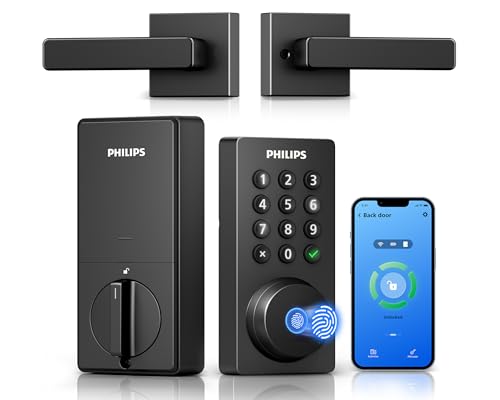
Philips WiFi Keypad Deadbolt with Handle, Built-in WiFi, AppBest Voice ControlPhilips WiFi Keypad Deadbolt with Handle, Built-in WiFi, AppReplaces the deadbolt, with handle2.4GHz WiFi, no hub neededn/a8 of 10
MSR X6 Smart Door Lock with Handle, Fingerprint, IP64Best Weather RatingMSR X6 Smart Door Lock with Handle, Fingerprint, IP64n/an/aFingerprint, keypad, IC card, ekey, mechanical key5 of 10
DESLOC B200 Fingerprint Smart Door Lock, 4 AA, USB-C BackupBest Backup PowerDESLOC B200 Fingerprint Smart Door Lock, 4 AA, USB-C Backupn/an/a8-in-1, fingerprint under 0.3 s3 of 10
RUIKANG POWER WiFi Fingerprint Keypad Deadbolt, 200 CredentialsBest Capacity and ValueRUIKANG POWER WiFi Fingerprint Keypad Deadbolt, 200 Credentialsn/a2.4 GHz WiFi with Smart Life appn/aCheapest of 10

Apartment doors come with a landlord's lock, a key you share with whoever lives there and often a rule against changing hardware. A smart lock can add a keypad, a fingerprint reader and guest codes, so you stop carrying a key and can let a visitor in without handing over a copy.

The apartment twist is how the lock installs. A retrofit lock clamps onto the inside of the existing deadbolt and leaves the outside alone, which is easy to undo. A full replacement swaps the deadbolt and may need landlord consent. This guide compares both types and flags the lease and fit questions to settle first.

Before you buy

6 Criteria to Look For Before Buying a Smart Lock for Apartments

  1. 01

    Retrofit or replacement

    A retrofit lock like the Yale August or SwitchBot Lock Ultra clamps on the inside and leaves the outside and the key alone, while a replacement like the Philips or RUIKANG swaps the deadbolt. For a rental, retrofit is easier to undo. The common mistake is installing a replacement without asking, then paying to restore the original lock.

  2. 02

    Lease and landlord rules

    Many leases forbid changing locks, and landlords need emergency access. A retrofit that keeps your key usually passes, while a replacement needs written consent. Check the lease and ask before you buy, because a refused lock is a return, not a refund.

  3. 03

    Door and deadbolt fit

    Retrofit locks fit standard single-cylinder deadbolts and may not fit jimmy proof or mortise locks, as the SwitchBot listing warns. Replacement locks need the right door thickness and backset. Measure before buying, and check the thumb-turn shape.

  4. 04

    WiFi or hub or Bluetooth

    Built-in WiFi, as on the Yale, SwitchBot, Philips and RUIKANG, allows remote control without a hub but drains batteries faster. The MSR X6 needs a separate gateway for remote use. Bluetooth-only locks last longer but cannot be controlled away from the door.

  5. 05

    Backup power and key

    A smart lock can die, so look for a physical key or an emergency power port. The DESLOC has a USB-C backup and the Yale and SwitchBot keep your existing key. A lock that cannot be opened when dead is a lockout risk.

  6. 06

    Guest and user management

    Temporary codes let visitors and cleaners in without a spare key. The RUIKANG stores 100 fingerprints and 100 codes, and the MSR X6 offers ekey sharing. Check that codes can expire, so old guests do not keep access.

Detailed reviews

The 6 best smart locks for apartments, explained

01
Yale August Wi-Fi Smart Lock with Keypad Touch, Fingerprint
RetrofitWi-FiFingerprintTouch keypad
Check price on Amazon
Best for: Renters who want smart features without changing the outside of the door.

The Yale August lock is a retrofit design: it installs on the inside of your door without replacing the deadbolt, so the outside of the door stays the same, and your existing key keeps working. It adds a touch keypad and a fingerprint reader, built-in Wi-Fi for remote control and an auto-lock option. The listing describes it as the same deadbolt with a smarter inside.

The tradeoff is that it is the highest in the price order of the ten candidates we reviewed, and a retrofit adds a bulky thumb-turn unit on the inside of the door. Some doors and deadbolts do not fit, so check compatibility before buying. Compared with the SwitchBot Lock Ultra, it adds a fingerprint reader in the same price class. Against the full-replacement locks, it costs more but is far easier to reverse.

In ownership, the points are batteries and Wi-Fi. Replace the batteries when the app warns you, keep the physical key as a backup, and place the router so the lock sees a good signal. The retrofit design is the one a landlord is least likely to object to.

What works

  • Installs on the inside of the door and keeps the existing deadbolt
  • Existing key still works, which keeps the landlord's access intact
  • Fingerprint, keypad and app control cover every household member
  • Built-in Wi-Fi avoids a separate hub for remote control

Watch out for

  • Highest in the price order among the ten candidates here
  • Interior unit is bulky and not every deadbolt or door fits it

Specs

Install
Inside of the door, keeps your deadbolt
Connectivity
Built-in Wi-Fi
Unlock methods
Fingerprint, keypad, app, auto-lock
Key
Existing key still works
Position in price order
Highest of 10
02
SwitchBot Smart Lock Ultra with Keypad and Fingerprint
RetrofitBuilt-in WiFi12-month batteryFingerprint
Check price on Amazon
Best for: Renters with a standard deadbolt who want a retrofit lock with a clear battery claim.

The SwitchBot Lock Ultra is another retrofit design, and the listing says it fits most standard apartment door locks in the US, with a note that some jimmy proof and mortise locks can be adapted. A triple power system is stated to last 12 months, and it offers 0.3 second fingerprint recognition, a keypad, app control and auto-unlock. It has built-in WiFi.

The tradeoff is that retrofit locks rely on motors turning your existing thumb-turn, so a stiff or misaligned deadbolt will wear the battery quickly and can jam. It sits ninth in the price order of ten, so you pay a premium. Against the Yale August, it states battery life more clearly, and the Yale has the longer brand record. Compared with the Philips, it keeps your lock instead of replacing it.

In ownership, test the deadbolt by hand before installing, and fix any sticking with lubricant or a strike adjustment. Keep a spare key, and replace the batteries before they run out. The 12 month figure is a best case that shortens with a stiff lock.

What works

  • Retrofit design keeps your existing deadbolt and key in place
  • Triple power system is stated for 12 months of use
  • Fingerprint recognition in a stated 0.3 seconds plus a keypad
  • Built-in WiFi avoids a separate hub for remote control

Watch out for

  • Ninth in the price order of ten, so it is a premium retrofit
  • A stiff or misaligned deadbolt shortens battery life and can jam

Specs

Install
Retrofit on most standard US apartment locks
Connectivity
Built-in WiFi
Battery
Triple power system, 12 months stated
Unlock methods
Fingerprint in 0.3 s, keypad, app, auto-unlock
Position in price order
9 of 10
03
Philips WiFi Keypad Deadbolt with Handle, Built-in WiFi, App
Replacement deadbolt2.4GHz WiFiNo hubAlexa and Google
Check price on Amazon
Best for: Renters with landlord permission who want voice control and a keypad.

The Philips 4200 series is a full replacement: a keypad deadbolt with a handle that connects directly to 2.4 GHz WiFi, with no hub. The Philips Home Access app handles remote lock and unlock and user management, and it works with Alexa and Google Assistant for voice commands. It is a conventional smart lock with a recognised brand.

The tradeoff is that it replaces your deadbolt, so you need landlord permission and you must keep the original hardware to put back when you move out. It sits eighth in the price order of ten, so it is not cheap. Against the Yale August, it offers voice control and a cleaner outside look but needs more work to install and reverse. Compared with the RUIKANG, it is a more established brand.

In ownership, keep the old lock in a labeled bag, and photograph the door before you start. WiFi locks drain batteries faster than Bluetooth-only locks, so replace the batteries early. Check that the router offers 2.4 GHz, since the listing says it needs that band.

What works

  • Direct 2.4 GHz WiFi connection with no hub needed
  • Works with Alexa and Google Assistant for voice lock checks
  • Keypad deadbolt with a handle gives a complete, conventional look
  • Philips Home Access app manages users and remote control

Watch out for

  • Replaces the deadbolt, so it needs landlord permission and careful reversal
  • Eighth in the price order of ten, and WiFi shortens battery life

Specs

Install
Replaces the deadbolt, with handle
Connectivity
2.4GHz WiFi, no hub needed
App
Philips Home Access
Voice
Alexa and Google Assistant
Position in price order
8 of 10
04
MSR X6 Smart Door Lock with Handle, Fingerprint, IP64
IP64-35 to 122°FFingerprint + IC cardHandle set
Check price on Amazon
Best for: Doors exposed to weather, where a rating and a wide temperature range matter.

The MSR X6 is a handle-set smart lock that offers fingerprint, touch keypad code, IC card, ekey sharing, auto unlock and a mechanical key. It lists an IP64 water rating and an operating range of minus 35 to 122 degrees Fahrenheit. Remote control needs the G2 WiFi Gateway, which is sold separately.

The tradeoff is that remote access costs extra, since the lock itself is Bluetooth based. It is a replacement lockset, so it needs landlord consent and some door preparation. It sits fifth in the price order of ten, so it is mid-range. Compared with the Philips, it has no built-in WiFi but a wider list of unlock methods. Against the Yale, it replaces the lock instead of clamping on.

In ownership, the IC card is a useful backup for guests and cleaners. Keep the mechanical key somewhere safe outside, and test the fingerprint reader with dry and damp fingers. Treat IP64 as splash resistance, not a license to expose it to a hose.

What works

  • IP64 water rating and a -35 to 122°F range suit exposed doors
  • Multiple unlock methods include fingerprint, keypad, IC card and key
  • Ekey sharing lets you send access to a guest remotely
  • Mid-range position in the price order for a handle-set lock

Watch out for

  • Remote control needs a separate gateway that is sold on its own
  • Replacement lockset means landlord permission and door prep

Specs

Unlock methods
Fingerprint, keypad, IC card, ekey, mechanical key
Water rating
IP64
Temperature range
-35°F to 122°F
Remote
G2 WiFi Gateway, sold separately
Position in price order
5 of 10
05
DESLOC B200 Fingerprint Smart Door Lock, 4 AA, USB-C Backup
4 AA batteriesUSB-C backup8-in-1 entryAI fingerprint
Check price on Amazon
Best for: Renters who want a replacement lock with an emergency power port.

The DESLOC B200 is a full-replacement lock that runs on four AA batteries and includes a USB-C emergency port so a dead lock can be powered from a power bank. The listing says it has eight ways to unlock, an AI fingerprint reader that responds in under 0.3 seconds and app control with user management. It is aimed at a typical entry door.

The tradeoff is that the brand has little track record, and the listing says little about WiFi or remote use, so app control is likely Bluetooth. It sits third cheapest of ten, which is the value. Compared with the RUIKANG, it has a clearer backup power story. Against the Yale August, it replaces the lock, with the paperwork and reversal that follow.

In ownership, keep a power bank and a physical key in different places. Replace the AA batteries when the lock warns, and use alkaline cells, not cheap carbon ones. Photograph the original lock and keep the hardware so you can restore it when your lease ends.

What works

  • USB-C emergency port can wake a dead lock from a power bank
  • Standard four AA batteries are cheap and easy to replace
  • Eight unlock methods cover fingerprint, code, app and key
  • Third lowest in the price order among the ten candidates

Watch out for

  • Little brand track record and few details on remote access
  • Replacement lock needs landlord permission and careful reversal

Specs

Power
4 AA batteries
Emergency
USB-C backup power
Unlock methods
8-in-1, fingerprint under 0.3 s
Finish
Matte black
Position in price order
3 of 10
06
RUIKANG POWER WiFi Fingerprint Keypad Deadbolt, 200 Credentials
WiFi deadbolt100 fingerprints100 codesAnti-peep PIN
Check price on Amazon
Best for: Shared flats and short lets that need many codes and fingerprints at a low cost.

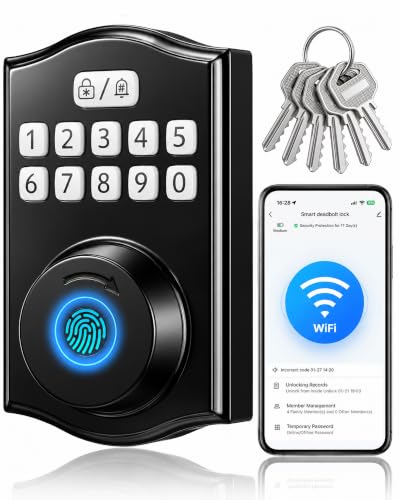
The RUIKANG POWER lock is the cheapest of the group, a WiFi fingerprint keypad deadbolt that stores up to 100 fingerprints and 100 user codes. It connects to 2.4 GHz WiFi and gives access history in a Smart Life app, and an anti-peep feature lets you add random digits before or after the code. The listing also mentions guest requested remote unlocking.

The tradeoff is brand certainty: the maker has little track record, and it relies on a third-party app. It is a full replacement, so it needs landlord permission. As the lowest in the price order, it is attractive but carries support risk. Compared with the Philips, it lists a huge number of credentials but fewer voice control details. Against the DESLOC, it has WiFi while the DESLOC does not state it.

In ownership, test every fingerprint at install and delete test entries. Keep the original deadbolt and its screws for move-out. Check the app's privacy terms, because a cheap lock relies on a cloud service.

What works

  • Cheapest of the ten candidates, with WiFi included
  • 100 fingerprints and 100 codes suit shared homes and short lets
  • Anti-peep PIN entry hides your real code from onlookers
  • Access history in the app shows who came and went

Watch out for

  • Little brand track record and reliance on a third-party cloud app
  • Replacement deadbolt needs landlord permission and careful reversal

Specs

Credentials
100 fingerprints and 100 user codes
Connectivity
2.4 GHz WiFi with Smart Life app
PIN length
6 to 10 digits
Anti-peep
Random digits before or after the code
Position in price order
Cheapest of 10

Spec decoder

What the listing measurements really mean

The numbers brands lead with, translated into what they tell you about fit, comfort and wear at home.

Retrofit lock

A smart unit that mounts over the interior of your existing deadbolt and turns the thumb-turn. The outside stays untouched.

Watch forOnly the Yale August and SwitchBot Lock Ultra are retrofits in this lineup.

IP64

Dust resistant and protected against splashing water from any direction. It is not rated for jets or submersion.

Watch forThe MSR X6 lists IP64, and the others give no rating.

2.4 GHz WiFi

The longer-range, lower-speed WiFi band most smart devices use. A router that only offers 5 GHz will not connect.

Watch forThe Philips and RUIKANG state that they need 2.4 GHz.

Fingerprint recognition time

How long the reader takes to match a finger. Listed times are best case with clean, dry fingers.

Watch forThe SwitchBot lists 0.3 seconds and the DESLOC under 0.3 seconds.

Credential capacity

The number of fingerprints and codes the lock can store. A high number helps shared homes and short lets.

Watch forThe RUIKANG lists 100 fingerprints and 100 codes.

Methodology

How We Evaluated These Smart Locks for Apartments

Renter friendliness

We evaluated whether each lock keeps your existing deadbolt and key. The Yale August and SwitchBot are retrofits and the others replace the lock. We favoured easy reversal.

Connectivity and control

We compared built-in WiFi, gateways and voice control. The Philips works with Alexa and Google Assistant and the MSR X6 needs a gateway. We noted battery tradeoffs.

Backup and safety

We looked at physical keys, USB-C backup and battery claims. The DESLOC has a USB-C port and the SwitchBot states 12 months of battery. We treated all runtimes as best case.

Access management

We checked credential capacity and guest tools. The RUIKANG stores 100 fingerprints and 100 codes. We rewarded expiring codes and access history.

Brand and support

We based this on owner feedback patterns and brand history, not in-house use. Yale and Philips have longer records than the smaller brands. We lowered rank where support was unclear.

Decision guide

How to Choose the Right Smart Locks for Apartments

By Install Type

SituationPickWhy
Strict lease, keep the deadboltYale AugustInside retrofit, key still works
Standard deadbolt, long batterySwitchBot Lock UltraRetrofit with 12 month claim
Landlord allows replacementPhilips WiFi DeadboltDirect WiFi, voice control
Exposed doorMSR X6IP64 and wide temperature range

By Budget

SituationPickWhy
Cheapest replacementRUIKANG POWERLowest in the price order
Low-cost with backup portDESLOC B200Third lowest of ten
Mid-range handle setMSR X6Fifth in the price order
Premium retrofitYale AugustHighest in the price order

Retrofit vs Replacement

Retrofit locks

The Yale August and SwitchBot keep your deadbolt, key and exterior. They are easy to undo but bulkier inside and cost more.

Replacement locks

The Philips, MSR X6, DESLOC and RUIKANG swap the deadbolt. They look cleaner and cost less but need permission and careful reversal.

Choose retrofit for a strict lease, and replacement only with written consent.

By Household

SituationPickWhy
Roommates and short letsRUIKANG POWER100 fingerprints and 100 codes
Solo renter with a key habitYale AugustKey still works
Voice assistant homePhilips WiFi DeadboltAlexa and Google
Bad weather entryMSR X6IP64 rating

For Renters Specifically

Look for

A retrofit that keeps your key, a lock that fits your deadbolt, expiring guest codes and a backup entry. Read the lease and ask first.

In this comparison

The Yale August and SwitchBot are the renter-friendly picks, and the replacement locks need landlord consent.

When to Spend More

Spend more if

You need a retrofit that your landlord will accept, a brand with a record on firmware or remote access you rely on.

Save if

Your landlord allows a lock swap. The RUIKANG or DESLOC cover the basics at a low position in the price order.

Ownership

Maintenance schedule

The upkeep that decides whether a piece still looks good in year five.

TaskIntervalWhy it matters
Replace the batteriesEvery 6 to 12 monthsA dead lock is a lockout. Replace when the app warns, not when it fails.
Test the deadbolt by handEvery few monthsA stiff bolt strains the motor on retrofit locks. Lubricate the bolt or adjust the strike plate.
Clean the fingerprint sensorMonthlyOil and dust reduce recognition. A dry soft cloth restores it.
Review codes and usersEvery few monthsOld guest codes are a security gap. Delete the ones you no longer need.
Update the firmwareTwice a yearUpdates fix connection and security bugs. Use the maker's app.

FAQ

Frequently Asked Questions

Can I install a smart lock in a rental?

A retrofit that keeps your deadbolt is often fine, but check your lease. A replacement lock usually needs written consent.

Will my landlord still have access?

If you keep your original key and cylinder, yes. With a replacement, you must give the landlord a way in.

Do smart locks work if the WiFi goes down?

Yes, the keypad, fingerprint and key still work. Remote and app features pause until WiFi returns.

What if the batteries die?

Use the physical key or, on the DESLOC, a USB-C power bank to wake the lock. Replace the batteries when warned.

Will a retrofit lock fit my door?

It fits most standard single-cylinder deadbolts. Check the maker's compatibility list for your lock type.

Are WiFi smart locks safe?

They add convenience and a software risk. Use a strong password and keep the firmware up to date.

Bottom line

The short version

Browse more smart locks for apartmentson Amazon →
Brianna Cole, Lead Product Editor

About the author

Brianna Cole

Lead Product Editor, SenseiReview

Brianna Cole leads SenseiReview's buying guides, turning published specifications, documentation and owner feedback patterns into clear verdicts across home, tech, fitness, outdoor and DIY products.

More from Brianna →

Keep reading

Related guides