
Amazon affiliate links - we earn a commission.Affiliate disclosure

Buying guide · 12 min read · Updated 2026-11-27

Best Smart Locks Under $200 (2026)

Smart locks under $200 compared on fingerprint, keypad, Wi-Fi or Matter support, battery life and security grade, with honest notes on door fit and backup keys.

Brianna Cole, Lead Product EditorBy Brianna ColeLead Product Editor6 picks comparedSpec-sheet verified
Best Smart Locks Under $200

At a glance

Our top picks

Side by side

Spec comparison

PieceConnectivityPrice tierEntry
WYZE Auto-Lock Bolt v2 Wi-Fi Fingerprint Smart DeadboltBest OverallWYZE Auto-Lock Bolt v2 Wi-Fi Fingerprint Smart DeadboltWi-Fi built inLow to mid in this lineupn/a
ULTRALOQ Bolt SE Wi-Fi Smart Deadbolt, Matter, 7-in-1 Keyless EntryBest for MatterULTRALOQ Bolt SE Wi-Fi Smart Deadbolt, Matter, 7-in-1 Keyless EntryBuilt-in Wi-FiMid in this lineupn/a
Aqara U400 UWB Smart Lock, Front Deadbolt, Apple Home Key, MatterBest for Apple Home KeyAqara U400 UWB Smart Lock, Front Deadbolt, Apple Home Key, Mattern/aUpper in this lineupHands-free unlocking with UWB technology
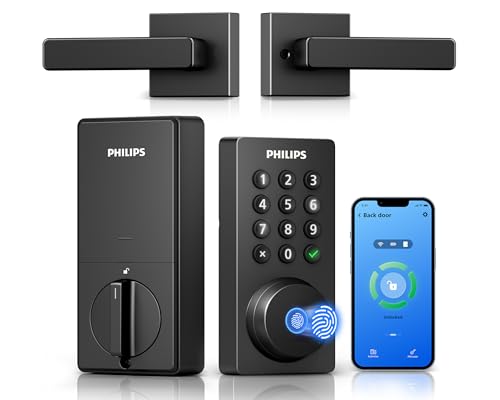
Philips WiFi Keypad Deadbolt with Handle, Built-In Wi-Fi, App Remote ControlBest Keypad With HandlePhilips WiFi Keypad Deadbolt with Handle, Built-In Wi-Fi, App Remote Control2.4 GHz Wi-Fi, no hub neededMid in this lineupKeypad with app control
eufy Security Smart Lock C220 Fingerprint Keyless Entry Door LockBest Multi-Method Fingerprint Lockeufy Security Smart Lock C220 Fingerprint Keyless Entry Door LockBuilt-in Wi-FiLow to mid in this lineupn/a
TEEHO TE001 Keyless Entry Deadbolt with Keypad, ANSI Grade 3Best Value KeypadTEEHO TE001 Keyless Entry Deadbolt with Keypad, ANSI Grade 3Standalone keypadLowest in this lineupKeypad with up to 20 codes

A smart lock replaces your deadbolt or the thumb turn with a lock that opens by fingerprint, code, app or key, and some also lock automatically and send alerts. The best ones are easy to install, last long on batteries and still work if the Wi-Fi or phone fails. A smart lock is a convenience upgrade, and it should never be the only way into your home.

This guide compares smart deadbolts that fit the price cap, based on live listing prices when the guide was updated. We evaluated each on published specifications, unlock methods, connectivity, battery claims and owner feedback patterns, and we explain door fit and backup steps. Prices move, and the cap reflects listing prices when this guide was updated. Check the lock you want against the cap before ordering.

Before you buy

6 Criteria to Look For Before Buying a Smart Lock Under $200

  1. 01

    How you want to unlock

    Fingerprint, keypad, app and key each suit different households. Fingerprint locks, like the Wyze and eufy, are fast, but struggle with wet or worn fingers. Keypads, like the TEEHO and Philips, work with guests and no phone. UWB, like the Aqara, is hands-free but depends on your phone. Choose the method you will actually use, and keep a backup. Think about children, visitors and cleaners as well, since a household with many users benefits from codes that can be changed or expire.

  2. 02

    Security grade and build

    ANSI grades rate deadbolt strength and durability, with Grade 1 the highest and Grade 3 the lowest. The TEEHO lists Grade 3. Smart locks add electronics and a battery to a mechanical lock, so the quality of the deadbolt still matters. A smart lock does not make a weak door secure. Door quality, strike plates and frame reinforcement matter as much as the lock, so check that the door frame is solid and the screws are long.

  3. 03

    Connectivity and standards

    Wi-Fi locks, like the Wyze, ULTRALOQ, Philips and eufy, work without a hub but use more battery. Matter, on the ULTRALOQ and Aqara, supports multiple platforms. Apple Home Key, on the Aqara, adds tap or hands-free entry. Check which platforms you use and what the lock supports. Wi-Fi locks that run on batteries may use the radio only when needed, which is why a lock that sits behind a thick door or far from a router can show delays.

  4. 04

    Battery life and backup

    Claims such as eight months on the Wyze depend on use and Wi-Fi activity. A lock that dies at the door is a hazard, so learn the backup, such as a physical key, a keypad code or an emergency power port. Replace batteries when the app warns you. Keep a spare set of batteries near the door and test the emergency power or key method at least once so you know it works.

  5. 05

    Door fit and installation

    Most smart deadbolts fit a standard door with a 2-1/8 inch bore and a 2-3/8 or 2-3/4 inch backset, but check your door. A handle set, as with the Philips, needs the right prep. Poor alignment causes sticking and jams. Take your time to align the strike plate. Measure the door thickness and the diameter of the hole before you order, and check whether the lock requires extra adapters.

  6. 06

    Privacy and software

    Smart locks connect to apps and sometimes cloud accounts. Check what data is stored and how updates are delivered. Use a strong password and two-factor authentication. Firmware updates fix problems, and brands vary in how long they support products. If you are uneasy about cloud accounts, a keypad lock that works without an account is a sensible choice.

Detailed reviews

The 6 best smart locks under $200, explained

01
WYZE Auto-Lock Bolt v2 Wi-Fi Fingerprint Smart Deadbolt
Fingerprint 0.5 sWi-Fi8-month battery claimAuto-lock
Check price on Amazon
Best for: Households that want fast fingerprint entry and Wi-Fi control without a hub.

The Wyze Lock Bolt v2 is a Wi-Fi smart deadbolt with an AI-learning fingerprint scanner that the maker says unlocks in about 0.5 seconds, with a battery claim of up to eight months. It auto-locks and connects through Wi-Fi without a hub. The earlier Lock Bolt is widely named as a best-value budget lock.

The fingerprint reader is the main convenience, since you do not need a key or a code at the door. Compared with the TEEHO keypad lock, it adds fingerprint and Wi-Fi at a higher price. Compared with the ULTRALOQ Bolt SE, it lacks the Matter support. A battery claim of eight months depends on usage and Wi-Fi activity, and heavy use will shorten it.

Ownership notes: confirm that your door has a standard deadbolt prep hole and the right backset. Register several fingerprints, including a spare, and set up a code as a backup. Keep a physical key or battery backup in mind. Check the manufacturer's firmware updates and security guidance.

What works

  • Fingerprint unlock in about 0.5 seconds claimed
  • Wi-Fi built in with no hub required
  • Auto-lock feature
  • Long battery claim of up to eight months

Watch out for

  • Battery life depends on use and connectivity
  • No Matter support listed
  • Fingerprint readers can struggle with wet or worn fingers

Specs

Unlock
Fingerprint in about 0.5 seconds, plus other methods
Connectivity
Wi-Fi built in
Battery
Up to 8 months claimed
Scanner
AI-learning fingerprint scanner
Price tier
Low to mid in this lineup
02
ULTRALOQ Bolt SE Wi-Fi Smart Deadbolt, Matter, 7-in-1 Keyless Entry
Matter supportWi-Fi built inFingerprint up to 507 unlock methods
Check price on Amazon
Best for: Smart home users who want Matter support and many fingerprint slots.

The ULTRALOQ Bolt SE is a Wi-Fi smart deadbolt that supports Matter and unlocks seven ways, including fingerprint and passcode, with storage for up to 50 fingerprints. Matter support makes it work with several smart home platforms. It is the choice here for people who care about open standards.

Matter compatibility reduces the risk of being locked into a single brand's ecosystem. Compared with the Wyze Lock Bolt v2, it adds Matter and a larger fingerprint capacity. Compared with the Aqara U400, it uses a conventional fingerprint scanner and not UWB. It suits a household that uses several platforms.

Ownership notes: check door fit and backset before ordering. Register fingerprints for each user and a spare. Choose a passcode backup, and understand how to use the mechanical key or emergency power if the battery dies. Keep the app and firmware current.

What works

  • Matter support for multiple smart home platforms
  • Stores up to 50 fingerprints
  • Seven unlock methods
  • Built-in Wi-Fi

Watch out for

  • Mid cost tier
  • Battery life depends on Wi-Fi use
  • Matter features vary by platform

Specs

Smart home
Matter support
Connectivity
Built-in Wi-Fi
Fingerprints
Up to 50 stored
Unlock
Seven ways including fingerprint and passcode
Price tier
Mid in this lineup
03
Aqara U400 UWB Smart Lock, Front Deadbolt, Apple Home Key, Matter
UWB hands-freeApple Home KeyMatterDeadbolt
Check price on Amazon
Best for: Apple households that want hands-free unlocking and Home Key.

The Aqara U400 uses ultra-wideband technology for hands-free unlocking, supports Apple Home Key and Matter, and is a deadbolt for the front door. UWB can sense your phone as you approach, so the door unlocks without taking the phone out. It is the most advanced lock in this guide.

Hands-free entry is a convenience that depends on the phone and platform, and it is not for everyone. Compared with the Wyze and ULTRALOQ locks, it relies on your phone and the Apple ecosystem for the headline features. Compared with the TEEHO keypad lock, it is far more complex. A good setup includes a keypad or key backup for guests.

Ownership notes: confirm phone compatibility for UWB and Home Key. Test the unlock distance and behavior at the door so it does not unlock when you are only near. Keep a mechanical key or code option. Check the battery type and replacement cost.

What works

  • UWB hands-free unlocking
  • Apple Home Key and Matter support
  • Modern design
  • Deadbolt fit for front doors

Watch out for

  • Upper cost tier
  • Best features need compatible phones
  • Hands-free unlocking needs careful setup

Specs

Entry
Hands-free unlocking with UWB technology
Apple
Apple Home Key support
Smart home
Matter support
Format
Front deadbolt, black
Price tier
Upper in this lineup
04
Philips WiFi Keypad Deadbolt with Handle, Built-In Wi-Fi, App Remote Control
KeypadHandle set2.4 GHz Wi-FiNo hub
Check price on Amazon
Best for: Households that want a keypad deadbolt and matching handle with Wi-Fi control.

The Philips WiFi keypad deadbolt with handle connects to 2.4 GHz Wi-Fi without a hub and offers app remote control with a keypad, sold with a matching handle. A combined handle and deadbolt can suit a door where you also want to replace the door handle. The Philips 4200 series is described as connecting without a hub.

A keypad is reliable and avoids dependence on phones or fingerprints. Compared with the TEEHO, it adds Wi-Fi and the handle. Compared with the Wyze Lock Bolt v2, it has no fingerprint scanner. It suits a household that wants simple keypad entry and remote control.

Ownership notes: check that the handle and deadbolt match your door preparation and backset. Use a long code that you do not reuse elsewhere. Remember that 2.4 GHz Wi-Fi must reach the door. Keep batteries fresh, and know the backup entry method.

What works

  • Built-in 2.4 GHz Wi-Fi with no hub needed
  • Matching handle in the set
  • Keypad entry works without a phone
  • Remote app control

Watch out for

  • No fingerprint scanner
  • Mid cost tier
  • Wi-Fi must reach the door

Specs

Entry
Keypad with app control
Hardware
Deadbolt with matching handle
Connectivity
2.4 GHz Wi-Fi, no hub needed
App
Remote lock and unlock
Price tier
Mid in this lineup
05
eufy Security Smart Lock C220 Fingerprint Keyless Entry Door Lock
Fingerprint under 1 s6 ways to unlockBuilt-in Wi-FiApp remote
Check price on Amazon
Best for: Households that want several unlock methods and use the eufy ecosystem.

The eufy Security Smart Lock C220 offers a fingerprint unlock in under a second, six ways to unlock, built-in Wi-Fi and app remote access. The multiple methods include fingerprint, code, app and key. It is a straightforward smart deadbolt from a smart home security brand.

The six unlock methods give flexibility for family and guests. Compared with the Wyze Lock Bolt v2, it is similar in concept with a different ecosystem. Compared with the Philips keypad deadbolt, it adds fingerprint. It suits a household already using eufy cameras.

Ownership notes: check the door fit and the backset. Set up several fingerprints and a code. Keep the mechanical key somewhere safe outside the home. Read the app privacy settings.

What works

  • Fingerprint unlock in under one second claimed
  • Six ways to unlock
  • Built-in Wi-Fi with app control
  • Low to mid cost tier

Watch out for

  • Ecosystem fit matters for the full benefit
  • Battery life depends on use
  • Fingerprint readers can fail with wet hands

Specs

Fingerprint
Unlock in under 1 second
Unlock methods
Six ways
Connectivity
Built-in Wi-Fi
Control
App remote access
Price tier
Low to mid in this lineup
06
TEEHO TE001 Keyless Entry Deadbolt with Keypad, ANSI Grade 3
KeypadANSI Grade 320 access codesAuto-lock
Check price on Amazon
Best for: Back doors, garages and rentals where a simple keypad lock is enough.

The TEEHO TE001 is a keypad deadbolt with an ANSI Grade 3 rating, space for 20 access codes and a temporary code option. It is the lowest-cost lock in this guide. It works as a standalone keypad without Wi-Fi or an app.

ANSI Grade 3 is the lowest of the three grades, so it suits a modest security need. Compared with the Wyze and eufy locks, it has no fingerprint, no Wi-Fi and no app. Compared with the Philips keypad lock, it is simpler and cheaper. It is a good fit for a back door, a garage entry or a rental.

Ownership notes: choose a code that is hard to guess and change it from time to time. Check the door fit and install carefully. Keep fresh batteries, and know the backup key location. Remember that a keypad shows wear on the most pressed keys.

What works

  • Lowest cost tier
  • 20 access codes and temporary codes
  • No phone or Wi-Fi dependence
  • Simple installation

Watch out for

  • ANSI Grade 3 is the lowest security grade
  • No app or remote control
  • Keypad wear can reveal common digits

Specs

Entry
Keypad with up to 20 codes
Security
ANSI Grade 3
Codes
Includes a temporary code option
Connectivity
Standalone keypad
Price tier
Lowest in this lineup

Spec decoder

What the listing measurements really mean

The numbers brands lead with, translated into what they tell you about fit, comfort and wear at home.

ANSI Grade

A standard for lock durability and strength. Grade 1 is the highest and Grade 3 the lowest. Even Grade 3 locks must meet basic strength tests.

Watch forThe TEEHO lists Grade 3.

Matter

A smart home standard that lets devices work across platforms.

Watch forThe ULTRALOQ Bolt SE and Aqara U400 list Matter.

UWB

Ultra-wideband radio that lets a lock sense your phone's position for hands-free unlocking.

Watch forThe Aqara U400 uses UWB.

Backset

The distance from the door edge to the center of the lock hole. Common sizes are 2-3/8 and 2-3/4 inches.

Watch forCheck your door before buying.

Auto-lock

A setting that relocks the door after a set time. It reduces the chance of leaving it unlocked.

Watch forThe Wyze lists an auto-lock feature.

Methodology

How We Evaluated These Smart Locks Under $200

Unlock methods

We compared fingerprint, keypad, UWB and app entry and the backups each offers. Our scores are editorial assessments based on published specifications and owner feedback patterns. We also considered how each lock behaves if the phone or network is unavailable.

Connectivity

We compared Wi-Fi, Matter and Apple Home Key support.

Security grade

We noted stated ANSI grades and the limits of smart features. Fingerprint readers were judged on published speed claims.

Battery and backup

We treated battery claims as claims and looked at emergency entry.

Value and honesty

We judged each lock by relative price tier, with all qualifying under the cap on listing prices when updated. Marketing speed claims were discounted.

Decision guide

How to Choose the Right Smart Locks Under $200

By Entry Style

SituationPickWhy
Fast fingerprint entryWyze Lock Bolt v2About 0.5 seconds claimed.
Keypad onlyTEEHO TE001Simple and low cost.
Keypad with Wi-Fi and handlePhilips WiFi KeypadHandle set.
Hands-free on iPhoneAqara U400UWB and Home Key.

By Budget

SituationPickWhy
Lowest spendTEEHO TE001Lowest tier.
Low to midWyze or eufyFingerprint and Wi-Fi.
MidULTRALOQ or PhilipsMatter or handle set.
Upper in the bandAqara U400UWB.

Wi-Fi vs Standalone

Wi-Fi

The Wyze, ULTRALOQ, Philips, eufy and Aqara locks give app control and alerts, with more battery use.

Standalone

The TEEHO keypad works without Wi-Fi or an app, so it has fewer failure points.

Choose Wi-Fi if you want remote control. Choose a standalone keypad for simplicity.

By Smart Home

SituationPickWhy
Apple HomeAqara U400Home Key and Matter.
Multiple platformsULTRALOQ Bolt SEMatter support.
eufy cameraseufy C220Same ecosystem.
No smart homeTEEHO or PhilipsKeypad entry.

For Smart Locks Specifically

Look for

An unlock method you will use, a backup plan, a security grade that fits your door and compatibility with your smart home. Check your backset.

In this comparison

The Wyze leads on balance, the TEEHO on value and the Aqara on features.

When to Spend More

Spend more if

You want Matter, Home Key or hands-free entry. The ULTRALOQ or Aqara earns its cost. Check the price against the cap before buying.

Save if

You just want keyless entry. A TEEHO or Wyze is enough.

Ownership

Maintenance schedule

The upkeep that decides whether a piece still looks good in year five.

TaskIntervalWhy it matters
Replace the batteriesWhen the app warns or every few monthsA dead lock is a lockout. Use fresh batteries of the type the maker recommends. Mark the date on a note in your phone.
Update firmwareWhen availableUpdates fix bugs and security issues. Use the maker's app. Read the release notes for changes to unlock behavior.
Clean the fingerprint sensor and keypadMonthlyDirt reduces accuracy. Wipe with a soft dry cloth. Avoid sprays that can reach the electronics.
Check alignment and the strike plateEvery six monthsDoors shift with seasons. Misalignment strains the motor. A tight door that needs a slam is a sign it has shifted.
Review user codes and fingerprintsEvery few monthsRemove old guests and unused codes. Keep a record of active users. Delete the app user when someone leaves. Review the activity log too.

FAQ

Frequently Asked Questions

What if the battery dies?

Most locks have a backup key or an emergency power point. Learn yours before you need it. A weak battery warning usually appears days or weeks before the lock stops working.

Are smart locks secure?

They can be, if the deadbolt is strong and you use strong codes and updates. A weak door is still weak. Strong deadbolt grades, a reinforced strike plate and long screws all help.

Will it fit my door?

Check the bore, backset and door thickness against the lock's requirements. A paper template in the box helps check the fit.

Do I need Wi-Fi?

Not for keypad or fingerprint entry. Wi-Fi adds remote control and alerts. Without Wi-Fi, you lose remote unlocking and alerts.

What is Matter?

A smart home standard that lets devices work across platforms. It reduces brand lock-in. Not every Matter feature works on every platform, so check the details.

Can I use it in a rental?

Check your lease and keep the original lock so you can swap it back. Some landlords also require a copy of the key. Removable adhesive and no-drill options are rare for deadbolts.

Bottom line

The short version

Browse more smart locks under $200on Amazon →
Brianna Cole, Lead Product Editor

About the author

Brianna Cole

Lead Product Editor, SenseiReview

Brianna Cole leads SenseiReview's buying guides, turning published specifications, documentation and owner feedback patterns into clear verdicts across home, tech, fitness, outdoor and DIY products.

More from Brianna →

Keep reading

Related guides