
Amazon affiliate links - we earn a commission.Affiliate disclosure

Buying guide · 12 min read · Updated 2026-11-21

Best Smart Plugs (2026)

Six smart plugs compared on Matter support, voice assistants, amp rating, size, schedule features and app reliability, with picks by ecosystem and use.

Brianna Cole, Lead Product EditorBy Brianna ColeLead Product Editor6 picks comparedSpec-sheet verified
Best Smart Plugs

At a glance

Our top picks

Side by side

Spec comparison

PieceRatingSizeAssistantsBest useHub
TP-Link Tapo Matter Smart Plug Mini, 15A and 1800W maxBest OverallTP-Link Tapo Matter Smart Plug Mini, 15A and 1800W max15A, 1800W maxCompact mini designWorks with Apple Home, Alexa and Google HomeLamps, fans and small appliancesn/a
Kasa Smart Plug Ultra Mini 15A EP10, no hub requiredBest Proven AppKasa Smart Plug Ultra Mini 15A EP10, no hub required15AUltra mini designWorks with Alexa and Google HomeEveryday lights and fansNo hub required
Linkind Matter Smart Plug for Apple Home, Alexa, Siri and Google HomeBest for Apple HomeLinkind Matter Smart Plug for Apple Home, Alexa, Siri and Google Homen/an/an/aApple Home users who want a simple plugn/a
Kasa Smart Plug HS103 with touch actuator, works with Alexa and GoogleBest Physical ButtonKasa Smart Plug HS103 with touch actuator, works with Alexa and Googlen/aStandard size plugWorks with Alexa, Echo and Google HomePeople who want a local buttonNo hub required
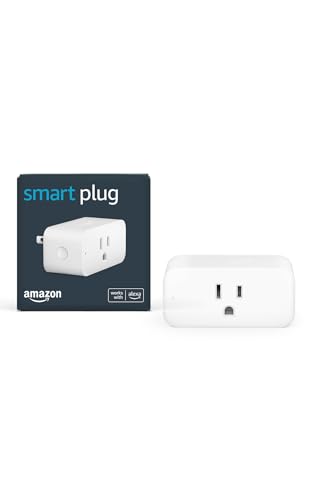
Amazon Smart Plug for Alexa with simple setupBest for Alexa SimplicityAmazon Smart Plug for Alexa with simple setupn/an/an/aAlexa-first homesNo hub required
EIGHTREE Smart Plug WiFi Outlet 4-pack, 15A, Alexa and Google HomeBest ValueEIGHTREE Smart Plug WiFi Outlet 4-pack, 15A, Alexa and Google Home15A, 1800Wn/aAlexa and Google HomeLamps, holiday lights and small appliancesn/a

A smart plug sits between a wall outlet and a device and lets you switch that device on and off from an app, a schedule or a voice assistant. It is the cheapest way to make a lamp, fan, coffee maker or holiday light string part of a smart home.

The details matter more than the box suggests: which assistants it works with, whether it supports Matter, how much current it is rated to carry and how stable the app is over time. We evaluated six smart plugs from the candidate pool using published specifications, listing details and patterns in owner feedback, then ranked them by fit for real homes.

Before you buy

6 Criteria to Look For Before Buying a Smart Plug

  1. 01

    Matter and ecosystem support

    Matter is a standard that lets a device work with several platforms, including Apple Home, Alexa and Google Home. A non-Matter plug usually works with one or two ecosystems. If you may switch platforms, Matter protects your purchase. Check whether the plug needs a hub or controller for remote access. Pick the assistant your household uses most and confirm the plug lists it by name, because vague compatibility language is a warning sign.

  2. 02

    Amp rating and appliance safety

    Most plugs are rated for 15 amps and 1800 watts. That covers lamps, fans and many small appliances, but the plug must never be asked to carry more than its rating. Space heaters and other heating devices draw a lot of current, so the plug must be explicitly rated for the load. Do not use a smart plug with a high-draw heater unless both are clearly rated. Plan for a Matter controller, such as a speaker or streaming box that acts as a hub, if you want remote access and automations away from home.

  3. 03

    Size and outlet access

    Mini plugs leave the second outlet in a duplex socket free, while larger plugs can block it. Check how the plug sits on your wall plate. A plug on a power strip may be crowded by neighbors. Measure before ordering. Look at the plug's printed label when it arrives and compare it with the label on your device, since mismatches are the main safety risk.

  4. 04

    App quality and reliability

    The app controls schedules, timers and away mode, so a clumsy app is a daily annoyance. Mature apps like Kasa's are more stable over time. Cloud outages and account requirements can affect control. Check that the plug works locally if Wi-Fi goes down. If you plan many plugs, test one in the farthest room first to make sure the Wi-Fi signal reaches before you buy a pack.

  5. 05

    Wi-Fi band and range

    Almost all smart plugs use 2.4 GHz Wi-Fi only, which has better range but is more crowded. If your router merges bands, setup can be confusing. Place the plug within range of the router or a mesh node. A weak signal causes dropouts. Give plugs short, clear names such as lamp or fan, so voice commands work the first time.

  6. 06

    Extra features and privacy

    Some plugs offer energy monitoring, away mode and physical buttons. A local button helps when Wi-Fi is down. Check what account and data the app requires. Choose features you will use rather than those that add complexity. Choose a schedule that matches real use, and add a random offset if you use plugs to make a house look occupied.

Detailed reviews

The 6 best smart plugs, explained

01
TP-Link Tapo Matter Smart Plug Mini, 15A and 1800W max
Matter15A / 1800WMini sizeApple, Alexa, Google
Check price on Amazon
Best for: Homes with mixed Apple, Alexa and Google devices that want one plug for all.

The Tapo Matter plug is a compact Wi-Fi smart plug that supports the Matter standard, so it can be added to Apple Home, Alexa, Google Home and other compatible platforms. A 15 amp, 1800 watt rating covers most lamps, fans and small appliances. The mini size leaves the second outlet of a duplex socket usable.

The tradeoff is that Matter setup depends on your hub or controller and can feel less polished than a brand's own app. Compared with the Kasa Ultra Mini, it supports Matter but has a less mature app history. Compared with the Linkind Matter plug, it comes from a larger brand with a wider range.

Ownership is simple. Pair it with the Tapo app or add it directly to your ecosystem with the Matter code, set schedules and check the rating before connecting heating devices. Owner feedback patterns on Matter plugs say that setup is easier in the manufacturer app first, and that connection stability depends on your router and the 2.4 GHz network.

What works

  • Matter support works with Apple Home, Alexa and Google Home
  • 15A and 1800W rating suits most small appliances
  • Mini size leaves the second outlet free
  • Large brand with a wide range of compatible devices

Watch out for

  • Matter setup depends on your controller
  • App history is shorter than the Kasa plugs
  • 2.4 GHz Wi-Fi only

Specs

Standard
Matter supported
Rating
15A, 1800W max
Size
Compact mini design
Assistants
Works with Apple Home, Alexa and Google Home
Best use
Lamps, fans and small appliances
02
Kasa Smart Plug Ultra Mini 15A EP10, no hub required
15AMini sizeNo hubAlexa and Google
Check price on Amazon
Best for: Alexa and Google homes that want a proven, dependable plug and app.

The Kasa Ultra Mini is a long-running, proven smart plug with a 15 amp rating and a compact body that leaves the neighboring outlet free. It needs no hub, works with Alexa and Google Home and offers schedules, timers and away mode in the Kasa app. The app is one of the more mature among smart plugs.

The tradeoff is that this model does not support Matter, so it cannot be added to Apple Home directly. Compared with the Tapo Matter plug, it has a more established app but fewer ecosystems. Compared with the Kasa HS103, it is smaller and has a higher current rating.

Ownership is easy. Install the app, join the plug to your 2.4 GHz network and set schedules. Owner feedback patterns on Kasa plugs say they are dependable over years, with the main complaint being that the app requires an account, and some features need a cloud connection.

What works

  • Proven app with schedules, timers and away mode
  • 15A rating handles most small appliances
  • Ultra mini size leaves the second outlet free
  • No hub required

Watch out for

  • No Matter support, so no direct Apple Home
  • Requires a Kasa account
  • 2.4 GHz Wi-Fi only

Specs

Rating
15A
Size
Ultra mini design
Hub
No hub required
Assistants
Works with Alexa and Google Home
Best use
Everyday lights and fans
03
Linkind Matter Smart Plug for Apple Home, Alexa, Siri and Google Home
MatterApple HomeSiriAlexa and Google
Check price on Amazon
Best for: Apple Home users who want a Matter plug without installing another app.

The Linkind Matter plug is designed to work with Apple Home, Alexa, Siri and Google Home, thanks to Matter support. The listing notes that you can skip downloading a separate app and add it with a Matter code. It supports timers and schedules, and the listing mentions energy monitoring features.

The tradeoff is brand maturity. Linkind is smaller than TP-Link or Amazon, and long-term app support is less proven. Compared with the Tapo Matter plug, it has a more Apple-focused pitch but a smaller brand. Compared with the Amazon Smart Plug, it is more open and works beyond Alexa.

Ownership requires a Matter controller. Apple Home needs a HomePod or Apple TV as a hub for remote control, and other platforms have their own requirements. Owner feedback patterns on Matter plugs say that adding the plug directly is simple, while remote access depends on the ecosystem hub.

What works

  • Matter support works with Apple Home, Alexa and Google Home
  • Add with a Matter code, no extra app required
  • Timer and schedule features in the home app
  • Lower cost than many branded Matter plugs

Watch out for

  • Smaller brand with less proven long-term support
  • Remote access needs a Matter hub
  • 2.4 GHz Wi-Fi only

Specs

Standard
Matter
Ecosystems
Apple Home, Alexa and Google Home
Voice
Siri, Alexa and Google Assistant
Features
Timer, schedule and energy monitoring
Best use
Apple Home users who want a simple plug
04
Kasa Smart Plug HS103 with touch actuator, works with Alexa and Google
Touch actuatorAlexa and GoogleNo hubWi-Fi
Check price on Amazon
Best for: People who want a local button for manual control and a mature app.

The HS103 is a standard-size Kasa smart plug with a touch actuator button on the side, so you can switch the connected device on and off by hand when the app is not handy. It works with Alexa, Echo and Google Home, needs no hub and supports schedules, timers and away mode.

The tradeoff is size and rating. It is bulkier than the Ultra Mini and can block the second outlet in a duplex socket. Compared with the Ultra Mini, it has a local button but a larger body. Compared with the Tapo Matter, it lacks Matter support but has a mature app.

Ownership is easy. Set up in the Kasa app, assign a name for voice control and use the button for manual control. Owner feedback patterns on the HS103 say that it is a dependable plug, and the physical button helps when Wi-Fi is down.

What works

  • Physical touch button for manual on and off
  • Mature Kasa app with schedules and timers
  • Works with Alexa, Echo and Google Home
  • No hub required

Watch out for

  • Bulkier body can block the second outlet
  • No Matter support
  • 2.4 GHz Wi-Fi only

Specs

Control
Touch actuator button on the plug
Assistants
Works with Alexa, Echo and Google Home
Hub
No hub required
Size
Standard size plug
Best use
People who want a local button
05
Amazon Smart Plug for Alexa with simple setup
Alexa onlySimple setupNo hubVoice control
Check price on Amazon
Best for: Alexa-first homes that want the simplest setup.

The Amazon Smart Plug is built for Alexa, with simple setup through the Alexa app and compatible Echo devices. It adds voice control, schedules and routines for lamps and small appliances. It is the simplest option for homes that already live in the Alexa ecosystem.

The tradeoff is ecosystem lock. It works with Alexa but not with Apple Home or Google Home, so it is less flexible if you change platforms. Compared with the Tapo Matter plug, it is simpler for Alexa but less open. Compared with the Kasa plugs, it has a smaller app feature set but easier setup.

Ownership is simple. Plug it in, open the Alexa app and add the device. Owner feedback patterns on Alexa plugs say that setup is quick, and the plug is dependable, though Alexa routines can be finicky.

What works

  • Simple setup through the Alexa app
  • Voice control, schedules and routines
  • No hub required
  • Low cost for an Alexa plug

Watch out for

  • Works only with Alexa
  • Less open than Matter plugs
  • Fewer app features than Kasa

Specs

Ecosystem
Alexa app and compatible Echo devices
Setup
Simple setup through Alexa
Hub
No hub required
Features
Voice control, schedules and routines
Best use
Alexa-first homes
06
EIGHTREE Smart Plug WiFi Outlet 4-pack, 15A, Alexa and Google Home
4-pack15A / 1800WAlexa and GoogleRemote control
Check price on Amazon
Best for: Budget buyers who want several plugs for lamps and holiday lights.

The EIGHTREE 4-pack is the budget pick, offering four 15 amp Wi-Fi smart plugs that work with Alexa and Google Home. Each plug supports remote control, schedules and timers through the app. The low cost per plug makes it practical for lamps, holiday lights and small appliances.

The tradeoff is app maturity and reliability. The app and cloud service are less polished than Kasa or Tapo, and the brand is less established. Compared with the Kasa Ultra Mini, it has more plugs for the money but less proven software. Compared with the Tapo Matter, it lacks Matter support.

Ownership requires care. Set up each plug on a 2.4 GHz network, label them and check the rating before connecting heating devices. Owner feedback patterns on budget plug packs say that most work well, with the occasional unit dropping its connection, so keep a spare.

What works

  • Four plugs at a low cost per plug
  • 15A and 1800W rating covers most small appliances
  • Works with Alexa and Google Home
  • Remote control and schedules

Watch out for

  • App is less polished than Kasa or Tapo
  • Brand is less established with less long-term support
  • No Matter support and 2.4 GHz only

Specs

Pack
4 plugs
Rating
15A, 1800W
Assistants
Alexa and Google Home
Control
Remote control and schedules
Best use
Lamps, holiday lights and small appliances

Spec decoder

What the listing measurements really mean

The numbers brands lead with, translated into what they tell you about fit, comfort and wear at home.

Matter

A cross-platform smart home standard that lets devices work with Apple Home, Alexa, Google Home and others. A higher rating gives margin, but you should still stay well under the limit for long running loads.

Watch forThe Tapo and Linkind plugs support Matter, the Kasa and Amazon plugs do not.

15A / 1800W

The maximum current and power the plug is rated to carry. Exceeding it is a safety risk. Matter does not remove the need for a hub in some ecosystems, so read the setup guide first.

Watch forCheck the rating of both the plug and the device before connecting heaters.

2.4 GHz only

Most smart plugs connect only to the 2.4 GHz Wi-Fi band. It has good range but is crowded. Dual-band routers can confuse setup, so temporarily use the 2.4 GHz network during pairing.

Watch forAll six plugs in this lineup use 2.4 GHz.

Hub required

Whether the plug needs a separate controller. Most Wi-Fi plugs do not, but Matter remote access may. Look for certification marks that show the plug was independently evaluated for safety.

Watch forThe Kasa plugs list no hub required.

Touch actuator

A physical button on the plug. It lets you control the device without the app. A physical button is a useful backup when your internet is down.

Watch forThe Kasa HS103 has a touch actuator.

Methodology

How We Evaluated These Smart Plugs

Spec sheet and listing review

We compared ecosystem support, ratings, size and features as published by each maker. We checked that claims were stated on the same basis. For example, Matter support varies in setup requirements. We also noted which plugs require an account and which can be added directly to a home platform.

Ecosystem fit

We matched each plug to Apple, Alexa and Google homes. A plug is only useful if it works with your assistant. This explains the Tapo and Linkind positions. We read how owners describe setup, dropouts and the reliability of schedules over time.

Rating and safety

We reviewed current ratings and cautions for high-draw devices. Safety matters more than features. This shaped our advice on heaters. We checked the amp rating on each listing and noted where it was missing or unclear.

Ownership and app quality

We read owner feedback patterns about app stability, dropouts and account requirements. We weighed software maturity. This shaped the order of the lineup. We compared the plug size with typical wall plates to see which leave the second outlet free.

Value for the home

We compared price tier against features for single plugs and multi-packs. A budget pack suits lamps and holiday lights. This shaped the budget pick. We kept the order tied to ecosystem and the devices people really plug in.

Decision guide

How to Choose the Right Smart Plugs

By Ecosystem

SituationPickWhy
Apple HomeLinkind MatterDesigned for Apple Home and Siri
Mixed ecosystemsTP-Link Tapo MatterMatter works across platforms
Alexa onlyAmazon Smart PlugSimple Alexa setup
Alexa and GoogleKasa Ultra MiniMature app with both

By Budget

SituationPickWhy
Lowest cost per plugEIGHTREE 4-packFour plugs at a low tier
Low tier, AlexaAmazon Smart PlugSimple and cheap
Mid tier, provenKasa Ultra MiniDependable app
Mid tier, MatterTP-Link Tapo MatterCross-platform support

Matter vs Non-Matter

Matter

The Tapo and Linkind plugs work across Apple Home, Alexa and Google Home. They are more future-proof.

Non-Matter

The Kasa, Amazon and EIGHTREE plugs work with Alexa and Google or Alexa alone. They are mature and often cheaper.

Choose Matter if you use Apple Home or may switch ecosystems, and non-Matter for a simple Alexa or Google setup.

By Use

SituationPickWhy
Lamps and fansKasa Ultra MiniCompact and proven
Holiday lightsEIGHTREE 4-packMany plugs at a low cost
Manual controlKasa HS103Touch button on the plug
Coffee maker or small applianceTP-Link Tapo Matter15A and 1800W rating

For Safety Specifically

Look for

A clear amp rating, certification marks such as UL or ETL and no overheating reports. Avoid daisy chaining and do not use with high-draw heaters unless rated.

In this comparison

All six list 15A and 1800W or similar, but check the label on your device and use the plug only within its rating.

When to Spend More

Spend more if

You use several ecosystems, want Matter and value a stable app. The Tapo Matter and Kasa plugs are the clearest upgrades.

Save if

You want a few scheduled lamps. The EIGHTREE or Amazon plug covers it.

Ownership

Maintenance schedule

The upkeep that decides whether a piece still looks good in year five.

TaskIntervalWhy it matters
Check the plug for heatMonthlyA plug that feels hot may be overloaded. Unplug it and check the device rating. Wipe the plug with a dry cloth, never a wet one.
Inspect the outlet and plugEvery 6 monthsA loose outlet can overheat. Replace worn outlets. Use the app's energy view, if available, to spot a device that draws more than expected.
Update app and firmwareWhen promptedUpdates fix connection and security issues. Keep the app current. Remove any plug that shows discoloration or a burning smell, and stop using it.
Review schedules and automationsEvery few monthsOld schedules can leave devices running. Remove those you no longer need. Keep plugs away from bathrooms, kitchens near sinks and outdoors unless rated for it.
Name and label plugsOn setupClear names help voice control. Labels help you find the right plug. Remove plugs from outlets before storing seasonal devices.

FAQ

Frequently Asked Questions

Is it safe to use a smart plug with a space heater?

Only if the plug is rated for the full load and the heater is allowed on a smart plug. Check both labels, and many makers advise against it. If you do not know the heater's draw, leave it off the smart plug and use a heater with a built-in timer.

Do smart plugs need a hub?

Most Wi-Fi plugs do not. Matter plugs may need a home hub for remote access in some ecosystems. If you change platforms later, a Matter plug can often be re-added without buying again.

What is Matter?

A standard that lets smart home devices work across platforms such as Apple Home, Alexa and Google Home. Each ecosystem has its own setup step, so follow the maker's guide for your platform.

Will a smart plug work with 5 GHz Wi-Fi?

Most work only with 2.4 GHz. Set up the plug on a 2.4 GHz network. Phones can control plugs away from home only if the plug uses a cloud service or a hub.

Can I use a smart plug with a lamp?

Yes. Lamps and fans are common uses. The lamp must be switched on at the lamp itself. Check that a lamp is switched on at the lamp itself, so power from the plug turns it on.

Do smart plugs use power when off?

A small amount to stay connected. It is typically very small, but not zero. Standby draw is small, but if you want zero draw, unplug rarely used devices.

Bottom line

The short version

Browse more smart plugson Amazon →
Brianna Cole, Lead Product Editor

About the author

Brianna Cole

Lead Product Editor, SenseiReview

Brianna Cole leads SenseiReview's buying guides, turning published specifications, documentation and owner feedback patterns into clear verdicts across home, tech, fitness, outdoor and DIY products.

More from Brianna →

Keep reading

Related guides