
Amazon affiliate links - we earn a commission.Affiliate disclosure

Buying guide · 12 min read · Updated 2026-11-21

Best USB Flash Drives (2026)

Six USB flash drives compared on connector type, read speed, capacity, build and multi-packs, with picks for laptops, phones, school and daily use.

Brianna Cole, Lead Product EditorBy Brianna ColeLead Product Editor6 picks comparedSpec-sheet verified
Best USB Flash Drives

At a glance

Our top picks

Side by side

Spec comparison

A USB flash drive is a small memory stick that plugs straight into a computer or phone for moving files, sharing documents and carrying a bootable installer. It is simple storage with no moving parts, and its quality comes down to the connector, the speed and the build.

Speed claims are the biggest trap. Listings quote the best read speed, while write speeds are often much slower and fall further during long copies. A drive that looks fast on the box can still take a long time to fill with large video files.

Before you buy

6 Criteria to Look For Before Buying an USB Flash Drive

  1. 01

    Connector type

    USB-A fits older laptops, desktops and TVs, while USB-C fits phones, tablets and new laptops. Dual connector drives like the SanDisk Ultra Dual Drive and Lexar D40E cover both. Buyers often pick USB-A only and then need a dongle on a new laptop.

  2. 02

    Real speed versus listed speed

    Listings quote read speeds such as 150MB/s on the Ultra Flair or 100MB/s on the PNY. Write speeds are often much lower and can fall further on long copies. If you copy large files often, consider a portable SSD, because flash drives are not built for sustained writes.

  3. 03

    Interface generation

    USB 2.0, as on the Cruzer Blade, is slow. USB 3.0 and USB 3.2 Gen 1 support much higher ceilings. The interface sets the limit, but the flash chips set the real speed. Choose USB 3.x for anything beyond documents.

  4. 04

    Capacity and risk

    Capacities range from 32GB to 256GB here. A bigger drive holds more but puts more data at risk if it fails. For irreplaceable files, a cloud copy or second drive is wiser than one huge stick.

  5. 05

    Build and connector protection

    Metal bodies like the Ultra Flair and Lexar D40E resist crushing. Swivels, slides and collars protect the connector but can wear. Caps get lost. Decide which mechanism you can live with.

  6. 06

    Multi-packs and sharing

    Packs like the PNY two-pack lower the cost per drive and make sense for households. Label them to avoid mix-ups, and wipe drives before handing them to someone else.

Detailed reviews

The 6 best usb flash drives, explained

01
SanDisk 128GB Ultra Dual Drive with USB-C and USB-A, retractable connector, up to 150MB/s read
USB-C and USB-A128GB150MB/s readRetractable
Check price on Amazon
Best for: People who move files between a phone, tablet and computer with different ports.

The SanDisk Ultra Dual Drive has both a USB-C and a USB-A connector, with the plug retracting into the body through a slider so there is no cap to lose. The listing quotes read speeds up to 150MB/s and presents it as a way to free up space on an Android phone as well as to move files between computers. It is a practical fit for people with a modern phone and an older laptop.

The tradeoff is that the dual design has a moving part. Compared with the Lexar D40E, it uses a slide rather than a swivel, which means a mechanism that can wear. Against the SanDisk Ultra Flair, it is more versatile but costs more per gigabyte. The 150MB/s figure is a read speed, and writing large files is usually slower, so do not expect that figure when copying.

In ownership, keep the connectors clean and avoid forcing the slider. Eject the drive before pulling it out, and keep copies of important files, since flash memory can fail without warning. Do not use it as the only copy of anything you cannot replace.

What works

  • USB-C and USB-A on one stick fit modern phones and older computers
  • Retractable connector removes the need for a cap
  • 150MB/s read speed suits documents, photos and music
  • 128GB covers a large photo library or a portable backup

Watch out for

  • Slide mechanism can wear over years of use
  • Quoted speed is read only, so large writes will be slower

Specs

Connectors
USB-C and USB-A
Capacity
128GB
Read speed
Up to 150MB/s
Design
Retractable connector
Brand
SanDisk
02
Lexar D40E 128GB Dual USB 3.2 Gen 1 Type-C and Type-A jump drive, metal housing
USB-C and USB-AUSB 3.2 Gen 1Metal bodySwivel
Check price on Amazon
Best for: Buyers who want a rugged metal drive with both connector types.

The Lexar D40E is a dual connector drive with a swivel design and a metal housing that can protect either the USB-C or the USB-A end. It uses USB 3.2 Gen 1, an interface rated at 5 Gbps, and comes in several capacities, including the 128GB version here. The swivel means the connector folds into the body rather than sliding.

The tradeoff is that the interface rating is not the same as real speed. Gen 1 sets the ceiling, but the flash inside and the controller determine the actual transfer rate, and the listing is vague on that. Compared with the SanDisk Ultra Dual Drive, the swivel is sturdy but can loosen with use. Against the SanDisk Ultra Flair, it adds USB-C. It is a good choice for buyers who like a solid metal body.

For care, do not use the swivel as a lever and keep the exposed connector free of lint. Eject before removal, and avoid letting it dangle from a keyring in a crowded pocket. Treat it as a transport device rather than permanent storage.

What works

  • Metal housing feels sturdy and protects the connector
  • Swivel hides whichever connector you are not using
  • USB 3.2 Gen 1 interface supports fast transfers on compatible ports
  • Dual connectors fit phones, tablets and computers

Watch out for

  • Swivel hinge can loosen with heavy use
  • Actual speed is not stated as clearly as on the SanDisk listings

Specs

Connectors
USB-C and USB-A
Interface
USB 3.2 Gen 1
Capacity
128GB
Build
Metal housing, swivel design
Brand
Lexar
03
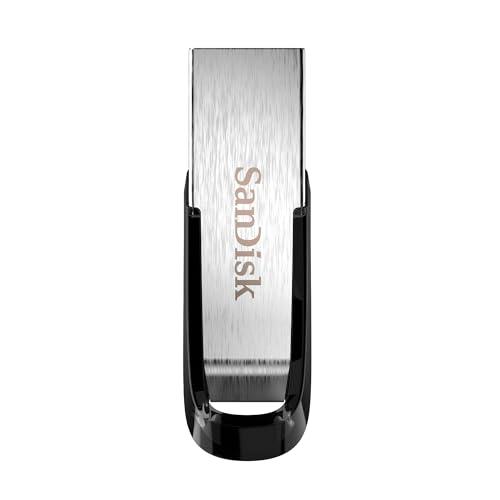
SanDisk 128GB Ultra Flair USB-A flash drive, up to 150MB/s read
128GBUSB-A150MB/s readMetal casing
Check price on Amazon
Best for: Office and home users with USB-A ports who want a fast, simple drive.

The SanDisk Ultra Flair is a USB 3.0 flash drive with a metal casing and a read speed listed up to 150MB/s. It has a single USB-A connector and no moving parts, which makes it one of the simplest and most durable designs. The listing says it transfers a full-length movie in under 30 seconds under ideal conditions.

The tradeoff is the connector. USB-A fits older laptops and desktops, but newer thin laptops and phones need an adapter. Compared with the Dual Drive, it is cheaper for the same capacity but less flexible. Against the PNY Turbo Attaché, it offers a faster claimed read speed and a metal body, though PNY sells packs. It is a good fit for office use and general file transfers.

In ownership, keep the cap or connector clean and eject before pulling it out. The drive can get warm in use, which is normal. Back up important files elsewhere.

What works

  • Metal casing is more durable than basic plastic drives
  • Up to 150MB/s read speed handles large photo and document sets
  • Single connector means no mechanisms to break
  • 128GB is plenty for documents, photos and music

Watch out for

  • USB-A only, so newer devices need an adapter
  • Read speed figure does not apply to writes

Specs

Connector
USB-A
Capacity
128GB
Read speed
Up to 150MB/s
Interface
USB 3.0
Brand
SanDisk
04
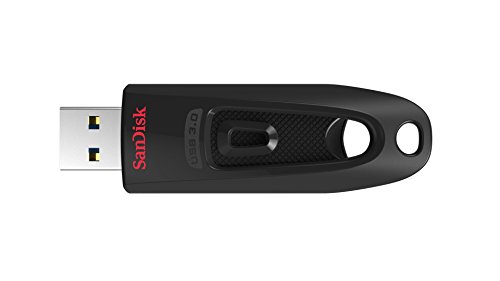
SanDisk 256GB Ultra USB-A flash drive, up to 130MB/s read
256GBUSB-A130MB/s readUSB 3.0
Check price on Amazon
Best for: People who carry large libraries of video and photos and want one drive for it.

The SanDisk Ultra in 256GB capacity is a USB 3.0 drive with a read speed listed up to 130MB/s, compared with about 4MB/s quoted for standard USB 2.0 drives. It has a USB-A connector and works with older ports through backward compatibility. It is aimed at laptops, desktops and game consoles where a large capacity is helpful.

The tradeoff is that a bigger flash drive is a bigger risk. If it fails, you lose more, and at this capacity a portable SSD may be a better choice. Compared with the Ultra Flair, it has a slightly lower read speed but double the space. Against the Cruzer Blade, it is far faster and larger, at a higher price tier. It suits those who carry a large media library.

For care, format it with the file system that suits your devices, such as exFAT for use with both Windows and Mac. Eject properly and keep a backup.

What works

  • 256GB holds a large photo library or a stack of videos
  • 130MB/s read speed is quick for a general-purpose drive
  • Backward compatible with older USB ports
  • Brand has a long track record in flash storage

Watch out for

  • Much more data is at risk in one small device
  • Lower read speed than the 150MB/s drives

Specs

Connector
USB-A
Capacity
256GB
Read speed
Up to 130MB/s
Compatibility
Backward compatible with older ports
Brand
SanDisk
05
PNY 128GB Turbo Attache 3 USB 3.0 flash drive, 2-pack, up to 100MB/s read
2-pack128GB each100MB/s readSliding collar
Check price on Amazon
Best for: Households and small offices that need several drives at a good price.

The PNY Turbo Attache 3 comes in a two-pack of 128GB USB 3.0 drives, each with a sliding metal collar that protects the connector. The read speed is listed at up to 100MB/s, and the body is light enough to sit on a keyring. It is a good deal for households or small offices that need several drives.

The tradeoff is speed and flexibility. At 100MB/s, it is slower than the SanDisk options, and the connector is USB-A only. Compared with the Ultra Flair, it costs less per drive when bought in a pack, but the build is lighter. Against the Cruzer Blade, it is much faster. It suits buyers who want to give drives to family members or to leave one at work and one at home.

For ownership, label each drive and keep one as a backup. Eject before removal, and avoid pulling on the collar. Replace any drive that starts to show errors.

What works

  • Two drives in one pack lower the cost per drive
  • Sliding collar protects the connector without a cap
  • USB 3.0 interface supports faster transfers than USB 2.0
  • Lightweight body fits on a keyring

Watch out for

  • Slower stated read speed than the SanDisk drives
  • USB-A only, so newer devices need an adapter

Specs

Pack
2 drives
Capacity
128GB each
Read speed
Up to 100MB/s
Design
Sliding collar protects connector
Brand
PNY
06
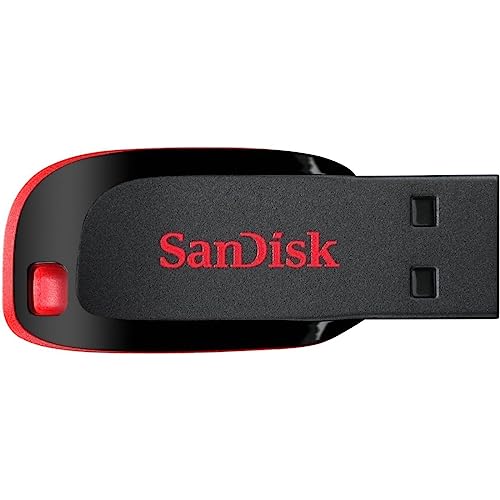
SanDisk 32GB Cruzer Blade USB 2.0 flash drive
32GBUSB 2.0CompactPlastic body
Check price on Amazon
Best for: Students and workers who move small documents and want the lowest price.

The SanDisk Cruzer Blade is an ultra-compact USB 2.0 drive with a contoured plastic body and a 32GB capacity. It offers password protection software according to the listing and is designed for basic file transfers. It is the cheapest and slowest option here, and it is a classic.

The tradeoff is speed and space. USB 2.0 is limited to a fraction of the speed of USB 3.0, so large files take a long time. Compared with the Ultra Flair, it is fine for documents but not for video. Against the PNY pack, it has a single drive and a smaller capacity. It suits students and office workers who move documents.

In ownership, keep the cap on the connector and eject before removal. Do not rely on password software as proper encryption. Replace the drive if it becomes unreliable.

What works

  • Low price tier is easy on a budget
  • Ultra-compact body fits on a keyring
  • 32GB is enough for documents and presentations
  • Well-known brand with years of use

Watch out for

  • USB 2.0 speed is slow for large files
  • Plastic build is less rugged than metal drives

Specs

Connector
USB-A
Capacity
32GB
Interface
USB 2.0
Design
Ultra-compact contoured body
Brand
SanDisk

Spec decoder

What the listing measurements really mean

The numbers brands lead with, translated into what they tell you about fit, comfort and wear at home.

Read speed

Read speed is how fast data comes off the drive, quoted in MB/s. It is the best-case number listings advertise.

Watch forWrite speed is usually lower and is rarely listed.

USB 3.2 Gen 1

USB 3.2 Gen 1 is the new name for USB 3.0, with a 5 Gbps interface. It sets a ceiling, not a guarantee.

Watch forThe Lexar D40E uses it, but the listing is vague on real speed.

USB-C versus USB-A

USB-C is the small reversible connector on phones and new laptops. USB-A is the older rectangular one.

Watch forDual drives like the Ultra Dual Drive include both.

File system

The file system, such as exFAT or FAT32, decides which devices read the drive and how large a file can be. FAT32 limits single files to 4GB.

Watch forFormat as exFAT for cross-platform use.

OTG

OTG, or On-The-Go, lets a phone read a drive directly. The drive needs a compatible connector.

Watch forDual USB-C and USB-A drives are the easiest OTG choice.

Methodology

How We Evaluated These USB Flash Drives

Research basis

We evaluated each drive from published specifications, listing details and recurring owner feedback. Our views are editorial assessments, not measurements. Capacity, connector and read speed come from the listings.

Connector and speed

We compared USB-A, USB-C and dual designs, along with listed read speeds from USB 2.0 to 150MB/s. We treated listed speeds as best case.

Build and durability

We considered metal versus plastic bodies, and swivel, slide or cap protection. Mechanical parts were weighed as potential wear points.

Capacity and value

We weighed capacities from 32GB to 256GB and pack options. More capacity adds risk if a drive fails.

Fit for users

We matched each drive to phone users, office users, students and households. Each pick says who should skip it.

Decision guide

How to Choose the Right USB Flash Drives

By Device

SituationPickWhy
Phone and laptopSanDisk Ultra Dual DriveUSB-C and USB-A on one stick.
Older laptop or desktopSanDisk Ultra FlairUSB-A with 150MB/s read.
New thin laptopLexar D40EUSB-C and USB-A with a metal swivel.
Family or office packPNY Turbo Attache 3Two 128GB drives in one pack.

By Budget

SituationPickWhy
Lowest tierSanDisk Cruzer BladeBasic 32GB USB 2.0 drive.
Lower to middlePNY 2-packTwo drives for a modest price.
MiddleSanDisk Ultra FlairFast and durable USB-A.
Higher tierDual Drive or 256GB UltraPay for dual connectors or capacity.

USB-A vs Dual Connector

USB-A only

The Ultra Flair, Ultra 256GB, PNY and Cruzer Blade are simple and cheap but need an adapter for new devices.

Dual connector

The Ultra Dual Drive and Lexar D40E fit phones and computers but cost more and have a moving part.

Choose USB-A if all your devices have it. Choose dual if you use a phone or a new laptop.

By Use

SituationPickWhy
DocumentsSanDisk Cruzer BladeLight files and low price.
Photos and musicSanDisk Ultra FlairFaster transfers and more space.
Large video librarySanDisk Ultra 256GBHighest capacity in the lineup.
Shared drivesPNY 2-packSeveral drives at a good price.

For Large Files Specifically

Look for

A USB 3.x interface, a good write speed and an SSD-based design if you copy often. Flash drives slow down during long writes.

In this comparison

The SanDisk Ultra drives are fastest, but for regular large copies a portable SSD is a better tool.

When to Spend More

Spend more if

You move files daily between different devices and want dual connectors and speed, as with the SanDisk Ultra Dual Drive.

Save if

You only carry documents and a Cruzer Blade or PNY pack is enough.

Ownership

Maintenance schedule

The upkeep that decides whether a piece still looks good in year five.

TaskIntervalWhy it matters
Eject before removingEvery usePulling a drive mid-write can corrupt files. Use the eject option every time.
Keep a second copyAlwaysFlash drives fail without warning. Never keep the only copy of important files on one.
Clean the connectorEvery few monthsLint and dust cause poor contact. Use a dry swab or compressed air.
Reformat if neededAs requiredA fresh format with the right file system fixes odd errors. Back up first.
Protect from heat and waterWhen storingHeat and moisture damage flash chips. Keep the drive in a cool, dry place.

FAQ

Frequently Asked Questions

Are listed USB speeds real?

They are best-case read speeds. Write speeds are often lower and may fall during long copies. For big files, a portable SSD is faster.

What is the difference between USB 3.0 and USB 3.2 Gen 1?

They are the same 5 Gbps interface under different names. The real speed depends on the flash inside, not just the label.

Do I need a USB-C flash drive?

If your phone or laptop has only USB-C, yes, or you need an adapter. Dual drives like the Ultra Dual Drive solve the problem with one stick.

How long do flash drives last?

Often for years, but they can fail without warning. Heat, rough handling and heavy writes shorten life. Keep backups.

Is bigger always better?

Not for safety. A larger drive holds more but risks more data if it fails. Use a cloud or second copy for important files.

Can I use a flash drive as a backup?

As a backup copy, yes, but not as the only copy. Use at least two places for anything important.

Bottom line

The short version

Browse more usb flash driveson Amazon →
Brianna Cole, Lead Product Editor

About the author

Brianna Cole

Lead Product Editor, SenseiReview

Brianna Cole leads SenseiReview's buying guides, turning published specifications, documentation and owner feedback patterns into clear verdicts across home, tech, fitness, outdoor and DIY products.

More from Brianna →

Keep reading

Related guides