
Amazon affiliate links - we earn a commission.Affiliate disclosure

Buying guide · 12 min read · Updated 2026-11-27

Best Portable SSDs for Video Editing (2026)

Portable SSDs for video editing compared on sustained speed, interface, capacity and ruggedness, with honest notes on peak versus real transfer rates.

Brianna Cole, Lead Product EditorBy Brianna ColeLead Product Editor6 picks comparedSpec-sheet verified
Best Portable SSDs for Video Editing

At a glance

Our top picks

Side by side

Spec comparison

PieceCapacitySpeedInterfaceBuild
SanDisk Professional PRO-Blade Transport 4TB, USB-C 20 GbpsBest OverallSanDisk Professional PRO-Blade Transport 4TB, USB-C 20 Gbps4 TB with included SSD magUp to 2000 MB/sUSB-C at 20 Gbpsn/a
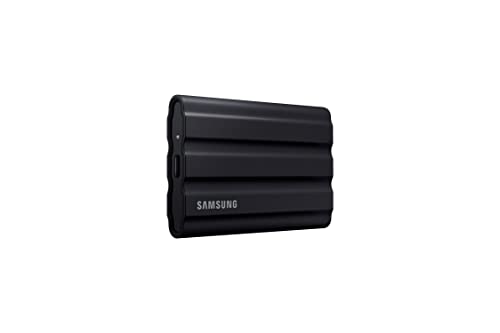
Samsung T7 Shield 1TB Portable SSD, IP65, Up to 1,050 MB/sBest Value Rugged DriveSamsung T7 Shield 1TB Portable SSD, IP65, Up to 1,050 MB/s1 TB (larger sizes sold)Up to 1,050 MB/sUSB 3.2 Gen 2 (10 Gbps)Rugged rubberized shell
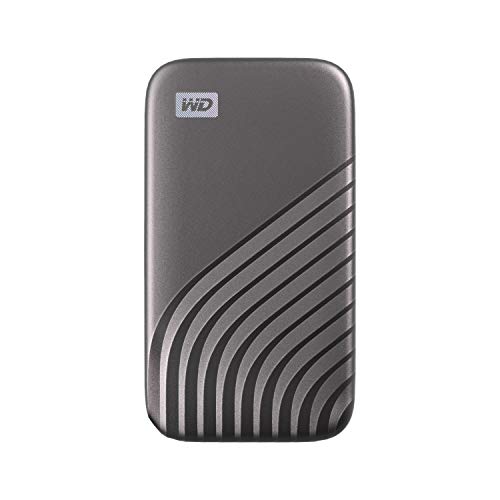
WD My Passport SSD 2TB, 1050 MB/s, 256-bit AES EncryptionBest Encrypted DriveWD My Passport SSD 2TB, 1050 MB/s, 256-bit AES Encryption2 TBUp to 1050 MB/s read, 1000 MB/s writen/aSturdy compact shell
Glyph Atom EV 2TB Portable SSD, 1,000 MB/s, Rugged USB-CBest Field DriveGlyph Atom EV 2TB Portable SSD, 1,000 MB/s, Rugged USB-C2 TBSustained up to 1,050 MB/sUSB-C 3.2 Gen 2Rugged production drive
KingSpec 1TB Portable SSD, USB 3.2 Gen2x2, Up to 2100 MB/sBest Budget 20 Gbps DriveKingSpec 1TB Portable SSD, USB 3.2 Gen2x2, Up to 2100 MB/s1 TBUp to 2100 MB/s readUSB 3.2 Gen2x2 (20 Gbps)n/a
Glyph Atom Pro 2 1TB Thunderbolt 3 NVMe Portable SSD, 3,000 MB/sBest Thunderbolt DriveGlyph Atom Pro 2 1TB Thunderbolt 3 NVMe Portable SSD, 3,000 MB/s1 TBUp to 3,000 MB/sThunderbolt 3Rugged production drive

Editing from a portable SSD can free your laptop's internal storage and let you move projects between machines. The drive has to keep up with large files, scrubbing and exports, so sustained speed and the connection matter more than a peak number on the box.

This guide compares portable SSDs chosen for video work. We evaluated each on published specifications, interface, capacity, ruggedness, encryption and owner feedback patterns, and we point out where a faster drive will not help because the laptop port is the limit.

Before you buy

6 Criteria to Look For Before Buying a Portable SSD for Video Editing

  1. 01

    Sustained speed, not peak

    Peak speed is a short burst from a fast host, and sustained speed is what you get over a long copy once the cache fills. The Glyph Atom Pro 2 lists sustained read and write figures, which is more honest than a single peak. For editing, sustained write matters for exports and ingest. Be wary of drives that list only the peak number.

  2. 02

    Interface and port match

    USB 3.2 Gen 2 is 10 Gbps, Gen2x2 is 20 Gbps and Thunderbolt 3 is higher. The drive is only as fast as the host port. The KingSpec and PRO-Blade need a 20 Gbps port, and on many Macs they fall back to 10 Gbps. Paying for speed your port cannot deliver is the commonest mistake.

  3. 03

    Capacity and workflow

    A working drive needs room for the project, a cache and a spare copy. One terabyte is about an hour or two of high-bitrate 4K, so a 1 TB drive like the Samsung T7 Shield fills quickly. The 2 TB WD My Passport SSD and Glyph Atom EV suit working projects, and the 4 TB PRO-Blade suits a library. Plan the capacity around your codec.

  4. 04

    Ruggedness

    IP65, as on the Samsung T7 Shield, means dust tight and resistant to water jets. Drop claims are manufacturer statements. Rugged shells matter for field work and cost little in practice. If the drive stays on a desk, a plain metal body is enough.

  5. 05

    Heat and throttling

    Long writes heat an SSD, and a hot drive can slow itself down to protect the controller. Metal bodies, as on the KingSpec and Glyph drives, spread heat better than plastic. Keep the drive in open air, and avoid stacking it under a laptop. Throttling shows up as speed that drops during a long copy.

  6. 06

    Security and backup

    Hardware encryption, as on the WD My Passport SSD, protects client footage if a drive is lost. It does not protect against failure. Keep a second copy of every project, because a portable SSD can die suddenly. A copy on a second drive or a cloud service is part of the plan, not an extra.

Detailed reviews

The 6 best portable ssds for video editing, explained

01
SanDisk Professional PRO-Blade Transport 4TB, USB-C 20 Gbps
4 TBUp to 2000 MB/sUSB-C 20 GbpsModular mags
Check price on Amazon
Best for: Professional editors who want a fast, modular project drive and a 20 Gbps port.

The PRO-Blade Transport is a modular portable system: a rugged transport housing that takes swappable PRO-BLADE SSD mags, with one preloaded. It connects over USB-C at up to 20 Gbps and the maker lists speeds up to 2000 MB/s. The idea is that you can swap mags to add capacity without carrying a separate drive for each project.

The modular approach suits editors who organize by project, since a mag can be filled, labeled and shelved. Compared with the KingSpec Gen2x2 drive, it offers the same class of interface but a professional ecosystem. Compared with the Samsung T7 Shield, it is faster and larger, but also costs far more. The 20 Gbps link needs a matching port, so on a Mac or a laptop with only 10 Gbps ports the drive will run slower.

In use, plug the transport in with the supplied cable, format the mag for your system and keep a second copy of important footage. Large mags run warm under long writes, so keep the transport in airflow. The modular design adds cost per mag, so a full library gets expensive. As with any SSD, plan for the drive to fail someday and back up.

What works

  • 20 Gbps USB-C link with speeds up to 2000 MB/s
  • Modular mags let you swap capacity per project
  • 4 TB capacity suits a working library
  • Professional-grade build and ecosystem

Watch out for

  • Highest cost tier, with extra mags adding cost
  • 20 Gbps speed requires a matching host port
  • Warm under long sustained writes

Specs

Capacity
4 TB with included SSD mag
Speed
Up to 2000 MB/s
Interface
USB-C at 20 Gbps
Design
Modular, swappable PRO-BLADE mags
Class
Highest tier here
02
Samsung T7 Shield 1TB Portable SSD, IP65, Up to 1,050 MB/s
1 TB1,050 MB/sIP65 ratedUSB 3.2 Gen 2
Check price on Amazon
Best for: Field editors who want a tough, well-known 10 Gbps drive at a sensible cost.

The Samsung T7 Shield is a rugged portable SSD with a rubberized shell, an IP65 rating and USB 3.2 Gen 2 at up to 1,050 MB/s. IP65 means it is dust tight and resists water jets, a useful margin for outdoor shoots. The 1 TB model is the entry point, and larger capacities are sold.

For most 4K editing, 10 Gbps is plenty, since compressed codecs do not need the highest speeds. Compared with the KingSpec Gen2x2 drive, it is slower on paper but has a clearer ruggedness story and a better-known warranty. Compared with the WD My Passport SSD, it adds an IP rating and a tougher shell. It is the practical choice for field editors.

Ownership is simple: use the short cable that came with it, keep it formatted exFAT if you swap between Mac and Windows and keep some free space for sustained writes. Rubber shells attract lint, but they protect the drive in a bag. Rated sustained performance is lower than the peak figure, especially as the drive fills, so avoid running it at full capacity.

What works

  • IP65 rating resists dust and water jets
  • Up to 1,050 MB/s over USB 3.2 Gen 2
  • Rubberized shell protects against bumps
  • Established brand with strong warranty history

Watch out for

  • 10 Gbps limit is slower than Gen2x2 and Thunderbolt drives
  • 1 TB fills quickly with high-bitrate footage
  • Sustained speed falls as the drive fills

Specs

Capacity
1 TB (larger sizes sold)
Speed
Up to 1,050 MB/s
Interface
USB 3.2 Gen 2 (10 Gbps)
Durability
IP65 water and dust resistant
Build
Rugged rubberized shell
03
WD My Passport SSD 2TB, 1050 MB/s, 256-bit AES Encryption
2 TB1050 MB/s read256-bit AESNVMe
Check price on Amazon
Best for: Editors who handle client footage and want hardware encryption with 2 TB of space.

The WD My Passport SSD is a 2 TB portable drive with NVMe technology, read speeds up to 1050 MB/s and write speeds up to 1000 MB/s. Password-enabled 256-bit AES hardware encryption protects the contents if the drive is lost, which matters for client footage. It has a compact, sturdy shell.

It is a good value for editors who want 2 TB of fast storage and a solid warranty. Compared with the Samsung T7 Shield, it has twice the capacity in the sizes listed, but no IP rating. Compared with the Glyph Atom EV, it is similar in speed and less rugged, but has security features. Encryption relies on the maker's software, which is usually Windows and Mac only.

In practice, set up the password and keep a record of it, since a lost password means lost data. Use exFAT for cross-platform work. Handle it with care, as the shell is sturdy but not rated for water. Like any SSD it benefits from free space, and long copies can slow once the cache fills.

What works

  • 2 TB capacity in a compact drive
  • 256-bit AES hardware encryption for client footage
  • Read up to 1050 MB/s and write up to 1000 MB/s
  • Sturdy shell and a known brand

Watch out for

  • No IP rating for water or dust
  • Encryption software is limited to Windows and Mac
  • Lost password means lost data

Specs

Capacity
2 TB
Speed
Up to 1050 MB/s read, 1000 MB/s write
Security
Password-enabled 256-bit AES hardware encryption
Technology
NVMe
Build
Sturdy compact shell
04
Glyph Atom EV 2TB Portable SSD, 1,000 MB/s, Rugged USB-C
2 TB1,050 MB/s sustainedUSB-C 3.2 Gen 2Rugged build
Check price on Amazon
Best for: Video editors who want a sustained 10 Gbps rugged drive with 2 TB of space.

The Glyph Atom EV is a 2 TB portable NVMe drive built for production work, with sustained performance listed up to 1,050 MB/s over USB-C 3.2 Gen 2. The maker aims it at 4K video professionals and positions it as rugged. It is compatible with Thunderbolt 3 ports, though it runs at USB 10 Gbps speeds.

The emphasis on sustained speed is the useful part, since peak figures flatter many drives. Compared with the Samsung T7 Shield, it offers more capacity at a similar speed and a more specialist brand. Compared with the Glyph Atom Pro 2, it is slower and cheaper, a better fit for editors who do not have Thunderbolt. It is a straightforward working drive.

Ownership is about keeping the drive in good condition: use the supplied cable, keep it cool, and leave free space. Rugged builds help in the field, but they do not replace a backup. The brand is smaller than Samsung or WD, so check warranty terms. If your laptop has Thunderbolt and you want more speed, step up.

What works

  • 2 TB capacity aimed at 4K video work
  • Sustained speed up to 1,050 MB/s
  • Rugged build for field use
  • Thunderbolt 3 port compatible

Watch out for

  • Speed capped at 10 Gbps despite Thunderbolt compatibility
  • Smaller brand than Samsung and WD
  • Cost per terabyte is higher than basic drives

Specs

Capacity
2 TB
Speed
Sustained up to 1,050 MB/s
Interface
USB-C 3.2 Gen 2
Compatibility
Thunderbolt 3 compatible
Build
Rugged production drive
05
KingSpec 1TB Portable SSD, USB 3.2 Gen2x2, Up to 2100 MB/s
1 TB2100 MB/s readUSB 3.2 Gen2x2Zinc-alloy body
Check price on Amazon
Best for: PC editors with 20 Gbps ports who want high read speeds at a lower cost.

The KingSpec drive uses USB 3.2 Gen2x2 for read speeds up to 2100 MB/s in a pocket-sized zinc-alloy body. It is the lowest cost way in this guide to reach 20 Gbps speeds on a compatible port. The metal body helps shed heat during long copies.

The speed needs a matching host port. On a computer with only 10 Gbps ports the drive runs at the slower rate, and on many Macs a 20 Gbps drive falls back to 10 Gbps. Compared with the PRO-Blade Transport, it offers a similar interface at a lower cost, but without a professional ecosystem. Compared with the Samsung T7 Shield, it is faster on paper but has no IP rating and a less certain track record.

In use, check your port speed before buying for the extra headline number. Use the short supplied cable, since long cables drop speeds. Watch for thermal throttling during long copies. Budget brands vary in warranty and support, so keep proof of purchase and back up your footage.

What works

  • USB 3.2 Gen2x2 with read speeds up to 2100 MB/s
  • Zinc-alloy body helps spread heat
  • Pocket-sized and light
  • Lower cost than professional 20 Gbps drives

Watch out for

  • Speed requires a matching 20 Gbps port
  • No IP rating or rugged claims
  • Less proven brand and support

Specs

Capacity
1 TB
Speed
Up to 2100 MB/s read
Interface
USB 3.2 Gen2x2 (20 Gbps)
Body
Pocket-sized zinc alloy
Class
Low to mid tier
06
Glyph Atom Pro 2 1TB Thunderbolt 3 NVMe Portable SSD, 3,000 MB/s
1 TBUp to 3,000 MB/sThunderbolt 32,800 MB/s sustained
Check price on Amazon
Best for: Editors with Thunderbolt laptops who work with demanding, high-bitrate footage.

The Glyph Atom Pro 2 is a Thunderbolt 3 NVMe portable drive with speeds up to 3,000 MB/s and sustained performance listed up to 2,800 MB/s read and 2,600 MB/s write. It targets creators and professionals who manage high-resolution video. It is the fastest drive here, though only over a Thunderbolt port.

It is built for heavy workflows, such as multicam editing and high-bitrate formats that stress slower drives. Compared with the Glyph Atom EV, it is far faster but needs Thunderbolt and costs more. Compared with the PRO-Blade Transport, it is a single fixed-capacity drive without modular mags. A faster drive helps only if the rest of the chain, from the cable to the editing software, can use the speed.

Ownership requires a Thunderbolt cable and port, and long cables lower speeds. Keep it cool, because high speeds produce heat. Capacity at 1 TB fills quickly with high-bitrate footage, and larger versions exist at a higher cost. Back up everything, since speed does not equal safety.

What works

  • Thunderbolt 3 speeds up to 3,000 MB/s
  • Sustained read and write numbers above 2,600 MB/s listed
  • Rugged production-oriented build
  • Handles demanding multicam workflows

Watch out for

  • Needs a Thunderbolt port to reach its speeds
  • Highest cost per terabyte in the lineup
  • 1 TB fills quickly with high-bitrate footage

Specs

Capacity
1 TB
Speed
Up to 3,000 MB/s
Sustained
Up to 2,800 MB/s read and 2,600 MB/s write
Interface
Thunderbolt 3
Build
Rugged production drive

Spec decoder

What the listing measurements really mean

The numbers brands lead with, translated into what they tell you about fit, comfort and wear at home.

USB 3.2 Gen 2 vs Gen2x2

Gen 2 runs at 10 Gbps, about 1,000 MB/s real. Gen2x2 runs at 20 Gbps, about 2,000 MB/s, but needs a matching port.

Watch forThe Samsung T7 Shield uses Gen 2 and the KingSpec uses Gen2x2.

Sequential read and write

Speed for large files in one stream. It is the number printed on the box, and sustained speed after the cache fills is lower.

Watch forThe WD lists 1050 MB/s read and 1000 MB/s write.

IP65

A rating for dust tightness and resistance to water jets. It does not mean the drive can be submerged.

Watch forThe Samsung T7 Shield lists IP65.

256-bit AES

A strong encryption standard. Hardware encryption requires a password and works through the maker's software.

Watch forThe WD My Passport SSD lists password-enabled 256-bit AES.

Thunderbolt 3

A 40 Gbps connection that needs a Thunderbolt port and cable. It allows higher speeds than USB 3.2 Gen 2.

Watch forThe Glyph Atom Pro 2 uses Thunderbolt 3.

Methodology

How We Evaluated These Portable SSDs for Video Editing

Speed and interface

We compared stated speeds and interfaces, from 10 Gbps on the Samsung T7 Shield to Thunderbolt 3 on the Glyph Atom Pro 2. We treated peak figures cautiously. Our scores are editorial assessments based on published specifications and owner feedback patterns.

Capacity

We matched capacities from 1 TB to 4 TB to editing workflows and noted how fast high-bitrate footage fills a drive.

Durability

We considered IP ratings, metal bodies and rugged claims, noting that drop ratings are manufacturer statements.

Security and support

We looked at encryption and brand support, such as the WD hardware encryption and the Samsung warranty record.

Value and honesty

We judged each drive by relative cost tier and avoided price figures. The KingSpec was credited as a low-cost 20 Gbps option with less proven support.

Decision guide

How to Choose the Right Portable SSDs for Video Editing

By Port

SituationPickWhy
10 Gbps USB-C portSamsung T7 ShieldMatched speed and ruggedness.
20 Gbps USB-C portSanDisk PRO-Blade TransportFull 20 Gbps link.
Thunderbolt 3 or 4 portGlyph Atom Pro 2Highest sustained speed.
Basic laptop portWD My Passport SSD2 TB with encryption.

By Budget

SituationPickWhy
Lowest spendKingSpec 1TB Gen2x2Low cost for 20 Gbps.
Low to midSamsung T7 ShieldRugged value.
MidWD My Passport SSD2 TB with AES.
HighestSanDisk PRO-Blade or Glyph Atom Pro 2Professional speed.

Rugged vs Fast

Rugged

The Samsung T7 Shield and Glyph Atom EV protect against bumps and weather, and run at 10 Gbps.

Fast

The KingSpec, PRO-Blade Transport and Glyph Atom Pro 2 chase higher speeds, but need matching ports.

Choose rugged for field work. Choose fast if your port and codec can use it.

By Footage

SituationPickWhy
Compressed 4K and proxiesSamsung T7 Shield10 Gbps is plenty.
High-bitrate multicamGlyph Atom Pro 2Sustained Thunderbolt speed.
Large project librarySanDisk PRO-Blade4 TB and modular mags.
Client footageWD My Passport SSDHardware encryption.

For Video Editing Specifically

Look for

Sustained speed, a port match, enough capacity for the project and a spare copy, and a metal body for heat.

In this comparison

The PRO-Blade leads on capability, the T7 Shield on value and the Atom Pro 2 on speed.

When to Spend More

Spend more if

You edit high-bitrate footage daily and have a matching port. The PRO-Blade or Atom Pro 2 saves time.

Save if

You edit compressed footage. A Samsung T7 Shield or KingSpec is enough.

Ownership

Maintenance schedule

The upkeep that decides whether a piece still looks good in year five.

TaskIntervalWhy it matters
Back up the projectDaily during editingSSDs can fail suddenly. A second copy on another drive protects the work.
Keep free spaceOngoingA nearly full SSD slows sustained writes. Leave about 10 to 20 percent free.
Use the short supplied cableEvery useLong or thin cables lower speeds. Replace damaged cables.
Eject before unpluggingEvery usePulling the drive can corrupt files. Use the system eject.
Check the connectorMonthlyPocket lint and wear cause connection drops. Clean gently with a dry brush.

FAQ

Frequently Asked Questions

Can I edit directly from a portable SSD?

Yes, for most compressed 4K workflows. High-bitrate and multicam work needs higher sustained speeds.

Is a 2000 MB/s drive faster on my Mac?

Only if the Mac port supports it. Many Macs run 20 Gbps drives at 10 Gbps.

How much capacity do I need?

Plan room for the project, cache and a copy. One terabyte fills quickly with high-bitrate 4K.

Do I need a rugged drive?

For field work, yes. For a desk, a plain metal body is enough.

Why does my drive slow down during long copies?

The cache fills or the drive heats up. Sustained speed is lower than peak.

Which file system should I use?

exFAT works on Mac and Windows. APFS is Mac only, and NTFS is read only on Mac.

Bottom line

The short version

Browse more portable ssds for video editingon Amazon →
Brianna Cole, Lead Product Editor

About the author

Brianna Cole

Lead Product Editor, SenseiReview

Brianna Cole leads SenseiReview's buying guides, turning published specifications, documentation and owner feedback patterns into clear verdicts across home, tech, fitness, outdoor and DIY products.

More from Brianna →

Keep reading

Related guides