

Amazon affiliate links - we earn a commission.Affiliate disclosure

Buying guide · 12 min read · Updated 2026-11-21

Best SD Cards for Cameras (2026)

Six SD cards for cameras compared on speed class, UHS-I versus UHS-II, write speed and capacity, with notes on what 4K video and burst shooting really need.

Brianna Cole, Lead Product EditorBy Brianna ColeLead Product Editor6 picks comparedSpec-sheet verified
Best SD Cards for Cameras

At a glance

Our top picks

Side by side

Spec comparison

PieceCapacitySpeed classRead speedPrice position
SanDisk 128GB Extreme PRO SD Card UHS-I V30 U3 Up to 250MB/s ReadBest OverallSanDisk 128GB Extreme PRO SD Card UHS-I V30 U3 Up to 250MB/s Read128 GBV30, U3, Class 10Up to 250 MB/sUpper-middle of the group
SanDisk 64GB Ultra SD Card UHS-I U1 Up to 145MB/s Read for Full HDBest ValueSanDisk 64GB Ultra SD Card UHS-I U1 Up to 145MB/s Read for Full HD64 GBU1, Class 10Up to 145 MB/sSecond lowest here
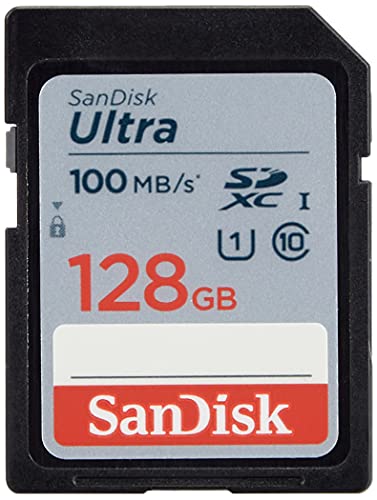
SanDisk 128GB Ultra SDXC UHS-I Memory Card 100MB/s C10 U1Best Mid-Capacity ValueSanDisk 128GB Ultra SDXC UHS-I Memory Card 100MB/s C10 U1128 GBU1, Class 10Up to 100 MB/sLower-middle of the group
SanDisk 64GB Extreme PRO SDXC UHS-I C10 U3 V30 4K UHDBest Entry Extreme PROSanDisk 64GB Extreme PRO SDXC UHS-I C10 U3 V30 4K UHD64 GBV30, U3, Class 10Up to 200 MB/sMiddle of the group
SanDisk 256GB Extreme PRO SD Card UHS-I V30 U3 Up to 140MB/s WriteBest Write SpeedSanDisk 256GB Extreme PRO SD Card UHS-I V30 U3 Up to 140MB/s Write256 GBV30, U3, Class 10Up to 200 MB/sHighest in the group
Lexar 128GB SILVER PRO SD Card 280MB/s Read V60 U3 UHS-IIBest UHS-IILexar 128GB SILVER PRO SD Card 280MB/s Read V60 U3 UHS-II128 GBV60, U3n/aUpper end of the group

An SD card is the part of a camera system that fails quietly: a card that is too slow drops frames in video or stalls during a burst, and a card that fails can lose a shoot. The right card matches your camera's speed support and your recording format.

This guide compares SD cards on speed class, UHS bus, write speed and capacity. We explain why advertised read speed is not the number that matters for recording, and how to choose a card that fits your camera instead of paying for speed it cannot use.

Before you buy

6 Criteria to Look For Before Buying a SD Card for Cameras

  1. 01

    Speed class

    Speed classes tell you the minimum sustained write: U1 is 10 MB/s, U3 is 30 MB/s, V30 is 30 MB/s and V60 is 60 MB/s. The SanDisk Ultra is U1 and the Extreme PRO and Lexar are U3 and above. For 4K video, look for U3 or V30. Check your camera manual for a line about the speed class or bus it supports, because that line decides everything else. If it says UHS-I only, a UHS-II card is a waste of money and a V30 card is already the practical ceiling.

  2. 02

    UHS-I vs UHS-II

    UHS-II cards use a second row of pins and run faster in cameras that support it. The Lexar Silver PRO is UHS-II, while the SanDisk cards are UHS-I. In a UHS-I camera a UHS-II card drops to UHS-I speed. Record a short test clip at your highest quality setting before an important shoot, then check it plays back cleanly. A card that drops frames during a test will drop them during the event too.

  3. 03

    Read vs write speed

    The headline 250 MB/s or 280 MB/s is read speed for offloading to a computer. Recording depends on write speed and the speed class. A fast read number does not make a card record faster. Do not read the speed number on the label as a promise for your camera, because cameras write at their own pace and the card only has to be fast enough. A faster card does not make a slow camera quicker.

  4. 04

    Capacity

    64 GB suits casual shooters, 128 GB suits a day of shooting, and 256 GB suits long events. Larger cards risk more footage on one card. Choose a size you are comfortable losing. Capacity should reflect how you offload. If you copy files to a laptop every night, a 64 GB card goes a long way, while if you travel without a laptop, a larger card or several cards helps.

  5. 05

    Camera compatibility

    SDHC cards go up to 32 GB and SDXC cards are above 32 GB, using exFAT. Check that your camera supports SDXC and the speed class it needs. Older cameras may reject large cards. Camera-specific notes matter, since some bodies need a V60 card for their highest bitrate or all-intra video modes. The camera manual or maker's support page names the card requirement.

  6. 06

    Reliability habits

    Format the card in the camera, copy files off often and avoid deleting on the camera. Cards fail suddenly, so keep a spare. Replace cards that throw errors. Keep your cards in their cases, write on them with a permanent marker and rotate them, so a single card does not carry all the wear.

Detailed reviews

The 6 best sd cards for cameras, explained

01
SanDisk 128GB Extreme PRO SD Card UHS-I V30 U3 Up to 250MB/s Read
128GBV30, U3250MB/s read4K UHD
Check price on Amazon
Best for: Photographers and videographers who need dependable 4K and burst performance.

The Extreme PRO 128 GB is a UHS-I card with V30 and U3 labels and a stated read speed of up to 250 MB/s. The V30 rating means a minimum sustained write of 30 MB/s, which is the number that matters for 4K video. It comes in capacities up to 2 TB, and 128 GB is a sensible all-day size for most shooters.

The tradeoff is that the headline read speed describes offloading to a computer, not recording, and it only reaches that speed with a fast reader and a compatible host. A UHS-I bus caps below UHS-II cards such as the Lexar Silver PRO. It costs more than the SanDisk Ultra line. It suits photographers and videographers who shoot 4K or bursts and want a reliable mainstream card.

Format the card in the camera, not on a computer, so the file structure matches. Copy files off after each shoot and avoid deleting on the camera. Replace a card that shows errors rather than trusting it for a client job.

What works

  • V30 and U3 labels suit 4K video and bursts
  • Up to 250 MB/s read speeds speed up offloading
  • 128 GB lasts through a day of shooting
  • Mainstream UHS-I works in nearly every camera

Watch out for

  • Read speed is not the write speed that recording needs
  • Costs more than the Ultra line

Specs

Capacity
128 GB
Speed class
V30, U3, Class 10
Read speed
Up to 250 MB/s
Bus
UHS-I
Price position
Upper-middle of the group
02
SanDisk 64GB Ultra SD Card UHS-I U1 Up to 145MB/s Read for Full HD
64GBU1, C10145MB/s readFull HD
Check price on Amazon
Best for: Point-and-shoot owners and Full HD shooters on a budget.

The SanDisk Ultra 64 GB is aimed at compact and mid-range cameras, with U1 and Class 10 labels and Full HD video. U1 guarantees a minimum sustained write of 10 MB/s, which suits 1080p recording and normal photography. The maker states read speeds up to 145 MB/s, a figure that matters for offloading.

The tradeoff is headroom. U1 is not enough for 4K video or fast bursts on many cameras, and a 64 GB card fills sooner with high-resolution files. Compared with the Extreme PRO, it saves money but limits sustained write. It suits point-and-shoot cameras, family photos and Full HD clips.

Check your camera's manual for the speed class it needs. Keep a second card as a spare. Format in the camera and copy files off regularly.

What works

  • Second lowest price position in the lineup
  • U1 and Class 10 suit Full HD video
  • Read speeds up to 145 MB/s for offloading
  • Fine for compact cameras and family photos

Watch out for

  • U1 is too slow for 4K video
  • 64 GB fills quickly with large files

Specs

Capacity
64 GB
Speed class
U1, Class 10
Read speed
Up to 145 MB/s
Video
Full HD
Price position
Second lowest here
03
SanDisk 128GB Ultra SDXC UHS-I Memory Card 100MB/s C10 U1
128GBU1, C10100MB/s readSDXC
Check price on Amazon
Best for: Travelers who want 128 GB for Full HD photos and clips.

The 128 GB Ultra SDXC is a straightforward UHS-I card with Class 10 and U1 labels and a stated read speed of 100 MB/s. It is aimed at compact to mid-range cameras and Full HD video, and the maker notes that Full HD support depends on the host device. The 128 GB size doubles the 64 GB option.

The tradeoff is again sustained write. U1 is the floor for Full HD, and it will not support 4K recording on cameras that require U3. Compared with the 64 GB Ultra, it carries twice the capacity at a higher price. It suits travelers who want more storage without a performance upgrade.

Format in the camera. Keep a second card for backup. Replace the card if it throws errors.

What works

  • 128 GB doubles the storage of the 64 GB Ultra
  • U1 and Class 10 suit Full HD video
  • Works in most compact and mid-range cameras
  • Lower-middle price position

Watch out for

  • Not rated for 4K or fast bursts
  • Read speed figure is not a recording speed

Specs

Capacity
128 GB
Speed class
U1, Class 10
Read speed
Up to 100 MB/s
Video
Full HD, host dependent
Price position
Lower-middle of the group
04
SanDisk 64GB Extreme PRO SDXC UHS-I C10 U3 V30 4K UHD
64GBV30, U3200MB/s read90MB/s write
Check price on Amazon
Best for: Casual 4K shooters who want V30 at a smaller capacity.

The Extreme PRO 64 GB brings V30 and U3 labels to a smaller capacity, with a stated read speed of up to 200 MB/s and write speed of up to 90 MB/s. The write figure is lower than the larger 256 GB model, which is typical for smaller flash cards. It offers the 4K-ready rating at a lower price than the larger cards.

The tradeoff is capacity. 64 GB holds less 4K video, so you may need to swap cards midday. Compared with the 128 GB Extreme PRO, it saves money but fills quickly. It suits casual 4K shooters and photographers who do not shoot long clips.

Pair it with a UHS-I reader for the stated speeds. Format in camera and offload after each shoot. Carry a second card.

What works

  • V30 and U3 labels support 4K video
  • Stated write speed up to 90 MB/s
  • 200 MB/s read speeds for faster offload
  • Lower price than larger Extreme PRO cards

Watch out for

  • 64 GB fills quickly with 4K clips
  • Write speed is lower than the 256 GB card

Specs

Capacity
64 GB
Speed class
V30, U3, Class 10
Read speed
Up to 200 MB/s
Write speed
Up to 90 MB/s
Price position
Middle of the group
05
SanDisk 256GB Extreme PRO SD Card UHS-I V30 U3 Up to 140MB/s Write
256GBV30, U3200MB/s read140MB/s write
Check price on Amazon
Best for: Event and travel shooters who need big capacity and fast stated writes.

The 256 GB Extreme PRO states a read speed of up to 200 MB/s and a write speed of up to 140 MB/s, the highest write figure among the UHS-I cards here. The V30 and U3 labels cover 4K video and bursts, and the 256 GB capacity suits a full day or multiple shoots between offloads. It works with the maker's QuickFlow offload technology when paired with a recommended reader.

The tradeoff is risk and price. A large card means more footage on one card, so a failure loses more, and it is the most expensive here. Compared with the 128 GB Extreme PRO, it offers faster stated write and double the capacity. It suits wedding, event and travel shooters who need to avoid card swaps.

Copy files off often and do not fill the card to the last gigabyte. Keep a second card for backup. Format in camera.

What works

  • Stated write speed up to 140 MB/s
  • 256 GB capacity reduces card swaps
  • V30 and U3 cover 4K and bursts
  • 200 MB/s read speeds speed offloading

Watch out for

  • Highest price position in this comparison
  • Large capacity concentrates risk on one card

Specs

Capacity
256 GB
Speed class
V30, U3, Class 10
Read speed
Up to 200 MB/s
Write speed
Up to 140 MB/s
Price position
Highest in the group
06
Lexar 128GB SILVER PRO SD Card 280MB/s Read V60 U3 UHS-II
128GBV60, U3280MB/s readUHS-II
Check price on Amazon
Best for: Mirrorless owners with UHS-II slots who shoot high bitrate 4K or fast bursts.

The Lexar Silver PRO is a UHS-II card with V60 and U3 labels and stated speeds of up to 280 MB/s read and 120 MB/s write. UHS-II cards use a second row of pins, which lets them run much faster in cameras that support it. The V60 rating means a minimum sustained write of 60 MB/s, suitable for higher bitrate 4K video.

The tradeoff is compatibility and price. In a UHS-I camera the card runs at UHS-I speed, so the extra cost is wasted unless your camera supports UHS-II. Compared with the Extreme PRO, it targets high bitrate video and fast bursts. It suits owners of UHS-II mirrorless cameras who need V60 writes.

Check your camera's manual for UHS-II support before buying. Use a UHS-II reader for full offload speed. Format in camera and keep a spare.

What works

  • V60 rating suits higher bitrate 4K video
  • Stated read up to 280 MB/s and write up to 120 MB/s
  • UHS-II bus unlocks faster cameras
  • Compatible with major camera brands

Watch out for

  • Runs at UHS-I speed in cameras without UHS-II support
  • Highest price tier for a 128 GB card

Specs

Capacity
128 GB
Speed class
V60, U3
Read/write
Up to 280 MB/s read, 120 MB/s write
Bus
UHS-II
Price position
Upper end of the group

Spec decoder

What the listing measurements really mean

The numbers brands lead with, translated into what they tell you about fit, comfort and wear at home.

U1 / U3

UHS Speed Class, with U1 guaranteeing 10 MB/s and U3 guaranteeing 30 MB/s sustained write.

Watch forU1 is not enough for 4K. Match the class to your camera's highest bitrate.

V30 / V60

Video Speed Class, with V30 guaranteeing 30 MB/s and V60 guaranteeing 60 MB/s.

Watch forV60 matters for high bitrate video. Check the camera's slot description before ordering.

UHS-I vs UHS-II

The card bus. UHS-II uses a second row of pins and runs faster.

Watch forThe camera must support UHS-II. Compare write speed, not just read speed.

Read speed (MB/s)

How fast data leaves the card, such as 250 MB/s on the Extreme PRO.

Watch forIt does not describe recording speed. Plan capacity around how often you offload.

SDXC

The card type above 32 GB, using exFAT.

Watch forOld cameras may not support it. Confirm the camera supports SDXC if the card is above 32 GB.

Methodology

How We Evaluated These SD Cards for Cameras

Specification review

We compared published speed classes, bus types, read and write speeds and capacities. We read each listing for host requirements. We set the SanDisk Extreme PRO against the Lexar Silver PRO. We also read how each maker describes write speed versus read speed.

Owner feedback patterns

We looked at recurring themes in owner feedback such as slow writes, counterfeit cards and compatibility. Single complaints were set aside. We did not use star ratings. We also checked which cards state a V rating, since it signals video support.

Design approach

We considered how each card fits camera needs, from Full HD to 4K and UHS-II. We also looked at capacity choices. We also kept camera compatibility in mind when ranking options.

Value and price position

We ordered the cards by relative price tier and asked what each step up adds. We did not quote prices. We also compared how each card handles capacity trade-offs.

What we did not do

We did not record video or run speed benchmarks on these cards. Scores are editorial judgments built on published information. Speed figures remain makers' claims. We also noted where listings use internal testing language.

Decision guide

How to Choose the Right SD Cards for Cameras

By Recording Format

SituationPickWhy
Full HD videoSanDisk Ultra 64GBU1 is enough
4K videoSanDisk Extreme PRO 128GBV30 and U3
High bitrate 4KLexar Silver PROV60 UHS-II
Burst photosSanDisk Extreme PRO 256GB140 MB/s write

By Budget

SituationPickWhy
LowestSanDisk Ultra 64GBSecond lowest
Low, more storageSanDisk Ultra 128GB128 GB
Mid, 4KSanDisk Extreme PRO 64GBV30
Upper, UHS-IILexar Silver PROV60

UHS-I vs UHS-II

UHS-I

The SanDisk cards work in nearly every SD camera and suit most users.

UHS-II

The Lexar Silver PRO runs faster in cameras with the second row of pins, but drops to UHS-I elsewhere.

Pick UHS-I unless your camera manual says UHS-II. Pick UHS-II for high bitrate video and fast bursts.

By Capacity

SituationPickWhy
64 GB casualSanDisk Extreme PRO 64GBLower cost
128 GB day shootSanDisk Extreme PRO 128GBBalanced
256 GB long eventSanDisk Extreme PRO 256GBFewer swaps
128 GB Full HDSanDisk Ultra 128GBStorage for less

For 4K Video Specifically

Look for

V30 or higher, a UHS-I or UHS-II bus that your camera supports and enough capacity for long clips.

In this comparison

The SanDisk Extreme PRO cards cover most 4K cameras, and the Lexar suits higher bitrate formats on UHS-II bodies.

When to Spend More

Spend more if

You shoot 4K or bursts, need V60, or want fewer card swaps on long events.

Save if

You shoot Full HD or stills on a compact camera, in which case the Ultra line is enough.

Ownership

Maintenance schedule

The upkeep that decides whether a piece still looks good in year five.

TaskIntervalWhy it matters
Format in the cameraAfter each offloadA camera-made file structure avoids errors. Formatting on a computer can cause issues. Label each card with a number so you can track which one has errors.
Copy files offAfter each shootCards can fail suddenly. A second copy is the real backup. A soft cloth keeps the gold contacts clean.
Keep cards in a caseAlwaysDust and static damage contacts. A case protects them. Do not leave cards in a hot car or in direct sun.
Check for errorsEvery few monthsA card that throws errors is a warning. Replace it. Eject safely from the computer before pulling the card.
Buy from authorized sellersWhen buyingCounterfeit cards report false capacity. Authorized sellers reduce this risk. Order replacements from the maker or an authorized store.

FAQ

Frequently Asked Questions

Do I need a UHS-II card?

Only if your camera supports UHS-II. Otherwise it runs at UHS-I speed. If a card ever shows an error message, copy what you can off it right away and retire it, because cards often fail further once they start giving trouble.

What does V30 mean?

Video Speed Class 30, a minimum sustained write of 30 MB/s, suited to 4K video. Most cameras stop recording or show a slow card warning when the card cannot keep up, so watch for that warning rather than guessing.

How much capacity do I need?

64 GB for casual shooting, 128 GB for a day of 4K or stills and 256 GB for long events. A card reader is not a luxury if you offload often, since built-in laptop readers are often slower than a proper USB 3 reader.

Is a faster read speed better for recording?

No. Recording depends on write speed and speed class. Read speed affects offloading. Cards can be written to many thousands of times, but wear is real, and heavy shooters replace cards every few years as a precaution.

Can I use a microSD card in a camera?

Only with an adapter, and many cameras need full-size SD cards. Check the camera slot. Use cards from the same maker in a pair if your camera has two slots, which keeps behavior predictable in a backup mode.

How do I avoid counterfeit cards?

Buy from the maker or an authorized seller, and test capacity with a checker tool before filing important work. When you travel, pack spare cards in a separate bag from the camera, so a lost bag does not take everything.

Bottom line

The short version

Browse more sd cards for camerason Amazon →
Brianna Cole, Lead Product Editor

About the author

Brianna Cole

Lead Product Editor, SenseiReview

Brianna Cole leads SenseiReview's buying guides, turning published specifications, documentation and owner feedback patterns into clear verdicts across home, tech, fitness, outdoor and DIY products.

More from Brianna →

Keep reading

Related guides